Enterprise Application, .NET Development 01 September 2026.NET Modernization Cost: Effort, Factors, and Budget Planning
Key Takeaways
- The type of modernization matters more than the label. A modern-version upgrade can take 2–10 person-weeks, while a large WebForms migration can reach 36–72+ person-weeks.
- There is no meaningful one-size-fits-all price. Estimate the work in person-weeks first, then apply the engineering rate your organization actually pays.
- The presentation layer can change the entire project. WebForms has no migration path that preserves the front end, turning what looks like a port into a rewrite.
- The biggest cost drivers are usually known upfront. Dependencies, authentication, test coverage, Windows-only APIs, and gaps in application knowledge can all expand the scope.
- Not everything in the estate needs to move. Retiring, replacing, or merging applications before migration can eliminate unnecessary work and reduce the overall .NET modernization cost.
- A good business case goes beyond the migration itself. Support exposure, hosting costs, and the maintenance drag of an aging application should all be part of the decision.
Introduction
Search for .NET modernization cost, and you’ll find figures from $50,000 to $25 million described as the same activity.
Those ranges aren’t wrong so much as meaningless, because they aggregate a package update on a small web API with a mainframe core replacement. And the deciding variable, the one nobody separates, is which of two entirely different projects you’re running.
Version upgrades between modern releases are bounded, testable, and predictable. Moving off .NET Framework touches hosting, authentication, configuration, and the presentation layer at once. The resulting .NET migration cost therefore depends on a very different set of variables.
Average the two and you get a number describing neither.
So this sets out effort by workload archetype and the five factors that move those numbers. It also explains how to convert effort into a budget using a rate your organization actually pays.
Haven’t established which project you’re running?
Read the .NET modernization guide first, because that distinction governs everything below.
Why Published .NET Modernization Cost Ranges Are Unusable
There are three structural problems.
Scope is undefined
“Modernization” covers version upgrades, framework ports, re-architecture, and full rewrites. Each is a different order of magnitude. The .NET Framework modernization effort for a legacy WebForms estate, for example, cannot be compared directly with a modern application version upgrade.
Rates vary by more than the work does
The same engineering effort, when priced in New York, Frankfurt, and Ahmedabad, can produce figures separated by a factor of four. As a result, a dollar range often says more about the vendor’s location than about your project.
Estimate discipline is rarely disclosed
Analogous programs are instructive here. The Panorama Consulting Group 2026 ERP Report puts average cost overruns at 189% across industries. Inadequate change management, poor data migration, and inexperienced teams account for more than 75% of failures.
Those are estimating failures rather than technology failures, and they transfer directly.
The honest alternative is to estimate the .NET modernization effort in person-weeks, which is comparable across organizations, and then multiply it by a blended rate you already know.
Effort By Workload Archetype
This table is the most useful starting point for .NET migration effort estimation. Why? Because it clearly separates version upgrades from Framework migrations instead of treating every modernization project the same.
The estimates assume the team is already competent in modern .NET. Add effort to any row where one or more of the following apply:
- Heavy Windows-only API usage: Registry, WMI, COM interop, or GDI+ can require additional migration work.
- Abandoned third-party components: Add effort when a component has no viable upgrade path, regardless of cost.
- Test coverage below roughly 40%: Characterization tests may need to be written before migration work can begin safely.
- Unavailable knowledge: If nobody on the current team understands the application, allow additional time for discovery. This is one of the most commonly underestimated areas of migration effort.
These figures represent effort, not the price. Multiply the midpoint estimate by the rate the organization actually pays to calculate the expected cost.

Understand the effort, risks, and migration path before you set the budget.

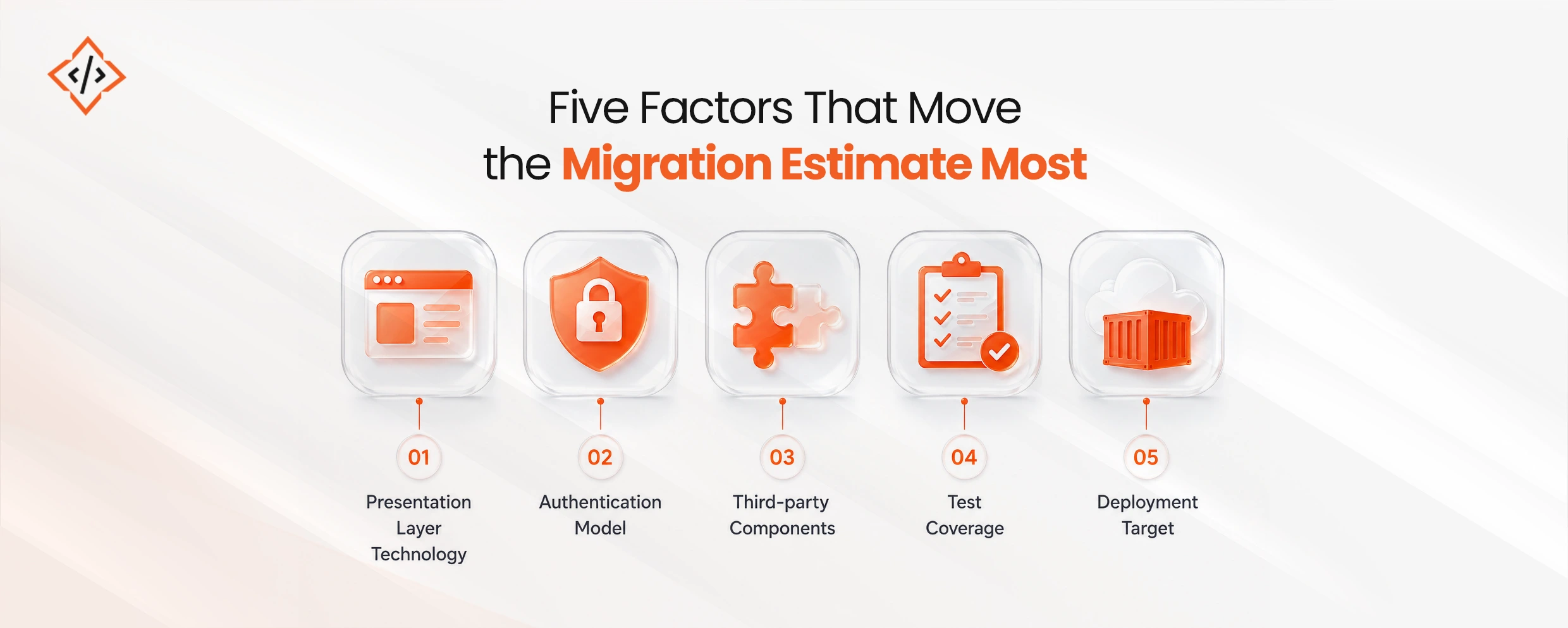
Five Factors That Move the Number Most

The migration estimate can change significantly depending on a few technical decisions and application characteristics. These five factors typically have the greatest impact on the final effort.
- Presentation layer technology: WebForms sets the ceiling because no migration path preserves it. The view layer becomes a rewrite in Blazor, MVC, or a JavaScript framework, and that decision deserves its own analysis. This is one reason WebForms migration cost can be dramatically higher than a straightforward application upgrade. Blazor vs React for enterprise applications covers it.
- Authentication model: Windows Integrated Authentication doesn’t survive a move to Linux containers or modern hosting. Replacing it touches every entry point rather than one library, which makes it a broad change rather than a deep one.
- Third-party components: A package with a modern build is a version bump. A package whose vendor has disappeared has no upgrade path at any price, so the component gets replaced or reimplemented. That category produces the worst surprises, which is why the dependency inventory belongs before the estimate, as covered in the Framework migration playbook.
- Test coverage: Coverage is what lets a migration be verified rather than hoped for. Below roughly 40%, characterization tests have to come first, and that work is real and invisible to stakeholders.
- Deployment target: Staying on Windows hosting is cheaper to migrate and more expensive to run. Moving to Linux containers adds work now and reduces hosting costs later, mainly through density rather than licensing. Running .NET on Linux and containers sets out the blockers.
Reasons To Hire Someone Else
A migration estimate is only useful when it reflects the actual condition of the application. Before committing to a number, make sure the scope, test coverage, and migration type are clear.
- If the estimate comes before an inventory: Expect a range that may be four times wider than what you can actually use. A tighter number may look better, but it is likely to be revised later. Take the wider, more honest estimate, whether it comes from us or someone else.
- If test coverage is below 40%: If the budget covers exactly one thing, spend it on characterization tests rather than migration services. They make every subsequent migration step verifiable, and you do not need an agency to do this work.
- If a WebForms rewrite is being called a migration: Stop before you start. If a rewrite has been mislabeled as a migration simply to clear a lower approval threshold, the difference will surface by month three. That conversation is far harder than having it now.
For organizations that do need external expertise, the right engagement depends on the estate, migration scope, and internal capabilities. If you need additional engineering capacity, see Hire .NET developers for support with .NET application modernization and migration work.
What Legitimately Reduces The Cost
Four levers genuinely reduce migration cost. Several popular ones do not.
- Decide what not to migrate: Identify applications being retired, replaced by SaaS, or merged before the inventory begins. This removes unnecessary work entirely. Porting something already scheduled for replacement is one of the easiest ways to waste budget.
- Use the Upgrade Assistant and analyzers: The .NET Upgrade Assistant, Platform Compatibility Analyzer, and API portability tooling turn discovery into a build-time report. They provide useful inputs for estimation at very little cost.
- Migrate the strangler way when the application is large: Progressively routing traffic from the old application to the new one avoids a single high-risk cutover and delivers value before the program is complete. It may cost more overall, but it reduces risk.
- Fix the runtime first, re-architect later: Moving to .NET 10 restores support and creates a stable foundation for future performance work. Combining that move with a microservices split, as discussed in microservices versus modular monolith, increases the variables in a single release.
Three things do not reduce cost: adding people to a discovery-bound phase, skipping test-coverage work, and choosing a lower day rate without checking whether the team has experience crossing a major version boundary.
What The Business Case Should Contain
Modernization business cases are stronger when they connect technical work to measurable business impact. Three factors usually carry the argument:
- Support exposure: .NET 8 and .NET 9 both reach end of support on 10 November 2026. After that, security patches stop, making the support position a business and audit concern. .NET 8 and 9 end of support covers the specifics.
- Hosting cost delta: When the move includes Linux containers, the potential saving is quantifiable and can be verified by finance. Density is usually the larger factor, particularly as the fleet grows.
- Maintenance drag: Time spent working around framework limitations is a real cost already being paid. It is often overlooked because it does not appear as a separate budget line.
For an enterprise .NET modernization program, these factors help connect the technical work to outcomes the business can measure.
The 36 to 72+ person-week range for WebForms is the widest in the table, and even that range can be too narrow.
- Why it varies: A 40-screen internal tool and a 400-screen line-of-business system can differ by more than tenfold in effort.
- What the range means: It is a planning benchmark, not a reliable midpoint. Treating 54 person-weeks as a fixed estimate without assessing the application would be misleading.
- What improves accuracy: Estimate based on screen count and complexity instead of treating every WebForms application as equivalent.
- Why the range remains: Current data spans roughly six engagements, which is not enough to publish a statistically reliable benchmark. Differences in scope and team composition also make direct comparison difficult.
The takeaway: use the range for planning, then refine it after assessing the application’s screens, complexity, dependencies, and architecture.
In Summary
Estimate migration work in person-weeks, then apply the rate your organization actually pays. Keep a straightforward version upgrade separate from a .NET Framework to .NET 10 migration. Application complexity, dependencies, test coverage, and the presentation layer can significantly change the effort.
Before committing to a number, run the analyzers, build the dependency inventory, and check it against the roadmap. This gives you a more realistic view of upgrade cost and migration cost, while reducing the risk of surprises from unsupported components, low test coverage, or a WebForms rewrite.
For the business case, focus on support exposure, hosting cost delta, and the maintenance drag already being absorbed by the business. The goal is not simply to reach .NET 10, but to understand the effort, risk, and business value of the migration before committing resources.
If you need additional engineering capacity for .NET application modernization and migration, Hire .NET developers with the experience to assess your application, plan the migration, and execute it with fewer surprises.
FAQs
It depends which project you're running, and by roughly an order of magnitude. A version upgrade between modern .NET releases runs 2 to 14 person-weeks. A .NET Framework port runs 10 to 72 or more, with WebForms applications at the top because the presentation layer becomes a rewrite.
Because they aggregate incompatible scopes, from a package update on a small API to a full re-architecture, and because the same effort priced across different markets varies by a factor of four. Estimate in effort and apply your own blended rate instead.
WebForms has no equivalent on modern .NET and no migration path that preserves it, so the entire view layer gets rewritten in Blazor, MVC, or a JavaScript framework. Screen count then dominates, which is why a forty-screen and a four-hundred-screen application aren't comparable.
Deciding what not to migrate. Checking the application inventory against the retirement and SaaS-replacement roadmap before scoping removes work entirely, and it gets skipped constantly because inventories are compiled without consulting the roadmap.
Yes, substantially, below roughly 40%. Characterization tests have to be written before the migration can be verified rather than hoped for, and that work is real, slow, and invisible to stakeholders, which makes it the line most often cut and most often regretted.
Bhavesh Kachadiya is a Full Stack Engineer and Technical Manager at CodeTrade with over a decade of experience building web applications from the ground up. He works across the entire stack, leads engineering teams, and has a reputation for turning complex technical requirements into clean, working software.







 Chand Prakash
23 October 2026
Chand Prakash
23 October 2026 Chand Prakash




 Hardik Soni