






Enterprise Application
 Chand Prakash
23 October 2026
Chand Prakash
23 October 2026
MCP integration for enterprise applications: architecture, use cases, security, and implementation
 Chand Prakash
Putting a basic version update and a complex legacy port in the same plan is an expensive mistake. One project is a simple .NET upgrade requiring a package update and a test pass. The other is a .NET Framework migration that touches authentication, hosting, and configuration. It also requires replacing third-party components whose original vendors have disappeared.
Both of these distinct efforts usually get called .NET application modernization. They actually belong in completely different budgets and different financial quarters. The planning conversation goes wrong in the very first meeting. Someone says the company needs to modernize, and everyone nods while picturing entirely different projects.
This guide serves as the central entry point for .NET development and modernization planning. It sets out the rigid version support calendar and separates the two migration types properly. The following sections provide detailed treatments of hosting constraints and complex staffing realities. You will also find actionable advice for targeted .NET performance optimization.
Version support in .NET follows a fixed and predictable rhythm. Microsoft designates even-numbered releases as Long Term Support with a three-year window. Odd-numbered releases receive Standard Term Support lasting two years.
This rhythm produces an unusual convergence for teams planning enterprise .NET modernization. Both .NET 8 and .NET 9 reach their official end of support on November 10, 2026.
Teams that chose the LTS release arrive at the exact same expiration date as teams using the newer version. The longer support advantage simply got consumed over the preceding years.
| Release | Track | Support ends |
|---|---|---|
| .NET 8 | LTS | 10 November 2026 |
| .NET 9 | STS | 10 November 2026 |
| .NET 10 | LTS | 14 November 2028 |
| .NET 11 | STS (expected) | Two-year window |
The planning consequence is straightforward. .NET 10 is the target for anything you don’t want to revisit soon, since .NET 11 costs the same migration effort for a shorter support period and brings the following migration forward. .NET 8 and 9 end of support covers the decision, and .NET 10 LTS for enterprise covers what the release actually changes.
No version of the argument makes staying on an unsupported runtime cheaper.
This distinction governs everything else in .NET application modernization. The exact same phrase describes two projects that remain an order of magnitude apart in effort.
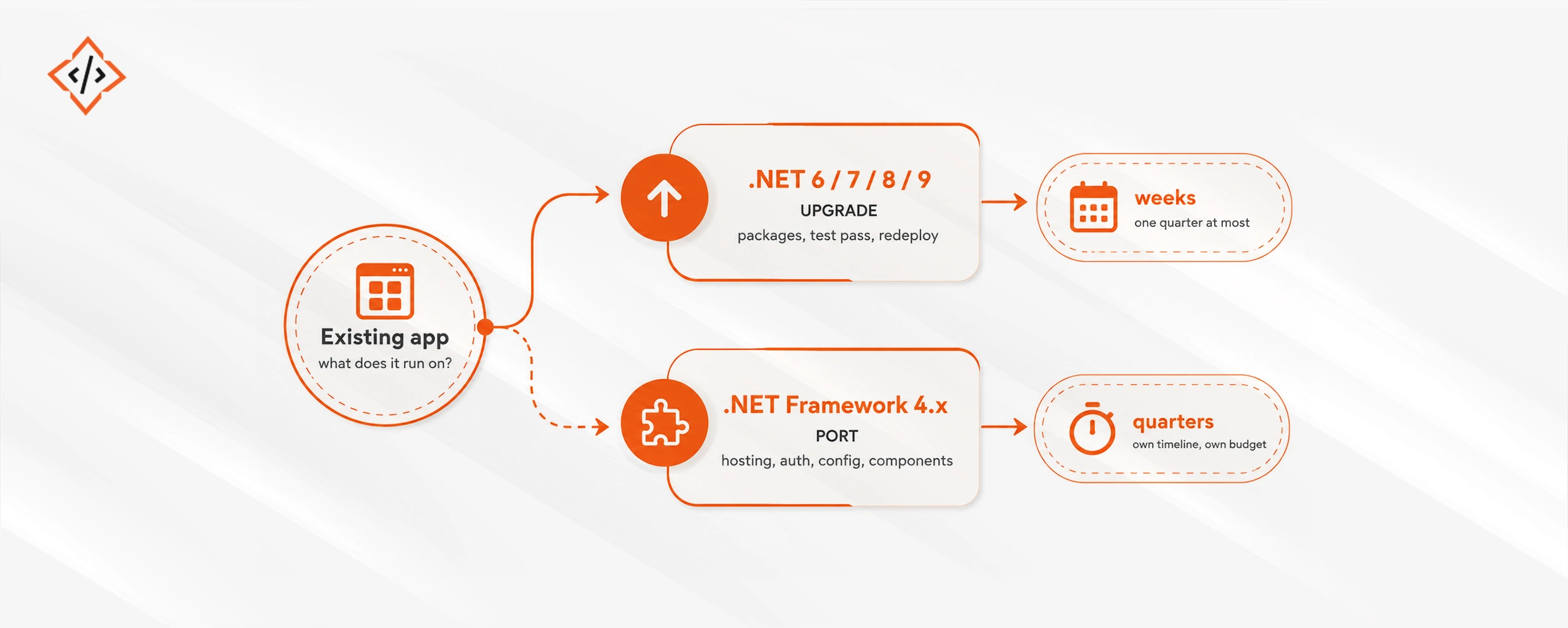
An application already on .NET 6 through 9 requires a straightforward .NET upgrade. This process involves package updates, a test pass, and a redeploy. Breaking changes exist, but they remain clearly documented and bounded.
An application on .NET Framework 4.x presents a completely different challenge. Four distinct blockers stop most legacy transitions. These include WebForms, WCF hosting, Windows-only APIs, and outdated third-party components. WebForms has no equivalent on modern .NET and lacks a preservation path. The presentation layer usually becomes a complete rewrite rather than a simple port.
Third-party components from defunct vendors produce the worst surprises during enterprise .NET modernization. No upgrade path exists at any price for these dead dependencies. Your only options are full replacement or keeping the application as it is. .NET Framework to .NET 10 migration covers finding these before they get scheduled.
One operational discipline saves more money than any other during a .NET Framework migration. You should never port any system that is already scheduled for replacement. Establishing application retirement plans before the inventory begins removes work you would otherwise pay for twice.
Data access issues create the biggest bottlenecks during .NET application modernization. A standard .NET upgrade delivers genuine improvements for free, but it rarely provides the largest available win. The N+1 query slows more Entity Framework Core endpoints than any other cause. This issue often remains invisible in C# while appearing obvious in the SQL log. Routine logging of generated SQL in a non-production environment is highly recommended. This practice supports better .NET performance optimization before production incidents occur.
Two other patterns account for most remaining performance issues. Blocking calls on asynchronous paths can dominate your system from a single hot path. These problematic calls include .Result, .Wait(), and GetAwaiter().GetResult(). Implementing an analyzer rule controls this better than standard code review vigilance. Missing or misapplied caching also turns a cheap repeated read into an expensive per-request database round trip.
ASP.NET Core performance tuning sets out the diagnostic order, and .NET observability with OpenTelemetry covers the instrumentation that makes diagnosis possible in production rather than in a lab.
Modern .NET runs on Linux unmodified during a .NET cloud migration. The real blockers are the specific dependencies of a Windows-era codebase. These include System.Drawing.Common, registry access, Windows authentication, and case-insensitive path assumptions.
Finding these four blockers is cheap and fast. The platform compatibility analyzer flags Windows-only API usage at build time. Adding a Linux job to your CI pipeline surfaces path and casing bugs immediately.
You must understand the precise savings because they often get misattributed. Windows licensing disappears completely. However, the larger financial effect comes directly from container density. Lower memory residency means more containers fit per node. This reduces the total node count and compounds with your fleet size. A single small application frequently saves nothing at all.
Running .NET on Linux and containers covers base image choice and why chiseled images remove the shell and package manager where most container CVE findings live.
If your enterprise application already runs on .NET 6 or a later version with reasonable test coverage, the transition to .NET 10 is simply a package update and a test pass. You should perform this straightforward .NET upgrade yourself. Hiring an external partner for that specific task means buying confidence rather than actual technical capability.
If a legacy .NET Framework application is genuinely scheduled for retirement within two years, do not port it. Harden the system, isolate it safely, and let it go. We have been paid to migrate older systems that were permanently switched off eighteen months later, and nobody involved comes out of that experience well.
If the only driver for enterprise .NET modernization is an approaching support deadline while nobody has audited the actual software estate, get a proper inventory before requesting a proposal. Any cost number quoted without that inventory, including ours, remains an unverified guess.
Project cost tracks the type of initiative far more than the total size of the codebase during enterprise .NET modernization. A simple version upgrade is bounded primarily by test coverage. A legacy .NET Framework migration is bounded by the presentation layer, the authentication model, and the state of third-party dependencies. Evaluating real .NET modernization cost puts accurate financial figures against both paths.
Regarding technical capability, three distinct skills matter, and they are rarely held by the same individual. You need legacy .NET Framework-era knowledge to understand what an existing application actually does, since much of it remains undocumented.
You need modern .NET fluency to rebuild systems idiomatically rather than merely transliterating old patterns. Finally, you need platform capability, meaning containers, CI pipelines, and cloud hosting expertise to run the final output effectively.
The scarcest skill among these is legacy framework experience. Engineers who can read a decade-old WebForms application and explain its exact behavior are becoming increasingly difficult to find. Their absence is precisely what turns a software port into an unpredictable archaeology project. Exploring specialized .NET developer engagement options sets out reliable delivery models for handling that complex work.
Legacy framework knowledge remains the scarcest capability during a .NET Framework migration. Technical leadership must address this genuine challenge when planning enterprise .NET modernization.
Engineers who deeply understand the WebForms lifecycle, classic WCF configuration, and legacy application quirks are mostly senior, highly compensated, and often uninterested in archaeology work. Career progression rarely stems from reading decade-old source code files. The professionals best qualified for this work usually have much more attractive technical alternatives.
Many organizations attempt pairing strategies to bridge this gap. Pairing a strong modern .NET developer with a legacy framework specialist turns code archaeology into a knowledge transfer exercise. This approach ensures the software port gets completed successfully. However, junior engineers rarely retain deep expertise because legacy code patterns tend to remain application-specific rather than generalizable.
An uncomfortable reality persists across long-term enterprise architecture. This specialized capability continues to grow scarcer and more expensive. Eventually, legacy estates may become entirely uneconomic to port. For certain aging systems, the most honest strategic advice becomes running the application securely until it reaches end of life.
Name your migration project correctly first. A version upgrade and a Framework port share a vocabulary but nothing else. Conflating them in planning produces most budget overruns in .NET development and modernization.
Work strictly to the support calendar. Both .NET 8 and .NET 9 expire on November 10, 2026. Target .NET 10 as your primary LTS release through November 2028. That expiration date is fixed. The only real question left is your sequencing timeline.
Prioritize data access before runtime updates for everything following the .NET upgrade. Instrument your systems before attempting any complex .NET performance optimization. Treat any .NET cloud migration as a dependency challenge rather than a simple infrastructure task when you hire .NET developers. The runtime itself has not been a real technical obstacle for years.

 Chand Prakash
 Chand Prakash
 Hardik Soni
 Bhavesh Kachadiya
 Bhavesh Kachadiya