






AI
Enterprise Application
 Chand Prakash
16 October 2026
Chand Prakash
16 October 2026
Enterprise AI Automation Strategy: A Step-by-Step Implementation Guide
 Chand Prakash
Most enterprises already have AI pilots that work well in a demo. The trouble starts when an agent needs live customer records from the CRM, stock levels from the ERP, or an order status from the ecommerce platform. Each system has its own API, its own authentication, and its own data format, so every new connection becomes a custom project.
Model Context Protocol, or MCP, was built to solve that problem. Anthropic released it as an open standard in late 2024. Then, in December 2025, it donated MCP to the Linux Foundation’s new Agentic AI Foundation, which made the protocol vendor-neutral. By that point, more than 10,000 MCP servers had already been created.
As a result, MCP integration for enterprise applications has quickly become a practical priority. This guide covers how the architecture works, where MCP fits next to APIs, the main use cases, the security controls that matter, and how to plan an implementation.
MCP integration for enterprise applications is the process of exposing business systems, such as CRM, ERP, databases, and document stores, to AI agents through the Model Context Protocol. Once connected, any MCP-compatible AI assistant can discover what a system offers and use it within set permissions.
Before MCP, every AI tool needed its own connector for every system. Ten AI tools and ten business systems could mean a hundred separate integrations. Model Context Protocol integration replaces that with one shared standard. Each system gets one MCP server, and each AI application gets one MCP client.
In practice, enterprise MCP integration exposes three kinds of capability:
MCP uses a client-server architecture. An AI application hosts one or more MCP clients, and each client connects to an MCP server that wraps a business system. Messages travel in a standard JSON-RPC format, so every server speaks the same language.
In an enterprise setup, the architecture usually has four layers:
The gateway is often left out of early pilots. Without it, each team ships its own MCP server with its own rules, and security teams lose sight of what agents can do. With it, MCP server integration follows one policy, one audit log, and one approval process.
This layer also matters when models feed decisions. For instance, a demand forecast built through machine learning development can sit behind its own MCP server, so agents query predictions under the same controls as any other system.
An API lets one application talk to another through fixed endpoints that a developer codes against. An MCP server wraps those APIs so an AI agent can discover what is available and decide which action to call at runtime. In short, MCP integration with APIs adds an AI-ready layer on top of what already exists.
The practical differences are clear:
Therefore, the choice between MCP and API integration is rarely either-or. Enterprise application integration still runs on APIs, and MCP makes those same APIs usable by AI agents without a new connector for each tool.
The strongest use cases for MCP connect AI agents to systems that teams already open dozens of times a day. Value grows when one agent can work across several of those systems in a single request.
The opportunity is large. Gartner predicts that agentic AI could drive about 30% of enterprise application software revenue by 2035, surpassing $450 billion. Much of that value depends on agents reaching live business data.
Common use cases for enterprise AI integration include:
Teams that need these agents to plan and act across several steps often pair MCP with dedicated AI agent development, which turns individual tool calls into complete, AI-powered business automation.
MCP is secure enough for enterprise use when each server is scoped, authenticated, and monitored like any other production service. The protocol defines the connection, but the organization still decides who can do what.
The risks are specific to agents. A model may call a tool it should not, read data outside its role, or follow hidden instructions planted in a document or ticket. Consequently, MCP security best practices focus on limiting what an agent can reach and recording everything it does.
Key controls include:
Data location also matters. Companies operating in the GCC or the EU should confirm where agent requests and tool results are processed before connecting systems that hold personal data.
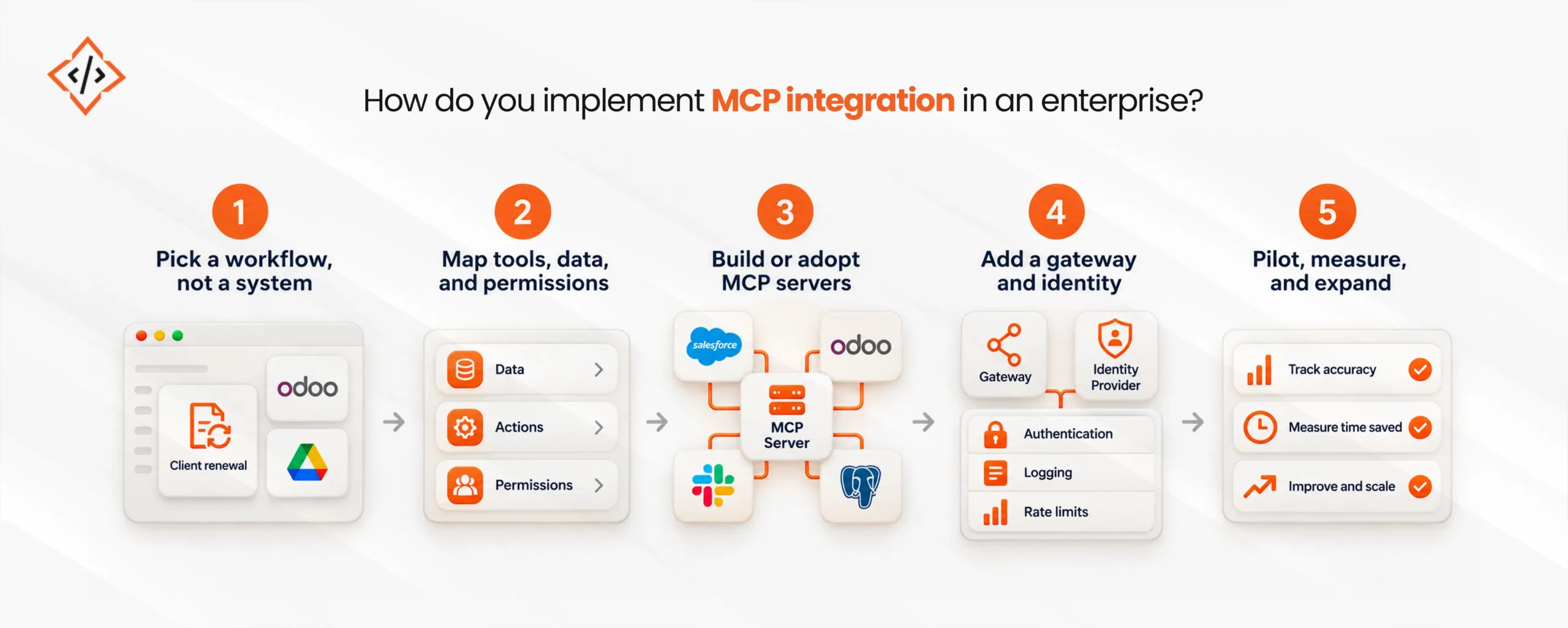
You implement MCP by starting with one high-value workflow, wrapping the systems it needs in MCP servers, and adding governance before scaling. The steps below keep the rollout controlled.
First, choose a task that crosses two or three systems, such as preparing a client renewal. A workflow-first approach shows which tools the agent actually needs.
Next, list the actions and data each system must expose, along with who is allowed to use them. This map becomes the specification for each MCP server.
Then, check whether a vendor already offers an official MCP server for each system. Where none exists, custom MCP development wraps the existing API with clear tool names and descriptions.
After that, route every server through a gateway connected to your identity provider. This step brings authentication, logging, and rate limits under one policy.
Finally, launch with a small group, track accuracy and time saved, and fix tool descriptions that confuse the model. For a broader roadmap, AI development services can help extend the same pattern across departments.
MCP integration cost depends on the number of systems involved, how deep each integration goes, and how much governance the organization needs. Rather than a fixed price, it helps to look at the main cost drivers.
The main factors are:
As a rule, buy where a trusted server already exists and build where the system is unique to your business. Specialist MCP integration services are most useful for the custom layer and the gateway, since those decide how safely agents can scale.
AI agents are only as useful as the systems they can reach. MCP integration for enterprise applications gives those agents a shared, open standard for working with CRM, ERP, e-commerce, and internal data, while existing APIs stay in place.
However, the protocol alone does not make an integration safe. The organizations that benefit most start with one workflow, route every server through a governed gateway, and expand only when results and controls hold up.
 Chand Prakash
 Hardik Soni
 Bhavesh Kachadiya
 Bhavesh Kachadiya
 Bhavesh Kachadiya