






Hire Developers
.NET Development
 Bhavesh Kachadiya
06 October 2026
Bhavesh Kachadiya
06 October 2026
How Do You Successfully Hire .NET Developers For Complex Enterprise Projects?
 Bhavesh Kachadiya
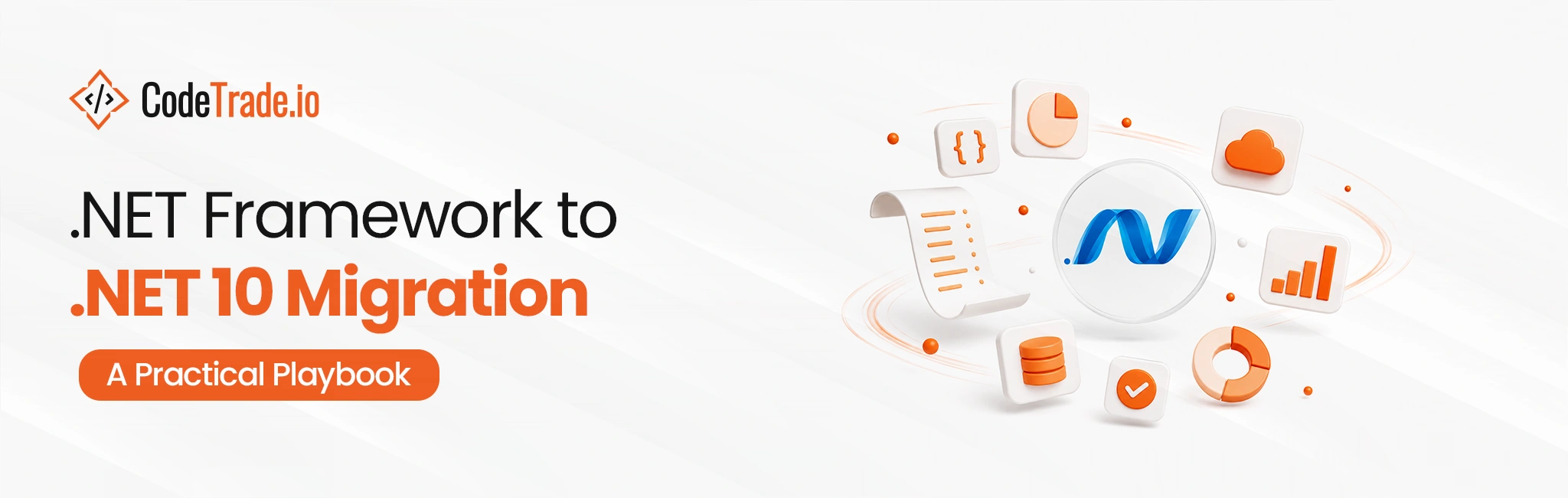
An upgrade changes a target framework and fixes warnings. A port confronts APIs that have no equivalent, hosting models that no longer exist, and components whose vendors disappeared years ago.
This is the second thing, and treating it as the first is what sinks these programs.
One timing error needs clearing up immediately. .NET 8 and .NET 9 reach end of support on 10 November 2026, and for applications already on modern .NET that deadline drives a genuinely small piece of work, covered in .NET 8 and 9 end of support. It doesn’t apply to .NET Framework, which sits under a different support policy. Fold a Framework portfolio into that three-month window and you’ve guaranteed a bad outcome.
So this covers what actually blocks, what the tooling does and doesn’t do, and how to sequence the work.
Four categories. Establish which you have before producing any estimate, because they differ by an order of magnitude in effort.
Modern .NET has no WebForms, and no migration path preserves it. The page lifecycle, ViewState, and server controls have no equivalent.
Options are rewriting the UI in Blazor, in ASP.NET Core MVC or Razor Pages, or as a JavaScript front end against an API. Blazor Server appeals to teams because the programming model feels closest, though the underlying model is genuinely different rather than a drop-in.
That work is usually the largest single item in a Framework migration.
Server-side WCF hosting doesn’t exist on modern .NET. Client-side consumption is largely covered by community libraries, so calling a WCF service is tractable while hosting one isn’t.
The replacement depends on the contract. gRPC where the interface is genuinely RPC and both ends can change, or a REST API where clients are diverse or external. Where external clients can’t be changed, you may need a compatibility shim, and that shim is its own scope.
Registry access, WMI, Windows services, COM interop, GDI+ drawing, Active Directory integration, Windows-specific cryptography. Some have modern equivalents on Windows through compatibility packages. Some have no cross-platform equivalent at all.
The category producing the worst surprise, because there’s no upgrade path at any price when the vendor no longer exists. Replacement or staying put, and neither was in the plan.
| Blocker | Modern .NET equivalent | Effort | Blocks Linux hosting? |
|---|---|---|---|
| WebForms | None, rewrite in Blazor, ASP.NET Core MVC/Razor, or a JS front end | Very high | No |
| Hosted WCF | gRPC, or a REST API; shim if external clients can’t change | High | No |
| Consumed WCF (client only) | Community client libraries | Low | No |
| COM interop | None cross-platform | High | Yes |
| Registry, WMI, Windows services | Windows-only compatibility packages | Medium | Yes |
| GDI+ drawing | Cross-platform imaging libraries | Medium | Sometimes |
| Active Directory integration | Available, with changes | Medium | Sometimes |
| Abandoned third-party component | Replace or reimplement | High and unbudgeted | No |
| BinaryFormatter | Removed, new format plus data migration | Medium | No |
The two rows marked as blocking Linux hosting decide whether the migration delivers the cost saving that often justifies it. Audit those first if cross-platform hosting is part of the business case.
Microsoft provides the .NET Upgrade Assistant and compatibility analyzers, and both are worth running early. Being precise about their role prevents disappointment.
They find the surface. Which APIs have no modern equivalent, which packages lack compatible versions, which project files need converting, and roughly how large the problem is.
They do some mechanical work. Project file format conversion, straightforward package updates, some code fixes.
They don’t make design decisions. What replaces WebForms, whether WCF becomes gRPC or REST, whether a dead component gets replaced or reimplemented. All judgment calls.
Run the analyzers across the whole portfolio in the first week. No input to an estimate is more useful and it costs almost nothing. Just don’t mistake a clean analyzer run on a small service for a signal about the WebForms application next to it.
If an application is stable, internally hosted, rarely changed, and scheduled for replacement, don’t port it. We’ll take the work and you shouldn’t give it to us.
If you’re compressing this into the November window because that’s when budget exists, say so and let’s plan honestly around it rather than pretending the timeline is technical. A Framework port on a three-month clock fails, and it fails in a way that costs more than waiting would have.
And if nobody internally can explain what the WebForms application does, get that person before you get a vendor. Not us, not anyone. Archaeology billed at consulting rates is the most expensive way to recover institutional knowledge.
Six phases. The order is dictated by dependencies rather than business priority, and inverting them causes rework.
1. Inventory and analyze. Every application and library, its framework version, its dependencies, and an owner. Run the compatibility analyzers. Expect to find applications nobody is responsible for.
2. Triage into three groups. Straightforward class libraries with no blocking dependencies. Applications with one or two blockers. Applications with WebForms or hosted WCF, which are effectively rewrites.
3. Migrate shared libraries first, leaves first. A library everything depends on has to move before its consumers. Multi-targeting is genuinely useful here, because a library can target both net48 and net10.0 during the transition so old and new consumers coexist. Nothing else in the playbook earns its keep this well.
4. Migrate services and APIs. Usually the easiest applications, and they build team familiarity before the hard ones.
5. Rewrite the UI layer. WebForms applications, one at a time. Each is a project with its own design decisions.
6. Decommission. Turn off the old deployment, remove the old build pipeline, update documentation. Migrations that skip this leave two systems running, which doubles maintenance and confuses everyone.
The multi-targeting point in phase 3 deserves emphasis. It lets migration proceed incrementally instead of requiring a synchronized switch, which is what makes a large portfolio tractable at all.
Framework-to-modern porting changes behavior in a consistent set of places. These deserve explicit test attention rather than trusting a green build.
BinaryFormatter is gone and shouldn’t be reintroduced. Anything persisted or exchanged with it needs a new format and a data migration.web.config and app.config give way to a different configuration model. Verify every setting actually binds, especially connection strings and nested sections.async behavior, and code that relied on it can deadlock or behave differently.The last two separate a migration that runs on Windows from one that genuinely runs anywhere, which matters if Linux hosting is part of the business case. That side is in running .NET on Linux and containers.
No, and saying so protects budgets.
Migrate when the application is actively developed, strategically important, when Linux or container hosting would reduce cost meaningfully, or when hiring for Framework maintenance is getting difficult.
Leave it when the application is stable, rarely changed, internally hosted, and scheduled for replacement by a package or SaaS product within a reasonable horizon. Porting an application that’ll be retired is spending twice.
Replace rather than port when the application is small, poorly understood, and its behavior isn’t worth preserving. A three-form internal tool is often cheaper to rebuild than to analyze.
One honest constraint on “leave it”: Framework applications still need the underlying Windows Server and its patching, and the pool of engineers comfortable maintaining WebForms shrinks every year. That risk is real even for stable applications and it belongs in the decision.
I want to name a specific failure, because Framework migration estimating is where I’ve been worst.
We scoped a portfolio at nine applications. Analyzers run, triage done, blockers cataloged, the WebForms rewrite priced separately and generously. Solid work, and I’d defend the method.
What we missed was a shared utility library. Forty-odd classes, no obvious blockers, sitting comfortably in the “clean libraries, migrate first” bucket. It multi-targeted fine. Then during phase 3 we found that six of those classes wrapped COM components, invoked through reflection with type names built from configuration strings.
No analyzer flags that, because there’s no static reference to flag. It looked clean by every automated measure and it wasn’t clean at all.
The fix took seven weeks and it delayed everything downstream, because that library sat under four of the nine applications. What I do now is grep for reflection-based type loading during inventory and treat every hit as an unknown until someone reads it. Crude, and it would have caught this one.
Porting .NET Framework to .NET 10 is a rewrite of specific parts wrapped in a migration. Keep it on its own timeline, because the November 2026 date belongs to .NET 8 and 9, and applying it here compresses a project that needs sequencing.
Start with the analyzers across the whole portfolio, since their output is the best estimate input available and it costs a week. Then triage honestly into clean libraries, applications with one or two blockers, and WebForms or hosted-WCF applications that are rewrites. And grep for reflection-based type loading while you’re in there, because that’s the category no analyzer catches.
Migrate shared libraries first with multi-targeting so old and new consumers coexist, then services, then UI rewrites one at a time. Test serialization, configuration binding, culture handling, cryptography, and if Linux is the target, path case sensitivity.
Then decide honestly which applications shouldn’t move at all. Porting something scheduled for replacement wastes money more needlessly than anything else in the program.
 Bhavesh Kachadiya
 Bhavesh Kachadiya
 Bhavesh Kachadiya
 Hardik Soni
 Hardik Soni