






Enterprise Application
 Chand Prakash
23 October 2026
Chand Prakash
23 October 2026
MCP integration for enterprise applications: architecture, use cases, security, and implementation
 Chand Prakash

Reviewing the standard feature list makes this release look optional. Evaluating the extended support window and free performance gains proves it is mandatory. This highlights the usual framing problem with major framework releases. The strongest argument for adopting .NET 10 LTS is the extended support timeline stretching to November 2028.
That specific operational stability matters far more to production systems than any shiny new syntax. The practical reality is already settled for most engineering teams. Both releases reach official .NET 8 and .NET 9 End of Support on November 10, 2026. This reality makes a scheduled .NET 10 upgrade inevitable for technical leaders. The actual challenge is deciding what to do beyond updating a simple target framework.
This guide details what genuinely changes for .NET 10 enterprise applications. It shows how to execute a clean transition without generating unnecessary technical churn. The breakdown also covers which heavily marketed features engineering teams should safely ignore.
The LTS designation dictates how often engineering teams must execute framework migrations. The framework alternates between specific release tracks. Even-numbered releases offer Long Term Support lasting three years. Odd-numbered releases provide Standard Term Support lasting two years. During the final six months of both tracks, Microsoft provides only security fixes.
| Release | Track | Supported until |
|---|---|---|
| .NET 8 | LTS | November 10, 2026 |
| .NET 9 | STS | November 10, 2026 |
| .NET 10 | LTS | November 14, 2028 |
| .NET 11 | STS (expected) | Two-year window |
Executing a .NET 10 migration buys roughly two years before this architectural conversation repeats. Targeting .NET 11 instead delivers less value for identical engineering effort. This makes .NET 10 LTS the optimal target for stable enterprise systems you prefer not to revisit frequently.
Three distinct categories matter most to an existing enterprise codebase. They appear below in descending order of actual technical importance.
Notice what is missing from this specific list. Nothing requires sweeping architectural changes during enterprise .NET development. A major version update is not a complete migration like an older Framework port. Treating it as a massive overhaul simply manufactures unnecessary engineering work.
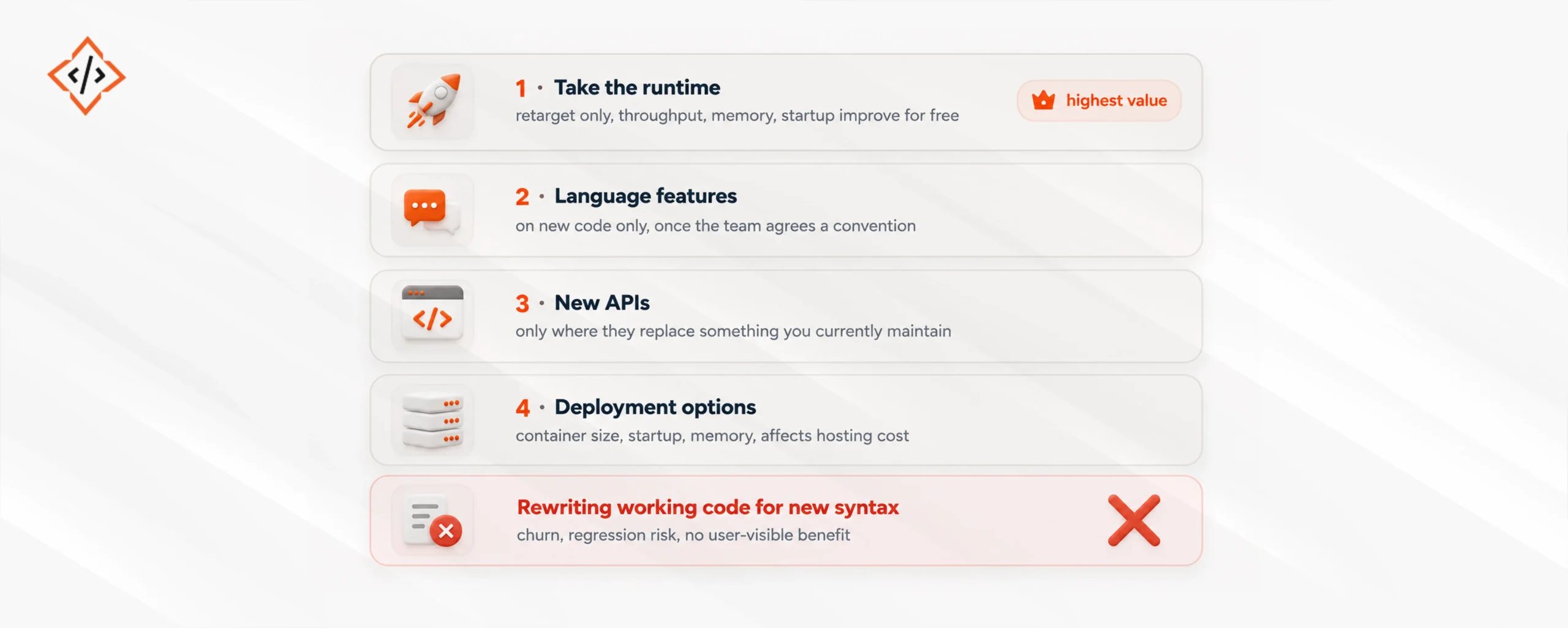
Step one delivers most of the benefit and requires zero code changes. Chasing unnecessary architectural changes is exactly where engineering teams lose valuable time.
Executing a structured adoption strategy ensures engineering teams maximize technical value while carefully controlling operational risk during upgrades. Here are four specific implementation steps presented in descending order of actual business value.
One specific anti-pattern requires immediate attention from technical leaders. Never treat a major version upgrade as a license for sweeping .NET application modernization. This mistake converts a low-risk framework retarget into a massive code diff. Large code changes make tracking any subsequent system regressions significantly harder.
If your system runs on .NET 8 or 9 with a working test suite, expect a simple retarget. Do not rush to hire .Net developer contractors for this specific task. If the existing test suite appears weak, invest your budget into improving it directly. Strong testing pays dividends during every future framework update.
If internal teams propose bundling this .NET 10 application migration with broader modernization efforts, push back immediately. Complex modernization engagements represent the wrong technical shape for this transition. Retarget the framework cleanly first and measure the baseline results. Then decide exactly what additional architectural work remains necessary.
If a critical third-party dependency lacks a proper .NET 10 build, pressure the vendor directly. Do not pay external development agencies to build complex technical workarounds. Securing proper vendor support remains the most useful first step before upgrading.
For enterprise teams, deployment characteristics frequently matter more than new language features. These operational metrics are easier to justify in formal business cases. Three specific areas remain worth evaluating immediately after the framework retarget.
Cross-platform hosting deserves separate consideration during enterprise .NET development. If the application operates without Windows-only APIs, Linux containers cost less. Hosting .NET 10 on Linux containers generally runs cheaper than Windows Server. That specific decision requires evaluating .NET on Linux container configurations separately.
Measure all three metrics before and after using the exact same production workload. Vague performance feelings will never secure infrastructure budget approvals.
Minor framework upgrades rarely break compilation directly. They change underlying behavior instead. These subtler shifts appear in highly predictable places during a .NET 10 upgrade.
Run this verification list explicitly. Never rely entirely on a simple green build. A compiling application is never a fully verified one.
Technical leaders generally face one good reason and one bad reason regarding this upgrade timing.
The good reason involves applications scheduled for complete decommissioning before November 2026 with highly credible dates. Incurring added .NET modernization cost on a system facing immediate shutdown simply spends your budget twice.
The bad reason involves waiting for the future .NET 11 release instead. That version will be an odd-numbered STS release featuring only a two-year support window. Waiting costs identical migration effort for less official support while bringing your next required migration forward.
A third unique case sits firmly in between these two extremes. Your application might contain a heavy third-party dependency lacking a proper .NET 10 build. This technical blocker remains completely real. The correct response involves raising this issue with the vendor immediately rather than waiting until the support deadline. Proper dependency inventory remains the very first task in any .NET 10 application migration for exactly this specific reason.
“Target the runtime first and never bundle it with anything else.” This advice remains correct. Yet development teams constantly break this rule.
The initial framework retarget remains genuinely small. This creates apparent slack in the sprint. Developers find lingering warnings they want to clean up. A new base library makes an old helper class completely redundant. A nullable annotation pass looks tempting. Each individual refactor represents a good idea. None belong in the exact same commit as a runtime change.
Technical leaders know this reality well. It appears multiple times throughout this guide. Yet during a typical .NET 10 enterprise upgrade, the shipped code diff grows unexpectedly large. Marginal code changes always look free when the initial framework update feels easy.
The true cost rarely involves a broken build. The problem surfaces when p99 latency shifts two weeks later. Nobody can definitively blame the baseline .NET 10 runtime performance or the bundled refactor. Teams end up bisecting complex changes they should never have combined originally.
The only discipline that actually works requires implementing a strict procedural boundary. The retarget commit must touch only project files and package references. This is never a simple judgment call. It must become a rigid rule enforced during code review. This strict separation ensures complete predictability during any framework transition.
Moving your systems to .NET 10 LTS makes strategic sense primarily due to the extended support window. Official support extends through November 2028 while earlier versions reach end of life by November 2026. The decision centers entirely on execution timing rather than whether to upgrade.
Isolate the runtime framework update cleanly during your initial .NET 10 upgrade. Retarget project files, benchmark against realistic production traffic, and keep this commit strictly isolated. This disciplined approach captures maximum performance value without requiring extensive code modifications.
Adopt new syntax only within fresh .NET development tasks instead of rewriting stable working codebases. Introduce newer framework APIs exclusively when they replace custom utility classes you actively maintain. Measure container size, startup speed, and memory usage to demonstrate hosting savings for .NET 10 business applications. Finally, verify runtime behavior thoroughly across serialization, cryptography, and configuration binding rather than trusting clean build passes.

 Chand Prakash
 Chand Prakash
 Hardik Soni
 Bhavesh Kachadiya
 Bhavesh Kachadiya