




AI
FinTech & Banking
 Chand Prakash
06 November 2026
Chand Prakash
06 November 2026
Predictive analytics in finance: use cases, models, and how to put it into practice
 Chand Prakash
Everyone is going crazy about automation, especially the tech teams. But as good as the term ‘automation’ sounds, it is something even the techies have to carefully work with.
Automation initiatives can give you the best outcomes when built correctly but they fail to. But that happens because the teams try to automate processes that are already broken. And then, they expect AI to clean up the mess. Well, what they ignore is that even that kind of automation will result in the same manual review loop, only it would get faster and slightly more expensive.
According to the State of AI 2025 survey by McKinsey, 88% of businesses now regularly employ AI in at least one business function. However, about two-thirds are still trapped in experimental or pilot mode. Moreover, only 6% of them qualify as genuine high performers driving measurable EBIT impact. That gap tells you that operationalization is a problem. Teams are experimenting widely but shipping narrowly.
By the end of the year 2026, according to Gartner, 40% of enterprise applications will have been integrated with task-specific AI agents. The businesses that close it are the ones picking the right AI use cases in business automation first, not the flashiest ones.
This detailed guide covers the top 10 use cases of AI in business processes and what each one actually automates. Additionally, the guide mentions where the risks sit and how to decide which automation process is the best to adapt first.
To begin with, traditional business process automation works well when everything is structured and predictable. For example, forms with fixed fields, triggers with known conditions, and rules that lead to clear outcomes. But in real scenarios, things rarely stay that clean. The moment something slightly different shows up, the workflow breaks and someone has to step in and fix it.
The bigger problem is that most business inputs are not structured in the first place. A large part of enterprise data sits inside documents, emails, and reports, which traditional automation struggles to handle properly. If you look at daily operations, you will notice situations like:
These are some situations where having an AI workflow automation can change things for good! Instead of relying on rigid rules, it works with language and patterns.
For example, it can read a contract and flag a missing clause. It can also read a support ticket and route it based on sentiment and topic rather than keyword matching alone.
That capability is what makes AI in business automation fundamentally different from the RPA era.
Well, understanding the issue is only half of the puzzle. You also have to pick the appropriate use case. Let’s see how you can do that!
Before jumping into any use case, it helps to pause for a second and really look at what you are trying to automate. This is where a lot of teams rush (like literally!). They start building first and only later realise the process itself was not worth automating.
So, take a while before you pick anything to automate and make it a point to run a few quick checks on:
McKinsey research says 74% of executives see AI development services as critical to their operations, but only 1% feel they are mature in using it. In a lof of cases, this gap shows up because teams skip this and move straight into building.
With that in mind, the use cases that are listed below are arranged in a way that makes them easier to implement. And the very first one usually shows the results faster than any other.
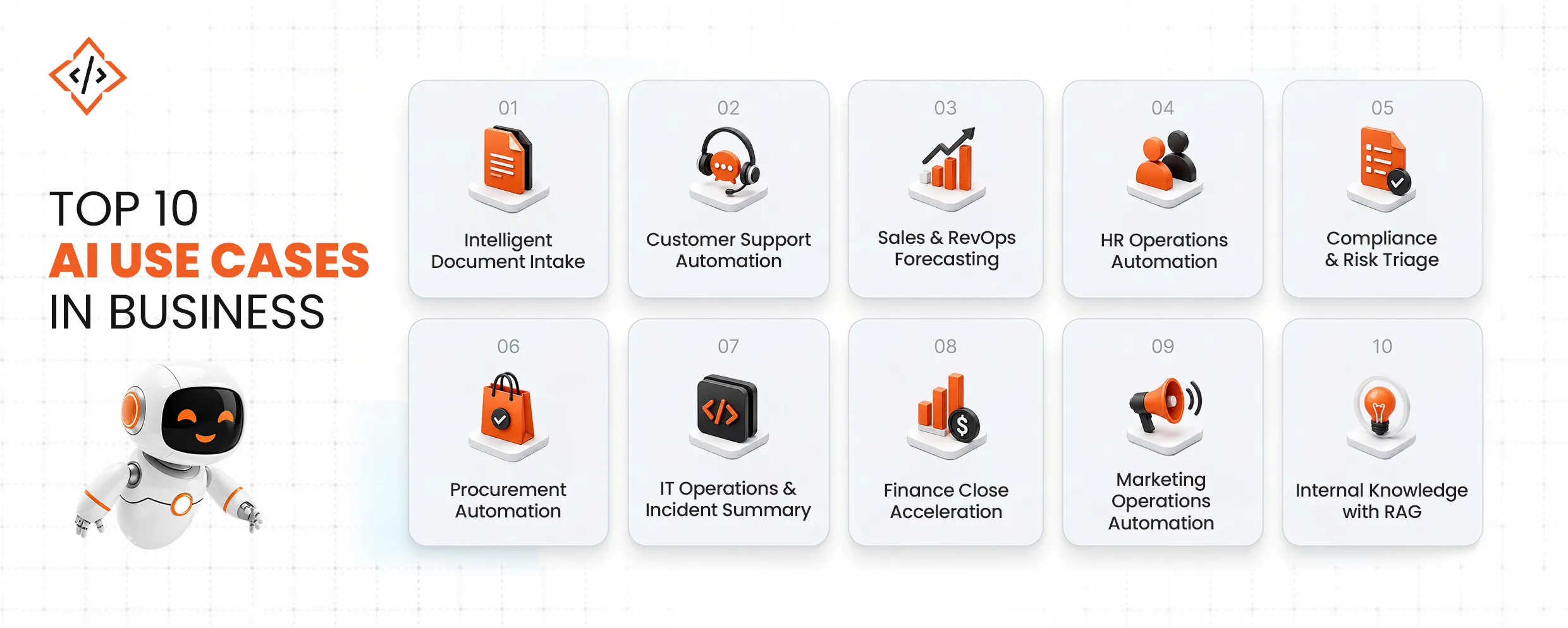
This use case focuses on turning invoices, contracts, and forms into structured records automatically. AI classifies the document type, extracts key fields, validates against business rules, and triggers the next workflow step without human involvement.
Companies using intelligent document processing report 4x faster processing speeds, and IDP can cut document processing time. CodeTrade builds these pipelines end-to-end, ensuring extracted data flows directly into ERP and CRM systems where it is actually needed.
Next, AI reads incoming tickets, summarizes the issue, suggests a reply draft, and routes it to the right agent based on intent and customer history.
As a result, teams typically see first-response times drop within the first two weeks when routing and triage are automated properly. Gartner predicts that by 2028, agentic AI will autonomously resolve 80% of common customer service issues without human intervention, making this one of the fastest-moving deployment areas today.
Moving to sales, AI helps normalize messy CRM pipeline data, flags stale deals, and generates next-best-action suggestions for account teams.
According to ZoomInfo, sales professionals using AI are 47% more productive and save an average of 12 hours per week. Additionally, 83% of AI-enabled sales teams report revenue growth. CodeTrade integrates AI workflow automation directly into existing CRM and ERP systems without requiring a full platform replacement.
In HR, AI simplifies employee interactions by answering policy questions, providing onboarding checklists, and retrieving benefits information through an AI assistant.
Moreover, cases are summarized before reaching HR teams, which significantly reduces review time. This is especially valuable for organizations with distributed teams or multiple business units.
For compliance, AI scans contracts and policy documents for missing clauses, regulatory conflicts, and unusual terms. Instead of reviewing everything manually, teams only focus on flagged issues.
As a result, businesses report cutting compliance task time. CodeTrade ensures these workflows include audit logs and approval chains from the start, avoiding compliance risks later.
In procurement, AI automates vendor intake, purchase order extraction, and spend classification. It also standardizes vendor terms and flags anomalies before they reach human reviewers.
This leads to better visibility and cost savings.
When an alert is triggered, AI converts it into a clear incident summary, suggests possible root causes, and links to relevant runbooks.
Because of this, engineers spend less time diagnosing issues and more time resolving them. IT operations is already one of the most advanced areas for AI deployment.
In finance, AI extracts data from statements and PDFs, reconciles entries, flags anomalies, and even drafts close summaries.
As a result, teams see faster closing cycles and fewer errors. Business process automation AI in finance is often one of the highest ROI starting points.
For marketing teams, AI generates content briefs, tags assets, and creates campaign performance summaries.
This means teams no longer have to spend hours pulling reports manually. With this automation in place, they can easily focus on acting on insights. Bain reports that AI can improve conversion rates across the funnel by over 30% when used systematically.
Finally, AI enables employees to search across internal systems using natural language and get direct, cited answers.
Beyond that, it can trigger actions like creating tickets or updating records. CodeTrade builds these AI-powered automation solutions using retrieval-augmented generation layered over existing knowledge systems.
Even with the right use case, execution is where most teams struggle. In fact, most AI business automation examples fail during implementation, not ideation.
Here are the most common pitfalls:
McKinsey reports that only 6% of organizations qualify as true AI high performers. This highlights that the challenge is not the technology, but design and governance.
To avoid these pitfalls, successful teams follow a phased approach instead of building everything at once.
Each phase builds on the previous one:
Start by documenting what actually happens, not just what the SOP says.
Clean and consistent data directly impacts AI output quality.
Choose between extraction, classification, summarization, or RAG based on the problem.
Define triggers, approvals, and handoffs clearly.
Set confidence thresholds, filters, and test cases before going live.
Continuously track performance and improve over time.
McKinsey shows that companies redesigning workflows around AI achieve 2 to 3 times higher productivity gains.
At this stage, the key is prioritization. Start with workflows that have high volume, clear SLA impact, and unstructured data.
Before moving forward, evaluate each workflow based on:
Then, run a small pilot with defined success metrics. This ensures you validate impact before scaling.
Looking ahead, things are clearly moving fast. The pace of change around AI is only picking up. Gartner outlines a shift from task-specific agents today to more autonomous systems by 2028.
What this really means is simple. The foundation you build now, like clean data, structured workflows, and proper governance, will decide how easily you can scale later. If that base is weak, everything slows down.
At the same time, AI is no longer just acting like an assistant. It is slowly becoming a part of the workflow itself. Because of that, things like accountability, auditability, and explainability start to matter a lot more.
The top 10 AI use cases in business covered here are not just ideas. They are some of the most practical places to start right now. So the question is not whether to start, it is where you begin and how you approach it.
Are you ready to turn your selected AI in business automation use case into a production-ready pilot? Book a consultation with CodeTrade and map the right workflow, integrations, and governance model to your existing stack.
 Chand Prakash
 Chand Prakash
 Chand Prakash
 Hardik Soni
 Chand Prakash