







Mobile App Development
Hire Developers
 Chand Prakash
05 October 2026
Chand Prakash
05 October 2026
How Should You Screen and Hire Flutter Developers for Enterprise Applications?
 Chand Prakash

Flutter pays for itself when one team ships the same interface to iOS and Android. It stops paying when only one platform is in scope.
That’s the whole economic case. Hold onto it and you’ll avoid most of the disappointment that follows a framework decision made on enthusiasm.
Everything after that is engineering detail, and this guide is the entry point to it. Where Flutter fits, what actually drives cost, how to structure a codebase that survives growth, and which operational realities catch teams arriving from web development. If you’re still choosing between frameworks, start with the comparison in the next section.
Framework selection goes wrong when it’s treated as a technology preference instead of a product decision. Three questions settle it faster than any feature matrix.
Are both platforms genuinely in scope? If iOS ships this year and Android is a maybe, the shared-UI advantage is theoretical. Native becomes a legitimate comparison again.
How much of the app is platform-specific? Widgets, watch apps, deep OS integrations, and background execution all pull toward native. An app that’s mostly forms, lists, and flows pulls toward Flutter.
What does your team already know? A strong Swift and Kotlin team shipping both platforms in step, without divergence problems, has less to gain than a team fighting to keep two codebases aligned.
For the main alternative, Flutter vs React Native covers rendering models, hiring pools, and web output. Those differ in ways that matter more than syntax does.
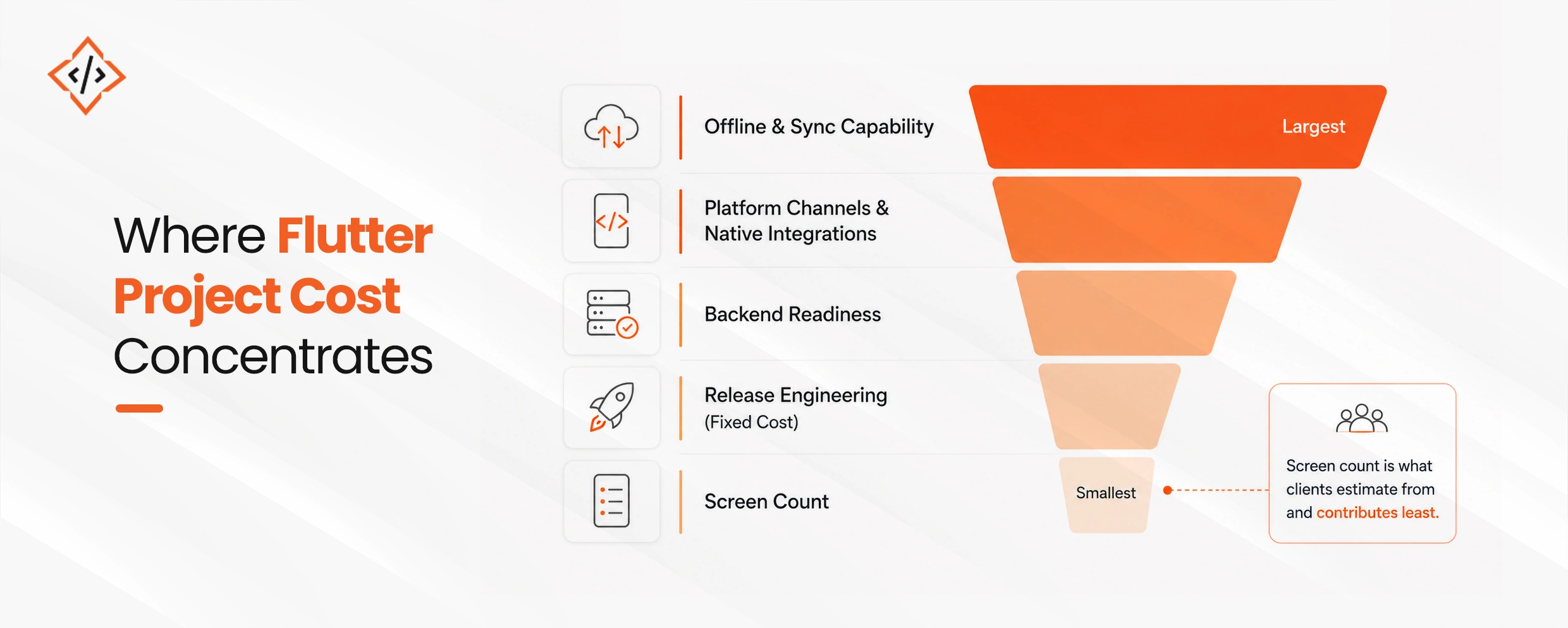
Estimates go wrong in predictable places, and none of them are the screen count.
| Driver | Effect on cost | Why it surprises teams |
|---|---|---|
| Offline capability | Largest single swing factor | Sync, conflict resolution, and queue state are a subsystem, not a feature |
| Platform channels | High | Every native integration is bespoke work on both platforms |
| Backend readiness | High | Frequently not Flutter work at all, and often omitted from the estimate |
| Release engineering | Fixed | Doesn’t scale down, so small apps pay the same |
| Design system maturity | Moderate | Ad-hoc styling accumulates rework across screens |
| Maintenance | Recurring | The line item most commonly left out entirely |
Interrogate “offline” before anything else. Read-only caching for a commuter tunnel and a field-service app that accepts edits for a full shift without connectivity are different products at different prices.
Conflict resolution policy alone is a design exercise. Last write wins is fine for free-text notes. Quantities should be rejected and surfaced rather than merged. Prices should always come from the server.
The full breakdown sits in Flutter app development cost.
Structure decided in the first two weeks determines whether the codebase survives a growing team. The most consequential choice is feature-first organization rather than layer-first.
Layer-first structure, meaning top-level models/, services/, and widgets/ folders, reads well at ten screens and gets painful past twenty, because every change touches four directories. Feature-first keeps a change inside one folder.
The second decision is one state management approach, enforced. Codebases carrying three state libraries because three contractors each preferred one are common and expensive. Which library you pick matters far less than picking one.
The third is the enforcement mechanism itself. Import boundary checks, a no-Flutter-in-domain rule, a single-state-library check, and the analyzer treated as an error gate all survive team turnover. Documented conventions don’t. Past roughly five engineers or three teams, splitting into packages pays for itself.
Flutter enterprise architecture covers the layout and the CI rules in detail.
Four operational realities catch teams arriving from web, where a bad deploy is reversible in minutes.
There’s no fast rollback. Once a build reaches the stores, the fix is a new build going through review. So the staged rollout is your safety mechanism rather than a formality, and rollout percentage deserves to be treated as a real control.
Jank usually isn’t a rendering problem. Work on the UI isolate, meaning JSON parsing, large list building, synchronous I/O, blocks the frame. Optimization aimed at widgets and shaders often produces no measurable improvement, because it targets the wrong layer. Flutter performance in production sets out the diagnostic order.
Signing is where pipelines become untrustworthy. Store credentials, provisioning profiles, and the manual steps around them are the part most teams have an uncomfortable arrangement for and have never examined closely. Flutter CI/CD for enterprise covers doing it properly, including why distinct application IDs matter more than they look like they should.
Device fragmentation is a renderer question too. An app can be smooth on a modern device and janky on an older one for renderer reasons rather than CPU reasons. That’s what makes a real-device test matrix necessary rather than nice to have.
If you’re shipping to one platform and have no concrete plan for the second, don’t hire a Flutter team. Ours included. You’ll pay a cross-platform tax for a benefit you never collect, and a native contractor will serve you better.
If your app is mostly OS integration, meaning widgets, background location, watch companion, deep share sheets, Flutter is the wrong shape and we’ll spend your budget writing platform channels.
And if you already have a native team shipping both platforms in step without drift, leave it alone. Rewrites justified by “consolidating onto one codebase” have a poor track record, and we’ve been on the wrong side of that argument before.
Two adjacent questions come up constantly.
Web. Flutter web is stable and used in production, mostly for authenticated application UI, internal tools, and interactive canvas features. It renders to a canvas rather than the DOM, which gives it different accessibility and SEO characteristics. So it suits application screens behind a login and fails on public pages that need indexing. The hybrid split, conventional web for content and Flutter for the application, is usually right. Flutter web and WebAssembly covers where the boundary sits.
ERP and back-office front ends. Flutter works well as a front end over an enterprise system, provided a backend-for-frontend layer sits between them rather than the app calling the ERP directly. That layer is the highest-value component in the whole integration, and Flutter with ERP integration explains why. Regulated deployments should also read Flutter fintech security, which covers the difference between protecting a secret and merely storing it carefully.
Migrating an existing native app? Read native to Flutter migration before committing to a rewrite. The incremental route usually wins.
Dart and widget fluency is the capability most candidates have and most interviews test. Two others matter more and get assessed rarely.
Platform integration. Writing platform channels, handling permissions, background execution, and the behavior differences between iOS and Android. Teams without it produce apps that work in the happy path and fail around the operating system.
Release engineering. Signing, store policy, phased rollout, crash triage. Teams without it discover App Store and Play policy requirements during submission, which is when fixing them costs the most.
Hire Flutter engineers covers what to test for, and CodeTrade’s Flutter developer engagement options set out the delivery models.
Here’s where I don’t have a settled position.
The advice above says decide architecture early and enforce it in CI. That’s right for a team of five or more. For a team of two shipping an MVP in ten weeks, I’m much less sure. Boundary enforcement has real friction, and a two-person team that knows the whole codebase gets little from rules designed to protect people from each other.
The argument for doing it anyway is that you can’t predict which MVP becomes the thing you maintain for six years, and retrofitting boundaries into a codebase that grew without them is genuinely expensive. The argument against is that most MVPs die, and you paid for insurance on something that didn’t survive.
I lean toward enforcing it, on the grounds that the retrofit cost is worse than the friction cost. But I’ve watched small teams ship faster without it and I can’t honestly call that a mistake.
Flutter is an economic decision before it’s a technical one. Both platforms genuinely in scope, limited platform-specific surface, and a team that benefits from a single codebase. Those are the conditions that make it pay, and without them native stays a legitimate answer.
Once you’ve committed, cost lands on offline capability, platform channels, backend readiness, and fixed release engineering. Not on screen count. So interrogate “offline” first, because it moves the number further than any other requirement in the brief.
Then decide architecture early and enforce it in CI rather than in documentation. Feature-first layout, one state management approach, and mechanical boundary checks are what let a codebase absorb a growing team without the rewrite that otherwise shows up in year two.
 Chand Prakash
 Chand Prakash
 Chand Prakash
 Chand Prakash
 Chand Prakash