







Mobile App Development
FinTech & Banking
 Chand Prakash
01 October 2026
Chand Prakash
01 October 2026
How to Secure a Flutter FinTech App for Regulated Finance?
 Chand Prakash
Teams using Flutter app development services rarely struggle because builds take too long. Release delays usually come from manual signing, store submission, and the checks surrounding both steps. A reliable Flutter CI/CD pipeline removes those weak points before they slow delivery or increase production risk. This matters because mobile teams cannot roll back a bad release as quickly as web teams can.
Store review creates a gap between finding a problem and getting the corrected build into users’ hands. Flutter release automation should therefore cover signing, submission, testing and controlled rollout instead of compilation alone. The safest setup also keeps signing keys under client control and injects secrets only during the build.
Flutter continuous delivery becomes more dependable when each release passes clear technical gates before reaching production users. Staged rollout then limits exposure while crash and core-flow metrics show whether expansion is safe. Done well, Flutter CI CD gives engineering teams a repeatable release process without hiding risk behind manual steps.
Five stages. Each has a clear pass condition, and the value comes from every stage running on every change rather than from any one stage being clever.
| Stage | Runs on | Pass condition |
|---|---|---|
| Static checks | Every push | flutter analyze passes with warnings treated as errors; formatting enforced |
| Test | Every push | Unit and widget tests pass; domain coverage stays above the defined floor |
| Architecture checks | Every push | Import boundaries hold; no Flutter imports in domain/; single state library |
| Build | Every merge to main | Signed artifacts for both platforms; version and build number stamped |
| Distribute | Merge to main, or tag | Automatically distributed to internal testers; store submission on tag |
Two design principles matter more than tool choice.
Secure signing is the foundation of reliable Flutter release automation because every production build depends on controlled credentials and ownership. This determines whether the pipeline is trustworthy, and most teams have an uncomfortable arrangement here they’ve never examined.
The client owns the store accounts and the signing keys. The app publishes under the client’s own Apple Developer and Google Play accounts. The client holds the Android upload key and keystore, and controls the Apple certificates and provisioning profiles.
That matters because the failure mode is severe. A vendor-held Android upload key is genuinely hard to recover from. An app published under a vendor’s store account also can’t simply be transferred without their cooperation. In a bad engagement, it’s the one item that can’t easily be unwound. This is why it appears in the contract terms for hiring Flutter engineers.
In the CI provider’s secret store or a dedicated secret manager, injected at build time and never written to a persistent location. Specifically:
Keep an offline backup of the Android keystore with the client, separate from CI. Losing it means publishing a new app listing and losing every existing install.
Android needs the keystore file, its password, the key alias, and the key password. iOS needs a distribution certificate, a provisioning profile, and an App Store Connect API key. Prefer the API key to storing an Apple ID password because it’s scoped and revocable.
Rotate whatever can be rotated when teams change. Review the store account membership list quarterly. Former agency accounts with store access are the mobile equivalent of dormant admin accounts in Magento security hardening.
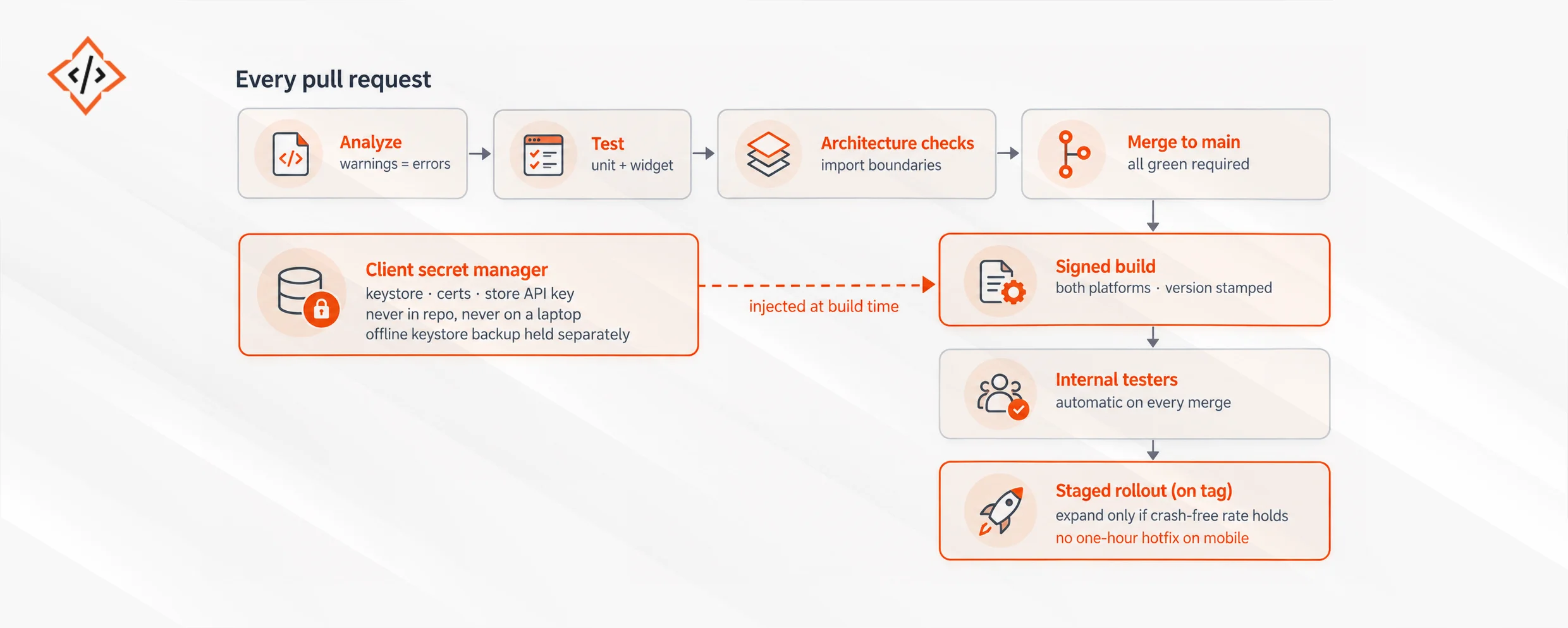
Secrets enter from the side, at build time only. Nothing downstream can hotfix quickly.
For scalable Flutter development, three environments are the usual set: development, staging, and production. Each needs its own bundle identifier or application ID so all three can install side by side on one device, which QA will want immediately.
One rule prevents the worst failure: the environment is selected at build time, not at runtime. A runtime environment switch, even one hidden behind a debug menu, can ship pointing at staging. A compile-time flavor can’t.
For each flavor, vary the application ID and app name, the API base URL, and the analytics and crash reporting keys. Vary the app icon too, so testers can tell builds apart at a glance, along with feature flag defaults.
Two failure modes are worth designing against. Production keys leaking into non-production builds pollutes analytics and can send test data to real systems, so keep the key sets fully separate. And staging builds reaching real users, which is why distinct application IDs matter more than they might seem.
A reliable Flutter CI/CD pipeline should enforce quality, architecture, dependency, and compliance checks before code reaches a production build. Six checks, all cheap, each preventing a class of problem that’s expensive later.
One deliberate omission: full integration tests on every pull request. They’re slow and flaky enough to erode trust in the pipeline. Run them on a schedule and before release tags instead.
If you ship one release a quarter and you’re happy with that, don’t buy a Flutter CI/CD engagement. The payback comes from release frequency, and at that cadence the manual process is cheaper than the automation.
If your team already has a working pipeline and the complaint is that it uses a CI provider somebody dislikes, leave it. Migrating CI providers is a week of work that produces exactly zero user-visible improvement.
And if you want us to hold your signing keys because it’s more convenient, we’ll say no. It’s more convenient right up until the engagement ends badly, and then it’s the single worst thing in the relationship.
A controlled Flutter release automation strategy limits production exposure and gives teams clear signals before expanding deployment to more users. Because there’s no fast rollback on mobile, the gate has to be the rollout itself.
One interaction with server-side changes deserves emphasis. An app release depending on a backend change should ship after the backend supports both old and new clients, because mobile users don’t all update. Every backend change must tolerate old app versions indefinitely. No cross-team release mistake happens more often.
Crash-free rate is a useful rollout gate, but it cannot confirm whether a release is working correctly for users.
In one enterprise mobile app deployment, the rollout threshold looked safe and the release stayed within the expected crash-free range. The team expanded the rollout in stages, and every stability metric remained green. The release eventually reached all users.
Support volume then tripled because a permission prompt appeared at the wrong point in onboarding on one Android version. Nothing crashed, but the issue disrupted a critical user flow and made the release unsuccessful from a business perspective.
The lesson is clear. Flutter release automation should not rely on crash-free rate alone. Teams should also track at least one funnel metric, such as completion of the app’s primary flow, against the pre-release baseline. That additional signal can expose issues that stability monitoring will miss.
Adding more release gates also has a cost. Each one slows the rollout, so the goal is not to monitor everything. The better approach is to combine technical stability with one or two business-critical user signals that show whether the release is actually working.
A team using enterprise Flutter CI/CD shows a specific set of characteristics.
Any engineer can produce a signed build from a clean checkout without asking anyone for a certificate. Releases happen on a predictable cadence rather than when someone has time for manual steps. Store submission is a tag, not an afternoon.
Rollouts are staged by default, and someone owns the crash dashboard by name. App size is tracked and its growth is explainable. The architecture checks added at the start still pass because they fail the build rather than sitting in a wiki.
The measure that matters most: time from merged fix to available in store. If that’s measured in weeks, the pipeline is your constraint rather than the engineering.
Safer enterprise releases depend on controlling the parts of mobile delivery that create the most risk, not simply building faster. A mature Flutter CI/CD pipeline keeps signing under client control and removes manual release steps that slow teams down. A sound Flutter enterprise architecture should lock environments at compile time so staging settings never reach production users by mistake.
Flutter release automation should also enforce architecture checks, testing, dependency reviews, and reproducible builds before anything reaches the stores. Release safety then continues after submission through staged rollout and clearly defined health thresholds. Crash-free sessions matter, but teams should also watch a core funnel metric that reflects whether users can complete key actions.
Over time, enterprise Flutter CI/CD should make releases predictable without weakening governance or ownership. The clearest measure is simple: a merged fix should reach the store through a repeatable process that teams trust, understand, and can operate without depending on one engineer.
 Chand Prakash
 Chand Prakash
 Chand Prakash
 Chand Prakash
 Chand Prakash