






Enterprise Application
 Chand Prakash
23 October 2026
Chand Prakash
23 October 2026
MCP integration for enterprise applications: architecture, use cases, security, and implementation
 Chand Prakash

The November deadline is not the actual problem. Both versions entered maintenance support earlier this year. Non-security bug fixes officially stopped around May 2026. Affected systems receive only security patches today. Another major issue catches many software portfolios completely off guard. Patch currency remains a strict support condition rather than a recommendation.
An application pinned to an older patch is completely unsupported today. This reality hits months before the official .NET 8 end of support. The main headline confirms both versions expire on November 10. This exact date convergence frequently traps engineering teams looking to hire .NET developers for runtime maintenance. Organizations choosing the long-term support window hit the exact same deadline.
Newer feature adopters face the exact same .NET 9 end of support. This guide explains these specific lifecycle dates clearly. It evaluates the required effort for a successful .NET 10 migration. The following sections also explain why legacy platform upgrades demand a completely different strategy.
Microsoft operates two distinct release tracks. The simple naming convention immediately tells you which specific track applies.
| Version | Released | End of support | Track | Window |
|---|---|---|---|---|
| .NET 8 | 14 Nov 2023 | 10 Nov 2026 | LTS (even-numbered) | 3 years |
| .NET 9 | 12 Nov 2024 | 10 Nov 2026 | STS (odd-numbered) | 2 years |
| .NET 10 | 11 Nov 2025 | 14 Nov 2028 | LTS | 3 years |
Even-numbered releases represent Long Term Support and carry a three-year window. Odd-numbered releases deliver Standard Term Support lasting two years. The final six months of every release track enter maintenance support. These restricted phases provide critical security fixes only.
Two strict consequences follow this official schedule. The second consequence is the exact one engineering teams consistently miss.
First, the .NET 8 support end date genuinely converges with the .NET 9 support end date. Both software tracks expire together. Choosing the initial LTS release confers no remaining technical advantage today. That extended benefit was entirely consumed over the preceding years.
Second, strict patch currency remains a mandatory support condition. Microsoft policy states systems must apply released patch updates continually. An application pinned to an older patch is outside the supported configuration right now. This compliance failure represents a more urgent finding than the November deadline.
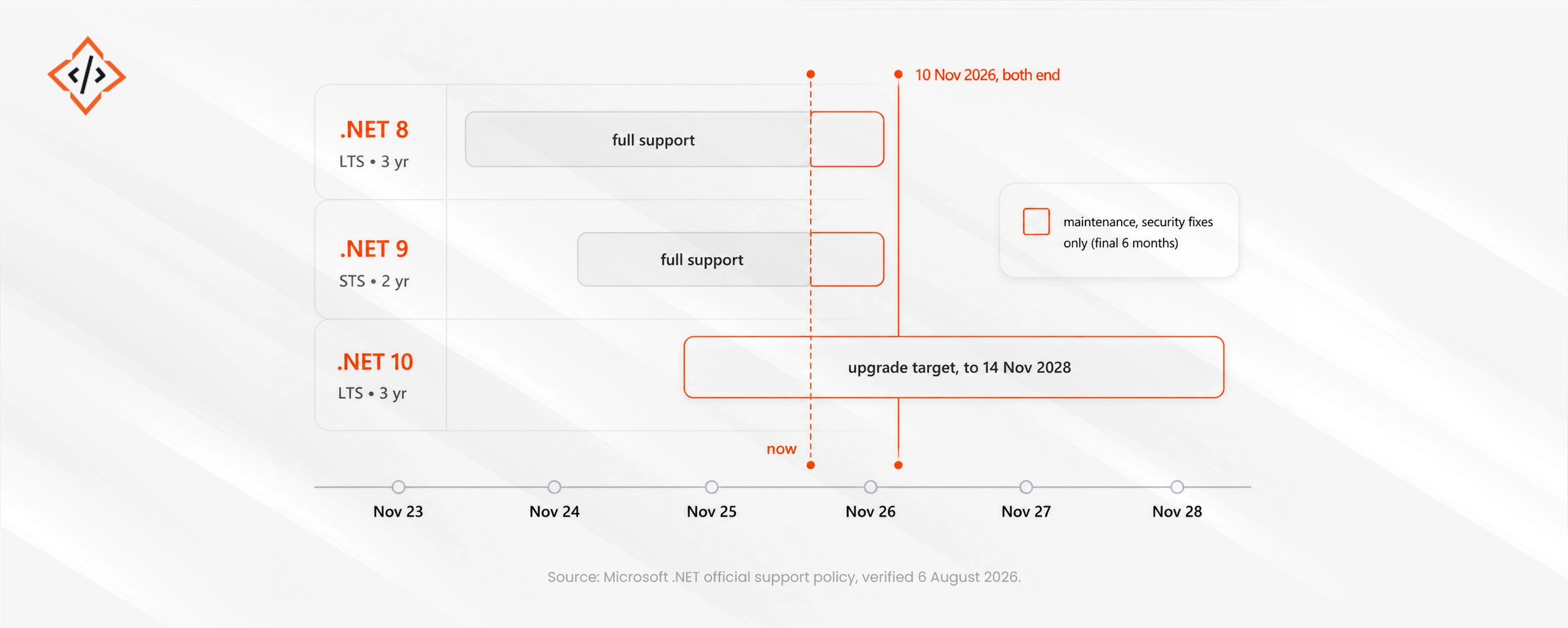
Both versions are already operating inside the restricted maintenance band. Standard non-security bug fixes have completely stopped.
This depends entirely on your architectural starting point. The required effort differs drastically based on current application versions. Treating everything as a single project represents a major planning failure within any .NET upgrade strategy.
| Starting point | Typical effort | Main risk |
|---|---|---|
| .NET 8 or 9 → .NET 10 | Low. Often a target-framework change, package updates, and a test pass | Third-party packages without a .NET 10 build |
| .NET 6 or 7 → .NET 10 | Moderate. Two or three generations of behavioral change | Accumulated deprecations, and hosting still on old runtimes |
| .NET Core 3.1 → .NET 10 | High. Substantial API and hosting change | Configuration and hosting model differences |
| .NET Framework 4.x → .NET 10 | Very high. A porting project, not an upgrade | Windows-only dependencies, WCF, WebForms, third-party components |
The .NET 8 migration to .NET 10 usually remains straightforward. Update the target framework and bring NuGet packages to their newer versions. Run the analyzers to resolve deprecation warnings before testing. Most applications need zero underlying code restructuring.
The realistic blocker involves third-party dependencies. Packages lacking proper updates force teams into difficult technical choices. Teams must replace the package, fork it, or rebuild the core capability entirely. Inventory all dependencies before touching the target framework to save valuable engineering time.
Treat a .NET Framework migration strictly as a comprehensive port. Windows-only APIs, WCF services, and older WebForms lack direct modern equivalents. Each legacy component requires a distinct architectural decision rather than a simple upgrade. Microsoft utilities identify much of this surface area accurately. However, mere identification never equals actual technical remediation.
Treat the November 2026 deadline as completely irrelevant to this specific timeline. Modern platforms dropped support for older framework portfolios years ago. The impending deadline changes nothing about this compromised legacy position. Never allow arbitrary dates to compress projects requiring meticulous technical sequencing.
Applications running on current versions with decent test coverage require a simple framework bump and a test pass. Do not hire external agencies to upgrade .NET 8 to .NET 10. Execute this technical work in-house and invest that budget into better test coverage instead.
Organizations running legacy systems should never hire CodeTrade simply to hit the November deadline. That specific date remains entirely irrelevant to older architectures. Vendors manufacturing urgency around this deadline are merely selling panic. Scope the required .NET application modernization properly on its own dedicated timeline.
Applications facing scheduled replacement within six months require a simple runtime upgrade and nothing more. Development agencies will gladly execute the complete port. However, businesses should never pay for .NET migration services on systems nearing immediate retirement.
Executing a successful .NET 10 migration requires four distinct phases. Teams frequently skip the first two inexpensive phases entirely. This exact failure pattern appears repeatedly across enterprise ERP and commerce upgrades.
Follow one crucial sequencing rule unconditionally. Upgrade the applications with the fewest technical dependencies first. These simple services validate the deployment pipeline perfectly. They produce highly reusable engineering knowledge for harder migration cases later.
Minor framework upgrades rarely break initial code compilation. They silently change underlying runtime behavior instead. These behavioral shifts appear across a consistent set of technical areas during .NET application modernization.
Where an application integrates with an enterprise ERP platform, give the internal call surface its own testing pass. External contracts remain static while internal calling code changes completely. This exact integration trap appears in standard Odoo 18 to 19 upgrade guide.
Delaying your framework migration might seem tempting, but technical leaders must strictly evaluate the true risks of waiting. Two specific technical arguments exist for delaying this work. Only one argument actually holds up under scrutiny.
The argument for waiting for the next release fails completely. That version represents an odd-numbered standard release with limited support. Moving there instead of .NET 10 LTS buys a much shorter support period. It requires the exact same migration effort while putting the portfolio back into compliance danger sooner. Long-term support releases remain the only correct target for business applications.
The argument regarding a fully funded system rewrite partly holds. An application scheduled for imminent replacement should not undergo migration twice. The major caveat involves standard software replacement timelines slipping unexpectedly. An unsupported runtime in production creates a severe security exposure. Upgrade the runtime anyway if the replacement misses the November deadline. This minor .NET 8 migration to .NET 10 removes massive operational risks.
No technical argument makes staying on an unsupported runtime cheaper. Security patches stop entirely on the final expiration date. The security exposure profile instantly mirrors any other unpatched legacy platform.
Patch currency appears throughout key takeaways and timeline sections. However, organizations still fail to prioritize this critical technical detail.
The November deadline provides a highly effective headline. It remains concrete and helps secure necessary budget approvals easily. Enterprise portfolios typically contain numerous applications running unsupported patch configurations today. This patch failure exceeds the applications facing the November deadline. The impending .NET end of support 2026 remains highly visible. Meanwhile, the patch currency problem remains completely hidden.
No engineering team plans to run older patches for eighteen months. Deployment pipelines simply pin specific versions accidentally. Sometimes a base container image never gets rebuilt. Often, an application remains stable and nobody touches the code. System monitoring tools generate absolutely zero compliance alerts. Microsoft policy declares the system unsupported while monitoring dashboards continue showing green.
Making this reality register with stakeholders proves exceptionally difficult. Emphasizing patch currency sounds like a minor technicality next to a hard deadline. Technical decision-makers frequently dismiss it as mere pedantry. Leading with the deadline treats patch currency as a minor detail. It rarely gets recognized as the massive security exposure it actually represents.
Consequently, this crucial component of a proper .NET upgrade strategy rarely sticks with leadership teams.
The looming .NET 8 end of support hits exactly on November 10 alongside its .NET 9 counterpart. Both legacy versions already sit in maintenance support receiving essential security fixes only. Executing a comprehensive .NET 10 migration provides the only sensible architectural path forward. This specific long-term target guarantees official platform support through November 2028.
Start your planning by inventorying exact patch levels across all applications, including systems supporting custom AI software development. Failing to maintain strict patch currency leaves your software completely unsupported today. Triage your portfolio carefully and upgrade .NET 8 to .NET 10 systems first. Clearing these simpler systems rapidly removes immediate compliance exposure across your organization.
Never fold a complex .NET Framework migration into this strict upcoming deadline. Forcing massive legacy porting programs into a tight three-month window guarantees total project failure.

 Chand Prakash
 Chand Prakash
 Hardik Soni
 Bhavesh Kachadiya
 Bhavesh Kachadiya