






AI
Odoo Development
 Hardik Soni
29 July 2026
Hardik Soni
29 July 2026
Odoo AI in 2026: The Complete Guide to Native AI in Odoo 19 & 20
 Hardik Soni
Business software is entering a new phase where execution matters as much as functionality. ERP platforms are no longer expected to simply manage processes, as businesses now expect more value from modern Odoo ERP solutions. Businesses now expect them to reduce manual effort, improve decision-making, and help teams move faster across operations. Odoo 20 reflects that shift clearly.
Its latest release introduces stronger Odoo 20 AI features across CRM, reporting, workflows, and everyday business operations. AI in Odoo 20 feels built into the platform rather than added as a separate layer. That makes the release especially relevant for businesses evaluating how ERP systems will support future growth.
According to the PwC 28th Annual Global CEO Survey (2025), 49% of CEOs say generative AI has already increased profitability in their companies over the past 12 months. That signals a clear shift in how businesses are moving AI from experimentation into core operational strategy.
For businesses exploring Odoo 20 AI updates, the more practical question is what actually changes inside the ERP—and where those changes create measurable operational value.
Odoo 20 introduces changes that go beyond a standard version release. The update feels more closely tied to how businesses actually operate across teams and workflows.
Odoo 20 goes beyond interface improvements and performance upgrades. The release signals a broader shift in how ERP platforms are expected to support business operations.
The focus is no longer limited to managing workflows. It is increasingly about helping teams execute work faster, with better context and fewer manual steps. Many of the Odoo 20 new features are built around that shift.
What makes this release stand out is how AI in Odoo 20 becomes part of everyday operations. It sits inside the workflow rather than outside it. Teams can move through tasks faster, make quicker decisions, and maintain stronger process consistency across departments.
This makes Odoo 20 AI features feel less like software updates and more like operational improvements built directly into the ERP.
Odoo 20 brings AI into practical business workflows where teams can use it daily without changing how they already work.
The Odoo AI assistant adds support inside everyday tasks across the platform. It helps with contextual guidance, content drafting, internal prompts, and task suggestions. Users can move faster without switching between tools or searching for the next step manually.
One of the strongest Odoo 20 CRM AI features is how it improves sales visibility. Teams can prioritize leads faster, review conversation summaries, and generate replies with less effort. This creates better follow-up and clearer opportunity tracking.
Odoo AI automation focuses on reducing repetitive work across teams. Approvals, reminders, follow-ups, and routine workflows can move with less manual intervention. In Odoo 20, smart automation is not just about speed. It is about improving workflow consistency across departments while reducing operational friction. That makes day-to-day execution faster without losing structure or process control.
AI in Odoo 20 also strengthens reporting with better forecasting and trend recognition. Teams can review patterns earlier and respond with more confidence. These Odoo 20 AI updates make reporting more useful for day-to-day business decisions.
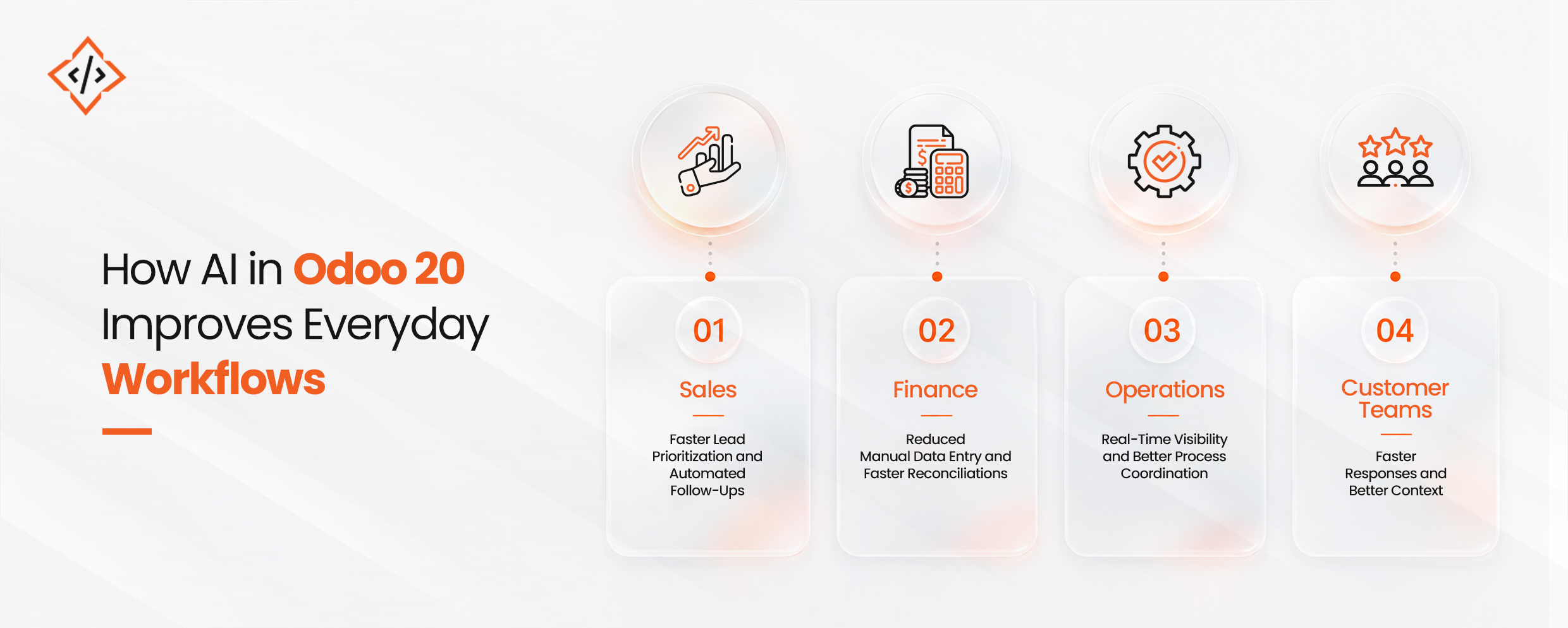
The impact of AI in Odoo 20 becomes most visible inside everyday business workflows.
Sales teams can spend less time updating records and more time focused on active opportunities. The Odoo AI assistant supports tasks directly inside the workflow, helping reduce admin effort without adding extra steps.
Finance teams can manage repetitive data tasks with fewer manual actions. That improves accuracy while saving time across routine operations.
This shift matters because operational efficiency is becoming a measurable outcome of AI adoption across businesses. According to Deloitte research, 66% of organizations say AI is already improving productivity and efficiency across their operations. That makes AI less of an experimental capability and more of a practical business tool, especially for companies investing in AI development services to improve operations.
With Odoo 20 AI updates, that efficiency can happen directly inside the ERP. Operations teams gain better visibility across workflows and real-time business data. Customer-facing teams can respond faster with stronger context and fewer delays.
As a result, Odoo 20 AI features make day-to-day work more efficient, more connected, and easier to manage across the business.
Odoo 20 brings meaningful improvements beyond AI that shape how teams interact with the platform every single day.
Several Odoo 20 new features focus on improving everyday usability across the platform. Navigation feels cleaner, workflows feel more structured, and teams can move through tasks with fewer interruptions. Small interface improvements may seem minor individually, but together they create a smoother user experience across daily operations.
Odoo 20 business updates also introduce meaningful improvements across core modules businesses rely on every day. Accounting workflows feel more streamlined. Inventory becomes easier to manage. Sales teams benefit from better workflow continuity, while manufacturing teams gain stronger operational visibility and control across execution stages.
Beyond AI and usability improvements, Odoo 20 AI updates are supported by stronger platform performance in the background. Faster loading speeds improve day-to-day efficiency. Better stability helps reduce workflow interruptions. Improved integrations and scalability also make the platform better equipped to support long-term business growth.
The Odoo 20 release date has already started conversations across the Odoo ecosystem. For many businesses, that makes the upgrade worth evaluating earlier than expected.
Growing SMEs managing increasing operational complexity can benefit from stronger workflow control and reduced manual dependency across teams. Multi-location businesses can gain better visibility while keeping processes connected across departments and locations.
CRM-focused sales teams may find particular value in Odoo 20 CRM AI features, especially where lead management, follow-up speed, and sales visibility directly affect revenue performance.
Operations-led businesses can also benefit through faster execution, stronger process alignment, and better day-to-day visibility across workflows.
For businesses already running Odoo and planning their next phase of scale, many Odoo 20 new features offer value beyond functionality alone. The bigger opportunity lies in improving how work moves across the business.
That is where AI in Odoo 20 becomes strategically relevant.
Before moving to Odoo 20, businesses should review these key areas:
Odoo 20 shows a clear change in how ERP platforms are supporting modern business operations. The release focuses less on adding features and more on improving how work moves across teams each day. Odoo 20 AI Features bring practical improvements inside the system through better workflow support and faster decision-making. AI in Odoo 20 feels useful because it fits naturally into existing business processes.
From reporting to Odoo AI automation, the updates are built around efficiency and better execution. Businesses exploring Odoo 20 new features should look beyond the release itself and focus on where these changes can create measurable long-term value across operations.
CodeTrade works closely with businesses to help them plan, implement, and scale Odoo around real operational needs. With strong experience across ERP consulting, migration, customization, and automation, the team helps businesses understand where Odoo 20 AI Features can create practical value. From strategy to execution, CodeTrade supports organizations in building smarter workflows that align with long-term growth.
 Hardik Soni
 Chand Prakash
 Chand Prakash
 Chand Prakash
 Chand Prakash