
Odoo Development
 Hardik Soni
19 May 2026
Hardik Soni
19 May 2026
Cost of Maintaining Odoo After Go-Live: Support, Upgrades, Cloud & Training
 Hardik Soni
Businesses running Odoo are always working with whatever version they’re on right now. The next one is already being shaped. Odoo 20 is on the horizon and if infrastructure planning, team workflows, or budget cycles are part of the picture for your company, this isn’t something to catch up on later.
Here’s what’s expected, when it’s coming, and why it changes things.
Odoo follows a fairly consistent release schedule, with new versions typically launching in October each year. Odoo 16 was released in October 2022, followed by Odoo 17 in October 2023 and Odoo 18 in October 2024. Based on this pattern, Odoo 20 is expected to be released around October 2026.
It’s important to understand one thing here. The official release date is usually confirmed during Odoo Experience, the company’s annual event where major announcements are made. Until then, timelines are based on past trends. The October release window has remained consistent over the years, so it’s a practical benchmark to plan around. Still, it’s worth keeping an eye on the official roadmap as 2026 approaches in case anything changes.
For companies currently using v15 or v16, this timeline is already relevant. Upgrading to a new version is not something that happens overnight. It involves reviewing existing modules, checking compatibility, and preparing infrastructure. In most cases, the effort required is higher than what teams initially expect, which is why planning ahead makes a real difference.
The platform direction since Odoo 17 has been consistent. Trim the UI complexity. Push more automation into the core. Stop treating AI like an optional layer and start building it directly into daily workflows.
Compared to Odoo 19 new features, which already moved the needle on document handling and studio functionality, v20 appears to go further into territory that earlier versions barely touched. The pattern points toward an ERP that makes more calls on its own. Not in a black-box way. More like, it knows what your procurement team needs to see on a Monday morning without someone setting that up manually every time.
Modular flexibility is also expanding. Businesses that don’t need the full suite can get more value from smaller deployments than they could in previous versions.
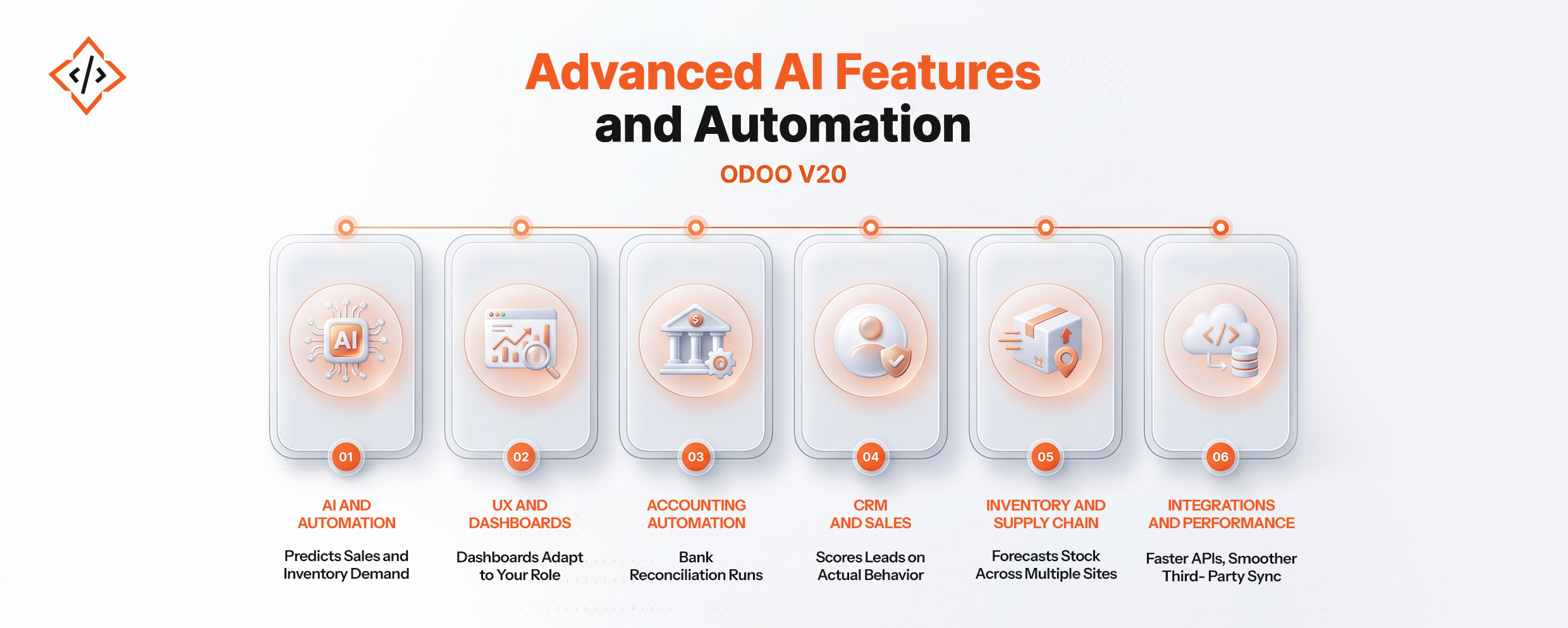
Here are the top features that you can expect to see in Odoo 20 this year:
Most of the progress in this release is happening here. Sales and Inventory are expected to include built-in predictive analytics. Reporting is moving toward highlighting what matters without requiring someone to manually run queries. CRM is also becoming more practical, helping teams identify which leads are actually worth focusing on based on past conversions.
Features like inventory reorder suggestions, automated lead scoring, and financial anomaly detection are not entirely new concepts. Odoo has been gradually building toward them since v17. What changes with v20 is how these capabilities come together and start feeling more complete and usable in day-to-day operations.
The interface has been improving with each release, and v20 continues in that direction. Dashboards are expected to adapt based on user roles, reducing the need for manual setup. Navigation should also become more straightforward, making it easier to access frequently used features without going through multiple layers.
The focus here is simple. Users should be able to see relevant information without spending time searching for it.
Accounting workflows are becoming more efficient. Bank reconciliation is expected to happen in real time, and invoices can be matched with purchase orders with minimal manual effort. Multi-country compliance is also being handled more effectively, which is important for businesses operating across regions.
For finance teams that currently spend significant time on month-end processes, these improvements can reduce a noticeable amount of manual work.
CRM is also shifting toward more meaningful insights. Lead scoring is expected to rely more on behavioral data instead of just static input fields. On top of that, Pipeline forecasting is becoming much more aligned with actual deal movement rather than assumptions.
Customer information is also being consolidated. Instead of switching between multiple tabs, teams can view invoices, support tickets, and communication history in a single place, which makes day-to-day usage more efficient.
Inventory management is becoming more practical for growing businesses. Demand forecasting is expected to account for seasonal trends as well as supplier timelines. Warehouse processes can be automated to reduce manual intervention.
Multi-location inventory management is also improving, which is particularly useful for businesses operating across multiple sites. Many eCommerce companies have relied on external tools for this, and Odoo seems to be addressing that gap more directly.
Performance improvements are a key part of this update. API response times are expected to be faster, and the system should handle high-volume transactions more efficiently. Third-party integrations are also becoming more stable.
For businesses that rely on multiple platforms alongside Odoo, this is important. Integration challenges have been a consistent issue in earlier versions, and this update is focused on reducing that friction.
Compared to Odoo 18 and 19, the shift in Odoo 20 is less about adding new modules and more about improving how existing ones function. Accounting has always been part of Odoo, but what’s changing is how much of the repetitive work it can now handle. CRM is another example. It’s not new, but the ability to score leads based on actual behavior within the pipeline makes it far more useful in practice.
Performance improvements are also becoming more relevant than before. Businesses scaling on Odoo have faced challenges with API limits and large data handling. These issues are now being addressed, which makes a noticeable difference for growing teams.
Here are the benefits of switching to Odoo v20 as soon as it is launched.
Automation reduces the time spent on repetitive tasks, allowing teams to focus on work that requires decision-making and oversight. This is where most businesses will see immediate impact.
Reporting is becoming more proactive. Instead of manually building reports, teams can rely on the system to highlight what needs attention.
Processes like invoicing, reconciliation, inventory replenishment, and lead follow-ups still take up significant time in many businesses. With Odoo 20, a large part of this workload can be handled automatically.
The modular structure allows businesses to start with essential features and expand over time. There is no need to replace the system as operations grow, which makes it a more sustainable long-term solution.
Well, that is a question worth asking! Businesses currently using v15, v16, or v17 and experiencing limitations in automation or reporting should start planning an upgrade. This is especially relevant for companies that are scaling quickly or relying heavily on manual processes in finance and operations.
On the other hand, businesses that have recently upgraded to v18 or v19 may not need to move immediately. If the current setup is stable and meeting operational needs, it makes sense to evaluate before making a decision. Odoo’s long-term support versions provide enough flexibility to plan upgrades at the right time.
One thing that remains consistent across any upgrade is the need for proper testing. Custom modules can break, and compatibility issues are common if not checked in advance. For more complex setups, working with an experienced Odoo implementation partner and investing in proper customization support can help avoid costly issues after deployment.
What about small businesses? Is Odoo 20 Suitable for them?
In many cases, small teams benefit the most from these updates. Features like automated invoicing, inventory alerts, and lead follow-ups directly address tasks that smaller teams often handle manually.
With modular pricing, businesses only pay for what they use, so there is no need to adopt the entire system at once. Combined with a simplified user experience, this makes it easier for smaller teams to get started without extensive ERP knowledge.
Start with a complete audit of your current system. Identify which modules are actively used, what customizations exist, and whether they are maintained internally or by external developers.
Plan your migration timeline around the expected October 2026 release. This should include setting up a testing environment, running parallel systems if needed, and allocating time for team training.
Last but not the least, hire Odoo developer because they can make a significant difference here. The gap between older versions like v15 and Odoo 20 can be substantial, and having the right technical support reduces the chances of post-launch issues.
The most valuable improvements in Odoo 20 are not just new features, but how they reduce everyday operational effort. Tasks like manually matching invoices, repeatedly generating reports, or tracking leads can be handled more efficiently within the system.
Odoo 20 represents a shift toward an ERP that takes on more of the operational load, allowing teams to focus on higher-value work.
If you are planning ahead, this is a good time to review your current setup. Whether it is a fresh implementation or an upgrade, having the right strategy in place can help you make the most of what Odoo 20 offers.
Reach out to discuss your upgrade path or explore how Odoo AI automation can start delivering value in your current version today.
 Hardik Soni
 Hardik Soni
 Hardik Soni
 Hardik Soni
 Hardik Soni