







eCommerce
 Chand Prakash
11 September 2026
Chand Prakash
11 September 2026
How Should Mid-Market Businesses Choose Magento vs Shopify Plus for B2B?
 Chand Prakash
Hardening doesn’t replace patching. It buys time while a proper upgrade gets scheduled, and that’s all it does.
– The highest-value single action is a managed web application firewall with current commerce rule sets. Hours to deploy, not weeks.
– Most Magento compromises arrive through admin credentials or an outdated extension, not a novel platform exploit.
– The characteristic outcome is a payment skimmer injected into checkout templates or JavaScript. File integrity monitoring shortens the exposure window.
– Running unsupported software with known vulnerabilities is a PCI DSS conversation, not only a security one. Raise it with your acquirer rather than assuming nothing changed.
Hardening gets sold as an alternative to upgrading. It isn’t one, and if anyone tells you otherwise they’re selling you something.
Here’s why. Once a version stops receiving patches, every newly disclosed vulnerability stays open permanently while remaining publicly documented. Controls at the edge and around the admin surface reduce how easily that gets exploited. They don’t close it.
What compensating controls buy you is weeks or months of reduced risk while an upgrade gets planned properly. That’s genuinely valuable and it’s a smaller claim than the one usually made.
So this lists the controls that matter, ordered by protection gained per hour of work, for stores in the gap between an end-of-support date and a completed upgrade. For the upgrade decision itself, see Adobe Commerce end of support.
Worth establishing before you spend money, because the popular mental image is wrong.
The dominant routes are unglamorous. Admin credentials: reused passwords, no two-factor authentication, dormant accounts belonging to former staff or former agencies. Outdated third-party extensions, which carry their own vulnerabilities and get patched on their vendors’ schedules rather than Adobe’s. Unpatched known platform vulnerabilities, which is the specific exposure an unsupported version creates. And server and infrastructure weaknesses that have nothing to do with Magento.
Novel research against a specific store is rare, because it’s unnecessary. Automated scanning finds unpatched stores at scale, and public advisories describe exactly what to look for.
The characteristic objective is payment data. A skimmer injected into checkout templates, JavaScript assets, or a database configuration row captures card details as customers type them, and it’s designed to be quiet. Stores frequently learn about it from their acquirer or a card brand rather than from their own monitoring.
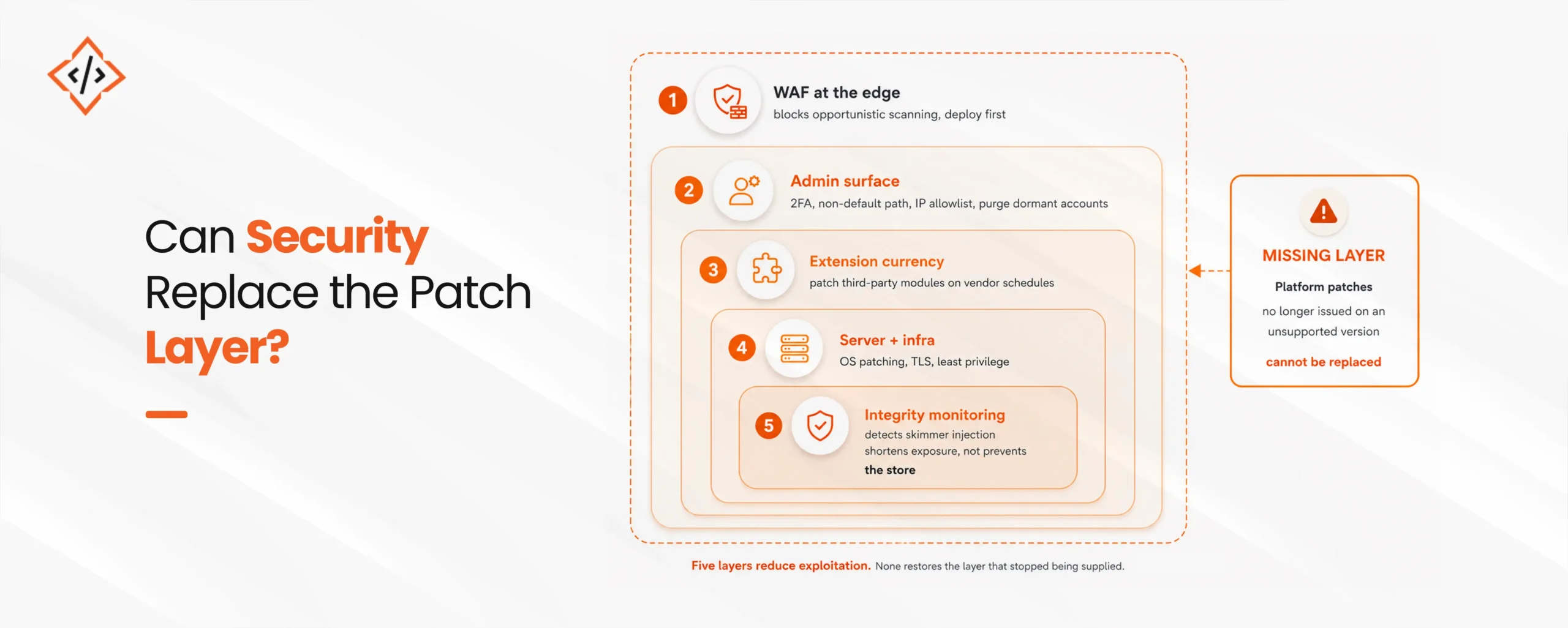
Ordered by protection gained per hour spent. Limited time? Work down this list.
The highest-value action available. A WAF with maintained commerce rule sets sits in front of the store and blocks a meaningful share of automated exploitation attempts before they reach the application.
Two practical notes. Choose a managed service where someone else updates the rules, because a WAF with stale rules provides less than it looks like it does. And run it in blocking mode rather than monitoring mode after a short tuning period, since a WAF that only observes stops nothing.
This closes the commonest route.
/admin and any other guessable value.Third-party extensions get patched by their vendors, independently of the platform’s support status. A store on an unsupported Magento version can still be fully current on every extension, and frequently isn’t.
Inventory the estate and update what has releases. Any extension whose vendor has disappeared is a finding for the upgrade project, and in the meantime a candidate for removal if nothing depends on it.
Operating system and package patching, current TLS configuration, disabled directory listing, least-privilege file permissions, no development tooling reachable in production. Also confirm database and cache services aren’t exposed publicly, which remains a surprisingly common misconfiguration.
Detection rather than prevention, and the control that limits damage. Monitor the codebase, theme templates, JavaScript assets, and the configuration tables where injected content commonly lands. Alert on any change outside a deployment window.
The value is time. A skimmer detected in hours exposes far fewer cards than one detected when the acquirer calls.
An untested backup is a belief. Restore to staging, confirm the store starts, confirm the data is intact. Keep at least one copy offline or immutable, because backups reachable from a compromised host can be encrypted or deleted.
If you can schedule the upgrade inside the next four weeks, spend the money on the upgrade rather than on a hardening engagement. Deploy a WAF yourself, turn on 2FA, and put the rest of the budget where it permanently fixes the problem.
If you’re already on a supported version and current on extensions, you don’t need this. Most of the value here is compensating for a gap you don’t have.
And if what you want from us is a letter saying your store is secure so you can show an auditor, we won’t write it. Compensating controls are documentable and defensible, and they aren’t a clean bill of health, and pretending otherwise would put you in a worse position than the one you’re in.
Hardening is a one-off project. These are the ongoing signals that something changed.
| Signal | Why it matters | Reasonable response |
|---|---|---|
| Unexpected file or template change | The primary skimmer indicator | Investigate immediately; treat as an incident until cleared |
| New or modified admin account | Persistence mechanism after access | Verify against change records |
| Admin logins from unexpected locations | Credential compromise | Force reset; review session history |
| Outbound requests to unknown domains | Skimmer exfiltration | Investigate immediately |
| Changes to payment configuration | Redirect or capture tampering | Verify against change records |
| Unusual order patterns or card testing | Fraud, or a compromised checkout | Notify the acquirer |
| Sudden cron or indexer failures | Sometimes a side effect of injected code | Investigate rather than restart blindly |
One pragmatic addition. Check the storefront checkout from an external network periodically, using browser developer tools to review which third-party scripts load. Skimmers are sometimes visible as an unexpected outbound request nobody recognizes.
Two obligations get assumed to pause when a vendor ends support. Neither does.
PCI DSS. Requirements around patching, vulnerability management, and secure development apply regardless of a vendor’s release calendar. Operating software with known unpatched vulnerabilities leaves you with a position to explain. Compensating controls are a recognized concept within PCI DSS, and they have to be documented rather than merely implemented. Raise the situation with your acquirer proactively, because discovering the position after an incident is materially worse.
Data protection. Where the store serves EU or UK customers, personal data obligations continue to apply, and running knowingly unpatched software is relevant to the security-of-processing question. Breach notification timelines are short, which is another argument for detection controls that work.
Neither is a reason to panic. Both are reasons to document what’s been done and keep a scheduled upgrade in the plan. “We were working on it, and here’s the dated plan” is a far better position than “we hadn’t looked at it.”
Stating the limits plainly, because the honest version is more useful than reassurance.
Compensating controls don’t patch the application. A vulnerability in unsupported code stays present, and a WAF rule is a filter in front of it rather than a fix. Targeted attacks against a specific store will find gaps that generic rule sets miss.
They also don’t reduce the upgrade you still owe. Every week of hardening is a week the version debt kept compounding.
I put file integrity monitoring at position five. I now think that’s wrong, and I’ve left the ordering as it is because I can’t decide what to replace it with.
The list is ordered by protection gained per hour. Integrity monitoring provides no protection at all, strictly speaking. It’s pure detection. By the ordering principle it belongs last, and by outcome it’s arguably the second most valuable thing here, because the difference between a skimmer caught in six hours and one caught in six weeks is the difference between a manageable incident and a card-brand investigation.
So the ordering principle is wrong, or at least incomplete. Prevention and detection aren’t commensurable, and ranking them on one axis produces a list that reads sensibly and misleads.
If I rewrote it honestly I’d give you two lists: prevent-first and detect-first, and tell you to do the top item from each before the second item from either. That’s harder to follow and probably more correct.
Compensating controls buy time. They don’t substitute for a supported version, and any framing that suggests otherwise is selling something.
Inside that limit, the order is clear enough. A managed WAF in blocking mode first, because it deploys in hours and stops a real share of automated exploitation. Then the admin surface, because credentials rather than platform exploits are how most Magento stores actually get compromised. Then extension currency, which is free protection your unsupported version doesn’t affect.
And run file integrity monitoring regardless of where it sits on a per-hour ranking, because the characteristic outcome here is a quiet skimmer and detection time is what decides how much that costs you.
Then document everything for your acquirer, keep the dated upgrade plan visible, and treat every week of hardening as a week of compounding version debt rather than a solution.
 Chand Prakash
 Chand Prakash
 Chand Prakash
 Bhavesh Kachadiya
 Chand Prakash