





AI
eCommerce
 Chand Prakash
02 November 2026
Agentic Commerce for Fashion Ecommerce: How Brands Can Prepare for AI-Driven Shopping
 Chand Prakash

Online retail keeps taking a larger share of total spending. According to the U.S. Census Bureau, ecommerce accounted for 17.1% of total U.S. retail sales in the second quarter of 2026.
As order volume grows, each sale touches more software, from the storefront and payment provider to the warehouse, the accounting ledger, and often a CRM.
When these systems do not share data, teams fill the gap with spreadsheets and manual updates.
Ecommerce integration closes that gap.
This guide explains how it works at a technical level, including the main integration types and methods, their benefits, and challenges. It also covers how Shopify and WooCommerce stores typically connect to back-office systems.
Ecommerce integration is the process of connecting an online store with the other software a business runs on so that orders, products, customers, inventory, and financial data flow between them automatically. Instead of each system holding its own version of the truth, the integration defines which system owns each type of data and how changes travel to the others.
For example, a single order can trigger several automatic actions:
Every integration answers the same questions. How does one system learn that something changed? How does the data travel? And how is it translated so the receiving system can use it?
Systems learn about changes in one of two ways. Webhooks send an instant notification when an event happens, such as a new order or a refund. Scheduled syncs, also called batch jobs, check for changes at set intervals, for example every 15 minutes or once a night.
Most production setups combine both, with a scheduled job acting as a backup for any webhook that fails.
Ecommerce API integration is the transport layer. Platforms expose REST or GraphQL APIs that let other systems read and write records.
Shopify, for instance, offers the Admin GraphQL API, while WooCommerce provides a REST API built into WordPress. Because each API has rate limits, the integration must queue requests and retry failures instead of dropping data.
Systems rarely store data the same way. A product might be a single SKU in the store but a parent item with variants in the ERP.
Tax codes, units of measure, and customer IDs also differ. Data mapping translates fields between systems, while validation rules reject records that would cause errors downstream. In practice, weak mapping is the most common reason integrations break after launch.
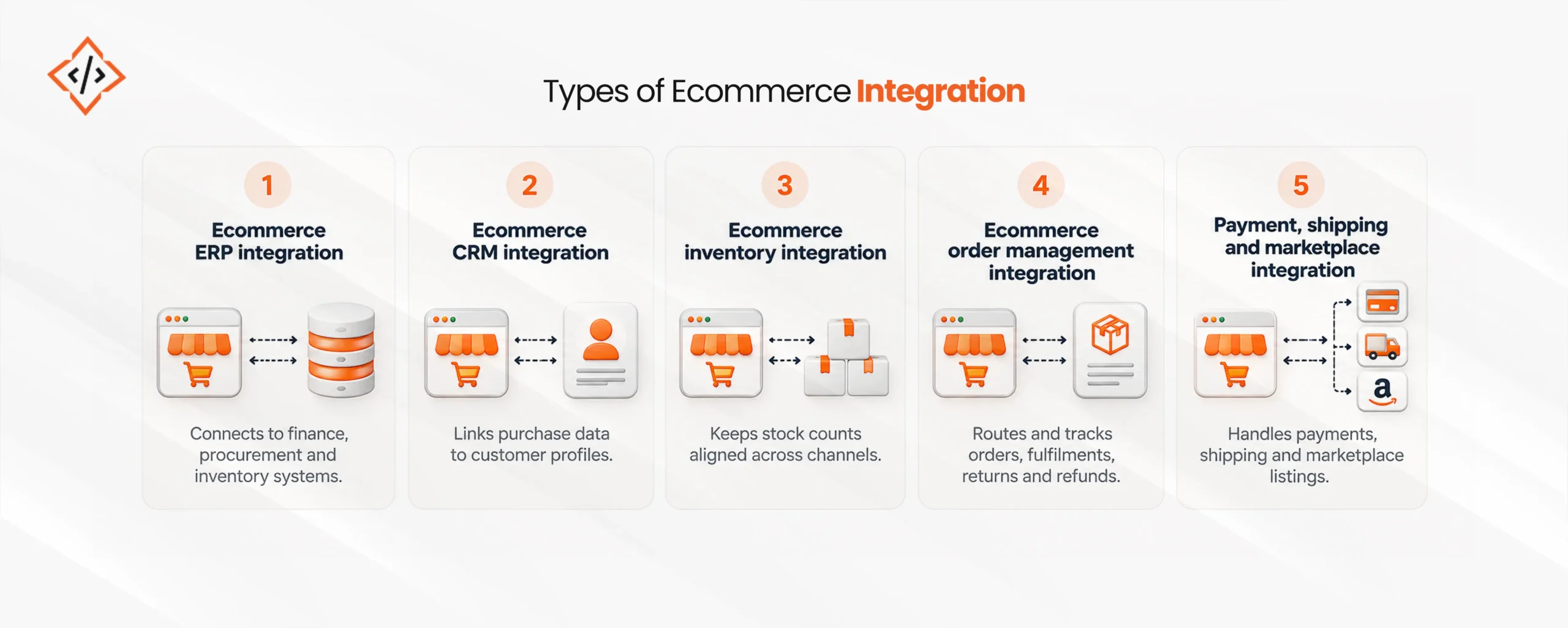
Each type connects the store to a different part of the business. Most growing retailers need several of them working together.
This connects the store to finance, procurement, and inventory planning systems such as Odoo, SAP Business One, NetSuite, or Microsoft Dynamics 365. Orders flow into the ERP for invoicing, while stock and pricing flow back to the store.
This links purchase behavior to customer profiles in tools such as Salesforce or HubSpot. As a result, sales and marketing teams can segment buyers, trigger follow-ups, and track lifetime value.
This keeps stock counts aligned across the store, the warehouse management system, and marketplaces. It matters most for brands selling the same SKU on several channels.
This routes each order to the right warehouse, store, or 3PL partner, then tracks it through fulfillment, returns, and refunds in one place.
Payment gateways handle checkout and refunds, and shipping platforms calculate rates and print labels. Meanwhile, marketplace connectors push listings and pull orders from channels such as Amazon, Noon, or eBay.
The type describes what is connected. The method describes how. Ecommerce platform integration usually follows one of three approaches.
| Method | Best for | Trade-off |
|---|---|---|
| Native connectors and plugins | Standard Shopify or WooCommerce setups using popular tools | Quick to install, but limited when workflows are custom |
| Middleware or iPaaS | Businesses connecting four or more systems | Central monitoring, but it adds a subscription cost and another vendor |
| Custom API integration | Unique workflows, legacy ERPs, and high order volume | Full control, but needs development and ongoing maintenance |
Many businesses start with plugins and move to middleware or custom work once order volume or channel count grows. A hybrid setup is also common, with connectors for simple links and custom code for core order and inventory flows.
Both platforms support integration well, although they work in different ways.
Teams that need custom apps or complex back-office links often work with Shopify development services to build them.
Stores planning heavy customization gain the most from experienced WooCommerce development support.
Disconnected systems remain common, even in large organizations. MuleSoft’s 2025 Connectivity Benchmark Report found that organizations use 897 applications on average, yet only 2% of IT leaders say they have integrated more than half of them. Connecting the store to core systems delivers clear gains:
Once systems are connected, ecommerce automation and AI become practical because both depend on clean, shared data. The same MuleSoft research reports that 95% of IT leaders see integration as a hurdle to implementing AI effectively. Common use cases include:
Businesses building these capabilities often pair integration work with Custom AI Software Development.
Most integration problems come from data and planning rather than code. The common ones include:
A structured plan reduces rework and launch delays. The following steps apply to most projects:
Timelines depend on scope more than platform. As a general guide:
Actual timelines also vary with data quality and the depth of testing.
CodeTrade connects Shopify, WooCommerce, and custom storefronts with ERP, CRM, inventory, and logistics systems, including Odoo. Each project starts with a systems audit and a data ownership plan, followed by phased builds and post-launch monitoring. With 180+ engineers, 450+ clients, 10+ years of delivery, CMMI Level 3 processes, and Odoo Ready Partner status, CodeTrade supports retailers from first connector to full multichannel operations.
Ecommerce integration turns separate tools into one connected operation for sales, stock, finance, and service. The right setup starts with clear data ownership, then matches the method to order volume and system age. Once that foundation is in place, it also becomes the base for automation and AI across the business.
 Chand Prakash
 Hardik Soni
 Chand Prakash
 Chand Prakash
 Chand Prakash