






Odoo Development
 Hardik Soni
28 September 2026
Hardik Soni
28 September 2026
Odoo 20 upgrade cost explained: migration, customization & hidden costs
 Hardik Soni
Every vendor selling AI-powered ERP software now claims the label. Most of what that means in practice is a chatbot bolted onto the side of the software, answering questions without touching anything.
In short, Odoo 20 AI features let agents act on records inside automated workflows, not just answer questions in a chat window. That single change is what separates real Odoo AI automation from a bolted-on assistant.
Odoo 20 was unveiled at Odoo Experience 2026 in Brussels on September 24, positioned as the most AI-focused Odoo 20 ERP release yet. One correction is worth making first:
Odoo 19 already had AI agents that took real actions. So the real question isn’t whether
Odoo has AI agents. It’s what changed in these Odoo 20 features, and whether that change is worth an upgrade.
In Odoo 19, AI mostly worked as a separate tool. Businesses could set up AI agents and choose the model they wanted to use. The “Ask AI” assistant could also pull information from CRM, accounting, helpdesk, and HR.
But the process was still mostly manual. A person asked a question, AI gave an answer, and the person had to take the next step.
However, Odoo 20 moves AI into the background.
Agents can now be triggered by automated and scheduled actions, so they act on records without anyone opening a chat window first.
That single change explains most of the Odoo 20 new features:
| Capability | Odoo 19 | Odoo 20 |
|---|---|---|
| Where agents run | A separate AI chat window | Inside automated and scheduled actions |
| File input | Text prompts | Plain instructions or an uploaded PDF |
| Voice | Not available | Accepts dictated requests |
| Outside AI tools | No standard connection | Connects through MCP |
| Website and mailings | Not covered | Generates images and buttons |
| Review | Answer shown to the user | A confirmation card for every write, plus a run log |
An Odoo 20 agent can read a simple instruction or a PDF uploaded instead of typed text. It then works out what needs to be done.
Here’s how the process works:
Two smaller additions also improve how these Odoo 20 AI agents work:
Neither feature is major on its own. Together, they make it easier for people to use an agent without having to sit down and type a request in a specific format.
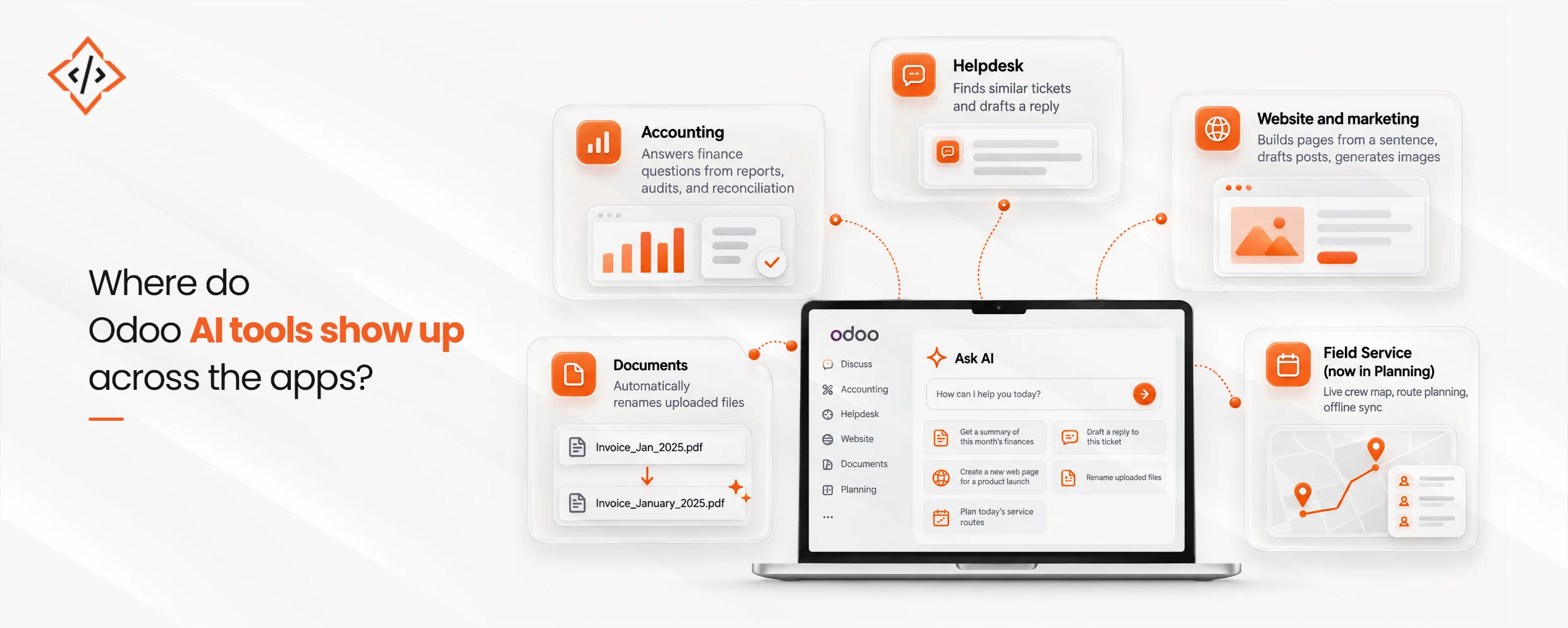
Odoo AI tools aren’t limited to one module. Here’s where they show up, and what each one replaces:
| App | What the Odoo AI tool does | What it used to take a person to do |
|---|---|---|
| Accounting | Answers finance questions from reports, audits, and reconciliation | Pulling reports and checking entries by hand |
| Helpdesk | Finds similar tickets and drafts a reply | Searching past tickets manually |
| Website and marketing | Builds pages from a sentence, drafts posts, generates images | Writing copy and sourcing images separately |
| Documents | Renames uploaded files automatically | Manually sorting and labeling files |
| Field Service (now in Planning) | Live crew map, route planning, offline sync | Paper worksheets and phone check-ins |
A few of these are worth a closer look:
Businesses that want to see exactly which processes fit their own Odoo 20 business automation plans should talk to a team that’s already mapped this out.
One of the more structural changes in Odoo 20 is support for Model Context Protocol, or MCP.
In plain terms, MCP is a standard way for an outside AI assistant or automation tool to read and act on Odoo data directly, with no custom-built layer of code translating requests back and forth.
This matters most for businesses that already use another AI tool for a specific job, such as a support assistant, a coding tool, or an internal chatbot:
A generic guide can only go so far here, since custom agent work depends on what a business wants to automate and what other tools it already runs.
If a business has a specific case in mind, like connecting a support tool or building an agent for something Odoo doesn’t cover,
CodeTrade’s Odoo integration services can scope that properly instead of forcing it into a default agent.
Here’s the part most vendor pages skip.
Every AI feature in Odoo 20 spends prepaid In-App Purchase credits, bought separately from user licenses.
A scheduled trigger that fires every hour spends credits every hour, whether or not anyone reads the result.
| Cost factor | What it means for the budget |
|---|---|
| IAP credits | Every AI call spends credits, so heavy team use becomes an ongoing line to monitor, not a one-time fee. |
| Plan tier | Agentic AI reportedly sits on the Custom plan, next to Odoo Studio, not on Standard. |
| Custom plan pricing | One partner reports a 20 to 31% custom plan price increase alongside this change (single source, unconfirmed). |
| Migration cost | The upgrade itself is a separate, one-time spend from the ongoing AI usage cost. |
A business currently on Standard that wants agents will likely need to move plans first.
None of this makes Odoo AI automation not worth having.
The real Odoo 20 upgrade cost includes an ongoing credit budget. This comes on top of the one-time migration cost and should be considered with licensing and implementation.
Anyone budgeting a move should read this alongside our [breakdown of Odoo migration cost], since the two figures answer different parts of the same question.
Getting real value from AI in ERP systems depends less on which agent you switch on first and more on how well your database is set up. A practical starting order looks like this:
Most of these steps can be handled by an internal team. The process usually gets more complicated when you need custom agent work, an external model connection, or data cleanup that turns out to be bigger than expected.
 Hardik Soni
 Hardik Soni
 Hardik Soni
 Hardik Soni
 Hardik Soni