







Odoo Development
 Hardik Soni
28 September 2026
Hardik Soni
28 September 2026
Odoo 20 AI features: what the AI agents actually do
 Hardik Soni
Odoo 20 launched at Odoo Experience 2026 in Brussels. It is the most AI-heavy version of the ERP so far. AI agents now act inside daily workflows.
Enterprise users get a native MCP server. There is also a new Light User role for staff who only need limited access. For companies on older versions, the first question is usually about money. What is the real Odoo migration cost of getting there?
The answer depends on how the current database was built. A clean, standard setup is cheap to move. One with years of custom code and messy data is not. Over time, Odoo 20 can lower total cost of ownership (TCO), but the upfront Odoo 20 upgrade cost still needs a proper budget.
This guide covers what businesses actually pay for, what pushes the price up, and the Odoo 20 hidden costs that tend to surface late.
Only in part.
For Odoo Enterprise customers, the database upgrade itself costs nothing. Odoo’s upgrade platform handles standard data, and Odoo Studio changes at no extra charge.
However, a database upgrade is only one piece of a migration project. Most Odoo migration expenses come from the professional work around it:
A standard system with no custom code may move over with little effort.
Once custom modules and large data sets enter the picture, though, the job needs dedicated Odoo 20 migration services.
Every project is different, so these figures are planning ranges rather than quotes.
Based on CodeTrade’s project estimates, Odoo 20 upgrade pricing usually falls into three bands:
Team size matters less to the final Odoo migration cost than what sits inside the database. The seven factors below explain why.
An accurate Odoo 20 upgrade cost starts with an honest audit of the current system against these drivers.
The version gap usually decides the budget more than anything else. Moving from Odoo 19 to Odoo 20 is a single jump, and most custom code needs only light changes.
An Odoo 16 system is a different story.
It has to cross four versions, and Odoo’s framework has changed a lot in that time. Every extra version means more code to rewrite and more workflows to test again.
Every custom module has to be moved over by hand.
Developers review each one, rewrite it for Odoo 20’s framework, and then test it before it goes anywhere near production.
So the more a system has been built away from standard Odoo, the higher the Odoo 20 customization cost climbs.
If a business runs on features built specifically for it, Odoo Customization Services can carry that logic through the upgrade intact.
Apps bought from the Odoo Apps store need checking too, one by one.
Some vendors have already released Odoo 20 versions, but the business may have to pay for them again.
Where no Odoo 20 version exists yet, a developer has to port the old code manually or rebuild the feature. Both routes add to Odoo migration expenses, and the second one can take weeks.
Odoo 20 data migration means mapping the old data structures onto the new database schema.
When the data is clean, that mapping goes quickly. Most older databases aren’t clean, though.
Years of use leave behind obsolete products, duplicate contacts, and financial entries that no longer link to anything.
The migration partner has to write and run scripts to sort this out before the actual move can start, and those hours show up on the invoice.
Some businesses use the upgrade as a chance to switch from Community to Enterprise, or to move off an on-premises server onto Odoo.sh or Odoo Online.
Combining these changes with a version upgrade makes the project bigger. The partner has to set up and test a separate staging environment for the new hosting, on top of the one used for the upgrade itself.
When manufacturing or accounting goes down after go-live, orders stall, and the books stop closing.
That is why these systems get the heaviest testing.
A thorough plan might add user acceptance testing (UAT) with the people who run those workflows every day. Plus a parallel financial run to check that the numbers match the old system. Each layer adds hours to the quote.
Skipping them makes the project cheaper up front and much more expensive if something fails in production.
Odoo 20 changes a lot of what users see every day.
The back office has a new design, and the mobile interface has been rebuilt for touchscreens, so even experienced users will need time to relearn familiar screens.
Setting aside a budget for training before go-live means staff spend the first few weeks working in the system rather than working around it.
For most decision-makers, the hardest part of an upgrade is approving the spend. It helps to look at what that money buys beyond a newer version number. Several changes in Odoo 20 cut costs the business is already paying, whether in licenses, add-on tools, or developer hours.
Until now, every internal login cost the same, so a warehouse picker needed the same license as a sales manager.
Odoo 20 adds a Light User role for people who only handle their own tasks, such as barcode scanning or leave requests.
Light Users are priced well below full users, and Odoo quotes them through an Odoo Advisor. For companies with large warehouse or shop-floor teams, the saving adds up across the annual subscription.
AI now runs inside the apps teams already use, and Odoo includes it in the subscription.
Agents can match invoices, confirm sales orders, and route CRM leads without a separate automation tool on top.
That means fewer third-party subscriptions to pay for and fewer integrations to maintain. One catch: agents and external API access sit on the Custom plan, so companies on Standard should budget for a plan change.
Many companies pay developers to keep local tax and reporting rules working in Odoo.
Odoo 20 expands its built-in localizations, and for Indian businesses that includes GST and TDS workflows.
Every rule Odoo handles natively is one less custom script to maintain and rewrite at the next upgrade.
Older versions eventually stop receiving security updates and fall behind on performance.
Odoo 20 runs on current framework dependencies and adds a read-replica database setup that spreads the load on large databases.
The upgrade also forces a review of old custom code, which is a good moment to retire modules that Odoo now covers natively. Together, these changes lower ongoing maintenance costs.
Odoo 20 rebuilds the mobile interface for touchscreens, with visible field labels and proper touch support.
Field Service has also moved into Planning, so technicians and dispatchers work from the same schedule.
For teams that spend the day away from a desk, less time fighting the screen means more jobs finished per shift.
Many businesses estimate Odoo upgrade pricing and the wider Odoo migration cost from developer hourly rates alone. In practice, the most expensive items are often missing from the first spreadsheet.
An in-house upgrade can look cheaper on paper.
In reality, it eats dozens or even hundreds of internal developer hours. And if a team without migration experience breaks the live database, the fallout gets expensive.
Emergency recovery and stalled operations can cost far more than a partner’s fee.
Choosing a provider on the lowest bid often means paying the difference later.
Badly migrated custom code can break things that spread through accounting or inventory. For that reason, a sound Odoo 20 upgrade includes a warranty or hypercare period.
During that time, the partner watches the live system for edge-case errors.
The initial Odoo 20 upgrade cost can be significant. Even so, some new features are designed to cut ongoing bills, and the Light User role is the clearest example.
It is meant for staff who only handle their own tasks, such as warehouse scanning or time off. Their login costs well below a full user.
Odoo quotes Light User licenses through an Odoo Advisor, and rates vary by country. In addition, built-in AI for invoice matching and CRM lead routing can replace some paid automation tools.
The Odoo 20 upgrade timeline matters as much as the budget. This is a phased infrastructure project, not a weekend patch.
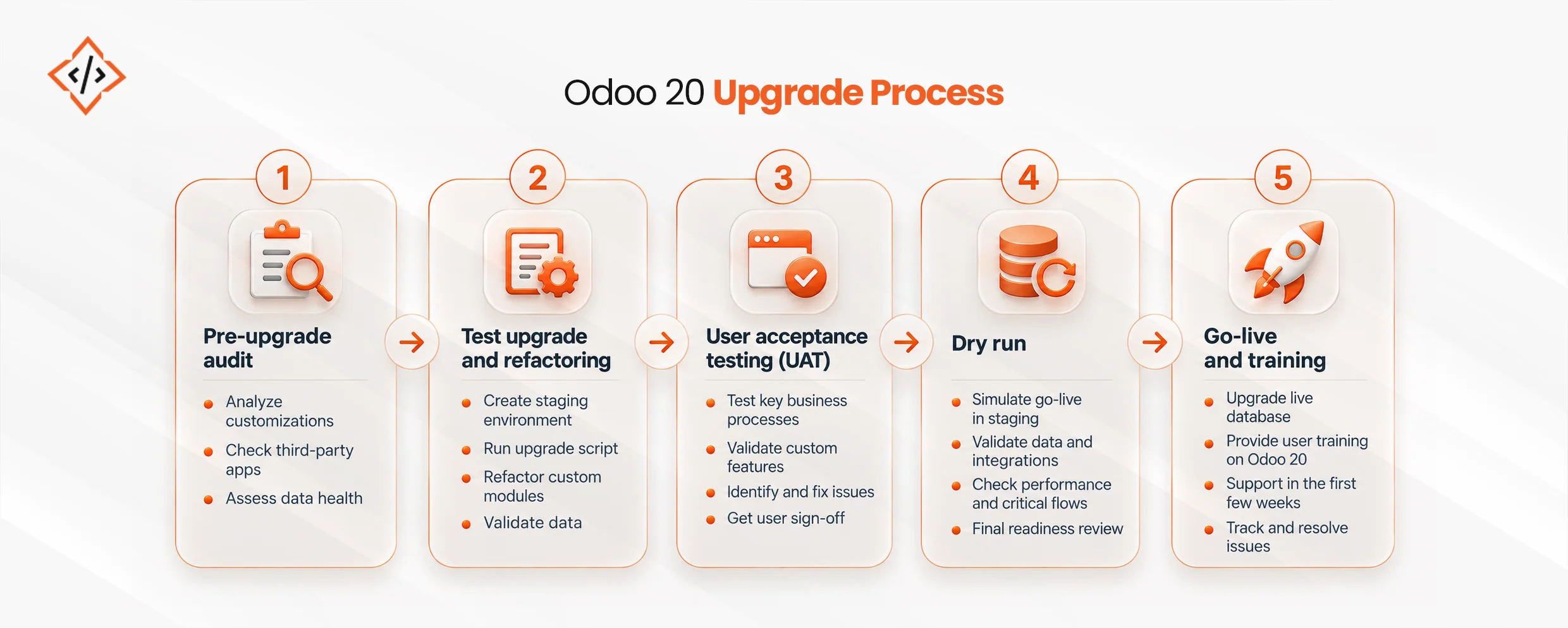
To hit the go-live date without costly delays, Odoo Migration Services brings the structured project management a migration needs.
Where a business operates affects both parts of the Odoo 20 upgrade cost.
Odoo sets license prices by region, so the same plan can cost several times more in one country than in another. Partner rates vary as well. Many companies in the US, Europe, and the Middle East hire offshore Odoo Development Services to keep migration expenses down.
The Odoo 20 upgrade cost in India, for example, stays competitive because the country has a large pool of experienced Python and ERP developers.
Localization changes the bill too. Odoo 20 expands its built-in tax and accounting features, so fewer companies need custom code to meet local rules. The updates include:
Every compliance rule Odoo handles natively is one less custom script to build, maintain, and rewrite at the next upgrade. That saving helps offset the initial Odoo 20 implementation cost.
 Hardik Soni
 Hardik Soni
 Hardik Soni
 Hardik Soni
 Hardik Soni