




Magento
Odoo Development
ERP
 Chand Prakash
13 November 2026
Magento ERP Integration: Connecting to Odoo, NetSuite, and SAP
 Chand Prakash

Odoo Google Shopping product disapproval is rarely random. In most cases, Google compares the product data in your feed with your live product page, finds a difference, and removes the listing from Shopping ads and free listings until the two match again.
For Odoo stores, these differences appear more often because product data lives in several places at once. Prices sit in price lists, stock sits in warehouses, and variants sit under a shared template. Meanwhile, Google expects one clean, consistent record per item.
This guide maps the most common Merchant Center errors to the Odoo fields that cause them.
It also covers the 2026 changes to Google’s API and image rules, a step-by-step fix process, and a checklist to run before every sync.
Google Merchant Center checks every product against two things: its product data specification and the landing page the product links to. Most cases of Odoo Google Shopping product disapproval start with this two-part check. When either check fails, the product receives an issue with one of three severity levels.
Follow these steps in order.
As a result, a warning today can turn into a disapproval later.
For example, Google’s 2026 product data specification update introduced warnings for images below 500 x 500 pixels in April 2026, with enforcement starting January 31, 2027.
Stores that ignore these warnings now will see a wave of disapprovals early next year.
In addition, Google crawls your Odoo product pages on its own schedule. So even a feed that was correct on upload can fall out of compliance once someone changes a price or stock level in Odoo without resyncing.
Every Google Shopping product data error points to a field, a setting, or a sync gap inside Odoo. The table below connects each common Merchant Center issue to where it starts in Odoo and how to fix it there.
| Merchant Center error | Where it starts in Odoo | Fix at the source |
|---|---|---|
| Mismatched value (price) | A website price list or discount changes the page price, while the feed still sends the base sales price. | Send the price from the same price list the website uses, and resync after every price change. |
| Mismatched value (availability) | On-hand stock drops to zero, but the feed still says in stock. | Sync availability from the forecasted or on-hand quantity on a short schedule. |
| Price incl. or excl. tax mismatch | The website shows tax-included prices, while the feed sends tax-excluded ones, or the reverse. | Match the feed to the website's tax display setting for each target country. |
| Invalid or missing GTIN | The Barcode field holds an internal code, or every variant shares one barcode. | Store a real GTIN on each variant, and set identifier_exists to no only for custom or own-brand items. |
| Missing brand | No brand field on the standard product form | Add a brand field through a custom field or module and map it to the feed |
| Product category issues | eCommerce categories follow internal logic, not Google's taxonomy. | Map each Odoo eCommerce category to a Google product category once, with product-level overrides. |
| Duplicate or broken variants | Variants of one template are sent without a shared group ID. | Send each variant as its own item, linked by an item_group_id taken from the product template. |
| Image too small or invalid | Low-resolution uploads or placeholder images on the product | Replace images below 500 x 500 pixels; Google recommends 1500 x 1500 or above. |
| Landing page unavailable | Product unpublished on the website, or pages blocked for Google's crawler | Exclude unpublished products from the feed and check robots rules for product URLs. |
Notably, the last four errors rarely appear in a one-off export. They surface as the catalog grows, which is why they often catch teams off guard.
Fixing them properly usually involves custom fields and mapping logic, which is where Odoo customization services save the most time.
Odoo is built as an ERP first, so its product model serves sales, inventory, and accounting together. That flexibility is useful for operations.
However, it means a single product can carry several valid prices and stock figures, and the feed has to pick the one Google will see on the page.
The main causes fall into four groups:
If your feed worked for years and then started failing, check how it connects.
According to Google’s deprecation notice, the Content API for Shopping reached its sunset date on August 18, 2026, and requests from clients without an extension began failing intermittently with HTTP 410 errors from September 1, 2026.
Many older Odoo Google Shopping integration modules and in-house scripts were built on that API.
As a result, products may stop updating while the old data slowly drifts into disapproval.
Moving these connectors to the Merchant API is a development task, and it is a good moment to review the whole Odoo ecommerce integration with Odoo development services.
Some cases of Google Merchant Center product disapproval have nothing to do with a single product field. Instead, they come from account settings or Google Merchant Center policy violations, which can affect every product at once.
Because these issues sit outside product data, fixing the feed alone will not clear them.
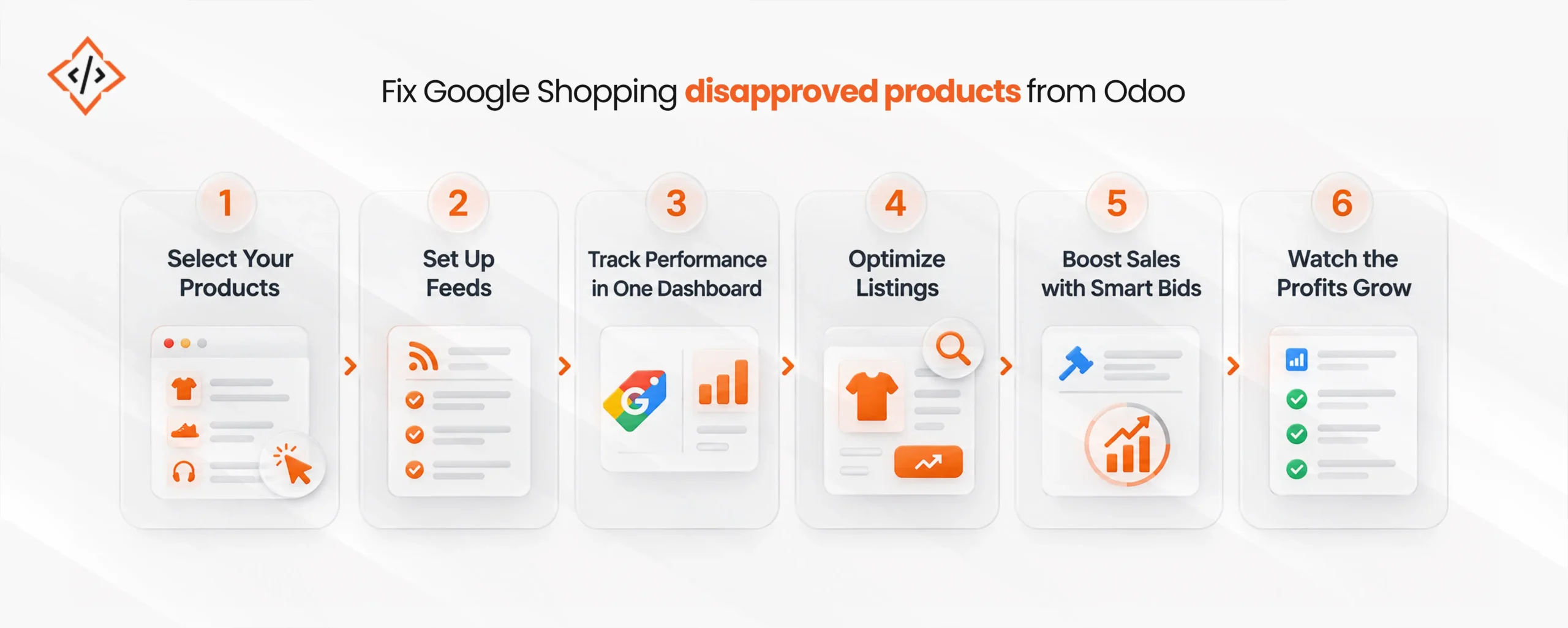
The fastest way to fix Google Shopping disapproved products is to work from Google’s diagnostics back to Odoo, rather than editing the feed file directly. Follow these steps in order.
For stores with thousands of SKUs, steps 3 and 4 take the most effort. In that case, Odoo product feed optimization works best as a one-time cleanup followed by automated rules, not as a weekly manual task.
Most Google Shopping product feed issues can be caught before Google sees them. Run this checklist before each major sync and after any catalog-wide change such as a sale or a new product line.
In practice, the last item is the one most teams have not checked.
Similarly, the image rule deserves attention now, because Google’s image size guidance confirms that undersized images will lead to disapprovals once enforcement begins.
Some fixes are simple data entry, such as adding a brand or replacing an image. Others need changes to how Odoo stores and sends data. It usually makes sense to hire an Odoo developer when:
Also, if your store is still being set up, building the feed rules into your Odoo implementation from day one avoids most of these errors entirely.
Odoo Google Shopping product disapproval is almost always a data consistency problem. The feed says one thing, the product page says another, and Google sides with the page.
Therefore, the lasting fix is to correct each value at its source in Odoo and keep the feed synced on a short schedule.
Start with the error-to-field table, run the pre-sync checklist, and confirm your connector uses the Merchant API. Then, audit your images before Google’s January 2027 deadline arrives.

 Chand Prakash
 Hardik Soni
 Hardik Soni
 Hardik Soni
 Hardik Soni