Magento, Odoo Development, ERP 13 November 2026Magento ERP Integration: Connecting to Odoo, NetSuite, and SAP
Key takeaways:
- Magento ERP integration links the storefront and the back office so products, stock, orders, and invoices share one version of the truth.
- Odoo, NetSuite, and SAP each connect differently, and the ERP edition matters as much as the ERP brand.
- The choice between a connector, middleware, and a custom build depends on order volume, system count, and process complexity.
- Mapping decisions, such as which system owns product data and where tax is calculated, cause more failures than code does.
- Businesses selling in the UAE must plan for mandatory e-invoicing, which starts its first phase on 1 January 2027.
Introduction
Magento ERP integration is the process of connecting a Magento or Adobe Commerce store to an enterprise resource planning system, so data moves between them without manual entry. Orders flow into the ERP for fulfillment and accounting, while stock levels, prices, and shipment updates flow back to the store.
The pressure to get this right keeps growing.
According to eMarketer, global retail ecommerce sales are forecast to reach $6.88 trillion in 2026, or 21.1% of all retail sales. More online orders mean more data to reconcile, and spreadsheets stop scaling long before revenue does.
This guide covers what syncs, how the three main integration methods differ, and how Odoo, NetSuite, and SAP compare as Magento partners.
It also explains cost drivers, timelines, regional compliance, and the mistakes worth avoiding.
What data syncs between Magento and an ERP
A Magento ERP system integration usually covers six data flows. Each one needs a clear owner, a direction, and a sync frequency:
- Products and pricing: The ERP often holds SKUs, costs, and price lists, while Magento keeps marketing content such as descriptions and images.
- Inventory: Stock levels move from the ERP or warehouse to Magento, which makes Magento inventory integration the main defence against overselling.
- Orders: New orders travel from Magento to the ERP for picking, shipping, and invoicing.
- Customers: Account and B2B company records sync both ways, with rules for matching duplicates and guest checkouts.
- Shipments and returns: Tracking numbers, partial shipments, and refunds flow back to Magento so customers see accurate status.
- Invoices and tax: The ERP usually generates legal invoices, and both systems must agree on how tax is calculated.
Orders deserve special attention. A Magento order management integration has to decide when an order moves to the ERP, for example, at placement or after payment capture.
That single choice affects revenue reporting, fraud checks, and warehouse workload.
Three ways to connect Magento to an ERP
Every Magento 2 ERP integration follows one of three architectures. Choosing the architecture first, and the product second, saves most teams from a costly rebuild.
| Method | How it works | Best fit | Main trade-off |
| Magento ERP connector | A prebuilt extension maps Magento data to one ERP's data model | Standard catalogue, one ERP, moderate order volume | Limited flexibility and an ongoing license fee |
| Middleware (iPaaS) | A separate platform sits between Magento, the ERP, and other systems | Several connected systems such as WMS, CRM, and marketplaces | Usage-based pricing and specialist debugging |
| Custom API build | Developers connect the Magento REST or GraphQL API directly to the ERP API | High volume, complex tax, multi-store, or unusual workflows | Higher upfront cost and long-term code ownership |
In practice, many projects mix methods. For example, a connector may handle orders while a custom service manages complex B2B pricing.
Teams that plan this split early usually work with a partner experienced in Magento 2 development, since extension conflicts and upgrade paths affect every option.
Magento Odoo integration
Odoo suits small and mid-sized businesses that want one modular system for sales, inventory, accounting, and manufacturing. Its open architecture makes a Magento Odoo integration flexible, although the hosting choice shapes the options.
- Edition and hosting: Community and Enterprise editions on Odoo.sh or private servers accept custom modules, whereas Odoo Online restricts third-party code.
- Connection options: Ready-made connectors exist on the Odoo Apps Store, and custom builds use Odoo’s external API.
- Custom work areas: Multi-warehouse allocation, regional tax rules, and bundled or configurable products usually need extra mapping.
Magento NetSuite integration
NetSuite is a cloud ERP popular with fast-growing brands and multi-entity groups.
A Magento NetSuite integration typically relies on established connectors or iPaaS platforms, while custom builds use NetSuite’s REST web services.
- Edition: OneWorld accounts add subsidiaries, currencies, and per-entity tax, so mappings become more complex.
- Sync limits: NetSuite caps concurrent API requests by service tier, so inventory usually syncs on a schedule rather than instantly.
- Custom work areas: Customer-specific pricing, custom item fields, and subsidiary routing often fall outside connector defaults.
Magento SAP integration
SAP serves large manufacturers, distributors, and multinational groups.
A Magento SAP integration depends heavily on the product, because SAP Business One, SAP S/4HANA, and older SAP ECC systems use different interfaces.
- Connection options: Integrations use OData services, IDocs, or BAPI calls, often routed through SAP Integration Suite or another middleware layer.
- Data scope: Material master, business partners, pricing conditions, and multi-plant stock all need careful mapping.
- Project reality: SAP-side configuration and internal approvals often take longer than the Magento work.
Odoo vs NetSuite vs SAP for Magento
| Factor | Odoo | NetSuite | SAP |
| Typical buyer | SMEs and mid-market | Growth-stage and mid-market groups | Large enterprises |
| Deployment | Cloud or self-hosted | Cloud only | Cloud or on-premise, by product |
| Integration effort | Low to moderate | Moderate | High |
| Customization | Very flexible, open source | Scripting within platform limits | Deep but specialist-heavy |
| License cost | Lowest of the three | Mid to high | Highest |
No single ERP wins for every store. The right Magento ecommerce ERP integration depends on business size, process depth, and the skills already inside the team.
For a wider view of the platforms beyond ecommerce, see this comparison of Odoo vs NetSuite vs SAP.

Get a clear integration plan before choosing a connector.

How much does Magento ERP integration cost?

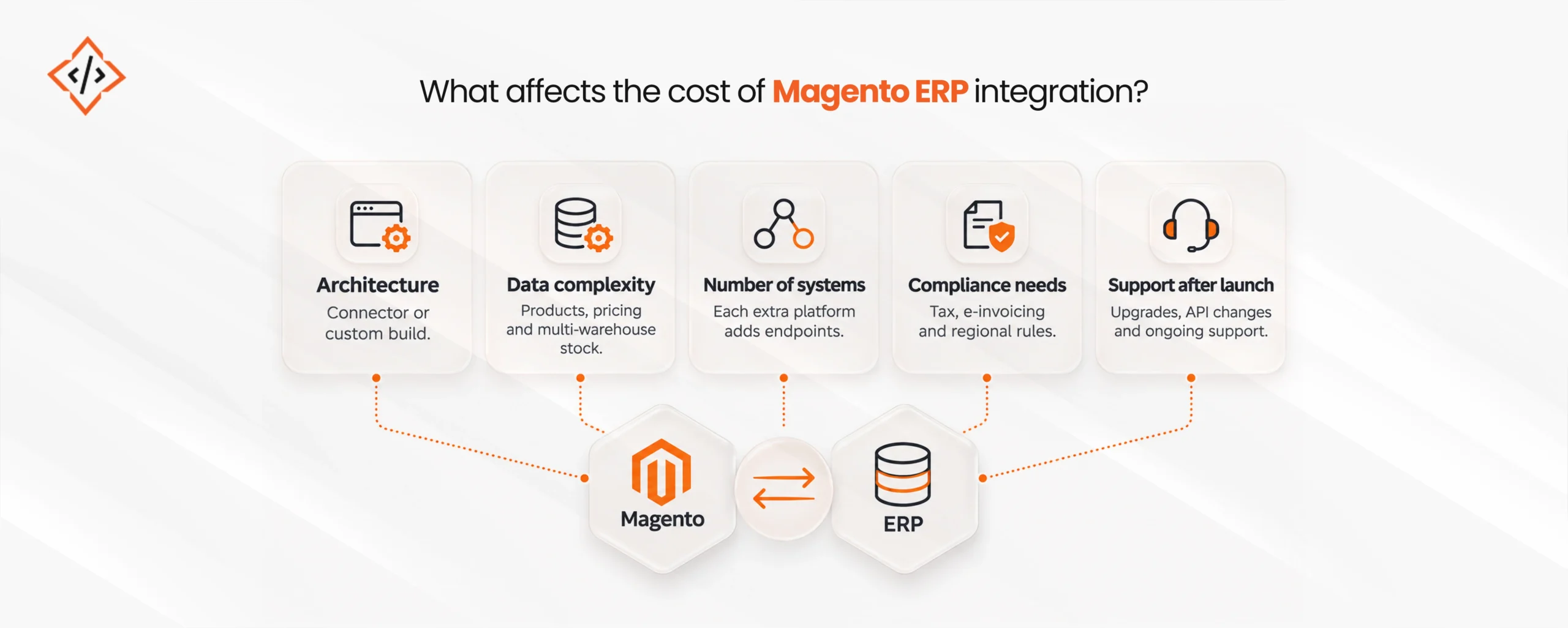
Cost depends on architecture, ERP edition, and scope, so any fixed price without discovery is a guess. These factors move the budget most:
- Architecture: Connectors carry lower setup costs but recurring licenses, whereas custom builds cost more upfront and less per transaction at scale.
- Data complexity: Configurable products, B2B price lists, and multi-warehouse stock all add mapping and testing time.
- Number of systems: Each extra platform, such as a WMS, CRM, or marketplace, adds endpoints to build and monitor.
- Compliance needs: Regional tax and e-invoicing rules may require extra fields, validations, and certified service providers.
- Support after launch: Version upgrades on either side, API changes, and error handling need an ongoing owner.
Budgets for this kind of work keep rising.
Gartner forecasts worldwide software spending to grow 15.1% in 2026, while IT services, which include application implementation, are expected to pass $1.87 trillion.
How long the integration takes
Timelines follow the same logic as cost. A standard connector on a clean catalogue can go live in a few weeks.
Middleware projects usually take two to four months, whereas custom or SAP-heavy builds can run longer once testing and internal approvals are included. Most delays come from data cleanup and decision-making, rather than coding.
Compliance for Middle East stores
Regional rules change what the integration must handle. According to KPMG, the UAE Ministry of Finance confirmed a phased rollout of mandatory e-invoicing, with the first phase beginning on 1 January 2027. Saudi Arabia already enforces e-invoicing through ZATCA.
Consequently, stores selling in the Gulf should check that the ERP produces compliant structured invoices, and that Magento passes VAT, currency, and Arabic customer data correctly.
Where AI fits into the integration
Modern ERPs increasingly add AI features for demand forecasting, invoice matching, and anomaly detection.
Once Magento data flows cleanly, these features support wider Magento business automation, such as reorder suggestions or flagging unusual orders before fulfillment.
The AI capabilities differ by platform, as this comparison of Odoo AI vs. NetSuite AI explains.
Integration process in six steps
- Map current workflows: Document how orders, stock, and invoices move today, including manual workarounds.
- Decide data ownership: Agree which system owns products, prices, customers, and tax before any build starts.
- Clean master data: Fix duplicate SKUs, missing attributes, and inconsistent customer records.
- Choose the architecture: Select a connector, middleware, or custom build based on volume and complexity.
- Test real scenarios: Run partial shipments, refunds, discounts, and tax edge cases in a staging environment.
- Monitor after launch: Set up error logs, retry queues, and alerts so failed syncs are caught within minutes.
Mistakes to avoid
- Buying a connector first: The tool should follow the architecture, not the other way round.
- Syncing everything in real time: Instant sync increases API load, while scheduled sync is often enough for inventory.
- Skipping error handling: Silent failures leave orders stuck between systems until a customer complains.
- Ignoring upgrades: Magento, ERP, and connector updates can break mappings, so each needs a test plan.
Conclusion
Magento ERP integration succeeds when the architecture, data ownership, and compliance needs are settled before the build begins.
Odoo, NetSuite, and SAP can all work well with Magento, provided the integration matches the store’s volume and the team’s ability to run it. Above all, clean data and clear decisions in the first weeks prevent most of the costly fixes later.
FAQs
Yes, Magento offers REST and GraphQL APIs that connect with most modern ERPs. Integration can use a prebuilt connector, a middleware platform, or a custom build, depending on volume and complexity.
The best ERP depends on business size and process depth. Odoo suits cost-conscious SMEs, NetSuite fits growing multi-entity brands, and SAP serves large manufacturers and distributors with complex operations.
Cost depends on the architecture, ERP edition, data complexity, number of connected systems, and compliance needs. Connectors cost less upfront, while custom builds cost more initially but scale better.
A standard connector can go live within a few weeks. Middleware and custom projects usually take several months, especially with SAP, complex tax rules, or extensive data cleanup.
A connector works for standard catalogues, one ERP, and moderate order volume. A custom build suits high volume, complex pricing or tax, multiple stores, or workflows connectors cannot model.
A connector is a prebuilt link between Magento and one specific ERP. Middleware is a separate platform that connects several systems and lets teams build and change data flows centrally.
Chand Prakash founded CodeTrade India and continues to lead it as CTO, shaping the technical direction of the company since its early days. He has spent his career solving hard engineering problems and building teams that ship reliable software, with a focus on ERP, e-commerce, and custom enterprise platforms.




 Hardik Soni
04 November 2026
 Hardik Soni