







How Do You Generate Accurate Predictions With AI Sales Forecasting In Odoo?
 Chand Prakash
Cashiers using standard Odoo retail solutions face constant pressure to process retail transactions quickly during busy shifts. This intense speed leaves no practical moment to browse product catalogues for relevant add-ons. As a result retail businesses consistently miss critical opportunities to increase daily order values. Implementing robust AI upselling software solves this fundamental operational gap seamlessly.
The AI POS Upsell Engine analyzes current cart contents and historical customer purchase data instantly. This precise Odoo AI integration surfaces ranked product suggestions directly on the checkout screen. Cashiers can then offer these highly relevant AI sales recommendations without slowing down the payment queue.
Deploying this specialized Odoo POS upsell module transforms routine checkouts into measurable revenue generators. Technical leaders simultaneously gain valuable POS upsell analytics to track recommendation accuracy. This data allows management to evaluate model performance and strictly monitor the return on investment over time.
At the point of sale, cashiers focus on processing transactions quickly. There is no practical moment during a sale to browse the product catalogue. Cashiers cannot easily determine what else a customer might want and suggest relevant add-ons during busy shifts. As a result, opportunities to increase the order value through AI-powered POS upselling are almost always missed.
For example, a customer buying a coffee maker might also want compatible coffee pods or a descaling kit. These products are already in stock and displayed nearby. The cashier knows the products but lacks time to make that connection during a fast-moving queue. Without a system to surface AI sales recommendations automatically, the business consistently leaves revenue on the table.
The AI POS Upsell Engine solves this by adding a single button to the POS order screen. The system analyzes the current cart contents and the selected customer purchase history instantly upon click. It then shows a list of relevant Odoo POS AI upsell recommendations with match percentages and specific reasons. The cashier can add any suggested item to the cart with one click without slowing down the checkout.
This Odoo 19 POS upsell solution adds a dedicated button directly to the order pad. Cashiers click this control during an active transaction. The system sends current cart contents to the configured AI provider. It also sends customer purchase history if a profile is selected. Organizations configure either OpenAI or Gemini AI for Odoo POS. Built by an experienced AI development company, the engine returns a ranked list of product recommendations. Each item includes a match percentage, unit price, and specific reasoning.
The interface displays recommendations across two separate tabs. The General tab provides AI-driven suggestions based on current cart contents. A Customer History tab shows products the selected buyer purchased previously. Cashiers can add any suggested item instantly using the Add button. This efficient Odoo POS customization updates the order total immediately.
The module includes a backend analytics section accessible from the main dashboard. Managers utilize POS upsell analytics to view detailed order-level logs. These logs track suggestion counts, accepted items, and overall acceptance rates. The system also stores raw AI debug payloads securely. This data provides clear visibility into how the recommendation model performs over time.
This Odoo POS upsell module depends on Discuss, Point of Sale, Inventory, and Invoicing modules. Much like enabling Native AI in Odoo 19 & 20, installation takes just a few minutes and requires no custom coding.
After installation, configure your AI provider and API key from Odoo Settings before opening a POS session. The Odoo AI integration will not generate suggestions until a valid API configuration is saved and tested.
Below is a step-by-step walkthrough of how the AI POS Upsell Engine works. The process covers configuring the AI provider to reviewing suggestions and completing the transaction.
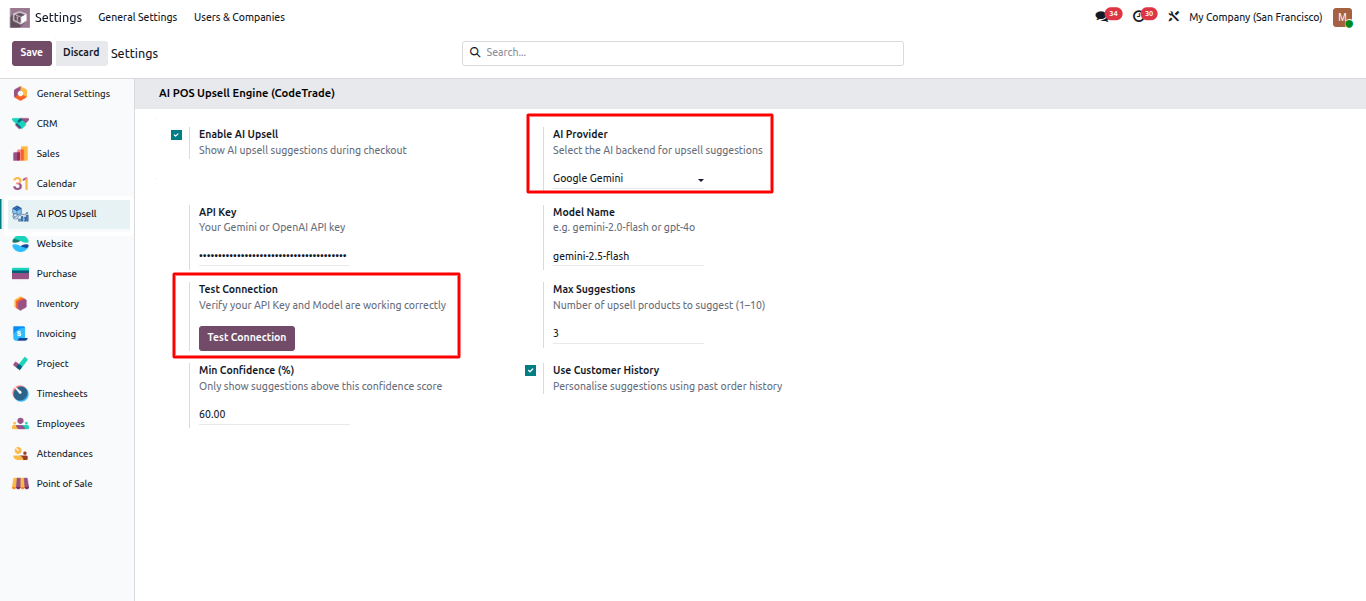
Go to Odoo Settings and find the AI POS Upsell configuration section. Select your preferred AI provider. Organizations can configure OpenAI or Gemini AI for Odoo POS. Enter the API key and choose the model. Set the maximum number of suggestions to display. Enable customer history personalization if needed. Click Test Connection to verify the API is active before going live.
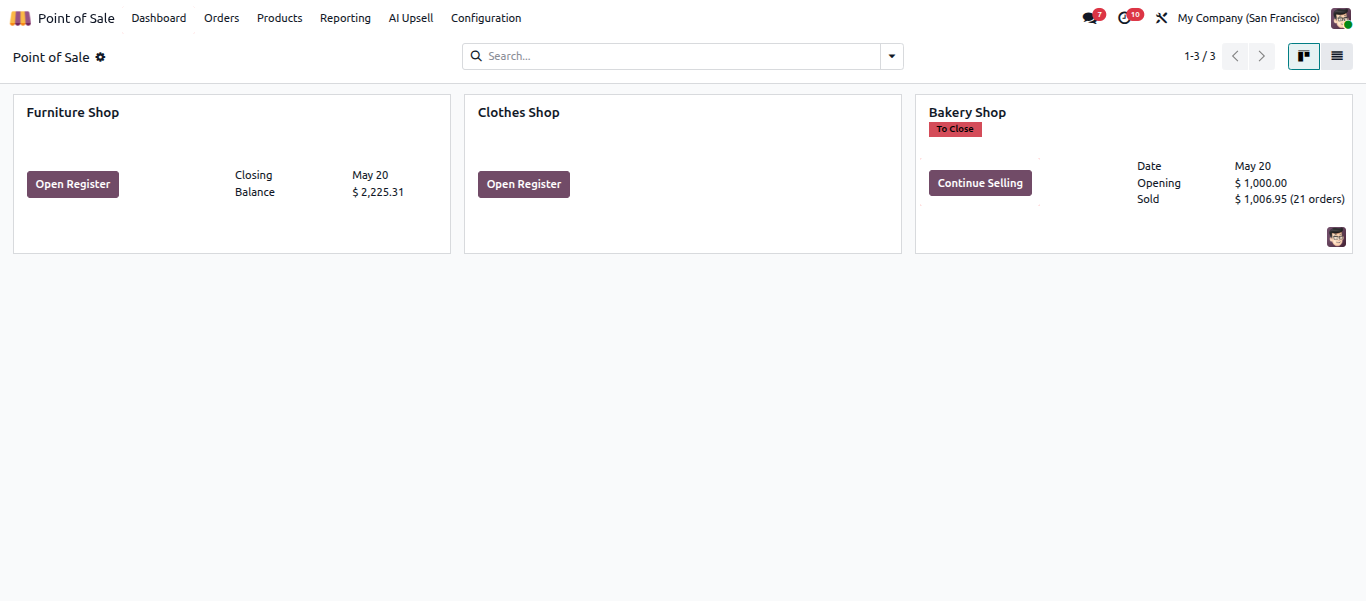
Open the Point of Sale module and start a new session from the dashboard. The POS order screen becomes ready once the session is active. The AI upselling software button sits in the order pad area alongside standard payment and action controls.
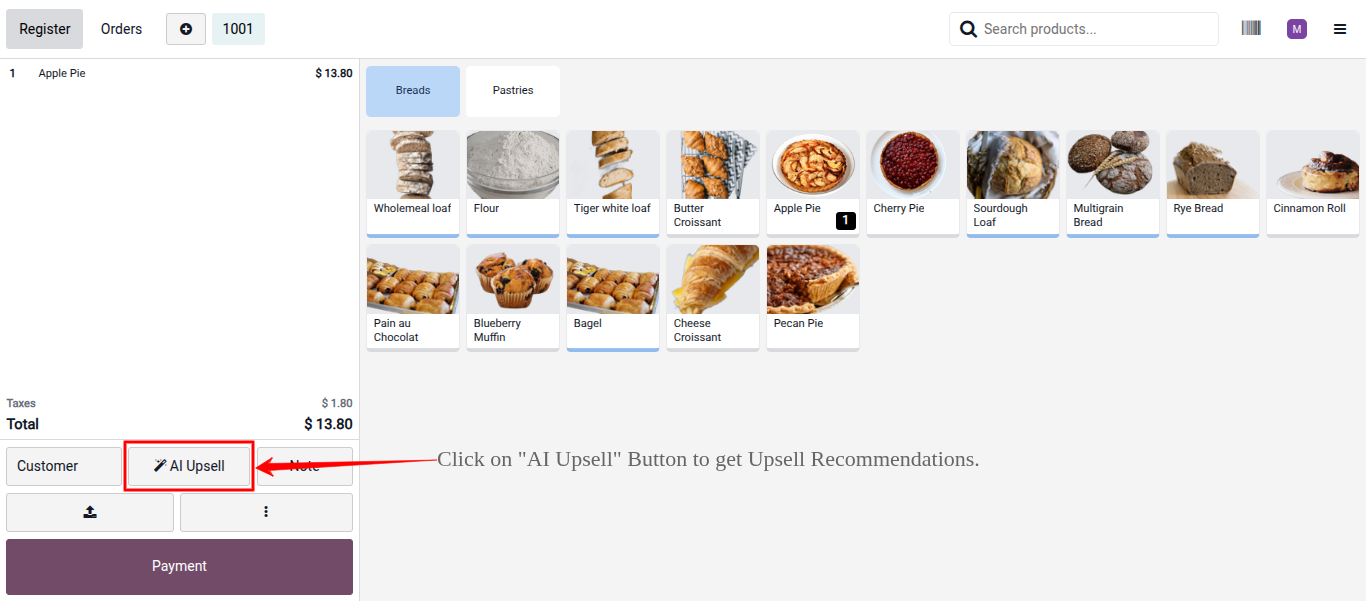
Add products to the cart as usual and select a customer from the POS customer lookup. Selecting a customer allows the AI to access historical purchase data. This enables the personalized Customer History tab within the AI POS Upsell Engine interface.
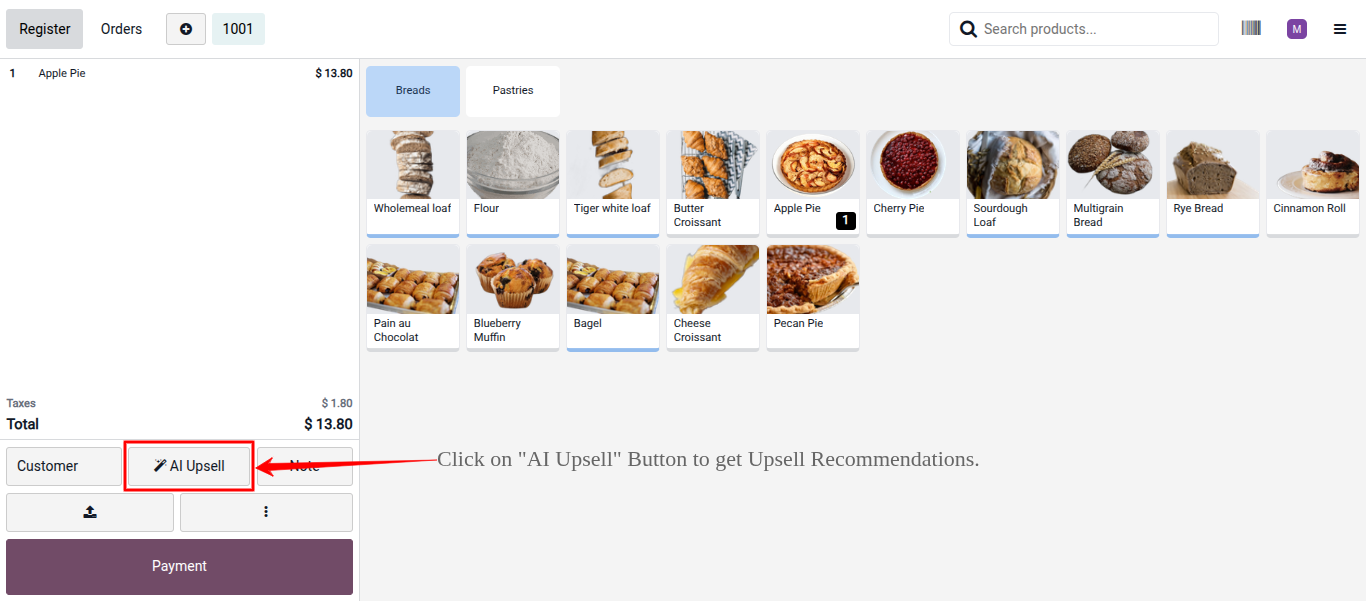
Click the AI Upsell button in the POS order pad area. The Odoo POS upsell module sends current cart contents and customer history to the configured AI provider. It returns a ranked list of product recommendations within seconds.
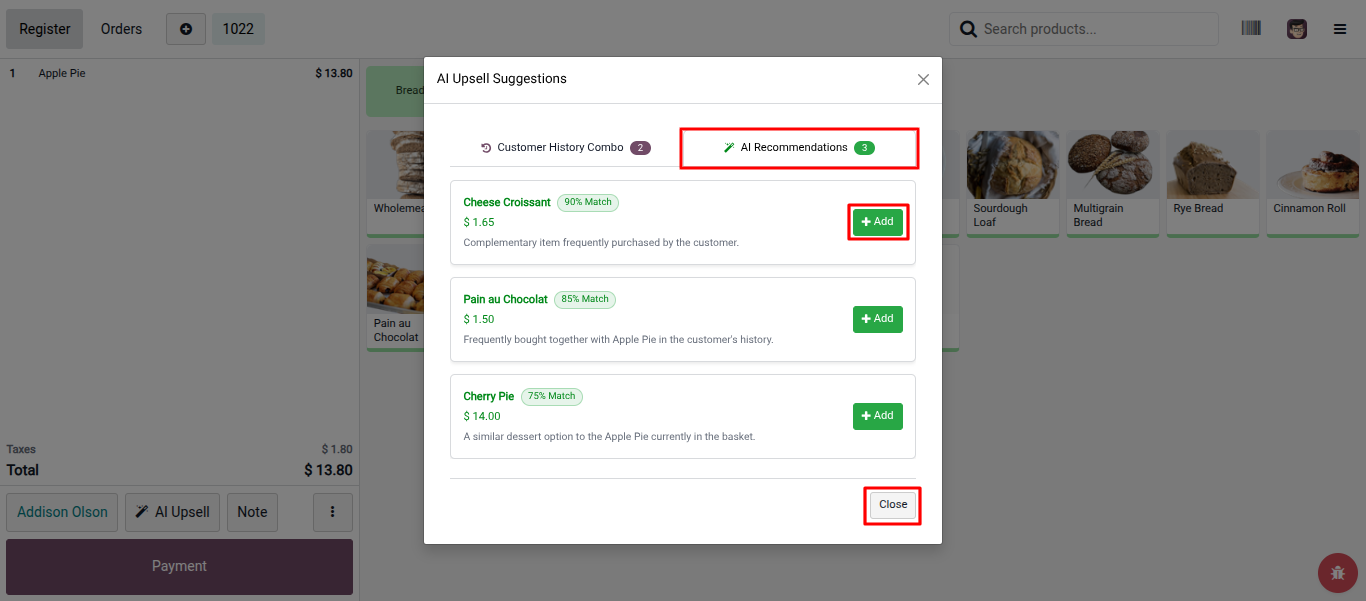
The recommendations panel opens showing the General tab. This tab displays AI sales recommendations based on current cart contents. Each suggestion displays the product name, match percentage, unit price, and a short reason explaining the recommendation.
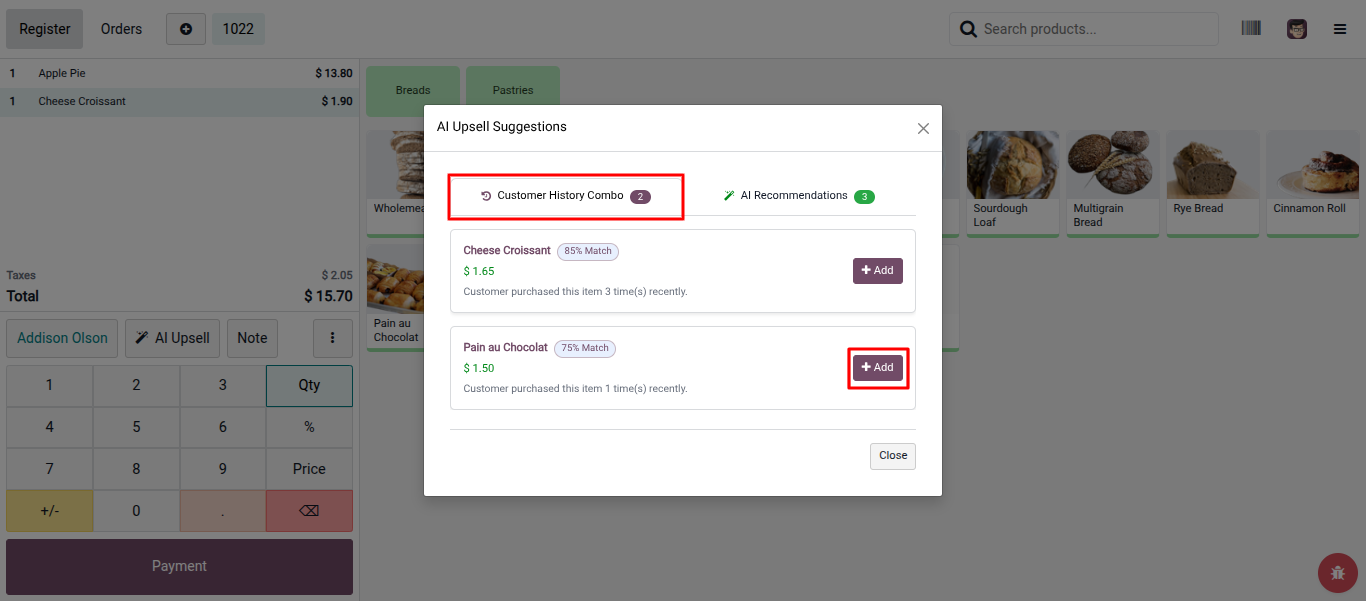
Toggle to the Customer History tab to view products the selected customer previously purchased. These suggestions are tailored to specific buying patterns. This makes them highly relevant for cross-selling items the customer already recognizes.
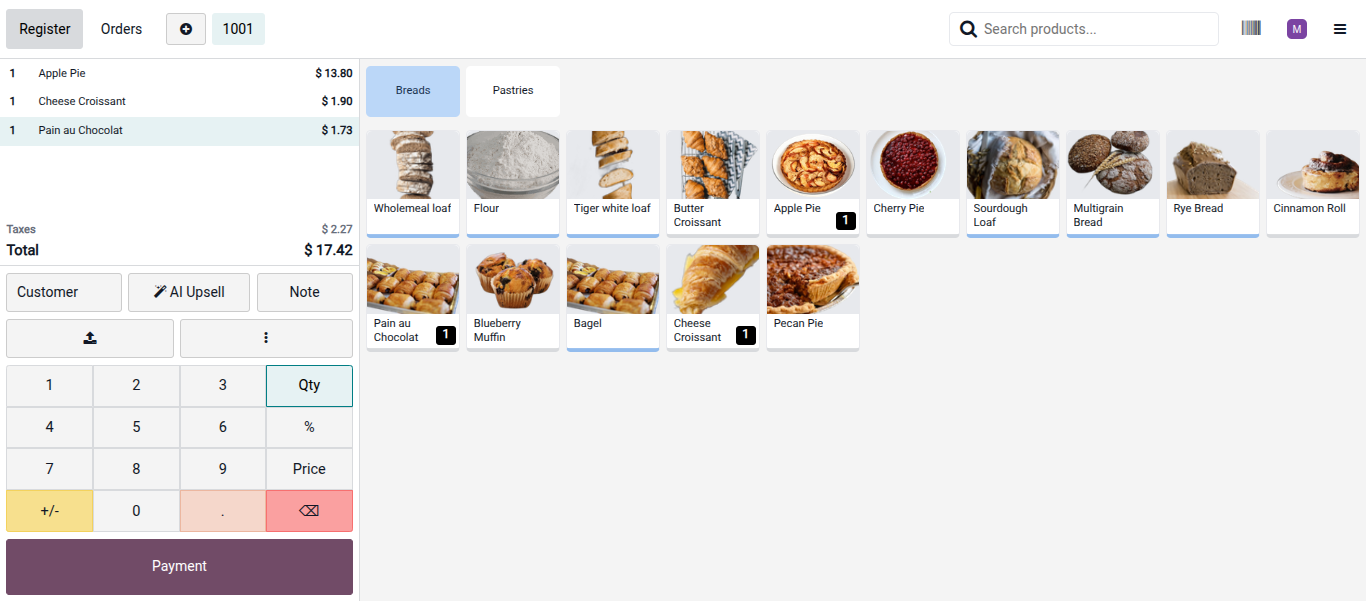
Click the Add button next to any recommended product to add it to the current order instantly. The cart updates and the order total recalculates immediately without closing the recommendations panel. This allows cashiers to add multiple suggestions consecutively if needed.
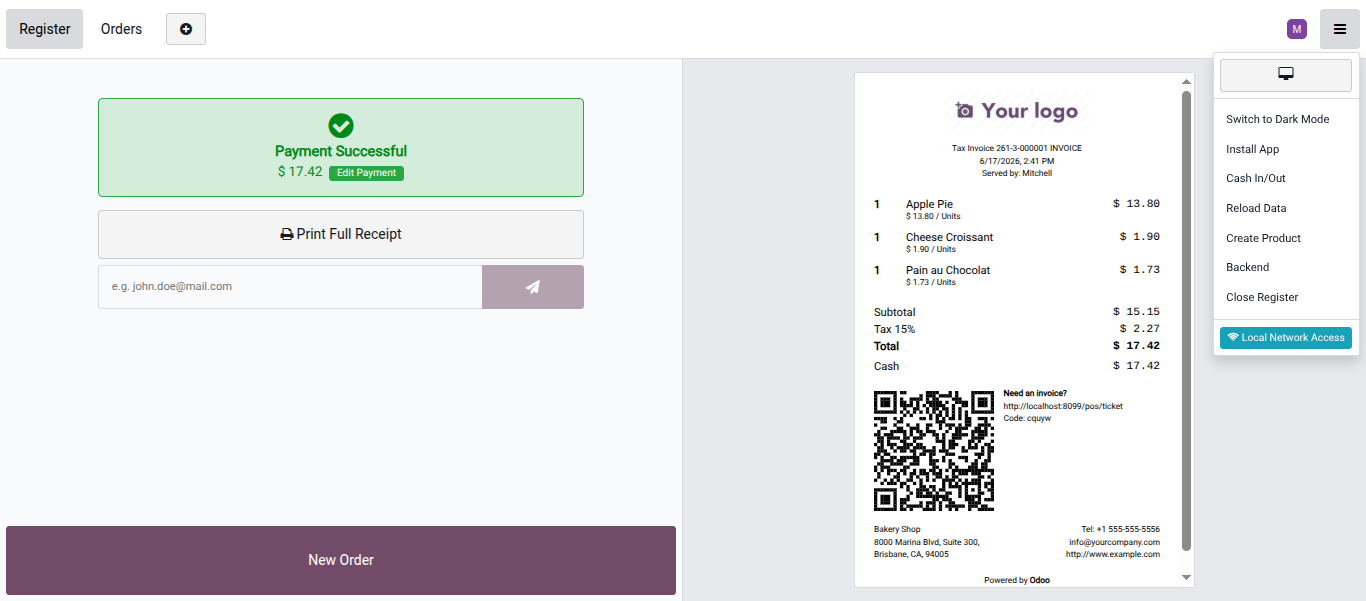
Proceed to payment as usual after adding any upsell items. Select the payment method and validate the order through the standard Odoo POS payment workflow. The Odoo AI integration logs the upsell interaction automatically for analytics.
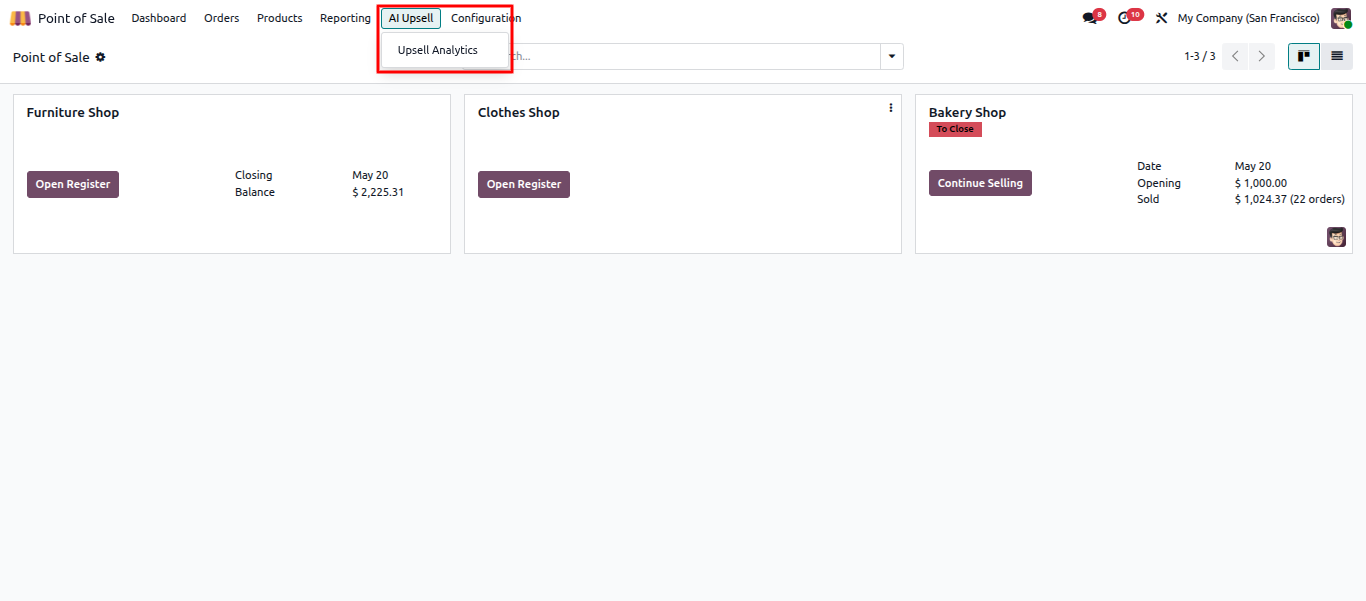
Go to the POS dashboard and open the AI Upsell menu from the navigation bar after the session. This section lists order-level performance logs. It shows how many suggestions were made and accepted during each transaction.
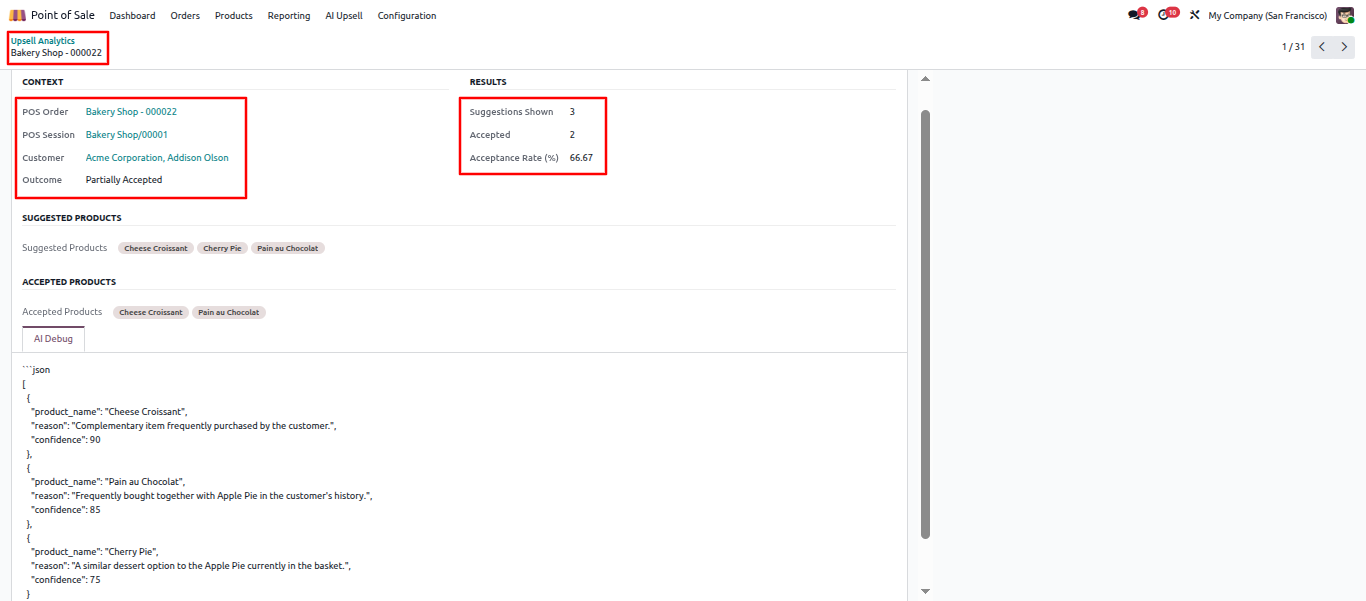
Open any log entry to view a detailed breakdown of that specific transaction activity. The POS upsell analytics display suggestion counts, accepted items, acceptance rates, and raw AI debug JSON payloads. This data helps managers evaluate recommendation quality. It tracks the operational impact on average order value over time.
This advanced AI upselling software offers powerful capabilities to streamline your checkout process and maximize daily retail revenue efficiently.
The module sends current cart contents to configured AI providers and receives ranked product suggestions in real time. Each recommendation includes a match percentage and a short contextual reason. This gives cashiers enough information to make quick, confident decisions about offering these AI sales recommendations.
The Odoo POS upsell module accesses historical purchase data when a customer is selected. It generates a separate set of personalized recommendations based on previous buying patterns. This makes suggestions more relevant and increases acceptance rates for returning customers during AI-powered POS upselling.
The AI Upsell button sits directly in the order pad alongside standard interface controls. There is no separate screen or workflow to navigate. The cashier triggers the AI, reviews suggestions, and adds items without leaving the active transaction. This seamless Odoo POS customization ensures optimal efficiency.
Cashiers can add any suggested product to the current order with a single click. The cart and order total update instantly. The cashier can continue adding more suggestions or proceed to payment without any operational interruption.
The backend section tracks suggestion counts, accepted items, and acceptance rates for every transaction. Managers utilize these comprehensive POS upsell analytics to monitor performance and identify trends. This data helps evaluate the direct return on AI upselling software investments over time.
Each upsell interaction is logged with the full AI prompt, raw response, and outcome. This Odoo AI integration gives technical administrators complete visibility into model inputs and outputs. It makes troubleshooting unexpected suggestions and verifying model behavior entirely straightforward.
Upgrading checkout systems with the AI POS Upsell Engine resolves chronic missed revenue opportunities. Cashiers can instantly offer precise AI sales recommendations without disrupting their fast-paced workflows. This robust Odoo AI integration analyzes customer purchase histories and cart data securely in real time.
Technical architects deploy this precise Odoo POS customization seamlessly across existing legacy infrastructure. Management utilizes built-in POS upsell analytics to track actual conversions and optimize overall system performance. Enterprises configuring OpenAI or Gemini AI for Odoo POS maintain strict data governance and transparency.
Deploying this proven AI upselling software transforms standard retail transactions into measurable growth engines. By embracing AI-powered business automation, IT leaders secure reliable returns on investment while completely eliminating manual recommendation guesswork at checkout.

 Chand Prakash
 Hardik Soni
 Chand Prakash
 Hardik Soni
 Hardik Soni