







How Do You Generate Accurate Predictions With AI Sales Forecasting In Odoo?
 Chand Prakash
Finance professionals using the Community edition, often requiring expert Odoo migration services, struggle with limited basic reporting features. They frequently export raw journal entries into manual spreadsheets to prepare monthly statements. This tedious data formatting takes hours and significantly increases the risk of costly calculation errors. The CodeTrade module provides a reliable alternative for generating enterprise accounting reports in Odoo directly.
Your finance team gains immediate access to eight dynamic statements without purchasing expensive software upgrades. These essential Odoo accounting reports feature collapsible hierarchies alongside real-time computation capabilities. Accountants can instantly generate a precise Odoo cash flow report perfectly formatted for immediate review.
Every financial statement supports clean PDF and XLSX exports to eliminate external data manipulation entirely. Businesses achieve superior financial oversight using these advanced Odoo financial reporting solutions seamlessly. Decision-makers finally get the accurate structured data they require to close the books confidently.
Odoo Community Edition lacks the advanced Odoo financial reports available exclusively in the Enterprise version. Businesses running the Community version miss crucial structured statements entirely. These include the Balance Sheet, Profit and Loss, and Cash Flow Statement. Teams also lack Aged Receivable, Aged Payable, Trial Balance, General Ledger, and Analytic Reports. Finance departments rely on these specific documents daily to monitor performance and close their books.
An accountant using Odoo Community has no built-in method to prepare a monthly Profit and Loss statement efficiently. They cannot generate properly structured documents featuring collapsible account hierarchies or comparison periods. Users also lack native options for generating a clean PDF export.
They typically export raw journal entries into an external spreadsheet. This forces them to format Odoo financial reporting documents manually. That manual process consumes hours and introduces significant calculation errors easily.
Through reliable Odoo implementation services, the CodeTrade module delivers all eight of these crucial statements to improve your Odoo enterprise accounting setup. Each report includes dynamic filters, collapsible hierarchies, and real-time computation capabilities. Users gain the ability to export clean PDF or formatted XLSX files instantly.
These exported files match exactly what appears on your Odoo accounting dashboard. Your finance team achieves this professional reporting standard without requiring an expensive Enterprise license.
This Odoo reporting module adds eight fully featured financial statements. Each report mirrors the exact capabilities found in standard Odoo enterprise accounting. Users gain dynamic date filters and comparison period selection options. The interface includes posting status filters alongside collapsible parent-child account rows. Right-aligned balance columns display clear color-coded positive and negative values.
These Odoo accounting reports support instant PDF exports using professional templates. Users can download formatted XLSX files preserving their exact expanded layout. Drill-down features on individual accounts open the underlying journal entries directly. Accountants navigate from a summary view to transaction levels easily. They achieve this without ever leaving the active financial screen.
These eight options cover the complete range of standard financial statements. The selection includes Profit and Loss, Balance Sheet, and Analytic Reports. Teams also access the General Ledger, Trial Balance, Aged Receivable, and Aged Payable. A dedicated Odoo cash flow report completes this comprehensive package. All statements remain accessible from a single menu inside the accounting application. Users need no separate installation or configuration screens to begin.
This module requires the standard Invoicing and Discuss applications. It is available for Odoo.sh and On-Premise deployments exclusively. You cannot use this tool with Odoo Online SaaS environments. Implementing this Odoo accounting customization takes just a few minutes.
After installation, all eight reports appear immediately under the reporting menu. No additional configuration is required before generating these Odoo financial reports.
Below is a walkthrough of each document available in this Odoo reporting module. It covers what each shows alongside filter and export functionalities.
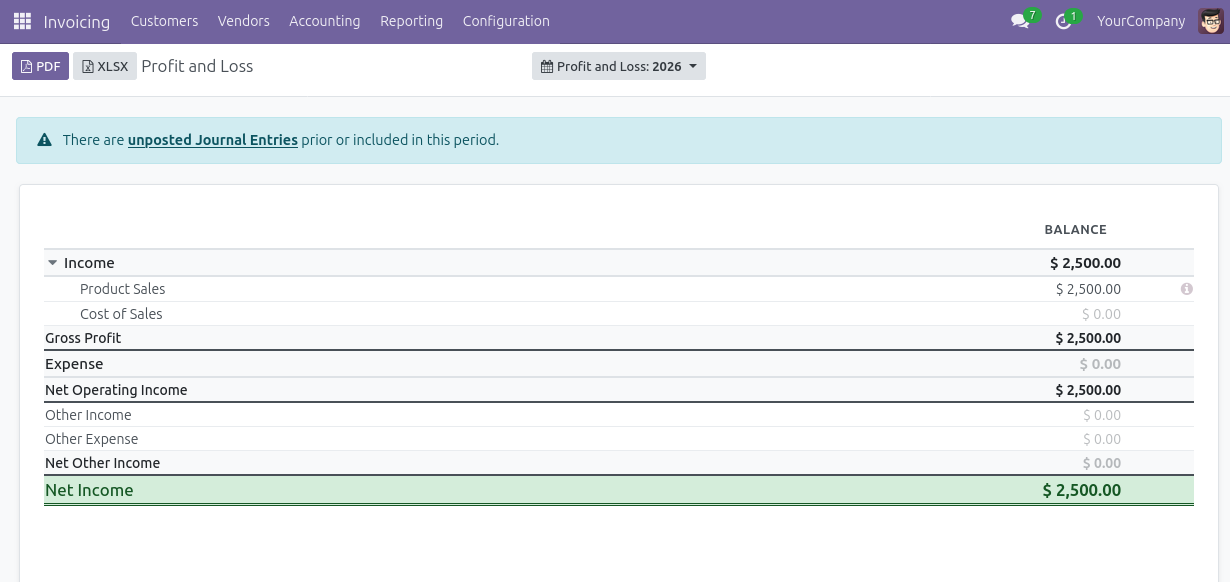
Navigate to Accounting, Reporting, and select Profit and Loss. The report displays income and expense accounts grouped in a collapsible hierarchy. It provides computed balances for your selected date range securely. Use the date filter and comparison selector to view month-over-month comparisons. Click any account row to drill down into the underlying journal entries.
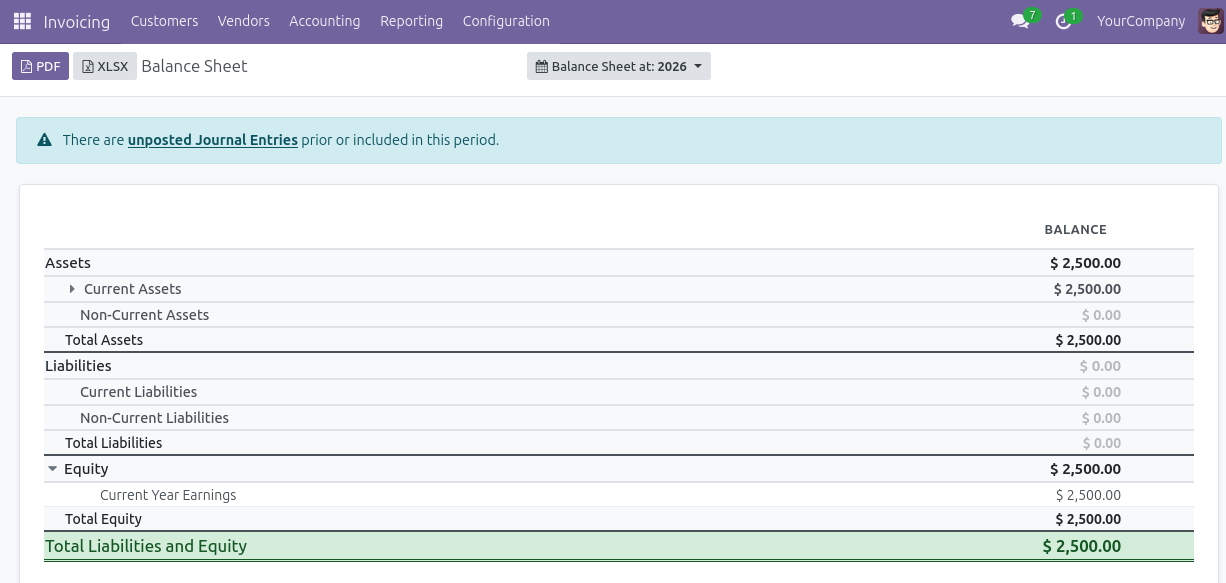
Open the Balance Sheet from the main reporting menu. The report presents assets, liabilities, and equity in a structured layout. It features collapsible parent-child rows and real-time balance computation. Parent rows expand or collapse to manage child account visibility easily. Export to PDF or XLSX using the toolbar to get formatted financial statements.
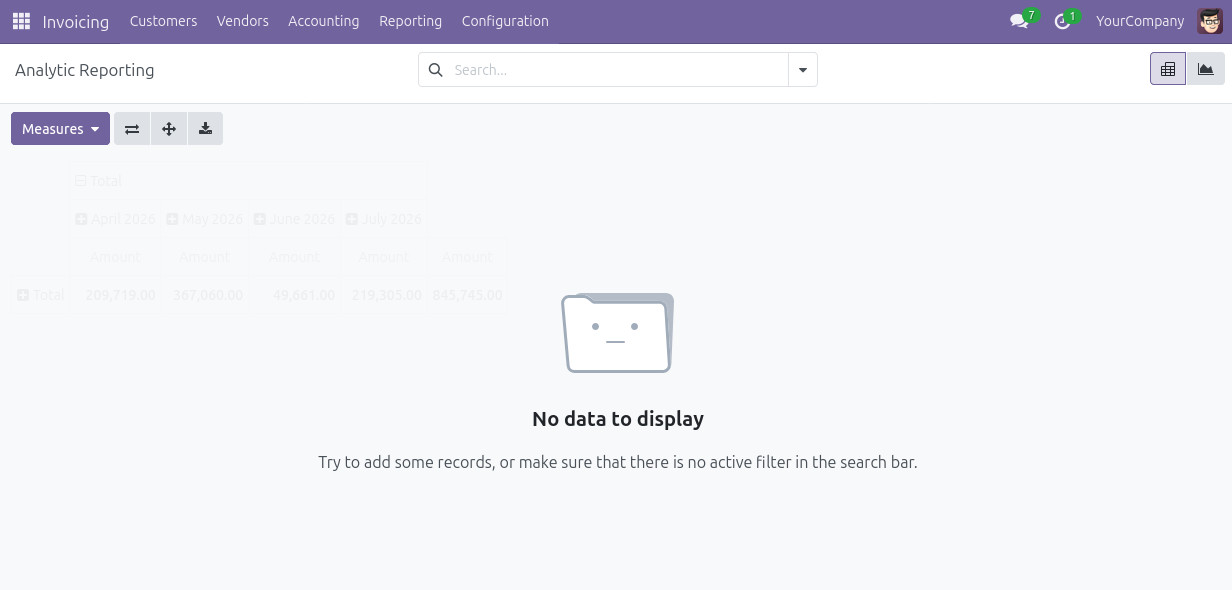
Open the Analytic Report from the accounting menu. This document groups transactions by analytic account and specific cost center. The dynamic grouping expands to show exact line-level detail clearly. Use this report to compare budgeted versus actual costs across different departments.
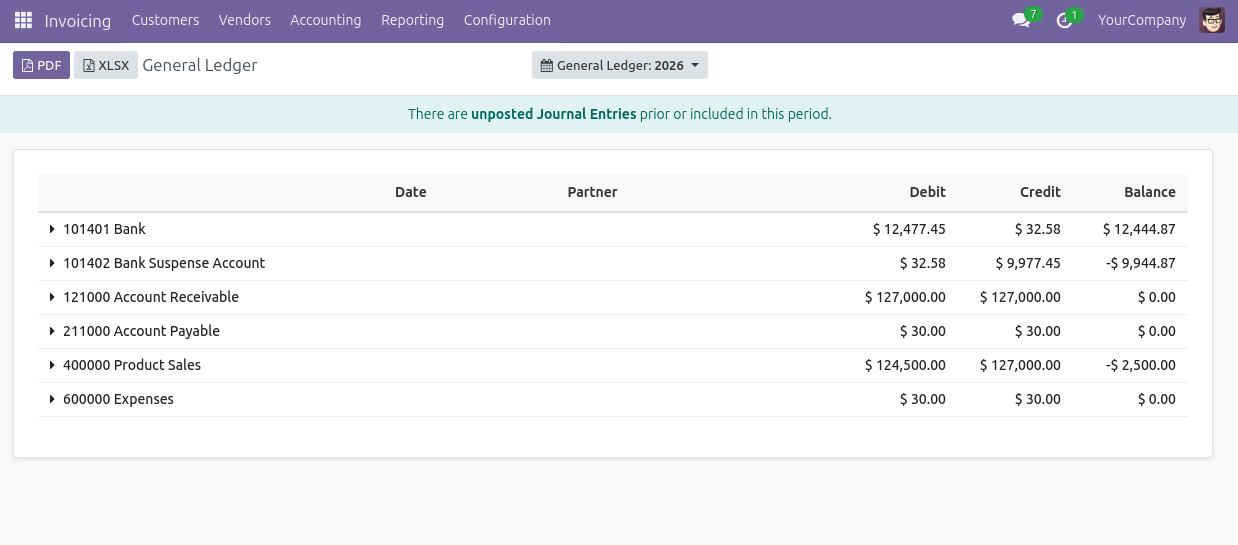
Navigate to the General Ledger within your Odoo financial reports. It lists every journal entry for each account within selected dates. The view includes opening balance, debit, credit, and closing balance columns. Drill down on any individual line to open the originating entry directly. Filter by posting status to show posted or draft entries.
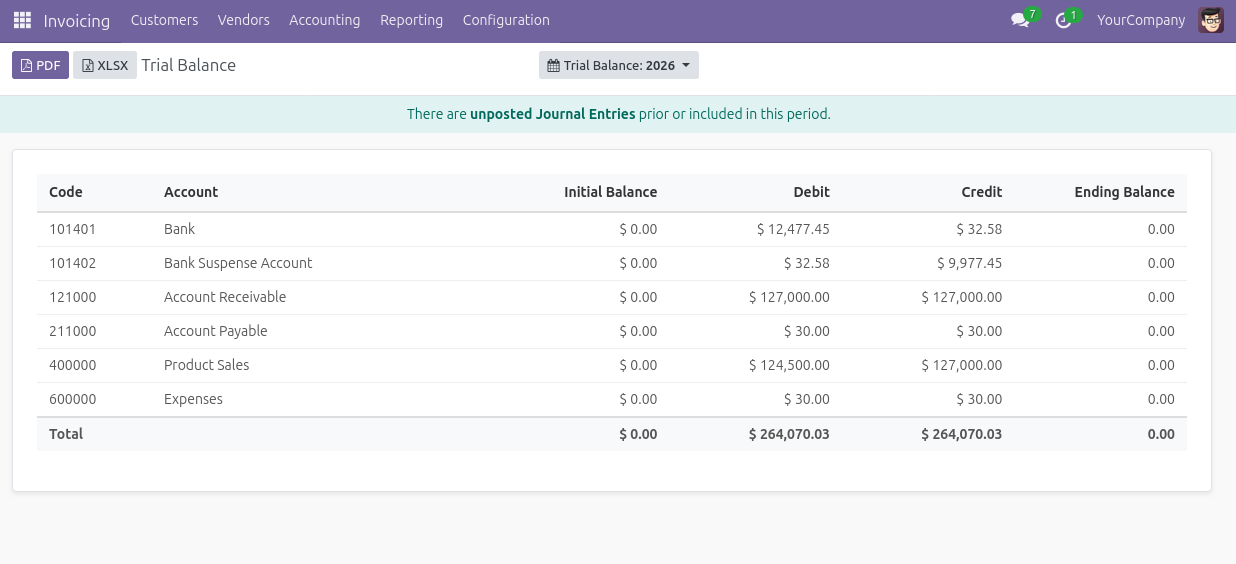
Open the Trial Balance from the main menu. The report displays each account alongside its initial balance and debit movements. It also shows total credit movements and ending balances for the period. Use this document to verify balanced entries before closing the period. Export to XLSX for a spreadsheet mirroring the exact on-screen layout.
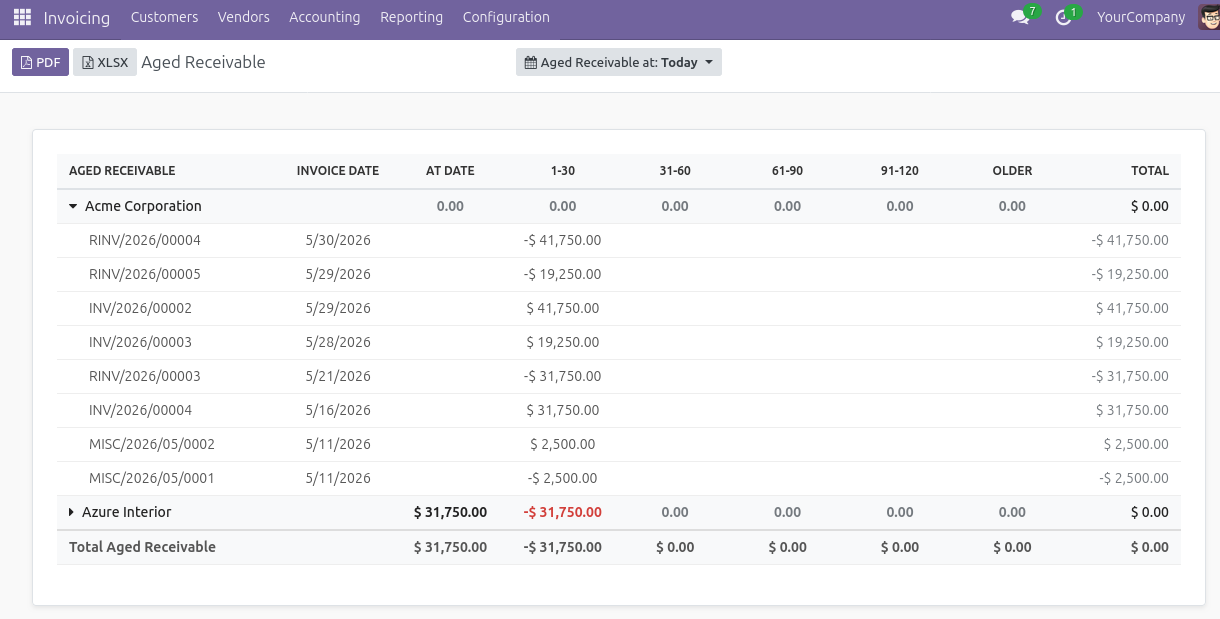
Navigate to the Aged Receivable section. The report groups outstanding customer invoices into specific aging buckets accurately. These include current, 30 days, 60 days, and over 90 days overdue. This provides a clear picture of collection risks across your customer base. Each customer row expands to show individual invoices contributing to that bucket.
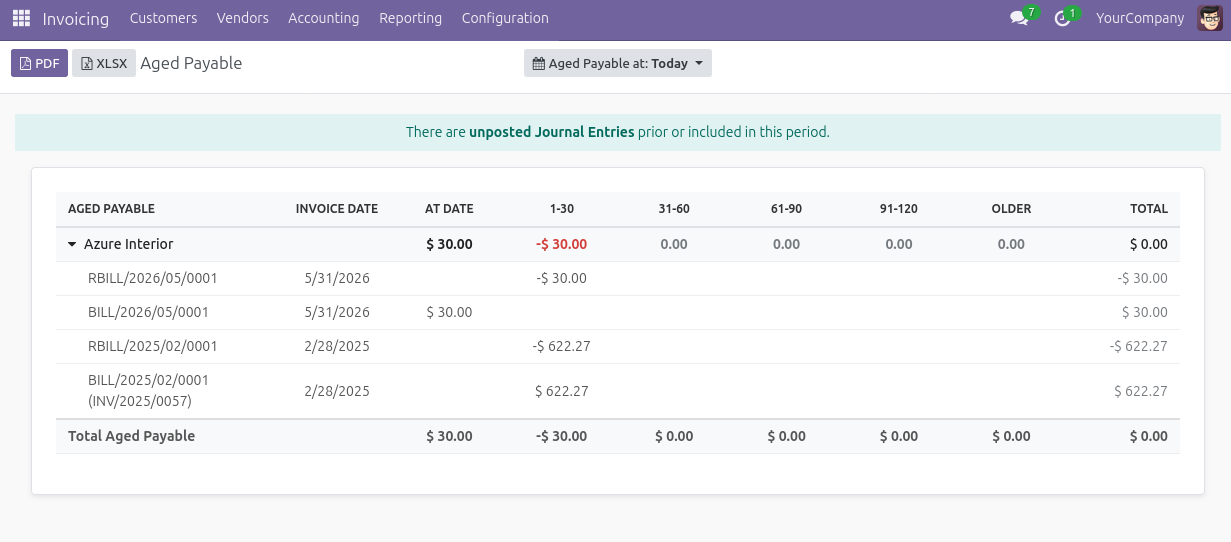
Open the Aged Payable report from the menu. It shows outstanding vendor bills grouped clearly by their aging period. Supported by efficient Odoo integration services, this makes identifying overdue payables and prioritizing payment runs completely straightforward. Each vendor row expands to display individual bills in every aging bucket.
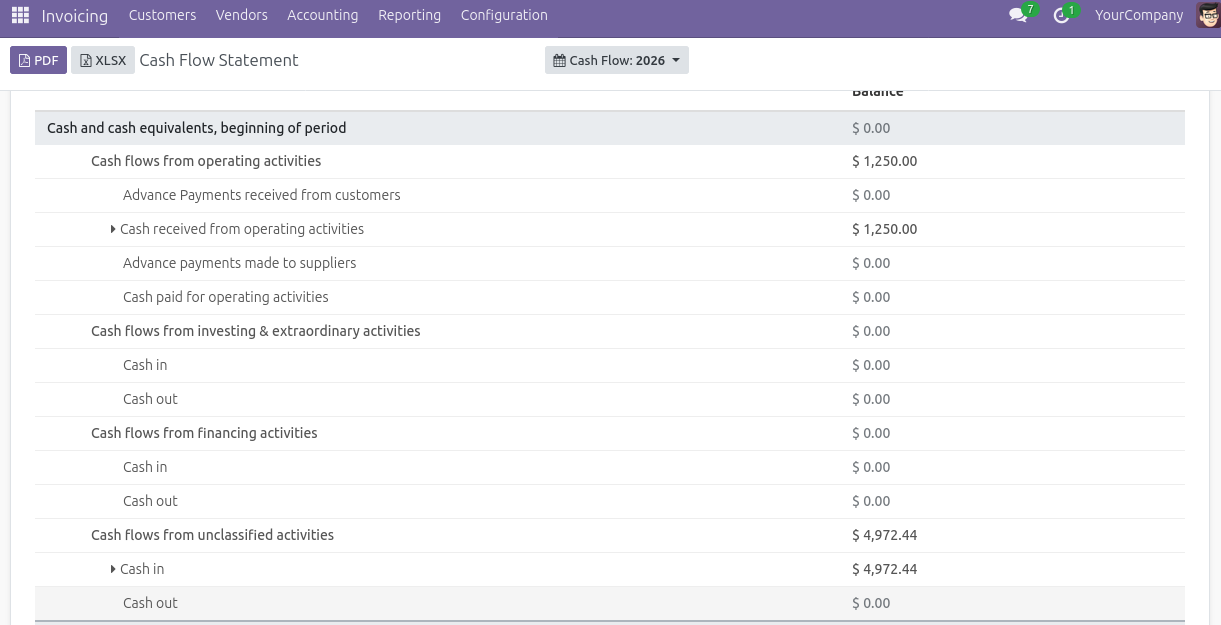
Navigate to generate your Odoo cash flow report. It organizes cash movements into operating, investing, and financing activities. Users see real-time totals for each section alongside a net change summary. Expand any section to view individual account movements driving these precise figures.
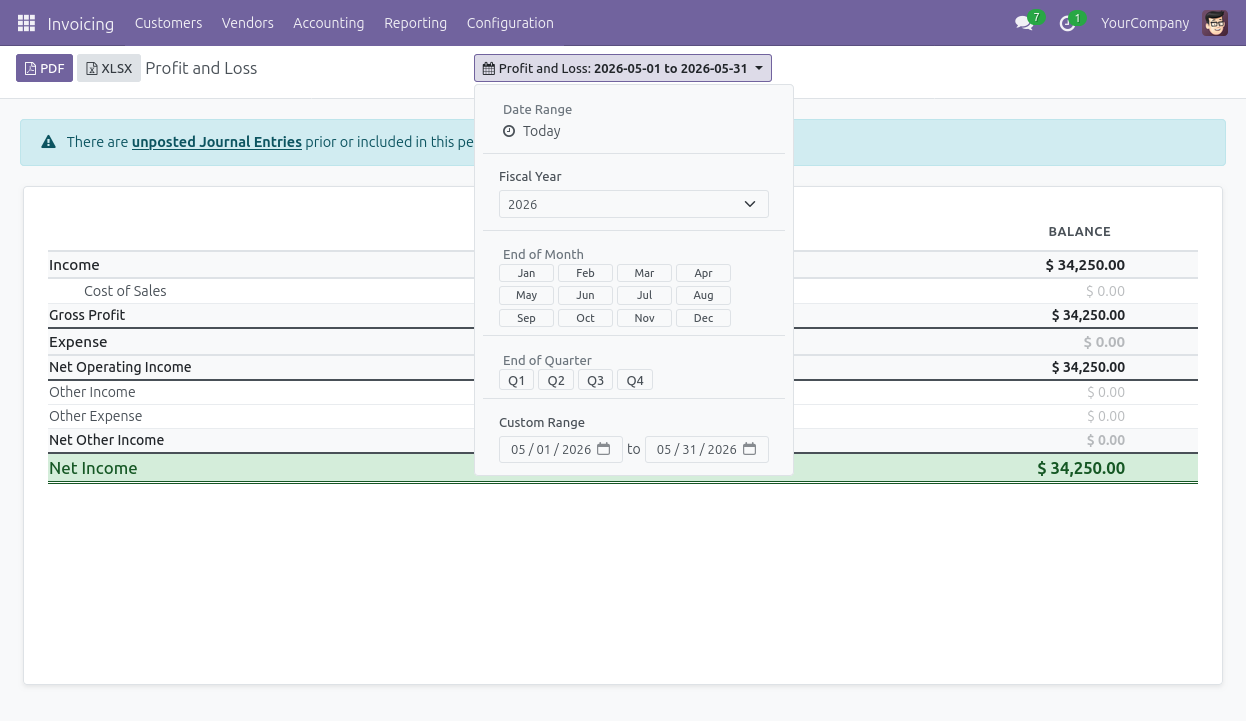
These Odoo accounting reports share the same dynamic filter bar. Select a date range using pre-defined options or enter custom dates. Add a comparison period to show changes between two time periods easily. Toggle the posting status filter between posted or all entries. This controls exactly which journal entries influence your final calculations.
This robust Odoo accounting customization provides essential reporting features to upgrade your community edition without writing any custom code.
The module adds eight essential statements directly to your Odoo 19 Community setup. These include Profit and Loss, Balance Sheet, Analytic Report, and General Ledger. Users also get Trial Balance, Aged Receivable, Aged Payable, and Cash Flow Statements.
Each document perfectly mirrors the exact structure and capabilities found in Odoo enterprise accounting. Community users access complete financial statements without ever upgrading their software license.
Every report includes a comprehensive filter bar with pre-defined date ranges. Users access custom date entry, comparison period selection, and posting status toggles. Comparison periods allow two separate date ranges to display side by side effortlessly. This makes analyzing month-over-month or year-over-year changes straightforward on your Odoo accounting dashboard. Finance teams achieve precise analysis without building separate complex views manually.
Parent account rows expand or collapse independently within every customized accounting reports Odoo output. This feature lets users view a high-level summary of major account groups quickly.
Accountants drill into specific details only where necessary for accurate auditing. They accomplish this without switching between different report views continuously. Teams bypass applying additional filters to adjust the visible detail level.
Clicking on any account row immediately opens the underlying journal entries. This displays exact transaction details for that specific account and period. Accountants move from a summary financial statement directly to the transaction level. They investigate unexpected variances or verify final balances in one single click. This accelerates month-end workflows significantly without navigating away from the main report.
Each report exports cleanly to a professionally formatted PDF using QWeb templates. Users can also download an XLSX file featuring perfectly formatted columns and row groupings. Both export methods preserve the current expanded or collapsed state entirely. The final downloaded output matches exactly what remains visible on screen initially. These enterprise accounting reports Odoo exports require zero additional manual formatting before sharing.
Reports feature right-aligned balance columns and clear parent-child row indentation consistently. The design includes subtle zero-row styling alongside color-coded positive and negative values. This visual clarity makes the final output incredibly easy to read instantly.
The documents remain professional enough to share directly with management or external auditors. You distribute these professional Odoo financial reporting solutions without performing additional manual formatting.
Relying on manual spreadsheets for monthly financial statements drains valuable accounting resources. Your team requires accurate data to monitor company performance effectively. Upgrading to expensive software licenses is no longer the only viable option. This specialized tool provides enterprise accounting reports in Odoo instantly.
Finance directors gain dynamic filters to analyze critical data perfectly. You can generate a structured Odoo cash flow report without leaving the system. The setup eliminates tedious spreadsheet formatting and costly calculation errors completely. Accessing comprehensive Odoo financial reports transforms how you manage your monthly close.
Every professional bookkeeper deserves a reliable Odoo reporting system for precise oversight. Review essential metrics directly from your Odoo accounting dashboard with complete confidence. Implement this robust Odoo accounting customization today, backed by professional Odoo customization services, to streamline your financial operations completely. Contact the CodeTrade team to upgrade your data infrastructure securely.
 Chand Prakash
 Hardik Soni
 Hardik Soni
 Hardik Soni
 Hardik Soni