






How to Assign Products to Multiple Websites in Odoo 19?
 Chand Prakash
Procurement operations often slow down when finance teams must handle upfront supplier deposits manually. Standard systems lack native cross-referencing for an automated Odoo Purchase Advance Payment routine. Accountants regularly balance separate incoming drafts while manually tracking down deposit allocations. Executing a comprehensive Odoo ERP implementation addresses this fragmented method, which introduces major financial visibility gaps during high-volume commercial purchasing cycles.
Forgetting to subtract an early deposit leads directly to duplicate supplier payments. Furthermore, manual calculation mistakes complicate standard month-end ledger balancing for procurement networks. Adopting a structured approach for Odoo Vendor Advance Payment workflows eliminates tracking errors entirely.
Automated workflows safeguard your outgoing capital while creating clean transaction records. Implementing a robust verification framework secures seamless data flow across all open supply chains.
The Purchase Advance Payment module by CodeTrade integrates seamlessly into your standard procurement architecture. This utility eliminates administrative workflows by converting manual tracking into automated system entries.
Here is what the tool handles at a glance:
This functional extension acts as an automated utility that monitors deposits, handles balance equations, and protects data integrity.
Leveraging specialized Odoo development services to configure your backend workflow requires just a few initial administrative steps to enable seamless automation across your entire procurement system.
Locate the designated section for initial deposits. Here, you will select or establish a product that the system applies as the dedicated line item for all Odoo Purchase Down Payment entries. This process standardizes your accounting logs because every transactional record applies the identical product designation, which simplifies long term tracking.
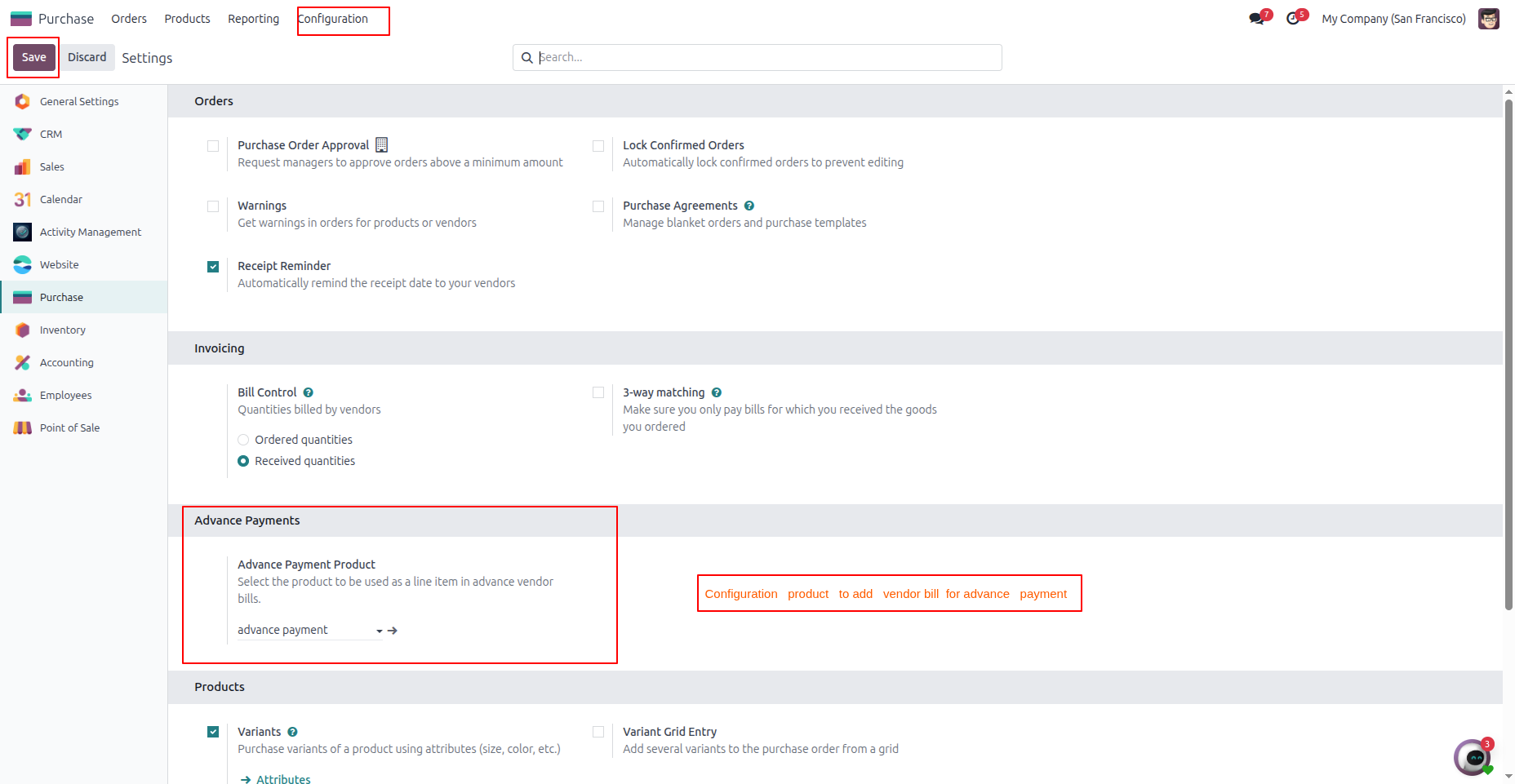
Give this product a distinct name like “Advance Payment” or “Vendor Down Payment.” Saving these backend modifications completes your Odoo Vendor Deposit Management setup immediately.
This structured operational walkthrough outlines the complete functional process for executing automated workflows from initial requisition to final supplier balancing.
Start your purchase order as you normally would. Add your vendor, add the items, and confirm the document. Let us assume the order total is $600.
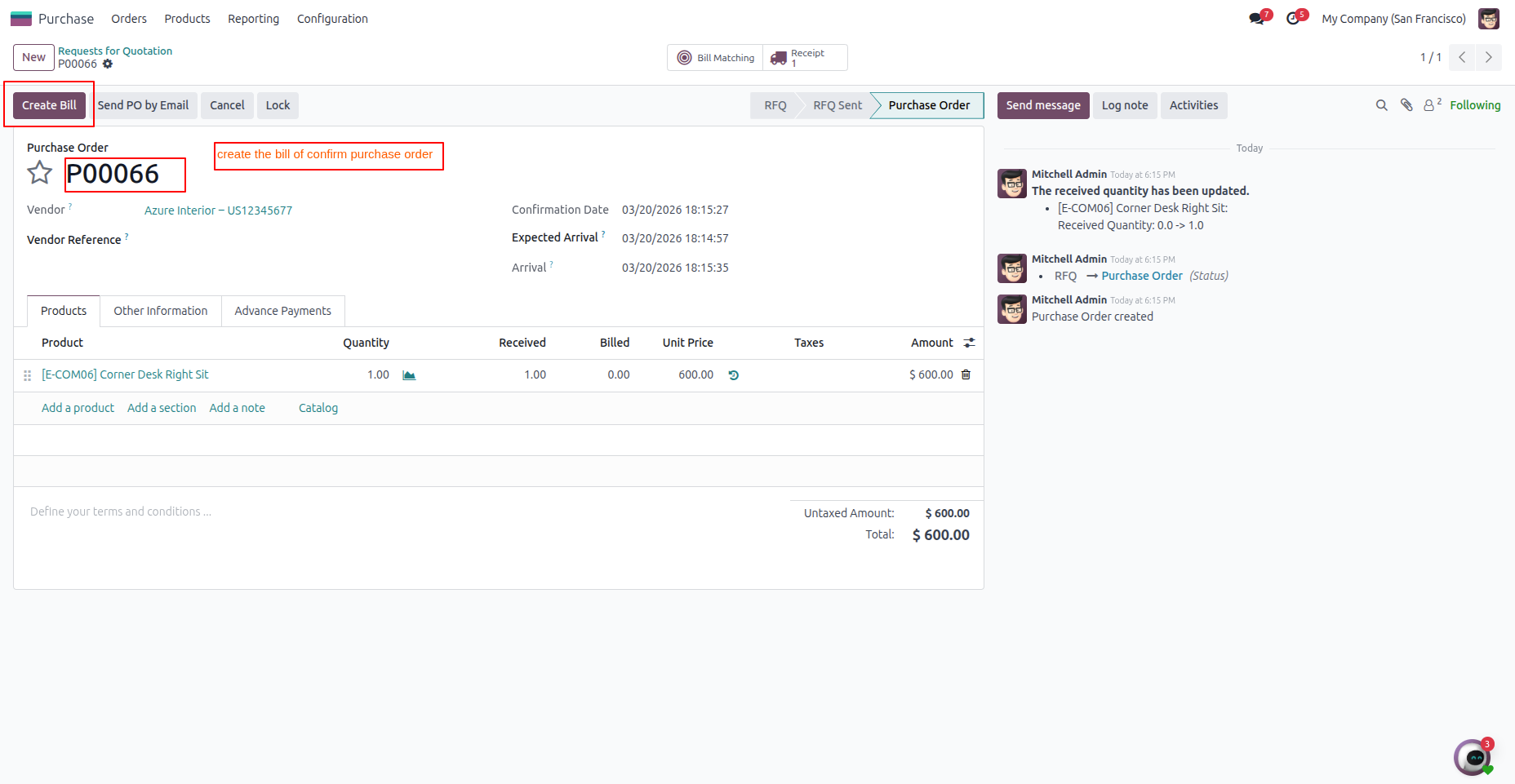
When a supplier requests upfront funds, you can trigger the automated workflow directly. Follow these operational steps:
The module instantly calculates the required balance amount, removing manual conversion work entirely.
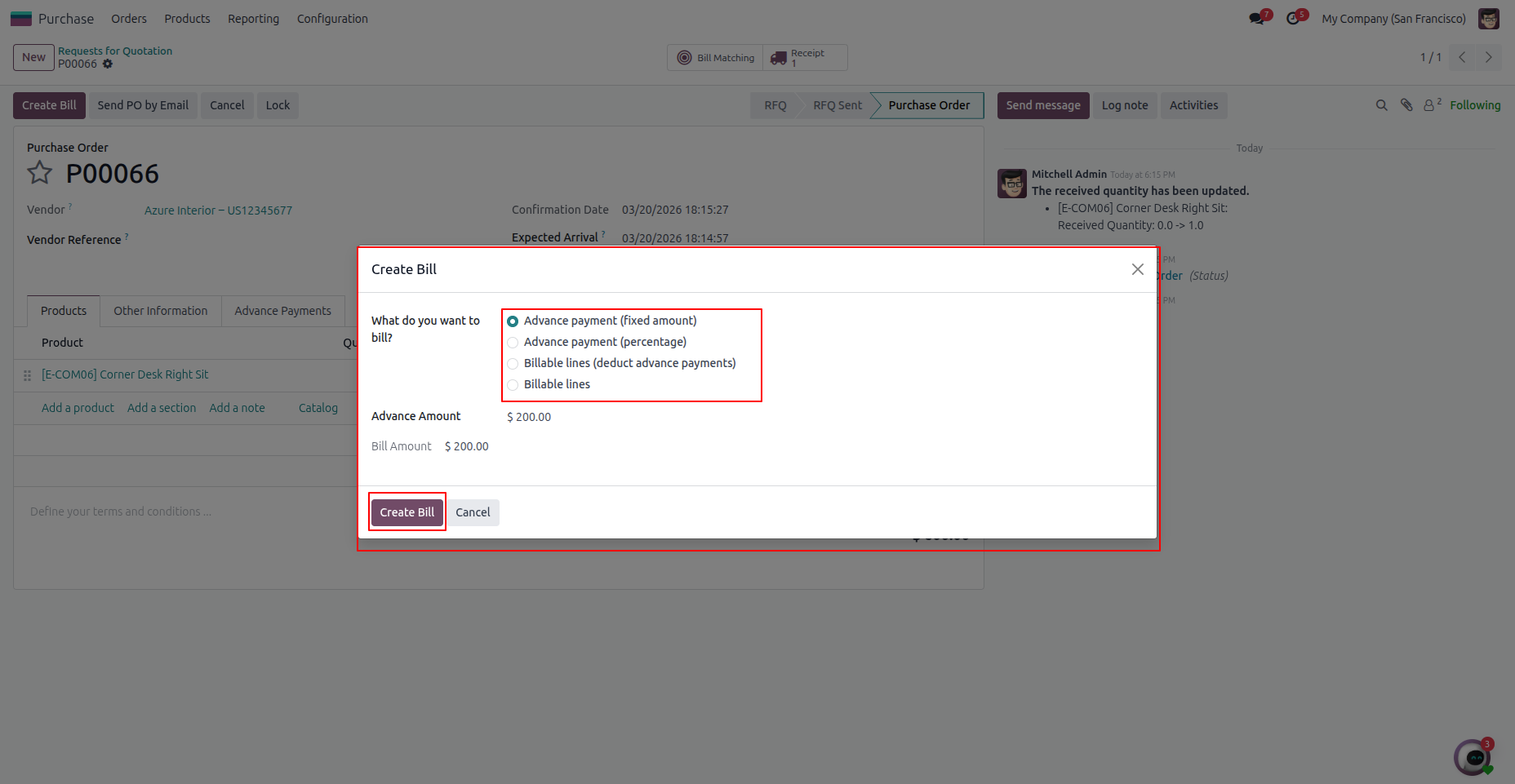
The system generates a draft vendor invoice for the requested $180 deposit. Review the entries, then click the validation button to post the transaction.
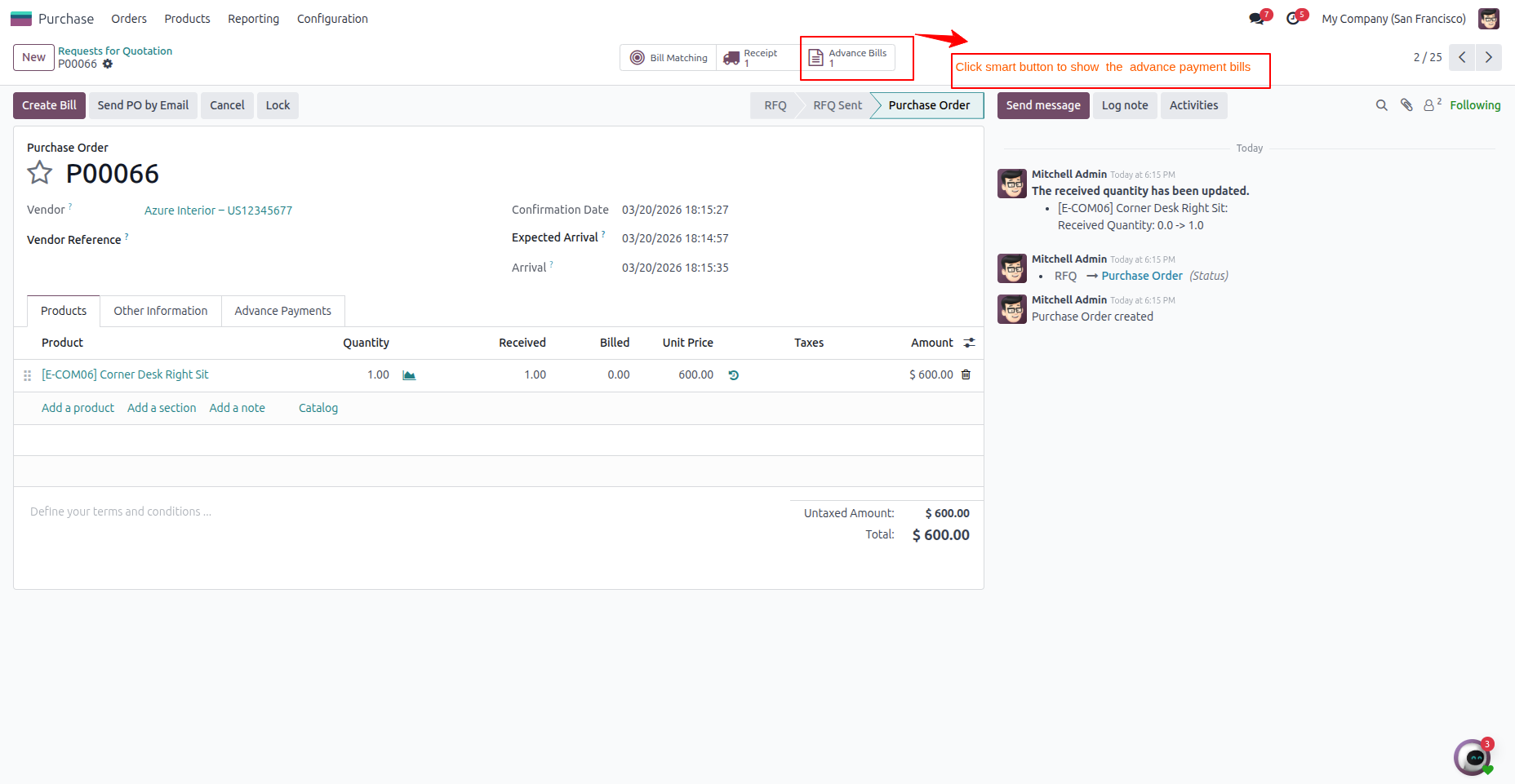
An integrated dashboard element appears on your source document. This allows managers to monitor ongoing Odoo Advance Invoice Management metrics, listing linked payments, transaction statuses, and historical posting dates.
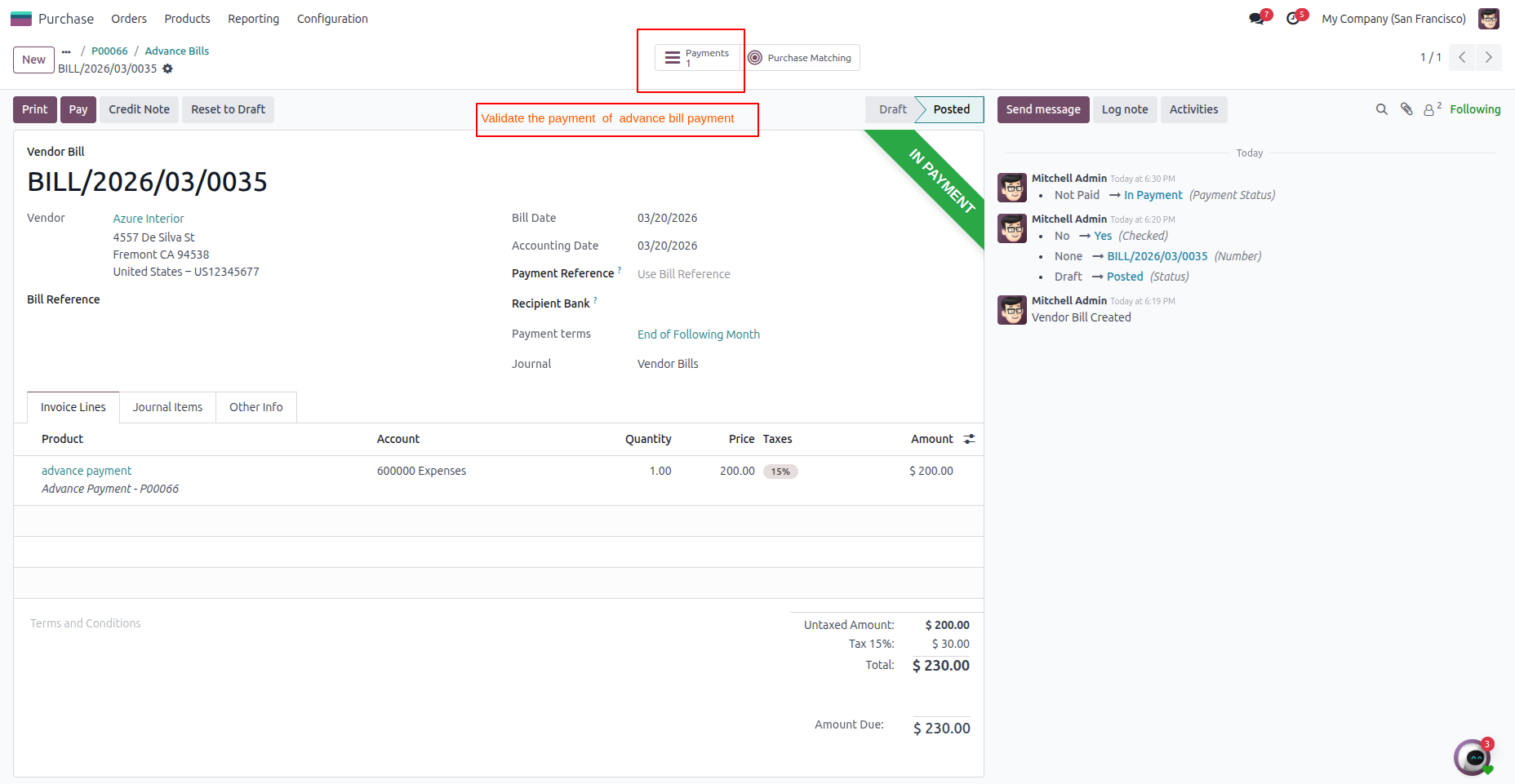
Once the inventory items arrive, confirm the receipt inside your dashboard. You can now execute the final billing routine with complete safety.
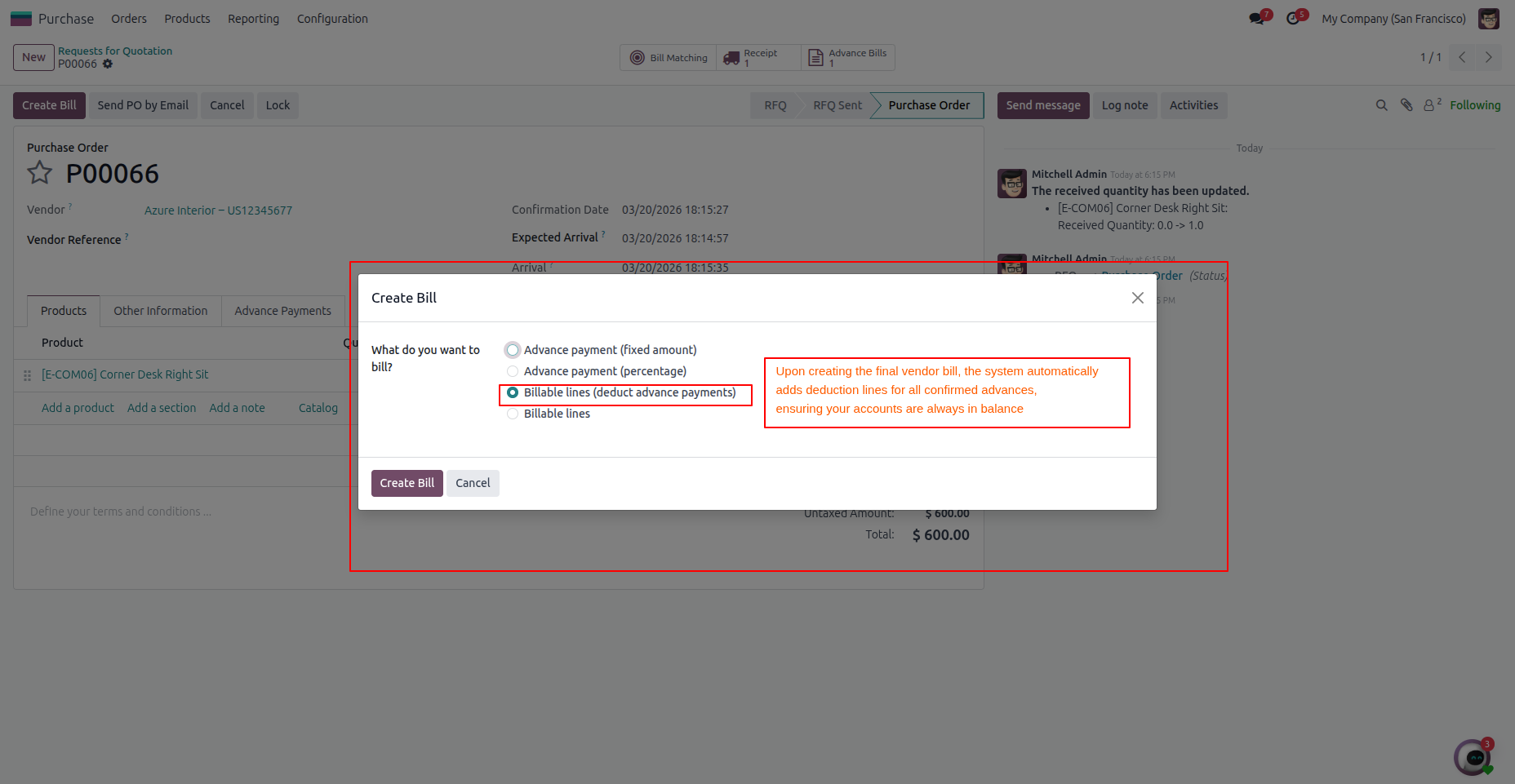
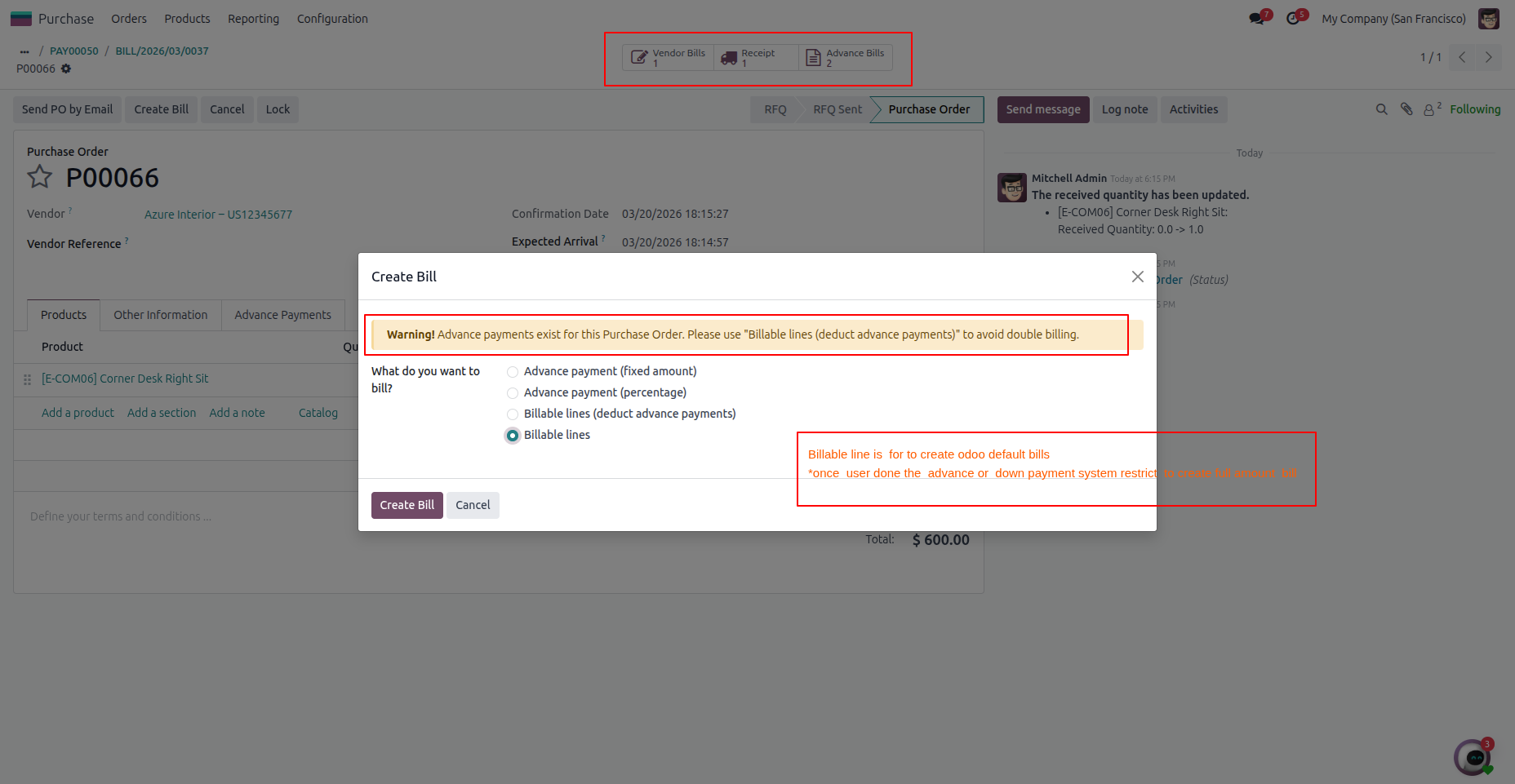
Click the invoice creation button and select the deduction option. The system evaluates previous data to complete your Odoo Purchase Payment Automation cycle, dropping the final document balance to $420 instead of the original total. Post this balanced document to complete the transactional cycle cleanly.
This innovative application refines your downstream financial operations through dedicated safety validation loops and flexible down payment tracking configurations.
Easily select the specific tracking item used for all initial distributions under Purchase → Configuration → Settings. Once you establish these backend parameters, every record utilizes the same item, keeping your database consistent and organized. This feature ensures clean Odoo Procurement Payment Management without confusing transactional labels.
Choose between flat economic fees or percentage calculations for your upfront obligations. The automated wizard processes the correct figures based on the core PO valuation instantly. Whether a merchant requests a quarter of the balance down or a flat deposit, the tool adapts seamlessly without manual calculations.
When generating the final invoice, the platform scans historical entries and presents a safe option to deduct previous deposits. This core capability modernizes your standard Odoo Purchase Accounting Automation setup by eliminating manual subtraction. The database retains historical transaction data and solves the equation automatically.
Track payment status parameters and total upfront values directly on the main procurement layout using an integrated smart tracking dashboard. Select the dedicated overview tab at any point to inspect authorized balances clearly. This provides total logistical clarity without opening multiple tracking screens.
Smart validation internal logic keeps users from creating duplicate baseline invoices alongside early deposits, protecting financial record health. If the team already logged a deposit, the system blocks repetitive draft creation with clear validation warnings. This critical framework establishes reliable Odoo Product Visibility Control across your procurement ledger profiles.
The system restricts users from creating balancing documents containing negative economic values. If a promotional deduction drops the document total below zero, the platform blocks completion and suggests generating a standard credit note instead. This built-in protection mechanism maintains compliant accounting logs and avoids structural reconciliation discrepancies.
Reviewing a typical purchasing lifecycle illustrates how this structural automation operates seamlessly inside a live operational environment:
Result: The merchant receives precise compensation, your primary ledger accounts balance perfectly, and the entire audit trail remains documented without manual accounting interventions.
If these operational vulnerabilities impact your current financial workflows, integrating this targeted automation utility is highly recommended:
Supplier deposits are a standard requirement in global trade, yet they frequently generate unnecessary administrative strain and reconciliation inaccuracies. The Odoo Purchase Advance Payment Module removes this complexity, allowing your accounting department to shift focus toward high-value financial analysis. This lightweight extension resolves fundamental procurement friction points by replacing manual entries with reliable Odoo Purchase Payment Automation.
It offers a streamlined, effective architecture for handling vendor deposits without errors. Implement a smarter, verifiable method for managing Odoo Advance Invoice Management and ensure your procurement ledger remains accurate, transparent, and audit-ready at all times.
Manual oversight of supplier deposits introduces significant operational vulnerabilities into modern supply chain environments. The specialized Odoo Purchase Advance Payment Module by CodeTrade provides a reliable architecture to eliminate these manual processing errors entirely.
Implementing this functional tool replaces complex calculations with an integrated deduction system directly inside your procurement dashboard. Financial controllers can confidently deploy precise Odoo Procurement Payment Management workflows to protect company cash reserves.
The built-in protection rules eliminate duplicate distributions while organizing historical vendor invoices under clean data categories. This technical refinement, delivered through tailored Odoo customization services, helps teams maintain complete accounting transparency during highly sensitive commercial transaction cycles.

 Chand Prakash
 Hardik Soni
 Chand Prakash
 Chand Prakash
 Hardik Soni