







How Do You Generate Accurate Predictions With AI Sales Forecasting In Odoo?
 Chand Prakash

Managing regional storefronts across different markets requires precise control over your catalog architecture. Standard configurations in Odoo eCommerce Multi Website environments force administrators into an all or nothing choice. You must either publish items on every store or isolate them to just one channel.
This rigid structure complicates Odoo Multi Store Product Management for companies running distinct regional operations. Executing a comprehensive Odoo ERP implementation helps businesses avoid the severe data risks created by manually toggling visibility parameters for large inventories. Implementing a tailored strategy for Odoo Product Website Assignment solves this catalog bottleneck instantly.
Business owners can map a single item to a specific cluster of digital storefronts simultaneously. This streamlined approach refines your daily operations while securing accurate, market-specific storefront displays for global buyers.
Managing multiple online storefronts within a single ERP network introduces severe operational challenges when distributing target inventories. Native system configurations restrict catalog administrators to an all or nothing publishing model.
You can only display a product on all digital channels or restrict it to one specific storefront. This structural limitation disrupts efficient Odoo Multi Storefront Management for businesses operating distinct regional or brand-specific markets.
For example, a company might operate separate digital storefronts for India, the UAE, and the United States. A specific product line available logistically in India and the UAE should remain hidden from US consumers.
Without a dedicated tool, handling these parameters requires continuous manual updates across isolated store profiles. This repetitive data entry process slows down updates and causes costly human errors during seasonal catalog updates.
The Product Multiple Website module by CodeTrade eliminates these systemic bottlenecks by introducing an independent website field directly on the product form. Catalog managers can easily execute precise Odoo Product Website Assignment strategies across specific store clusters simultaneously. This automated oversight saves administrative hours while ensuring each regional shop page remains accurate and uncluttered.
The Product Multiple Website module by CodeTrade streamlines Odoo Multi Website eCommerce workflows by automating visibility permissions. Instead of adjusting storefront filters manually, administrators select target digital channels directly on the master product form. This integration ensures clean product presentation across regional storefronts, wholesale portals, or brand segments.
This utility deploys an independent configuration field that leaves standard backend data structures untouched. Beyond individual entry management, the tool accelerates bulk administrative work through an Odoo Mass Update Product Websites wizard. This operational shortcut allows managers to update distribution paths for thousands of inventory units simultaneously.
To optimize daily workflows, website assignments display clearly within standard data tables for rapid administrative verification. Items left without specific storefront designations automatically revert to native system rules and remain visible across all active sales channels.
Deploying this functional utility takes just a few minutes and requires no complex code adjustments. Utilizing specialized Odoo development services ensures rapid deployment for teams seeking efficient Odoo multi website product management.
No additional setup steps are required after activation. The newly integrated field enables immediate Odoo Website Product Visibility control across your standard product form, list, and kanban dashboards.
This step by step operational overview demonstrates how to manage Odoo Multiple Website Products efficiently using standard platform dashboards.
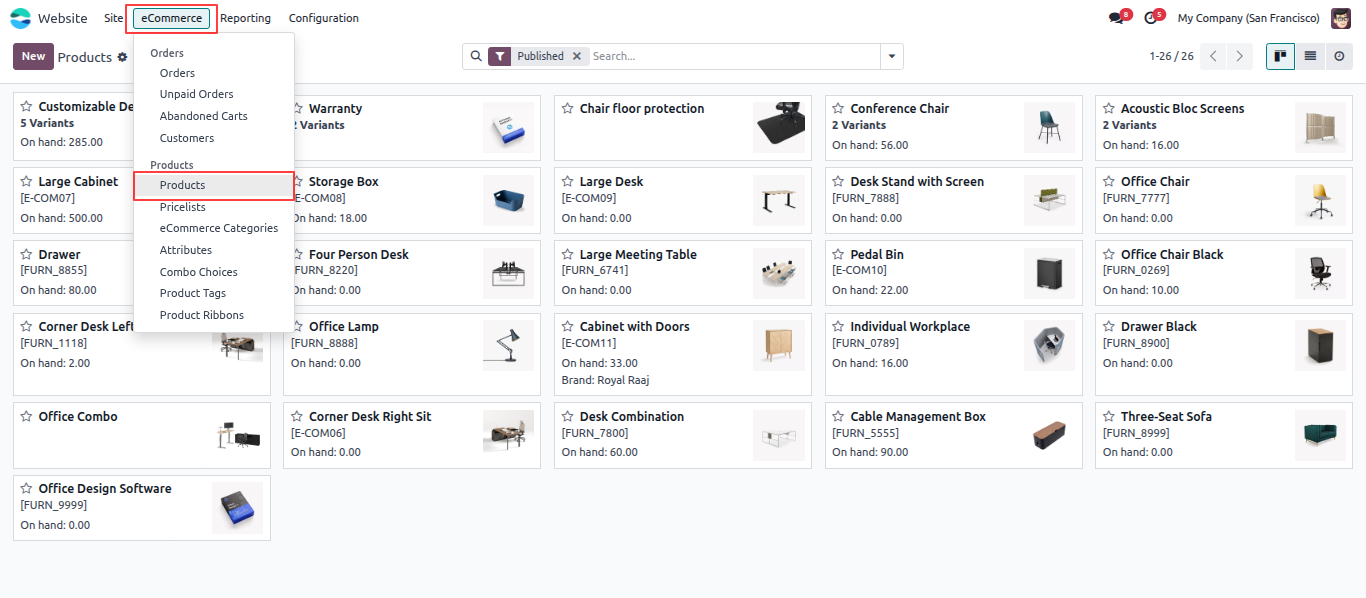
Go to the Website app, click eCommerce in the top menu, and select Products to access the master inventory records across your storefronts.
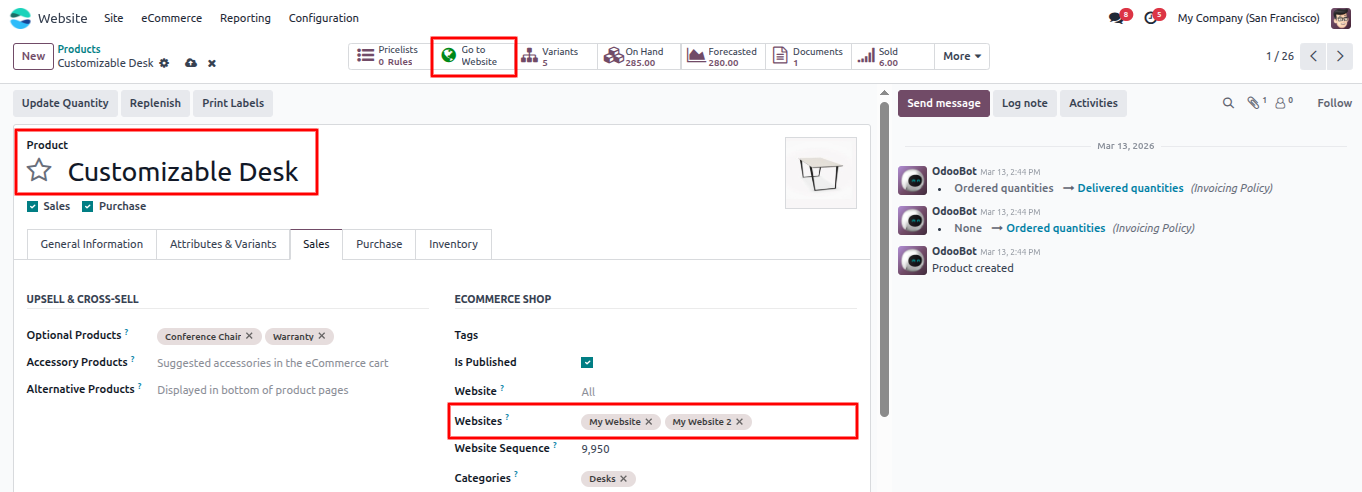
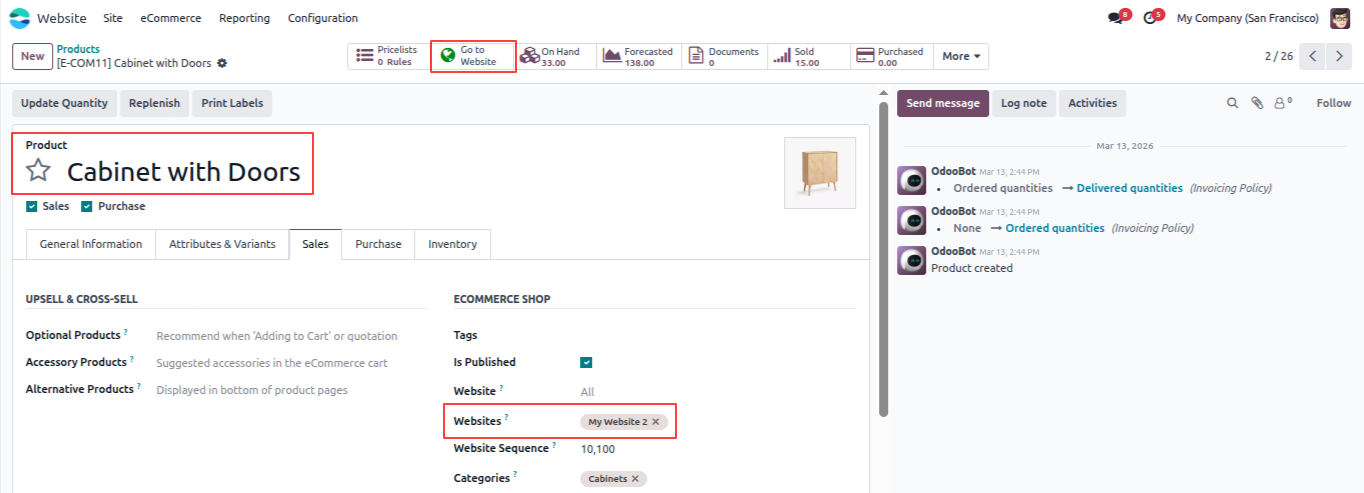
Open any product and go to the Sales tab. Use the newly added field to establish precise Odoo Product Visibility Control by selecting your target storefronts. If left empty, the item remains visible across all digital channels by default.
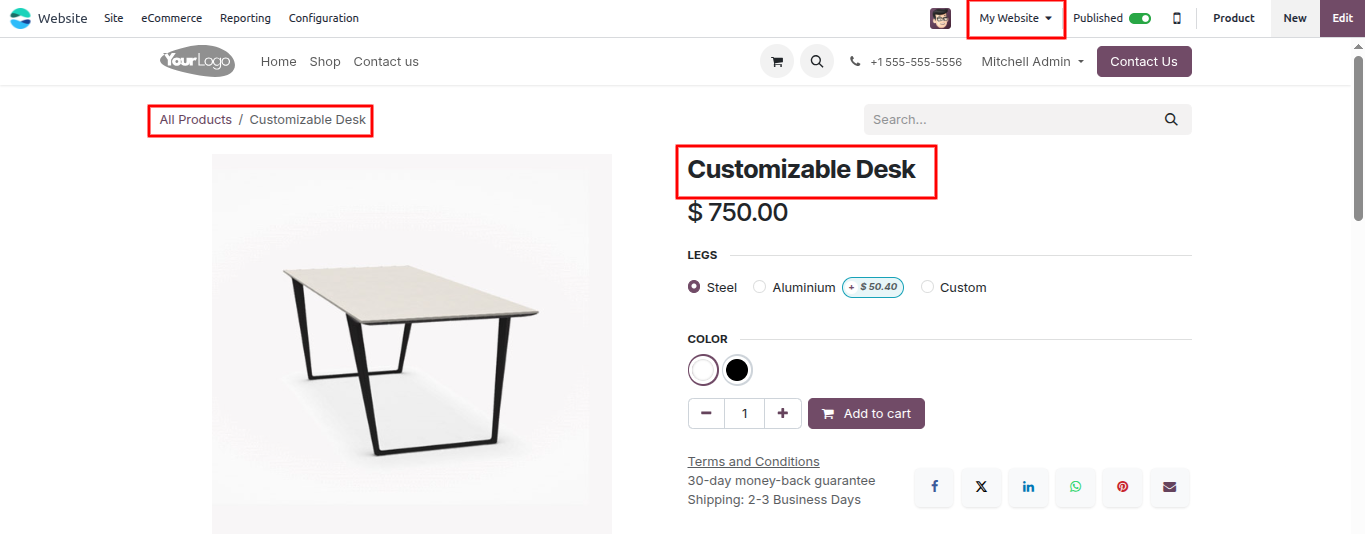
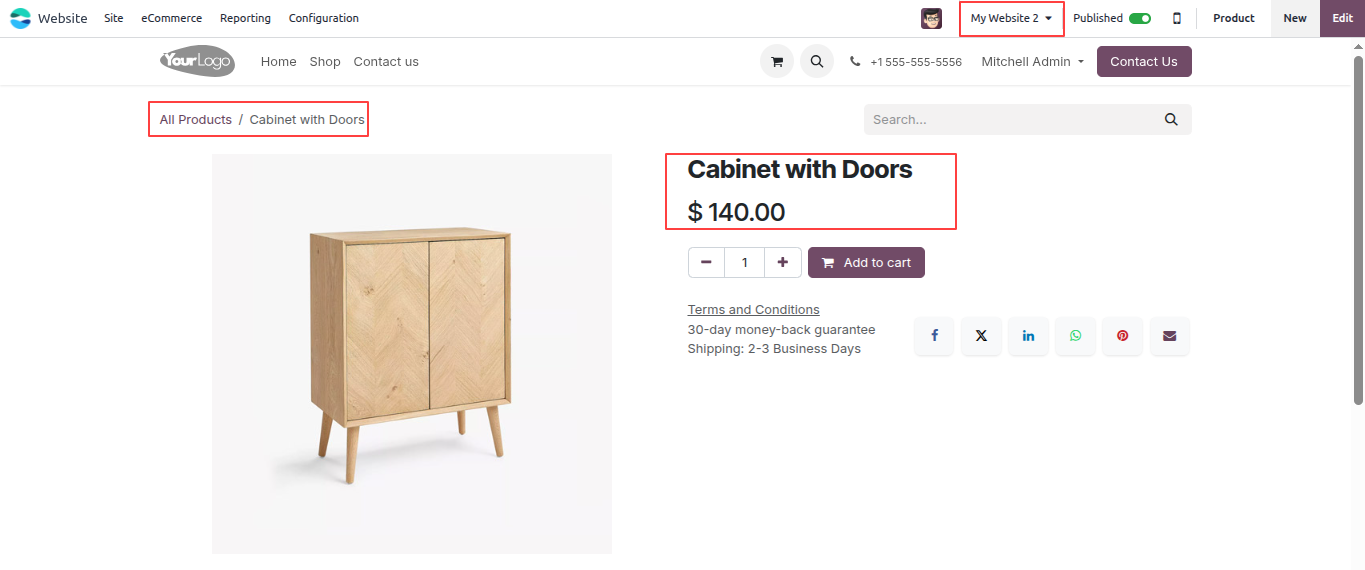
Once a website is selected and the product is saved, it becomes visible on that storefront’s shop page. This feature allows a single item to display on multiple storefronts simultaneously without duplicating data entries.
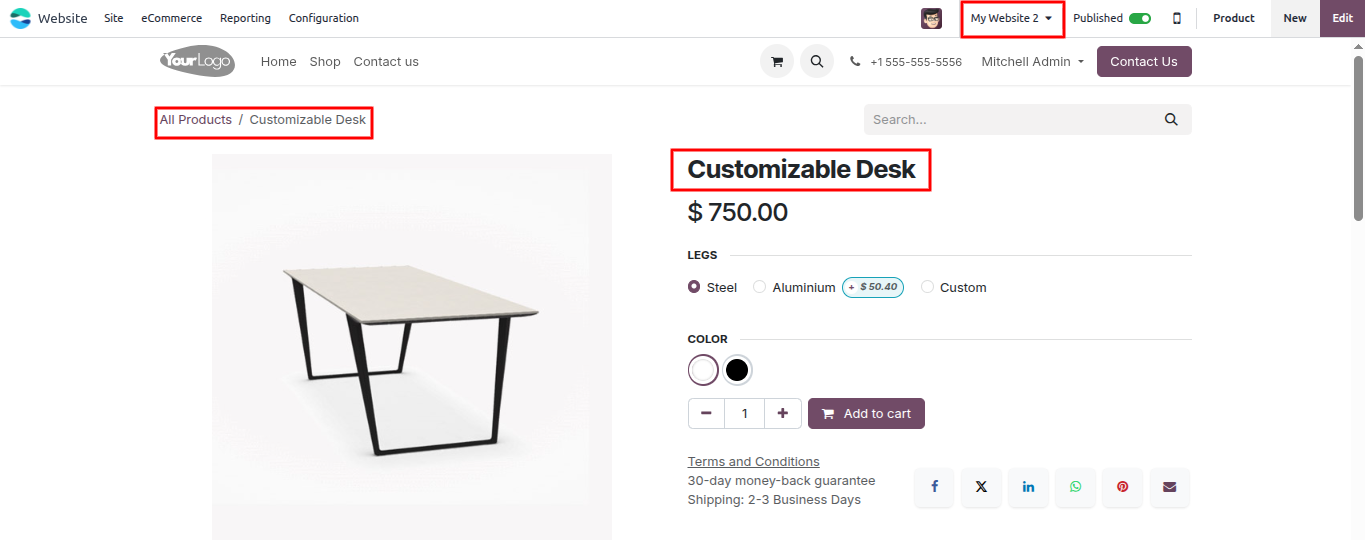
The same product appearing on a second website because both websites were selected in the configuration field. The same product can display on multiple storefronts at the same time.
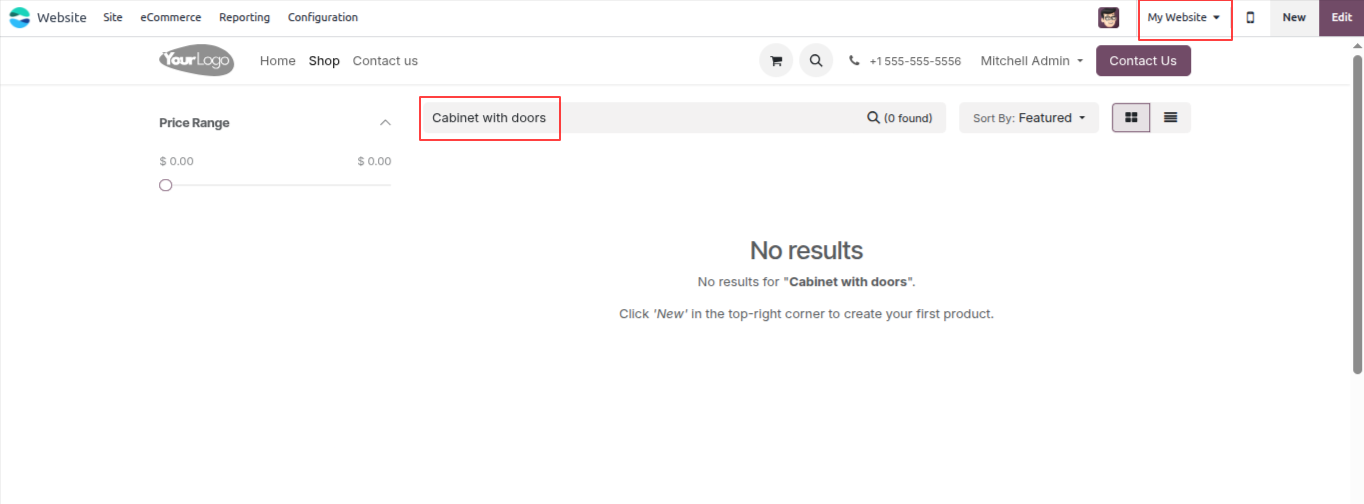
To restrict an inventory item to a single sales channel, select only that specific storefront. The item will not appear on any other digital storefront that has not been explicitly authorized.
After assigning a specific website, the product appears on that storefront’s shop page and is available for customers to view and purchase.
Websites not selected in the configuration field will not display the item. This structural isolation maintains strict Odoo Product Publishing Control and keeps each regional store catalog perfectly accurate.
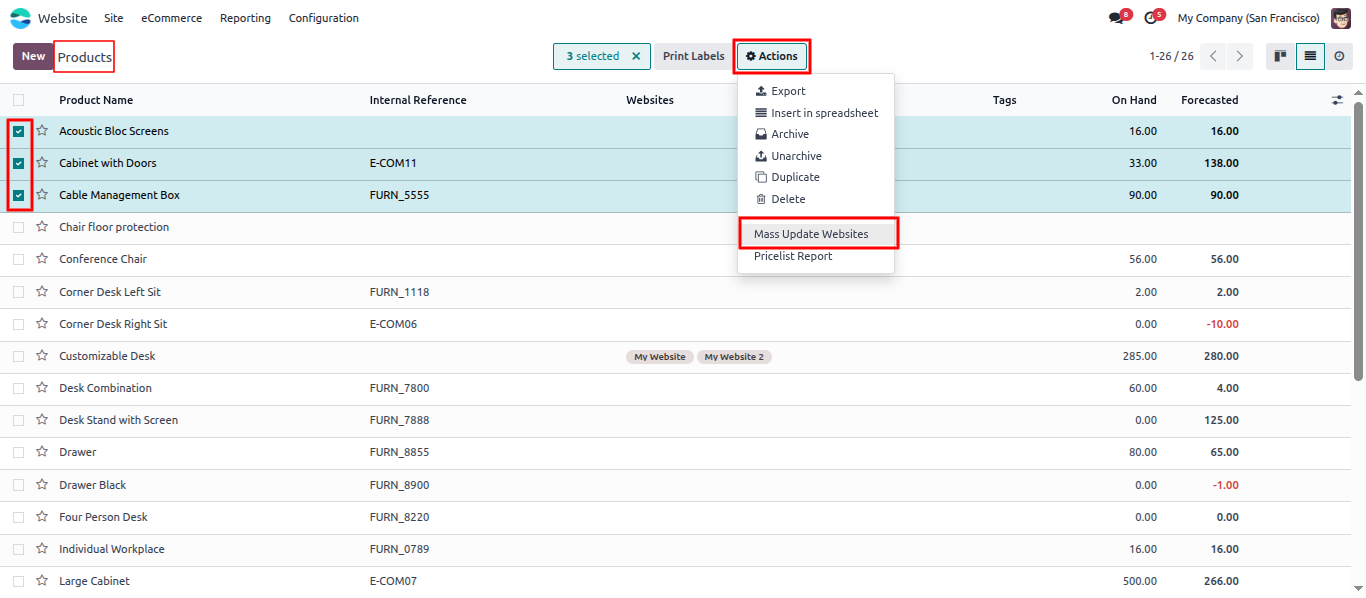
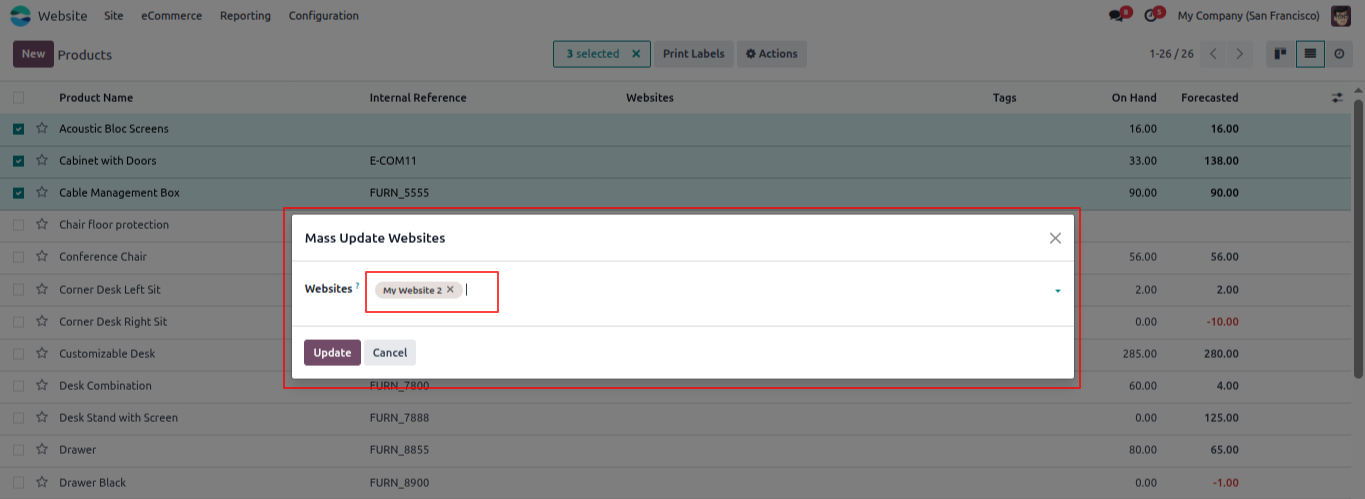
Select multiple items from the list view using the checkboxes, then go to Action > Mass Update Websites.
A wizard opens where you select the target websites and click Update to apply the same Odoo Website Product Assignment to all selected products at once.
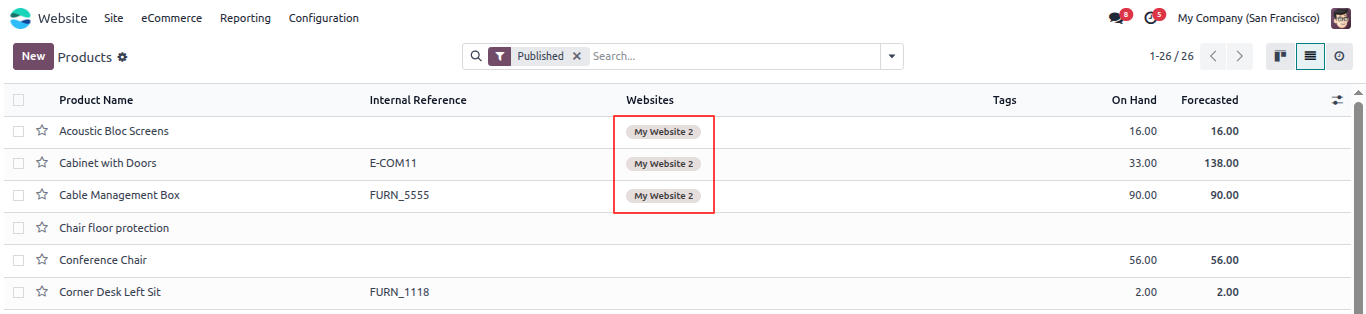
The main table layout includes a specialized column that shows active storefront designations, giving you a quick overview of your entire catalog without opening individual records.
This functional expansion optimizes your Odoo Product Multiple Website environment through dedicated data fields and automated bulk management utilities.
Assign a product to one or more websites directly from the product form. Products with no website selected are visible on all storefronts by default, so existing items continue to work without any structural updates.
The specialized field operates separately from Odoo’s built-in field configuration. This architectural separation ensures stable Odoo Website-Specific Products management without the risk of disrupting your current platform setup.
Select multiple products from the list view and use the bulk update action to assign channels to all of them at once. This operational tool accelerates standard administrative tasks during initial system deployments or seasonal catalog adjustments.
Each digital sales channel only displays the specific items assigned to it. This mechanism delivers absolute control over consumer browsing journeys without duplicating records or fragmenting backend stock data.
The integrated field appears naturally in the system product list, form view, and kanban dashboards. Operating without complex external configuration screens, the layout maintains clean alignment with your standard ERP user interface.
Watch the functional walkthrough video below to see the automation system operating live. The video demonstration covers setting up upfront deposit rules, managing percentage-based allocations, and verifying automated invoice reductions directly inside the procurement dashboard.
Efficient catalog administration remains a cornerstone of successful multi-channel retail operations. The Product Multiple Website module by CodeTrade delivers the exact structural flexibility that global e-commerce merchants require. By replacing rigid default settings, this tool establishes comprehensive Odoo Product Visibility Control directly within your existing sales dashboards.
Integrating professional Odoo customization services allows managers to easily align their digital inventory with regional logistics chains without creating duplicate database records.
Furthermore, implementing the built-in wizard allows for rapid Odoo Mass Update Product Websites adjustments during major catalog reconfigurations. This strategic tool simplifies day-to-day work while maintaining pristine customer browsing experiences across every branch.
Contact CodeTrade today to discover how our custom modules can refine your broad Odoo Multi Website Product Management workflows.
 Chand Prakash
 Hardik Soni
 Chand Prakash
 Hardik Soni
 Hardik Soni