




Odoo Development
 Hardik Soni
30 October 2026
Is XML-RPC removed in Odoo 20? The updated JSON-2 API timeline
 Hardik Soni

Many Indian businesses outgrow spreadsheets and basic tools at the same time. Sales, inventory, purchasing, and manufacturing move into Odoo. Meanwhile, the finance team stays with TallyPrime, because years of ledgers, GST returns, and audit history already live there. The problem starts in between. Someone exports invoices from Odoo, cleans them in Excel, and re-enters them in Tally every week.
Odoo and TallyPrime integration removes that manual bridge. It connects selected data between the two systems through clear rules, so each team keeps the software it knows. This guide explains what to sync, how the connection works on both sides, the India-specific compliance points that many guides skip, and a step-by-step plan to build an integration that finance teams can trust.
Odoo and TallyPrime solve different problems well. Odoo is a modular ERP that covers CRM, sales, inventory, purchase, manufacturing, and eCommerce in one platform. TallyPrime, on the other hand, is built for accounting, statutory compliance, and GST reporting, and most Indian chartered accountants already know it in depth.
As a result, many companies choose a split model instead of a full migration:
This split model works best when the Odoo side is set up properly from the start. Experienced Odoo ERP development services help define the chart of accounts, taxes, and product structure in Odoo so they line up with TallyPrime later.
The most important design decision is ownership. Each type of record should be created and edited in one system only, and the other system receives a copy. Without this rule, a customer address edited in both places quickly creates two versions of the truth.
A typical ownership model looks like this:
| Data | Owner system | Sync direction |
|---|---|---|
| Customers and vendors | Odoo | Odoo to TallyPrime (as ledgers) |
| Products and stock items | Odoo | Odoo to TallyPrime |
| Sales invoices and credit notes | Odoo | Odoo to TallyPrime (as vouchers) |
| Purchase bills and debit notes | Odoo | Odoo to TallyPrime |
| Payments and receipts | TallyPrime | TallyPrime to Odoo (status only) |
| Ledger balances and outstanding | TallyPrime | TallyPrime to Odoo (read-only) |
The last two rows matter more than they appear. When receipts flow back into Odoo, sales teams can see which customers have paid before they approve the next order. That turns a simple TallyPrime data synchronization into better credit control.
Equally important is what stays out of scope. Payroll, fixed asset depreciation, and year-end adjustments usually belong in TallyPrime alone, so there is little value in syncing them.
Not every record needs to move instantly. Customer and product masters can sync in near real time, because a missing ledger blocks every invoice that follows. Sales invoices, on the other hand, often work well in hourly or end-of-day batches, since finance reviews them in groups anyway. Payment status usually needs only a daily update.
Choosing the right timing for each flow reduces load on TallyPrime, which processes requests one at a time, and keeps error queues small enough for one person to review each morning.
An Odoo Tally integration has three parts: an API on the Odoo side, an import and export interface on the TallyPrime side, and a middleware layer that maps and moves data between them.
On the TallyPrime side, the main options are:
On the Odoo side, Odoo 19 introduced the External JSON-2 API, which uses API keys and plain HTTP with JSON. The older XML-RPC and JSON-RPC endpoints are now deprecated, and Odoo’s documentation schedules their removal for Odoo 22 (fall 2028) and Odoo Online 21.1 (winter 2027). Therefore, any new Odoo accounting integration should be built on JSON-2 from day one.
One licensing detail catches many buyers off guard. On Odoo Online, external API access is available only on the Custom pricing plan, so a business on the Standard plan cannot connect TallyPrime through the API without upgrading. Odoo.sh and on-premise deployments do not have this limit.
The middleware sits in between. It picks up approved records, converts Odoo fields into Tally ledgers and vouchers, checks for duplicates, posts the data, and logs the result.
A practical detail many guides miss: TallyPrime usually runs on a local Windows machine or office server, while Odoo often runs in the cloud.
As a result, the middleware needs a secure route to TallyPrime, and TallyPrime must stay open with the right company loaded whenever a sync runs.
Businesses typically solve this with a small sync agent installed next to TallyPrime that pulls work from Odoo, or by hosting TallyPrime on a cloud server so both systems are always reachable.
A ready-made TallyPrime Odoo connector from the Odoo Apps Store suits businesses with one company, standard GST, and simple invoices.
In contrast, custom development fits better when there are multiple GSTINs, branch-wise ledgers, custom voucher types, or high volumes. Professional Odoo integration services can also start with a connector and extend it, which often balances cost and control.
For Indian companies, the hardest part of an Odoo and TallyPrime integration is usually compliance. Field mapping is easy to fix later. A wrong GST setup, by contrast, can affect returns, input tax credit, and audits.
Settle these points before development begins:
Where standard Odoo fields do not cover these needs, targeted Odoo customization services can add IRN fields, branch mapping, or custom tax logic without heavy changes to the core system.
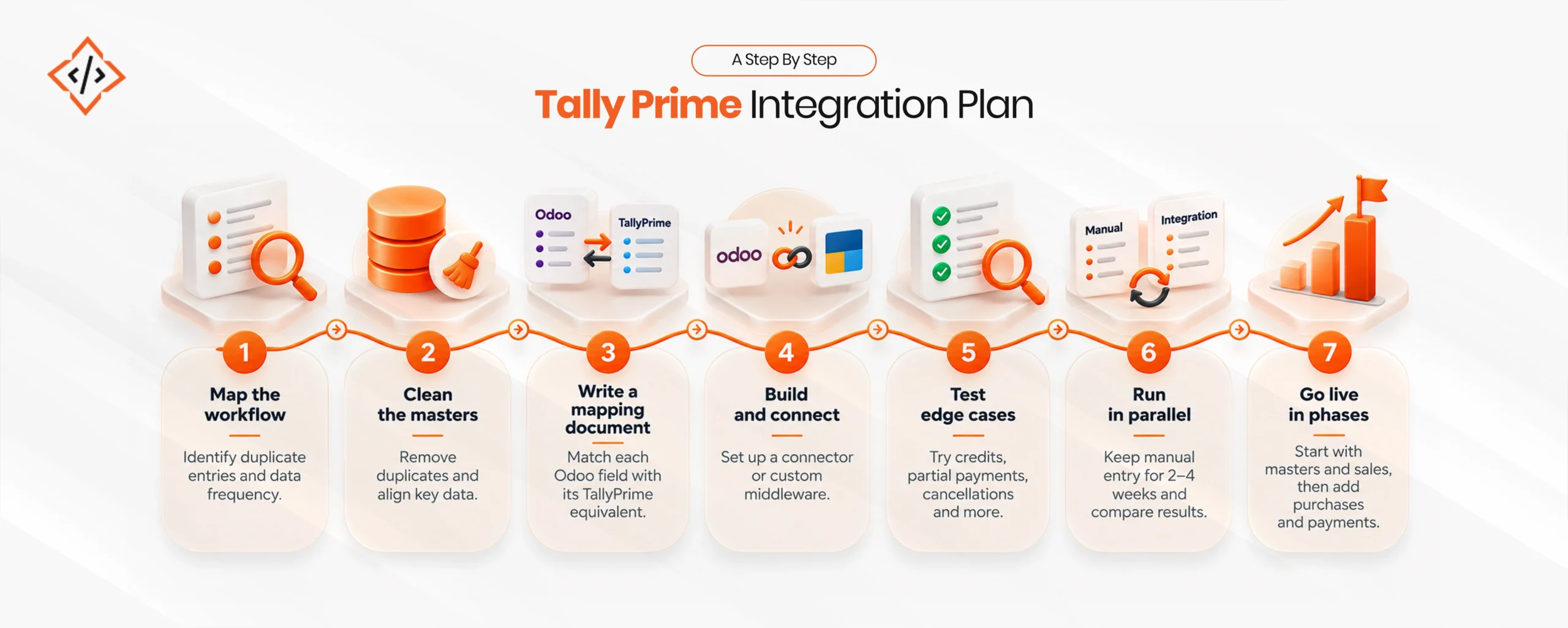
A reliable integration is built in stages. Each stage should be tested with real data before the next one starts.
For ongoing changes, such as new branches, new tax rules, or Odoo version upgrades, many businesses choose to hire an Odoo developer who already understands the integration, instead of starting from scratch each time.
Most integration problems come from data and process gaps rather than from the technology itself. The table below covers the issues that appear most often.
| Challenge | Practical fix |
|---|---|
| Duplicate customers or ledgers | Match records on GSTIN or a unique code, never on name alone |
| Tax ledger mismatches | Keep a fixed tax mapping table and test every GST rate |
| Failed syncs that nobody notices | Use an error queue with email alerts and one-click retry |
| TallyPrime offline during sync | Queue records and retry automatically once TallyPrime is available |
| Edits after posting | Lock synced invoices in Odoo and handle changes through credit notes |
| Version upgrades | Test the integration on a staging copy before upgrading either system |
In addition, security deserves attention. The integration should use a dedicated Odoo user with limited rights, store API keys safely, and avoid exposing TallyPrime’s port to the open internet.
Once these basics are stable, the same integration can support wider business process automation, such as automatic payment reminders, low-stock purchase orders, or daily cash position reports that combine data from both systems.
Odoo and TallyPrime integration gives businesses a practical middle path. Operations teams get a modern ERP, and finance teams keep the accounting system they trust. The outcome depends less on the connector and more on the groundwork: clear data ownership, clean masters, correct GST mapping, and a phased rollout with proper testing.
Businesses that follow this approach replace weekly re-entry and reconciliation with one consistent flow of data. Consequently, a well-planned Odoo and TallyPrime integration becomes a long-term foundation for reporting, compliance, and growth.
 Hardik Soni
 Hardik Soni
 Hardik Soni

 Chand Prakash
 Chand Prakash