






Odoo Development
 Hardik Soni
18 August 2026
Hardik Soni
18 August 2026
Top 6 Odoo Development Companies in the UAE
 Hardik Soni
Accounting teams, regardless of the industry, are experiencing a shift that has been developing for years. Businesses are expanding, compliance requirements are becoming more stringent, and financial data is now linked to nearly every department. Yes, it includes every single department, from operations to HR, sales, and inventories. Yet many firms still depend on QuickBooks as a standalone accounting tool. And while QuickBooks has supported thousands of companies for decades, the reality is that it was never designed to be the “center” of an expanding business.
This is exactly why more finance leaders are choosing to migrate from QuickBooks to Odoo. The change is a shift toward full financial visibility and smarter operations, and not just a simple system upgrade. If your team has been evaluating a QuickBooks to Odoo migration, let’s walk through the real reasons behind this industry movement.
For years, QuickBooks has been the go-to option for SMEs. It’s simple, familiar, and easy to implement. But that simplicity has a limit. QuickBooks was primarily built for bookkeeping.
Odoo, on the other hand, is a full-scale ERP. That means Odoo accounting is part of a much larger operational ecosystem that includes sales, purchasing, inventory, human resources, manufacturing, CRM, and much more. This difference becomes extremely noticeable the moment a business starts scaling.
If you’re an accountant, financial manager, or run a multi-client accounting practice, here’s what this shift truly means for you:
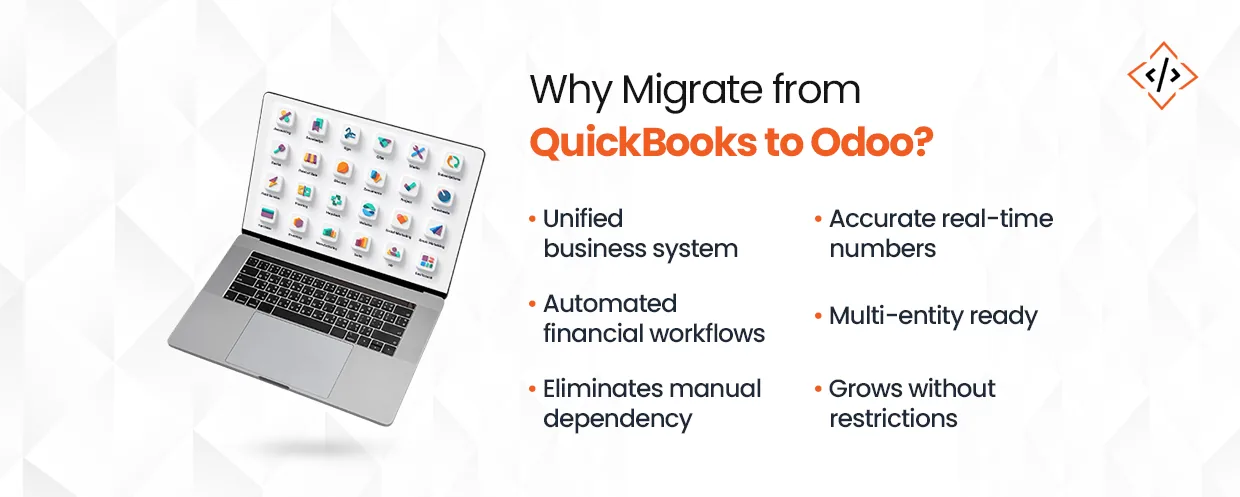
To fill operational gaps, QuickBooks relies heavily on spreadsheets or manual entries. Odoo does not. Once you migrate QuickBooks to Odoo, your accounting becomes part of a connected workflow. Sales orders automatically create invoices, and purchase receipts update the inventory. Moreover, bank reconciliation syncs with cash flow. And audit trails strengthen because information flows inside a single environment instead of jumping between tools.
This is when finance teams start realizing that manual work was never a part of accounting. Instead, it was part of the limitations of the system they were using.
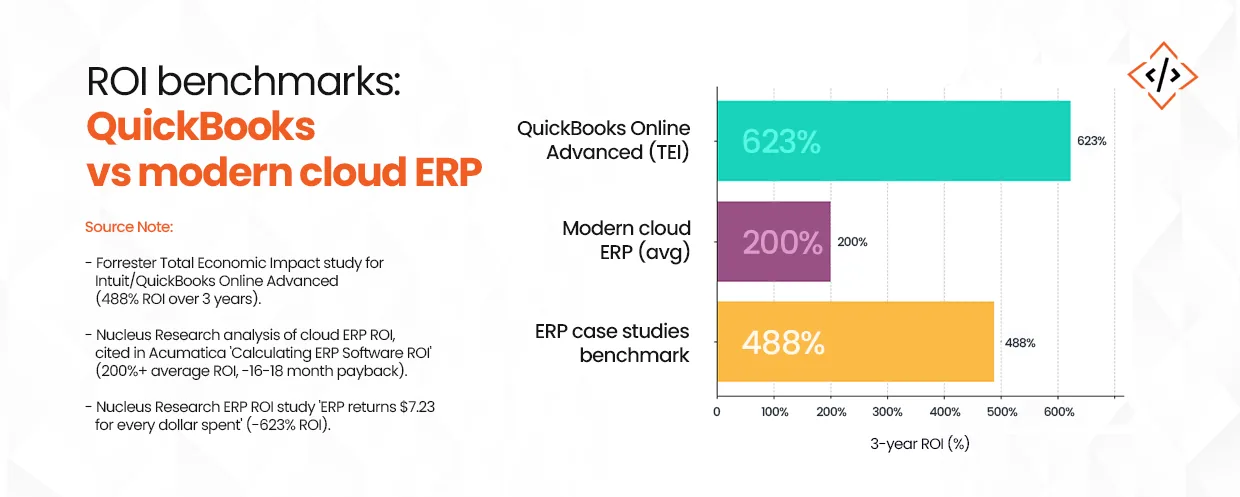
When evaluating accounting tools versus full ERPs, independent research shows clear differences in long-term value. A Forrester study found that businesses using QuickBooks Online Advanced saw 488% ROI over three years through time savings and faster reporting.
But when companies move to integrated ERP systems, the returns often jump higher. Nucleus Research found that ERP investments return $7.23 for every dollar spent—that’s over 600% ROI. Another analysis shows modern cloud ERPs deliver around 200% ROI in under 18 months.
What does this mean for you? QuickBooks works well for basic accounting, but Odoo—as a modern cloud ERP—belongs to the category proven to deliver higher returns when you need to connect accounting with inventory, sales, and operations.
With Odoo, you get an ERP, one that reduces double entry, minimizes reconciliation errors, and also gives you real-time visibility across the business. Yes, your team may need a short onboarding period, but once they settle into the system, the speed difference is noticeable.
And perhaps the biggest advantage of migration from QuickBooks to Odoo is long-term scalability. As your business grows into multi-entity accounting, multiple warehouses, multi-currency operations, intercompany transactions, or more complex revenue cycles, you don’t hit a ceiling. You simply grow within the same platform.
At this point, most finance leaders start thinking, “What is the cost of the QuickBooks to Odoo migration?” QuickBooks to Odoo migrations for small to mid-size businesses normally cost between $5,000 and $20,000, based on 2024–2025 industry benchmarks. It can sometimes be even higher depending on data volume, cleansing effort, multi-company requirements, and customization requirements. However, your migration costs will often be cheaper if your data is more structured.
For many finance professionals, this shift translates into:
Because of this, firms across industries are reevaluating their systems. Moving away from QuickBooks has become a logical next step for companies seeking control and clarity.
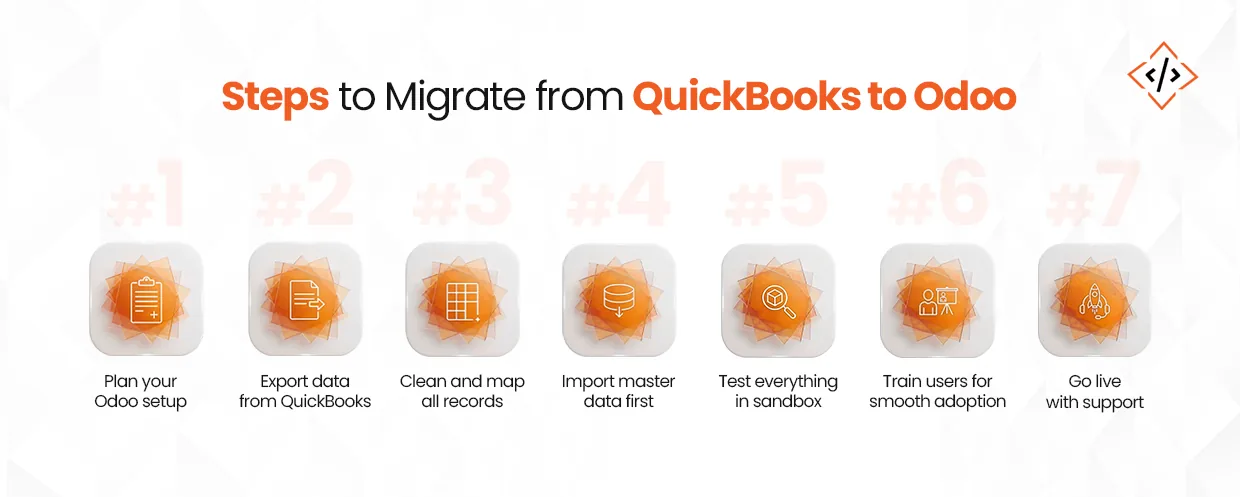
A successful QuickBooks to Odoo migration doesn’t only mean exporting data and importing it somewhere else. It, on a broader note, involves understanding how accounting data behaves inside Odoo and how it connects with the rest of your business processes.
This is also when teams begin asking, how long does an Odoo migration take for a small firm or SME? For most small firms and SMEs, an Odoo migration usually takes 4 to 12 weeks. Smaller datasets move faster. Projects that include historical data, app integrations, or workflow changes take more time. In general, most companies complete the migration within one to three months.
Let’s break it down in a simple, practical sequence.
Every effective migration starts with clarity. But before touching any data, identify:
This early planning ensures that your migration follows your operational structure and not the other way around.
QuickBooks offers standard export paths for most financial datasets. You’ll typically export COA, customers/vendors, items, open invoices, bills, and transactional data. No need to go too technical here; the goal is simply to extract everything your team needs to rebuild a clean accounting foundation in Odoo.
This is usually the point where teams ask whether accounting firms migrate QuickBooks data themselves or whether they should hire a partner. Well, most of the accounting firms can export basic QuickBooks data on their own. However, a full-fledged migration to Odoo is rarely a DIY job. Be it mapping accounts, cleaning historical entries, or validating reports, everything requires technical and functional expertise. That’s why most firms choose to hire an Odoo partner to avoid data gaps, downtime, and post-migration issues.
This is one of the most underrated steps and also the one that defines how smooth your go-live will be.
When teams migrate from QuickBooks to Odoo Project, most of them discover old or unused accounts, inconsistent naming, duplicated customers, or outdated products. Cleaning this data upfront saves time and improves reporting accuracy later.
Data mapping means aligning QuickBooks fields with Odoo fields. For example:
This is where accounting teams start seeing the difference between a bookkeeping tool and a full ERP. Once mapped, your dataset becomes part of a structured financial ecosystem, not a standalone ledger.
To understand how Odoo handles fields, models, and workflows during migration, you can refer to our Odoo development guide.
The rule of thumb is simple. Import master data first, then transactional data. To make that sequence clear, here’s what typically goes in first:
This way, the core structure of your accounting is in place before you migrate any historical activity.
Most migrations also involve a sandbox environment. This is where your team tests the import, validates sample records, and ensures reconciliations behave as expected. It gives you the freedom to experiment without touching live financials.
This is a crucial part of any migration of QuickBooks to Odoo journey.
Odoo works as a connected ERP, which means every module shares data. Because of this, teams need clarity on how information flows when they migrate.
A short training cycle helps your team:
Most firms run a parallel cycle for 2–4 weeks. During this period, finance teams validate entries, reconcile statements, and confirm that system behavior matches expectations.
If your team is testing on Odoo 19, you can review the updates in our Odoo 19 Guide to understand the new workflows more clearly.
Once everything checks out, your team moves into full go-live mode.
During the first month, you’ll have to focus on:
This early support phase ensures that your migration stabilizes quickly and that your accounting team feels confident with Odoo.
If your goal is a smooth, error-free migration, here are common mistakes accounting teams should avoid.
For a structured preparation, refer to the Odoo ERP Migration Checklist.
Migrating from QuickBooks is a turning point for your financial visibility. When you migrate QuickBooks to Odoo, your accounting stops operating on its own and starts working alongside the rest of your systems. Everything connects, so teams see the same numbers and follow the same process.
Odoo offers that balance. The simplicity accountants appreciate, paired with the power and scalability fast-growing businesses need. And with the right guidance, the transition becomes far smoother than most teams expect.
CodeTrade.io is an official Odoo partner helping accounting teams, SMEs, and finance leaders make this shift with confidence, with the best Odoo development services. From data mapping to training to end-to-end support, we ensure your Odoo environment feels structured, reliable, and ready for growth.
If you’re evaluating the move, we can walk you through the process and help you hire Odoo developer.
 Hardik Soni
 Hardik Soni
 Hardik Soni
 Hardik Soni
 Hardik Soni