






AI
 Chand Prakash
21 July 2026
Chand Prakash
21 July 2026
RPA vs AI Agents for Business Automation: Which Is More Cost-Effective?
 Chand Prakash
Finance teams rarely notice invoice inefficiency all at once. It builds through delayed approvals, repeated data entry, missing invoice details, and extra hours spent fixing bookkeeping errors later. A supplier invoice arrives as a PDF, gets entered manually, moves through review, and is checked again before posting.
When that happens hundreds of times each month, the process starts slowing everything around it. This is where Odoo AI invoice automation becomes practical inside day-to-day accounting operations. It reduces repetitive invoice handling while improving visibility across the finance workflow.
According to Ardent Partners’ AP Metrics that Matter in 2025, Best-in-Class AP teams process invoices 82% faster than all other organizations through automation-driven workflows.
For businesses managing finance operations in Odoo, invoice automation is becoming part of accounting efficiency rather than an additional layer of software.
Invoice bottlenecks usually build as invoice volume increases and finance workflows begin carrying more manual work than expected.
Manual invoice entry takes up more finance time than most teams initially expect. Entering invoice numbers, tax values, and vendor details repeatedly pulls attention away from higher-value accounting work. As invoice volume grows, that workload begins to consume a larger share of the finance team’s day.
Invoice approvals often move slower when routing depends on manual follow-up between teams. A pending review can hold an invoice for days before it reaches the next step. These delays affect payment cycles and create unnecessary pressure across accounts payable operations.
Small invoice errors often become larger accounting issues later in the workflow. Duplicate entries, incorrect tax values, wrong vendor mapping, or missed invoice fields can affect reporting and reconciliation. Fixing those errors later usually takes more effort than preventing them during invoice processing.
Invoice visibility becomes harder to manage when status updates are spread across emails, inboxes, and different teams. Accounts payable may be waiting for approval while finance assumes processing is complete. This gap creates confusion and slows decision-making across the workflow.
Odoo AI invoice automation turns invoice handling into a faster accounting workflow by reducing repetitive finance tasks across processing stages.
The process begins when invoices are uploaded into Odoo through email, scan, or document import. The system reads invoice data automatically from supplier bills without requiring manual entry for every field. This is often supported through tailored Odoo development services. It also helps teams reduce manual bookkeeping with AI across everyday invoice processing work.
Odoo OCR invoice processing reads invoice content and extracts the details needed for accounting. This includes supplier names, invoice numbers, due dates, tax amounts, and line-item values. The extracted information is prepared clearly before it moves into the next finance step.
Once invoice data is captured, the workflow continues through validation, internal routing, approval, and accounting review. AI invoice automation in Odoo helps move invoices through these steps with less manual follow-up and fewer delays between teams.
After approval, invoice data moves directly into Odoo Accounting without repeated manual entry across systems. This improves record accuracy and supports Odoo accounting automation through a more connected bookkeeping workflow.
Your invoice workflow already holds the operational data. The opportunity is building a faster process around it. Talk to the CodeTrade team to evaluate where Odoo AI invoice automation can remove manual effort, improve invoice flow, and support stronger accounting efficiency from day one.Your invoice workflow already holds the operational data. The opportunity is building a faster process around it.
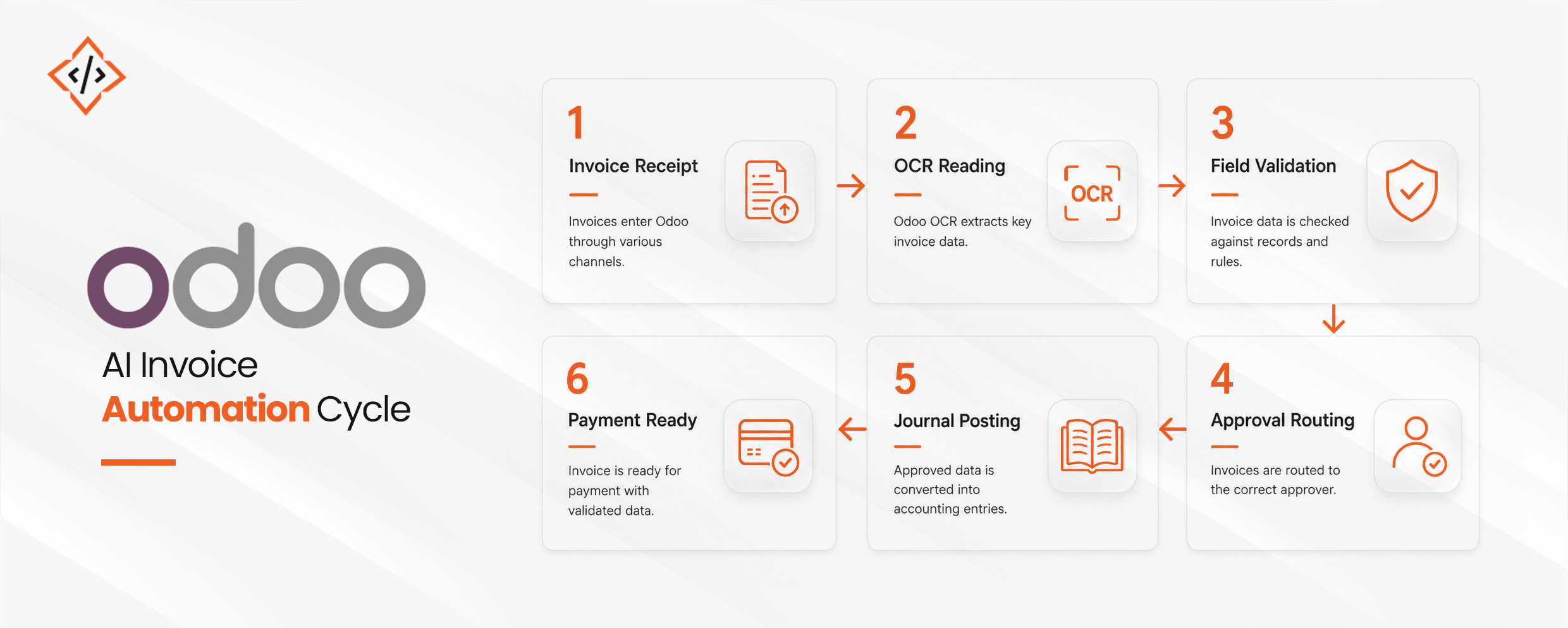
Odoo AI invoice automation follows a structured invoice flow that reduces manual effort across every stage of accounting operations.
The process begins when an invoice enters Odoo through email, file upload, scan, or supplier document import. Finance teams no longer need to collect invoices manually from multiple places before processing begins. This creates a cleaner starting point and helps automate invoice processing Odoo through one connected workflow.
Once the invoice is received, the system reads the document and extracts the required accounting details automatically. Odoo OCR invoice processing helps identify the vendor name, invoice number, due date, tax amount, and the line items. This reduces manual invoice entry and improves consistency across invoice records before review begins.
After extraction, the invoice data is checked against accounting rules already configured inside Odoo. Supplier records, tax settings, invoice references, and duplicate entries are reviewed before approval. This validation step helps catch issues early and supports stronger accuracy across finance operations without adding extra bookkeeping effort.
Validated invoices move to the right reviewer based on the approval logic already used by the business. Many companies hire Odoo developer teams to configure this flow. Routing can follow invoice amount, supplier type, department ownership, or finance policy. AI invoice automation in Odoo keeps invoices moving through approvals without relying on repeated manual follow-up between teams.
Once approved, invoice details are converted into accounting entries inside the system. Journal records are created using the captured invoice data without entering the same information again. This supports Odoo accounting automation and keeps bookkeeping records aligned with the invoice workflow from start to finish.
After posting, the invoice is prepared for payment inside Odoo with the required accounting information already in place. There is less need to recheck entries before the payment cycle begins. This is where AI bookkeeping automation becomes practical by reducing repetitive finance work while keeping invoice processing moving forward.
The biggest impact appears in finance workflows where invoice volume stays high and manual handling continues across multiple steps. This is where AI-powered automation solutions create measurable operational value.
Vendor bills are often the most repetitive part of accounts payable operations. Odoo AI invoice automation helps capture and process supplier invoices faster with less manual effort from finance teams.
Matching invoices against purchase orders and receipts often takes extra review time. AI invoice automation in Odoo helps finance teams verify invoice records with better speed and consistency.
Recurring bills from regular vendors often involve repeated entry of the same invoice details. This helps reduce manual bookkeeping with AI across recurring finance tasks.
Employee reimbursements and expense invoices often arrive from different sources and formats. AI bookkeeping automation helps organize those records before they reach accounting review.
Managing invoices across entities becomes harder as operations expand across locations or business units. Many businesses solve this through Odoo implementation services designed around finance operations. Odoo accounting automation helps keep invoice processing consistent across finance teams, entities, and locations.
Accounting efficiency improves when repetitive bookkeeping work is reduced and finance teams spend more time reviewing than correcting.
Month-end closing becomes smoother when invoice data is already captured and recorded correctly. Teams spend less time chasing missing entries during reconciliation and reporting.
Manual bookkeeping often creates extra work when invoice fields are entered incorrectly or duplicated. AI bookkeeping automation helps reduce rework before those errors reach accounting records.
Clean invoice data creates stronger accounting records across journals, ledgers, and financial reporting. Odoo AI invoice automation improves consistency by reducing manual handling across invoice workflows.
Finance teams often spend hours on repetitive entry that adds little strategic value. This helps teams focus more on review, control, and financial planning.
Clear invoice records make audits easier to manage across finance operations and approvals. Better traceability also supports Odoo accounting automation through stronger documentation and record visibility.
Invoice automation is becoming a practical part of modern finance operations inside ERP systems. As invoice volumes increase, manual bookkeeping creates delays that affect accuracy, approvals, and reporting across the finance workflow.
Odoo AI invoice automation helps businesses process invoices faster while reducing repetitive work across accounts payable. The long-term value comes from cleaner invoice data, fewer manual corrections, stronger visibility, and more efficient accounting operations. It allows finance teams to scale without adding unnecessary operational complexity.
For businesses already running Odoo, AI invoice automation in Odoo is becoming a smarter way to improve accounting efficiency while keeping finance processes structured, accurate, and ready for growth.
At CodeTrade, Odoo AI invoice automation is built around real finance workflows and practical accounting use cases. The team helps businesses design solutions that fit existing Odoo environments, improve bookkeeping efficiency, and perform reliably across day-to-day finance operations.
 Chand Prakash
 Chand Prakash
 Hardik Soni
 Chand Prakash
 Chand Prakash