





AI
Odoo Development
 Hardik Soni
28 October 2026
Hardik Soni
28 October 2026
Top Odoo Modules for AI & Automation: Best Apps for Business
 Hardik Soni
If you sell on Magento 2 and run your business on Odoo, you have probably seen the two systems disagree.
A product shows in stock online, but the warehouse is empty. A refund goes through in Magento, but accounting never sees it. Each mismatch is small. Across thousands of orders, though, they cost you sales and hours of cleanup.
Getting stock right matters more than most teams think. IHL Group’s 2026 Inventory Distortion Study puts the cost of out-of-stocks and overstocks at $1.7 trillion a year, or 6.2% of global retail sales.
An Odoo Magento 2 connector fixes the gap between your store and your back office. This guide shows you what it does, how to prepare, how to set it up, and how to keep it working.
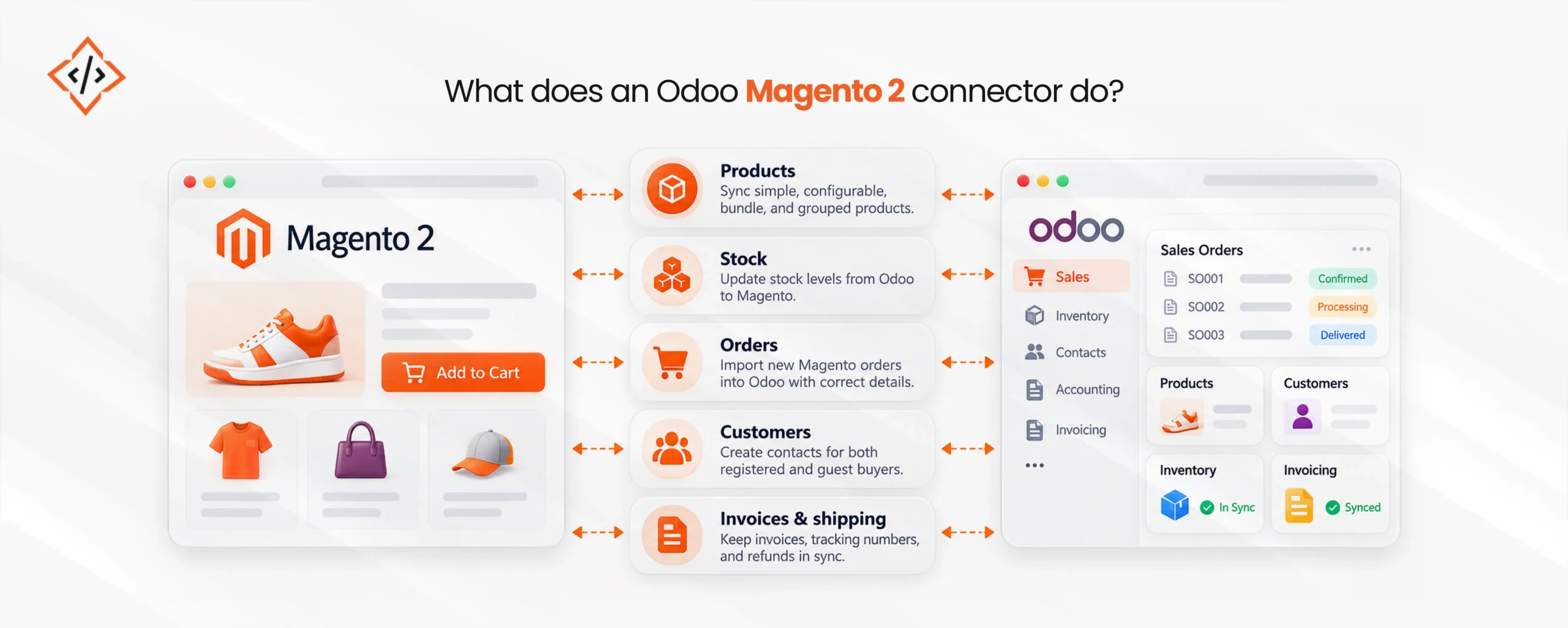
An Odoo Magento 2 connector is a module that links your Magento store to your Odoo database. It reads data from Magento, turns it into the format Odoo uses, and keeps both sides updated.
A typical Odoo Magento 2 integration handles five jobs:
In short, you get Magento order automation from checkout to invoice. Your team only steps in when something looks wrong.
Magento and Odoo use different names for the same things. This table shows how the main records line up.
| In Magento | In Odoo | Watch out for |
|---|---|---|
| Simple product | Product variant | Every SKU must be unique |
| Configurable product | Product template | Only the child products hold stock |
| Attribute set | Product attributes | Choose which attributes create variants |
| Inventory source | Warehouse | Match one source to one warehouse |
| Customer group | Pricelist | Keeps B2B prices the same |
| Tax class | Tax | Must follow each store's tax rules |
| Order | Sale order | Payment method links to a journal |
| Credit memo | Credit note | Always test refunds |
Next, decide which system is in charge of each piece of data, such as prices or stock. For more on this, read this guide to Magento Odoo integration architecture.
Your Magento Odoo integration can only be as clean as your data. Before you start, check these points:
Once your data is ready, setup follows a clear order:
No promo block found for ID 1
Testing decides whether your Odoo ERP Magento integration works on day one. Run these checks on your test site:
| Test | What Odoo should do |
|---|---|
| Order for a configurable product | Reserve the child product, not the parent |
| Order from a B2B customer | Apply that customer group's price |
| Partial shipment | Send tracking back to Magento |
| Full refund | Create a credit note and return the stock |
| Order in another currency | Use that website's currency and tax |
If a test fails, fix the setup before you move on. A mistake caught now takes minutes. The same mistake found in your books months later takes days.
Odoo inventory synchronization is the part that needs the most care. In most setups, Odoo holds the true stock count and sends it to Magento.
Magento can track stock in several places at once, such as a main warehouse and a regional hub. This feature is called Multi Source Inventory. Match each Magento source to one Odoo warehouse, so stock changes in Odoo update the right place online.
You will notice that the two systems sometimes show different numbers. That is normal. Magento subtracts stock that is reserved for open orders, while Odoo shows what is physically on the shelf. Getting this right pays off. The Pygmalios State of Retail 2026 report found that fixing stock record errors raised sales by 4% to 8% in controlled tests.
Many businesses run separate Magento websites for different countries or brands. One Odoo database can handle all of them. Each website gets its own currency, pricelist, tax rules, and warehouse, while every order ends up in the same Odoo system.
This makes Magento 2 order management much simpler. You can compare all your stores in one report instead of merging spreadsheets.
If you sell in the Gulf, check a few extra details. Each Magento website can use its own currency, such as AED or SAR, and orders should arrive in Odoo in that currency. Your tax classes also need to match each country’s VAT rate.
For Saudi Arabia, Odoo’s Saudi localization supports ZATCA e-invoicing for invoices created from your Magento orders. If you run an Arabic store view, make sure product names and descriptions sync to that store view too.
Magento runs on your own server, so heavy syncing can slow things down for shoppers. These habits help:
If your store is already slow, fix that first. A team offering Magento 2 development services can review your hosting, caching, and indexing before you add sync traffic.
Magento 2 ERP integration needs regular checks, especially in the first few weeks. Look at these every day:
Small problems are quick to fix in week one. Left alone, they turn into a big cleanup at month-end.
A standard Magento 2 Odoo connector works for most stores. Some businesses need more, for example, custom product types, complex B2B pricing, marketplace orders coming through Magento, or a link to a separate warehouse system.
In that case, Odoo integration services can extend the connector or build what is missing, so your Odoo eCommerce integration fits the way you sell.
An Odoo Magento 2 connector brings your store and your back office together, from product listing to stock, orders, invoices, and refunds. Most of the work happens before launch: clean SKUs, clear setup, and thorough testing.
After that, daily checks keep both systems in step as you grow. If you need help with setup or custom modules, experienced Odoo development services can get it right the first time.
No promo block found for ID 2

 Hardik Soni
 Chand Prakash
 Hardik Soni
 Hardik Soni
 Hardik Soni