






Odoo Development
ERP
 Hardik Soni
22 October 2026
Hardik Soni
22 October 2026
Odoo Amazon integration: How to connect your Amazon store with Odoo ERP
 Hardik Soni
Most Amazon sellers do not plan an ERP integration. Instead, they reach a point where daily work quietly stops keeping up with sales. Orders take longer to process, stock counts drift, and month-end closing stretches into weeks.
The pace on Amazon makes that point arrive sooner than expected. According to Amazon’s 2025 Small Business Empowerment Report, independent sellers in the US sold more than 4.6 billion items in 2025, or over 8,900 every minute. At that speed, even small gaps between Amazon and the back office grow fast.
The seven signs below help you decide whether Amazon and Odoo integration should be on this quarter’s plan rather than next year’s.
Odoo Amazon integration links Amazon Seller Central with Odoo so that orders, stock levels, and shipping updates move between them automatically. In effect, Odoo becomes the operating system behind your Amazon store.
An Odoo Amazon connector handles the routine work that teams usually do by hand. It imports orders, matches each Amazon SKU to an Odoo product, updates stock, and confirms shipments back to Amazon.
With that in mind, here are the signs that show your business has outgrown manual processes.
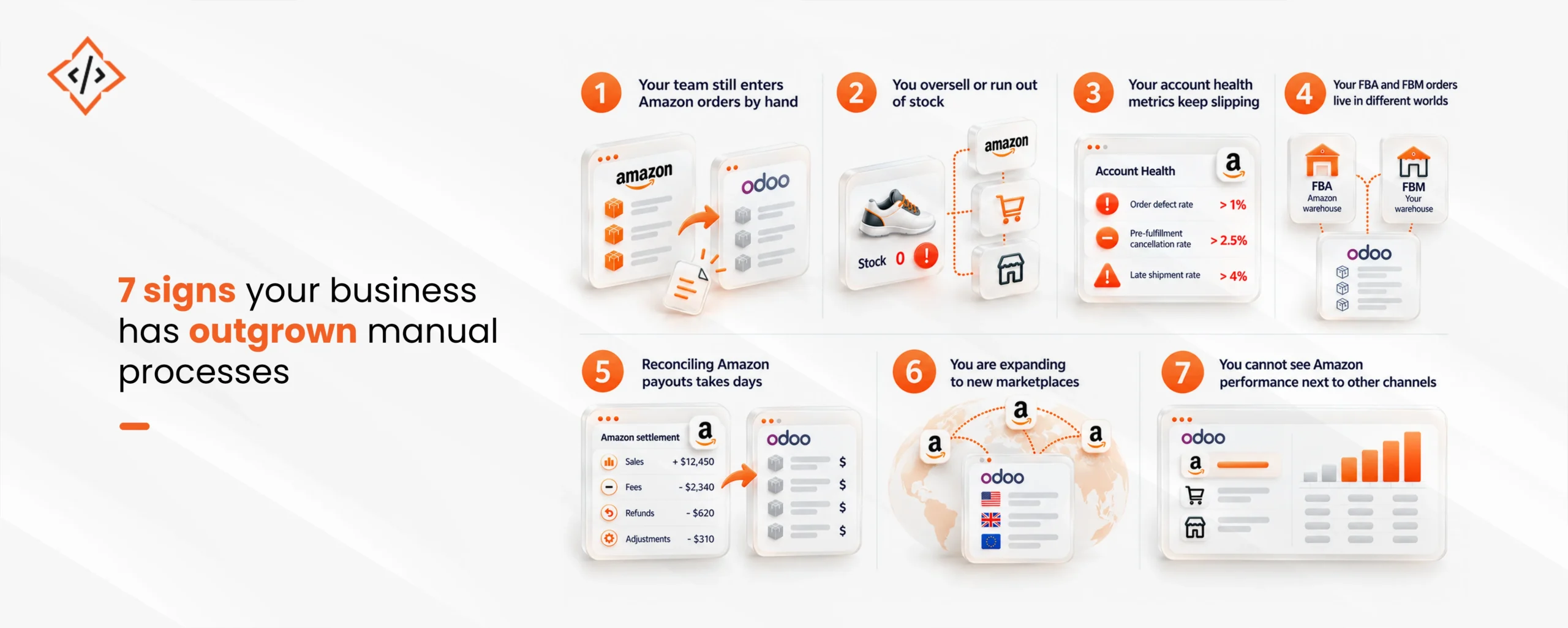
If someone downloads Amazon orders and retypes them into Odoo every day, integration is overdue. Manual entry slows fulfillment and invites typing errors in addresses, quantities, and prices.
Watch for these warning signs:
Amazon order automation removes this step entirely. Orders sync into Odoo on a schedule and arrive as ready-to-ship sales orders, so teams handle exceptions instead of routine entry.
Overselling happens when Amazon shows stock that your warehouse no longer has. This usually means stock updates depend on someone remembering to change numbers in Seller Central.
The risk grows when you sell the same products on your website, in retail stores, or on other marketplaces. Each channel draws from one shelf, yet each shows its own count.
Odoo inventory synchronization fixes this by treating Odoo as the source of truth. When stock changes in Odoo, the connector updates Amazon, which keeps every channel aligned with real warehouse levels.
Account health is the clearest warning light for Amazon sellers. Under Amazon’s seller performance policy, sellers must keep their order defect rate under 1%, pre-fulfillment cancellation rate under 2.5%, and late shipment rate under 4%.
Many of these problems trace back to disconnected systems. For example, cancellations rise when stock data is wrong, and late shipments rise when tracking numbers reach Amazon hours after dispatch.
An Amazon seller integration with Odoo addresses the operational causes:
Many sellers use Fulfillment by Amazon for fast movers and ship slower items themselves. As a result, FBA stock sits in Amazon warehouses while FBM stock sits in their own, and neither view is complete.
This split makes purchasing harder. Buyers cannot see total stock across both models, so they either over-order or miss reorder points.
Odoo Amazon marketplace integration brings both models into one view. FBA stock appears in a dedicated Odoo location, while FBM orders flow through your normal pick, pack, and ship process. Consequently, purchasing teams plan from one accurate picture.
Amazon pays sellers in settlements that bundle sales, fees, refunds, and adjustments together. Matching these to individual orders by hand is slow, and finance teams often close the month without knowing true margins per product.
If your accountants export settlement reports into spreadsheets every cycle, that is a strong signal. Odoo ERP integration for Amazon sellers can post fees, commissions, and refunds to the right accounts, which turns reconciliation into a review task.
Selling in one Amazon marketplace is manageable with workarounds. However, adding a second or third region multiplies currencies, tax rules, and fulfillment settings.
Typical growing pains include:
An Odoo Amazon connector manages several marketplaces under one account, so expansion does not mean a new spreadsheet for every country.
If answering “how did Amazon do compared to our website last month?” takes a day of exports, your reporting has fallen behind. Leaders need that view to decide where to invest stock and ad spend.
Odoo eCommerce integration places Amazon sales beside website, retail, and wholesale orders in the same reports. Better still, Odoo order management then tracks every order the same way, regardless of where it came from.
Once you spot two or more of these signs, start with a short audit before choosing any tool. A clear picture of your data and workflows prevents a rushed setup that creates new problems.
A practical starting sequence looks like this:
A standard connector is enough when your catalog is clean and your needs center on orders and stock. Custom work makes sense when Amazon data has to drive finance, purchasing, or approval workflows.
Odoo provides an official Amazon Connector that syncs orders, matches products by SKU, and handles both FBA and FBM. For many sellers, that covers the first stage of Amazon Odoo integration well.
Growing sellers, however, often need more depth. Settlement posting, custom stock rules, or links to business process automation across departments usually call for tailored development. In those cases, specialist Odoo integration services help design the right setup, and teams can hire Odoo developers to extend it as the business grows.
Each of these seven signs points to the same root cause: Amazon and the back office run on separate data. Manual entry, stock gaps, slipping metrics, and slow reconciliation are symptoms of that split.
Therefore, the sooner Odoo Amazon integration is in place, the less these problems cost. Sellers who connect early protect their account health, close their books faster, and gain a clear view of every channel.
 Hardik Soni
 Hardik Soni
 Hardik Soni
 Hardik Soni
 Hardik Soni