






Odoo Development
 Hardik Soni
22 October 2026
Hardik Soni
22 October 2026
7 signs you need Odoo Amazon integration now
 Hardik Soni
Selling on Amazon is rarely the hard part. Instead, the pressure shows up after the sale, when orders, stock levels, and payouts have to match what the rest of the business records. Many sellers still copy Amazon orders into their ERP by hand or reconcile stock in spreadsheets at the end of each day.
That approach breaks as volume grows. According to the Amazon 2025 Small Business Empowerment Report, more than 75,000 independent sellers passed $1 million in sales in 2025, a 36% increase from 2024. At that scale, a single stock mismatch can mean overselling, cancelled orders, and a hit to account health.
This guide explains how Odoo Amazon integration works, what it syncs, and how to set it up without disrupting daily operations.
Odoo Amazon integration is a connection between Amazon Seller Central and Odoo ERP that moves orders, inventory, and fulfillment data between the two systems automatically. As a result, sellers manage Amazon sales from the same place as their purchasing, warehouse, and accounting work.
Without integration, Amazon works as a separate island. Orders arrive in Seller Central, but stock, invoices, and customer records live in Odoo. Teams then spend hours keeping the two aligned, and errors creep in at every handoff.
An Odoo Amazon connector closes that gap. It uses Amazon’s Selling Partner API to pull data into Odoo and push updates back to Amazon. In practice, Amazon and Odoo integration turns Odoo into the single record for Amazon orders, stock, and revenue.
An Odoo Amazon connector syncs orders, products, stock, and fulfillment status between Amazon and Odoo. The exact scope depends on the connector, but most cover the same core data.
Based on Odoo’s official Amazon Connector features, the main sync points include:
Together, these features deliver Odoo inventory synchronization and Amazon order automation without manual data entry.
Amazon sellers should integrate Amazon with Odoo to stop overselling, cut manual order entry, and see true profit per channel. The benefits grow as order volume and the number of sales channels rise.
Amazon itself is investing heavily in seller tools. Its 2025 Small Business Empowerment Report notes that independent sellers created more than 12 million listings with generative AI in 2025. Faster listing creation, however, only adds pressure on the back office that fulfills those orders.
Key benefits of Odoo ERP integration for Amazon sellers include:
In short, Amazon seller integration with Odoo turns a busy sales channel into a predictable part of daily operations.
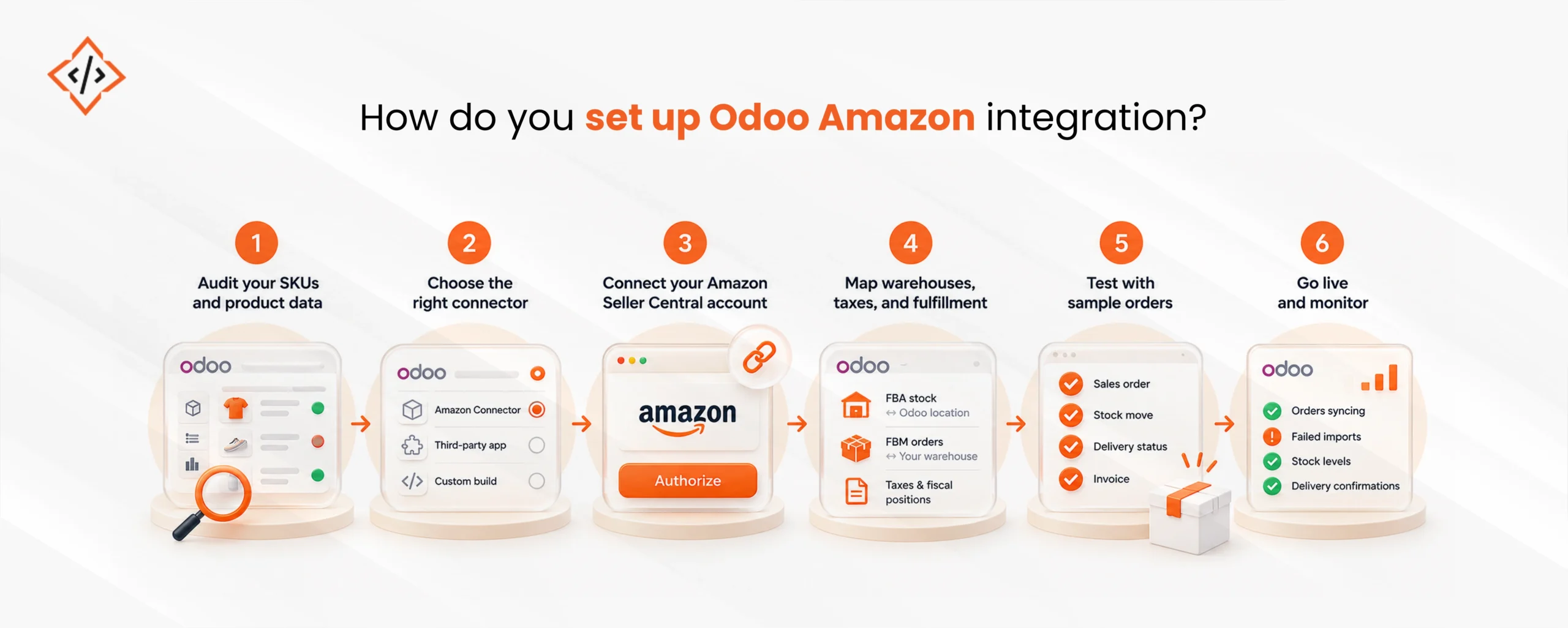
You set up Odoo Amazon integration by cleaning product data, choosing a connector, linking your Seller Central account, and testing with real orders before go-live. The steps below keep the rollout controlled.
First, confirm that every Amazon SKU matches an internal reference in Odoo. Duplicate or missing SKUs are the most common cause of failed order imports, so fixing them early saves rework later.
Next, decide between Odoo’s native Amazon Connector, a third-party app, or a custom build. The choice depends on your marketplaces, fulfillment model, and how much financial data you need in Odoo.
Then, authorize the connector with your Seller Central credentials through Amazon’s Selling Partner API. After that, select the marketplaces you sell in and set how often orders should sync.
After connecting, map FBA stock to a dedicated Odoo location and FBM orders to your own warehouse. Also confirm tax rules and fiscal positions for each marketplace, because cross-border sales often need different settings.
Before go-live, sync a small batch of orders and check each one end to end. Review the sales order, stock move, delivery status, and invoice to confirm that Odoo order management behaves as expected.
Finally, switch on automatic sync and watch the first few days closely. Track failed imports, stock gaps, and delivery confirmations, and fix mapping issues as they appear.
A standard connector suits sellers with simple catalogs and one or two marketplaces, while a custom integration suits sellers with complex fulfillment, many marketplaces, or heavy reporting needs. Most growing sellers start standard and extend later.
Odoo’s native connector covers the essentials of Odoo Amazon marketplace integration well. However, some businesses need more, such as settlement reconciliation, FBA inbound shipment tracking, returns handling, or links to third-party logistics systems.
A standard connector usually fits when you have:
A custom integration usually fits when you need:
In either case, experienced Odoo integration services reduce setup risk, especially during mapping and testing. Teams without in-house capacity can also hire Odoo developers to extend a connector as needs grow.
Amazon rewards sellers who ship fast and keep stock accurate, yet both depend on what happens behind the storefront. When orders, inventory, and invoices live in separate systems, small errors turn into cancellations and lost margin.
Therefore, Odoo Amazon integration gives sellers one reliable record for every Amazon sale. Start with clean SKUs, pick a connector that matches your fulfillment model, and test before going live. With that foundation in place, Amazon becomes a channel the whole business can plan around.
 Hardik Soni
 Hardik Soni
 Hardik Soni
 Hardik Soni
 Hardik Soni