






AI
Odoo Development
 Hardik Soni
19 October 2026
Hardik Soni
19 October 2026
Odoo 20 Native MCP Server: How AI Agents Connect to Odoo Data
 Hardik Soni
If the pipeline is already automated, why do releases still feel slow? Usually because the hardest parts were never scripted. Someone still has to work out why a test failed and decide which alert matters.
That is the gap AI fills. According to Google’s 2025 DORA report, 90% of technology professionals now use AI at work, and for the first time, the research links that adoption to higher delivery throughput. However, the same report found that AI still drags on delivery stability. Faster teams also ship their weak spots faster.
This guide walks through testing, deployment, and monitoring. It also covers three questions that often go unanswered: which type of tool to choose, how AI fits older and hybrid systems, and what data residency means for an AI-assisted pipeline.
AI in DevOps automation applies machine learning and large language models to the data a delivery pipeline already produces, such as code changes, test results, logs, and deployment history. The AI reads that data and returns a summary, a prediction, or a recommended action.
Classic automation is predictable. A rule fires at 90% CPU, a script restarts a service, and a failed test blocks a merge. AI adds interpretation on top. For example, it can read a long build log and point to the failing dependency or notice that latency looks wrong for a Tuesday morning even though no threshold was crossed.
Three layers often get mixed up:
Each layer needs a different level of trust. Teams that work across all of them often pair off-the-shelf tools with custom models through AI development services shaped around their own stack.
AI-driven software testing uses code diffs, past results, and defect history to choose which tests to run, draft new ones, and explain failures. Testing usually pays off first, because its inputs are clean and its results are easy to measure.
Useful capabilities in automated software testing include:
There is one catch to watch. Generated tests can mirror the code they test, so they pass because they assert what the code already does. Mutation testing helps here. It seeds small bugs into the code, and a useful test should fail when it meets one.
AI in CI/CD pipelines helps teams judge release risk, watch rollouts, and decide when to roll back. Because a wrong call here reaches customers, deployment is where AI should stay the most advisory.
The DORA finding on stability explains why. AI can push more change through a pipeline than its tests and reviews were built to handle. Therefore, AI-powered deployment automation needs to protect stability, not only add speed.
Practical uses include:
Two rules keep this safe. First, missing data should raise a release’s risk rating, never lower it. Second, if the AI says continue while the error budget says stop, the error budget wins.
AI-powered monitoring learns what normal looks like for each service and flags departures from it, instead of firing on fixed thresholds. AI for incident management then groups related alerts, ranks likely causes, and drafts status updates while engineers work on the fix.
The payoff shows up as time saved. According to IBM’s 2025 Cost of a Data Breach Report, organizations that used AI and automation extensively in security operations saved an average of $1.9 million per breach. They also cut the breach lifecycle by 80 days on average.
Good results depend on telemetry more than on the model. Structured logs, trace IDs that follow each request across services, and a current dependency map give AI something solid to reason over. Without them, it guesses from noise.
A sensible split for AI in cloud operations is simple. Read-only investigation, such as pulling logs and building a timeline, can be automated early. Anything that changes production, such as restarting services or editing configuration, should wait for a named approver. Purpose-built incident agents from AI agent development suit this model well, since their permissions can be scoped to exactly that boundary.
Tool lists are easy to find. The harder question is which kind of tool fits the problem. In practice, AI-powered DevOps automation comes from one of three sources.
To decide, look at where the problem’s data lives. If it sits inside one tool, try that tool’s AI first. If it spans code, tickets, logs, and deployment history, a custom layer is usually the better investment.
Yes, although the starting point differs. Most AI DevOps advice assumes containerized microservices on Kubernetes. Plenty of businesses run a large monolith, an ERP like Odoo with custom modules, or a mix of cloud and on-premise servers.
These setups have their own pain points. Releases tend to be bigger and less frequent, and logs are often unstructured. For these environments, good entry points include:
None of these require rebuilding the architecture first, which makes them a practical way to start.
The main risks are unstable releases, flawed AI-written code, agents with too much access, and sensitive data leaving the environment. Each one can be managed with controls most engineering teams already use.
Trust is still low. The 2025 DORA report found that 30% of respondents have little or no trust in AI-generated code. Access control is a bigger worry, since IBM’s 2025 research found that 97% of organizations with an AI-related breach lacked proper AI access controls.
Core guardrails include:
Data residency gets less attention than it should. Code, logs, and production telemetry often contain customer data, and sending them to an external model can conflict with local data protection rules. Companies operating in the UAE, Saudi Arabia, or the EU should confirm where each AI tool processes data. Where needed, they can use regional hosting or self-hosted models and mask personal data before it reaches any prompt.
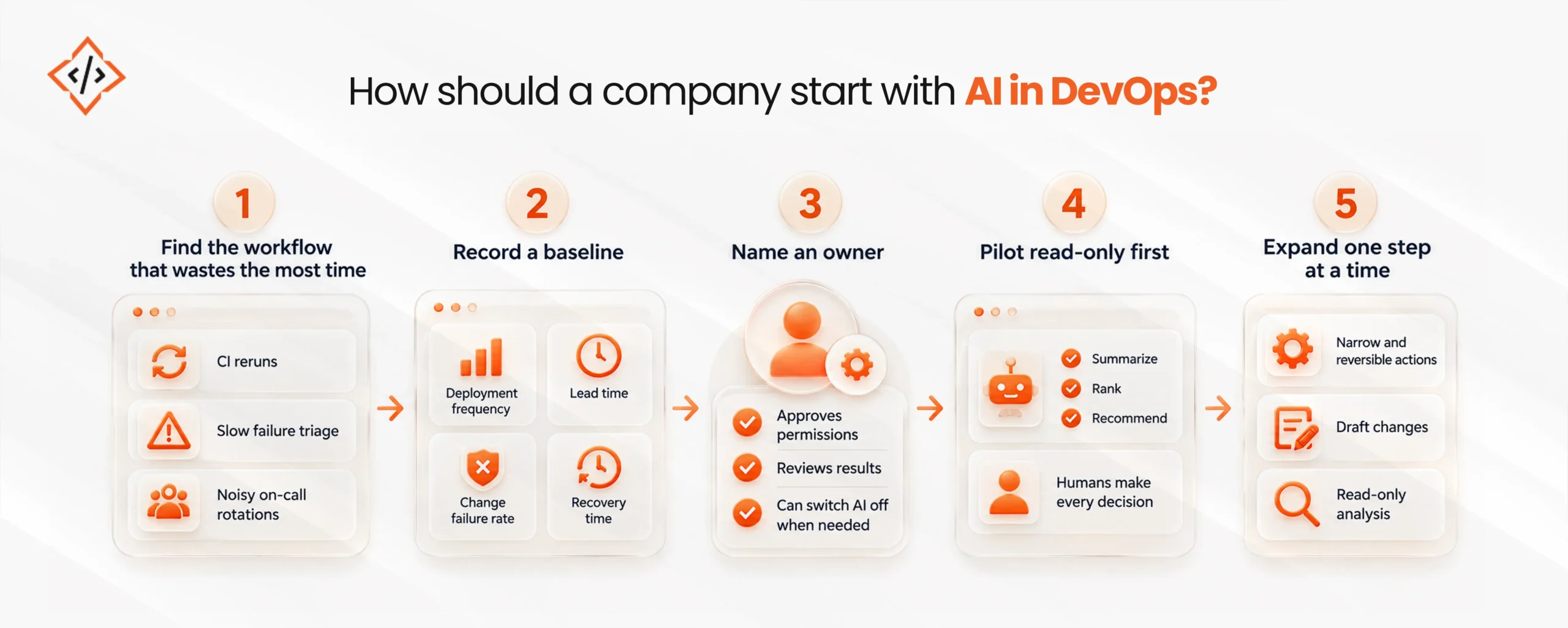
A company should start small, measure honestly, and widen AI permissions only when the evidence supports it. The steps below keep the rollout controlled.
First, look for repeated pain, such as CI reruns, slow failure triage, or noisy on-call rotations. Then pick just one to work on.
Next, capture current DORA metrics, including deployment frequency, lead time, change failure rate, and recovery time. Task-level numbers like test feedback time or weekly alert volume help too.
AI in the pipeline needs a clear owner, usually the platform or DevOps lead. That person approves permissions, reviews results, and can switch the AI off when needed.
After that, let AI summarize, rank, and recommend while people make every decision. Along the way, track how often its recommendations match what happened.
Finally, move from read-only analysis to drafting changes, then to narrow and reversible actions. Over time, DevOps workflow automation can connect with wider business process automation, so releases, approvals, and customer updates move together.
AI makes strong pipelines faster and exposes the gaps in weaker ones, which matches what the DORA research found. Clean data, solid tests, and clear ownership come first.
The teams getting real value treat AI as an analyst first and an operator later. They choose tools based on where their data lives, keep sensitive data inside the right borders, and hand over control one reversible step at a time.

 Hardik Soni
 Chand Prakash
 Chand Prakash
 Chand Prakash
 Chand Prakash