AI, Odoo Development 19 October 2026Odoo 20 Native MCP Server: How AI Agents Connect to Odoo Data
Key takeaways:
- The Odoo 20 MCP Server is a built-in module (ai_mcp) that turns your Odoo database into an endpoint AI agents can talk to at /mcp.
- AI clients such as Claude or ChatGPT connect with an API key that carries the MCP scope, then call the tools Odoo makes available.
- Read-only tools are on from the start, and any tool that changes data has to be switched on by an admin.
- Every request runs as the key’s Odoo user, so access rights and record rules decide what the agent can see.
- Odoo 20 Enterprise teams gain the most, while Community or older versions still need a third-party connector.
The Odoo 20 MCP Server is a built-in feature that lets AI agents read and act on Odoo data through one standard connection. MCP, short for Model Context Protocol, is an open standard that defines how AI tools such as Claude or ChatGPT talk to business software. With Odoo 20, the ERP itself works as the MCP server, so no separate bridge or middleware is needed.
Before this release, connecting an AI agent to Odoo meant running a custom script or a third-party connector, usually over XML-RPC, with its own credentials to manage. The native server moves that connection, and its security, inside Odoo. This blog explains what Odoo shipped, how AI agents connect to Odoo data, where the feature is most useful, and what teams should set up first.
Key numbers at a glance:
AI agents are moving quickly into everyday business software. Gartner expects 40% of enterprise apps to include task-specific AI agents by the end of 2026, up from under 5% in 2025, and ERP systems are part of that shift.
Software vendors are responding by building MCP support directly into their products. Forrester predicts that 30% of enterprise app vendors will launch their own MCP servers in 2026, which places Odoo among the early movers.
However, speed of adoption does not guarantee results. Gartner also predicts that over 40% of agentic AI projects will be canceled by the end of 2027 due to rising costs, unclear business value, or weak risk controls. For this reason, access control matters as much as the connection itself.
What Odoo actually shipped in version 20
Odoo 20 Enterprise includes a native MCP server as part of its AI app. According to the official Odoo documentation, the database acts as a remote MCP server, and an external AI agent connects to it to run tools such as reading data or editing records.
Here is what the native MCP server Odoo provides out of the box:
- One endpoint: The address is your database URL plus /mcp, for example, https://example.odoo.com/mcp.
- Scoped keys only: The bearer token comes from an API key created with the MCP scope, which each user sets up in their Odoo Preferences.
- Tools built from server actions: Odoo exposes server actions as AI tools, and admins decide which of them the MCP client can see and use.
- A cautious default: Read tools are exposed by default, and write tools must be exposed by hand.
How AI agents actually talk to Odoo data
The Model Context Protocol Odoo uses follows the standard MCP pattern, so any compliant client can connect. Claude, ChatGPT, Cursor, and similar tools all speak the same language. The flow looks like this:
- The AI client connects to the /mcp endpoint with the MCP-scoped key in its header.
- It asks the server which tools are available, and Odoo returns the server actions exposed to MCP.
- A user asks a question in plain language, such as “Which customers have invoices overdue by 60 days?”
- The model picks the right tool, and the client asks Odoo to run it.
- Odoo runs the server action as the user who owns the key, then returns the result to the agent.
Step five is the one that matters. Because the action runs as a real Odoo user, every access right and record rule still applies. In other words, an agent can only see what its key owner can see. Hand an administrator’s key to a chatbot, and you have given the chatbot administrator access.
This is why the Odoo MCP API feels different from older integrations. Previously, the bridge decided what the agent could touch. Now Odoo decides, using the same permission model your auditors already understand.
Why the middleware layer just lost its job
Before version 20, every MCP server for Odoo was a third-party layer. Packages and modules on the Odoo Apps Store translated agent calls into Odoo’s external API, often over XML-RPC. Each of those bridges added a server to patch, a credential to rotate, and a log to check.
Still, honesty matters here. Third-party connectors keep real value in a few cases:
- Community edition or older versions: The native server lives in the Enterprise AI app. Teams on Odoo 16 to 19 or on Community still need a module or an external bridge.
- Several databases at once: Some open-source servers handle multiple Odoo instances from one process, which suits agencies and multi-company groups.
- Heavier governance: Commercial modules add OAuth 2.1, audit logs, rate limits, and IP allowlists on top of basic access.
Governance still applies with the native server. It shortens the path between the agent and the data, but teams still need clear rules on who can connect, which tools are exposed, and how agent activity is reviewed.
Where Odoo AI automation pays off first
The strongest early wins come from read-only questions that used to need a report or an analyst. Because the default tools only read, these cases carry little risk. They also show value within a week.
- Sales managers: Ask for the open pipeline by stage and get an answer in seconds, instead of building a filtered list view.
- Finance teams: Pull overdue receivables, unpaid vendor bills, and cash position without exporting to a spreadsheet.
- Operations leads: Check stock levels and late deliveries across warehouses in one prompt.
- Service teams: Review open helpdesk tickets for a customer before a call.
Once trust builds, the right tools come next. A server action that creates a CRM lead, drafts a quotation, or logs a note on a record can be exposed to MCP with a single checkbox. This is where Odoo 20 automation starts to change daily work, since the agent moves from answering questions to finishing small tasks.
Even so, start narrow. Expose one write tool, watch how people use it for two weeks, then add the next. The teams that rush every action into MCP on day one are usually the same teams that end up in Gartner’s cancellation statistics.
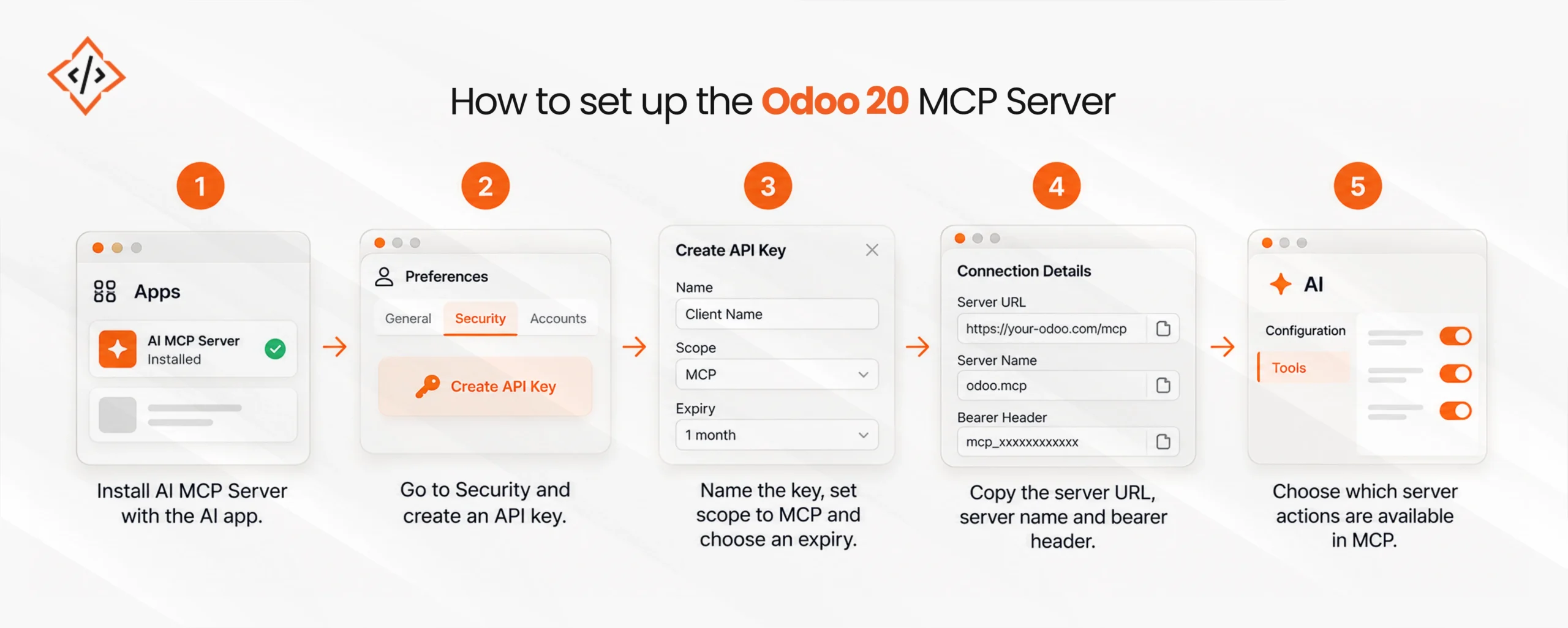
How to set up the Odoo 20 MCP Server

The technical steps for Odoo 20 AI integration are short. Based on the official documentation and Octura’s walkthrough, the process runs as follows:
- Open Apps and confirm the AI MCP Server module is installed alongside the AI app.
- Go to your user Preferences, open the Security tab, and click Create API Key.
- Name the key after the client, set the scope to MCP, and choose an expiry, such as one month.
- Copy the server URL, server name, and bearer header that Odoo shows once, then add them to your AI client.
- Under AI > Configuration > Tools, decide which server actions are available in MCP.
The harder work is deciding who and what the agent represents. These habits keep an Odoo ERP AI integration under control:
- Use a dedicated integration user: Give it only the groups the agent needs, rather than borrowing a manager’s account.
- Issue one key per client: If Claude and a second tool share a key, you cannot tell their actions apart or revoke one safely.
- Keep expiry short: A one-month key forces a regular review of whether the connection is still needed.
- Check for duplicate MCP surfaces: The native module auto-installs on Enterprise 20 databases with the AI app active. If you also run a third-party gateway, you may have two live endpoints.
Limits of the native MCP server
The native endpoint is excellent at one job, which is letting a general AI assistant read and act on Odoo data. It is less suited to agents that coordinate work across Odoo, a CRM, a data warehouse, and an email platform. Those systems need orchestration, memory, and approval flows that sit outside the ERP.
This kind of work is growing fast. Gartner predicts that at least 15% of day-to-day work decisions will be made autonomously through agentic AI by 2028, up from 0% in 2024. MCP has also settled as a shared standard after Anthropic donated it to the Agentic AI Foundation under the Linux Foundation in December 2025.
For multi-step Odoo AI agent integration, the native server becomes one building block among several, usually paired with custom Odoo development. The agent still connects through /mcp, but custom logic decides when to read, when to write, and when to ask a human first. That design work is where AI agent development earns its cost, and it is worth reviewing the wider set of Odoo 20 AI features before you plan it.

Ready to connect agents to your Odoo data?
Put Odoo 20 AI agents to work on your real business data, with security built in from day one.

FAQs
The Odoo 20 MCP Server is a built-in module, ai_mcp, that lets AI agents talk to an Odoo database through one /mcp endpoint. It follows the open Model Context Protocol standard.
Yes, Odoo 20 Enterprise ships a native MCP server inside its AI app, and Odoo Online offers it from SaaS 19.4. No extra middleware or external gateway is needed to connect an agent.
An AI client sends requests to your database URL plus /mcp, using an API key with the MCP scope. Odoo then lists available tools and runs each one under that key owner's permissions.
Any client that supports remote MCP servers can connect, including Claude, ChatGPT, and Cursor. You simply add the server URL, a name, and the bearer token header in the client's settings.
Read-only tools are exposed by default, and early reports describe five of them at launch. These let agents look up data without changing anything, while write tools stay switched off until an admin enables them.
Yes, if an admin exposes a write tool, such as a server action that creates a lead or drafts a quote. Until then, the agent can only read data through MCP.
It is as secure as the user behind the API key, because every call follows that user's access rights and record rules. A dedicated, limited integration user keeps agent access tightly controlled.
No, MCP sits beside Odoo's external API rather than replacing it. Developers still use the API for custom integrations, while MCP gives AI agents a standard way to discover and call tools.
The JSON-2 API lets developers call Odoo models directly from code, method by method. MCP wraps selected server actions as tools an AI agent can find and use through plain-language requests.
Choose native MCP if you run Odoo 20 Enterprise and need governed access for general AI assistants. Pick a third-party connector for Community edition, older versions, or multi-database setups.
CodeTrade's Odoo team plans which tools to expose, sets up secure integration users, and builds custom agents on top of MCP. As an Odoo Ready Partner, it supports both setup and ongoing changes.
Hardik Sonii is the CEO and Sales Director at CodeTrade's official Odoo Partner operation in Dubai. He works across Odoo, AI/ML, Python, Django, and e-commerce, and has spent years helping businesses in the Middle East adopt technology that fits their scale and industry requirements.







 Chand Prakash
19 October 2026
Chand Prakash
19 October 2026 Chand Prakash