






AI
Odoo Development
 Hardik Soni
19 October 2026
Hardik Soni
19 October 2026
Odoo 20 Native MCP Server: How AI Agents Connect to Odoo Data
 Hardik Soni
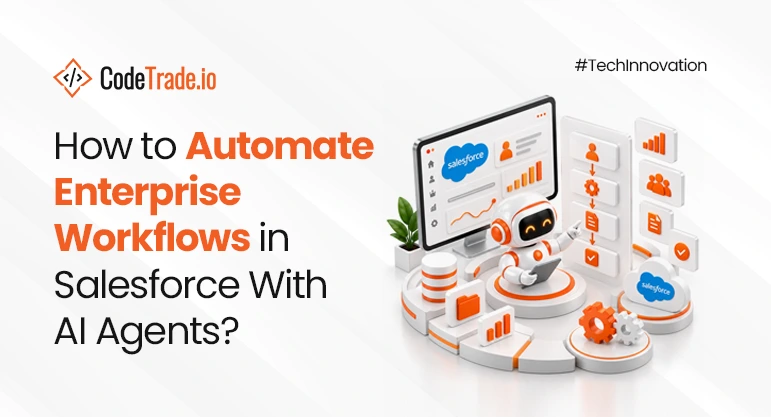
Traditional Salesforce automation follows fixed rules, where a trigger starts a workflow and the system performs a predefined action. That approach works for predictable tasks but becomes limited when customer context changes or decisions require judgement. Salesforce AI Automation adds a more adaptive layer by interpreting CRM data, spotting patterns and recommending the next best action.
Adoption of AI-powered business automation is already moving beyond early experiments. McKinsey reported in March 2025 that 19% of B2B decision-makers were implementing generative AI for buying and selling. Another 23% were developing or testing those use cases, showing how quickly AI is entering revenue workflows. For Salesforce teams, the opportunity is not simply adding AI features to the CRM.
The real value comes from applying AI automation in Salesforce where speed, context and repeated decisions affect business outcomes. In sales, that can improve qualification and follow-up. In service, it can support faster routing, better agent decisions and more consistent customer responses.
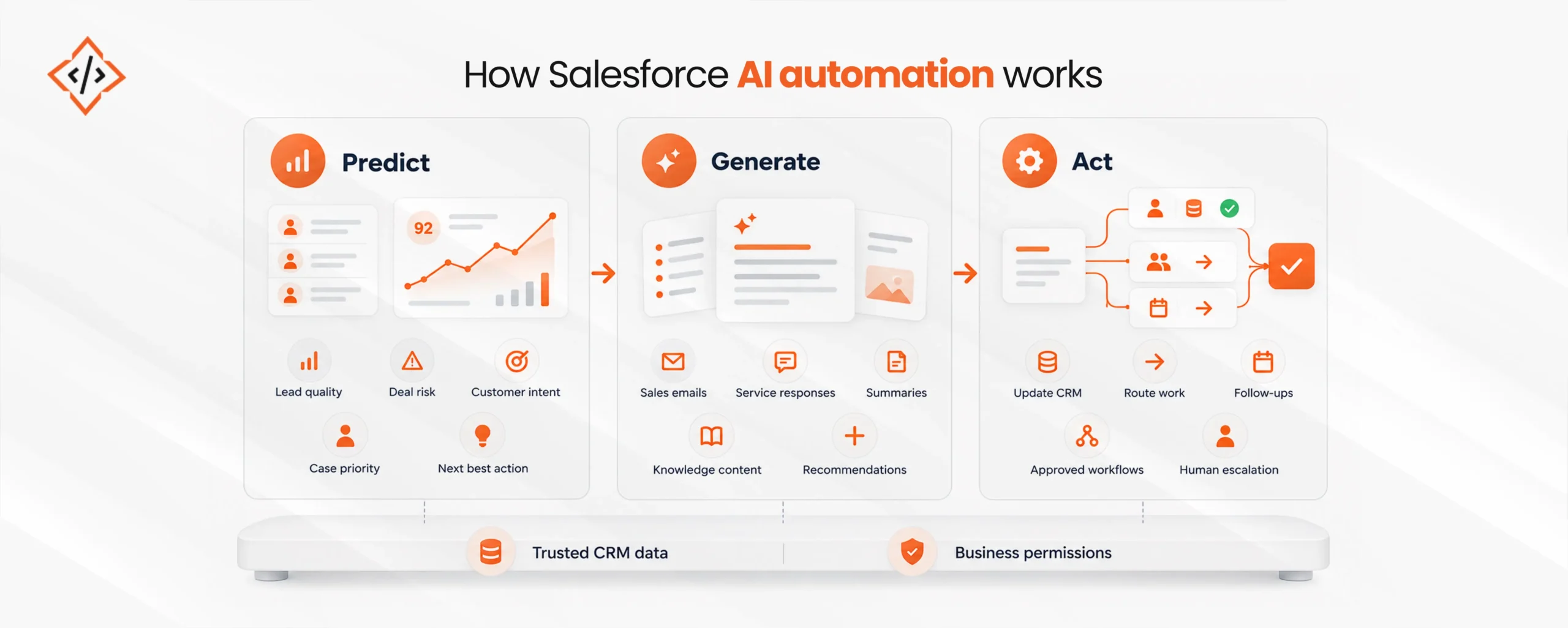
Salesforce can move beyond fixed rules when AI uses CRM data to understand context and guide the next action. Salesforce AI Automation brings predictive models, generative AI, agents, and workflow actions into the same operating layer.
Salesforce predictive analytics can assess lead quality, deal risk, customer intent, case priority, and likely next steps from existing data. Salesforce generative AI can then create sales emails, service replies, conversation summaries, knowledge content, and relevant recommendations. The next stage is action rather than suggestion.
Salesforce Agentforce automation can route work, update records, trigger follow-ups, or complete approved tasks without waiting for manual input. Salesforce workflow automation can also hand complex or sensitive cases to the right person when human review is required. This only works well when AI has access to trusted CRM context and clear business permissions.
An isolated AI response is useful assistance. When the system can read approved data and safely complete authorized actions, it becomes Salesforce business process automation.
Sales teams get the most value from AI when routine CRM work stops consuming seller attention. Salesforce AI for sales helps reps focus on the leads, opportunities, and actions most likely to move revenue forward. It does this by reading CRM signals, ranking priorities, and supporting timely action across the pipeline.
AI can assess firmographic data, lead source, engagement history, prior conversations, intent signals, and recent CRM activity. This helps teams separate high-intent prospects from contacts that need more nurturing. AI lead qualification Salesforce workflows can score and route leads based on fit, territory, product interest, or buying intent.
Salesforce automated lead management can also reduce manual review and shorten response times. Salesforce Agentforce automation can handle early prospect questions before passing qualified conversations to a seller.
Not every open opportunity deserves the same level of attention. Salesforce predictive analytics can compare deal stage, engagement changes, stakeholder activity, past outcomes, and periods of inactivity.
It can surface win probability, deal health, and recommend next steps for each opportunity. Sales teams can then focus on deals showing real momentum or rising risk. This makes large pipelines easier to inspect without manually reviewing every record.
Relevant outreach depends on context rather than volume. Salesforce generative AI can use CRM history to draft follow-ups based on previous conversations and current deal status. It can also prepare meeting summaries, next-step emails, and account-specific talking points. Messaging can reflect customer concerns without sounding disconnected from earlier interactions. Human approval should remain in place for sensitive or high-value communication.
Healthy-looking opportunities can still carry warning signs beneath the surface. AI automation in Salesforce can flag repeated close-date changes, long periods without buyer activity, or missing decision-makers.
It can also detect unusual stage duration or reduced communication across key stakeholders. These signals help managers intervene earlier and improve forecast reviews. The goal is better judgement, not a promise that AI can predict every outcome.
Administrative work often weakens CRM quality because sellers postpone updates after customer conversations. Salesforce sales automation can create call summaries, update fields, log activity, and capture next steps automatically.
It can also create follow-up tasks, opportunity notes, and renewal reminders from recent interactions. Better records reduce manual work and give future AI recommendations stronger context. The result is more selling time and a cleaner pipeline for managers.
Salesforce AI for customer service can automate routine support while helping complex cases reach the right people faster. It also gives service teams useful context during live interactions, which reduces time spent searching across disconnected records.
The goal is not to automate every conversation. It is to remove repetitive work while keeping human judgement available when the situation needs it.
A traditional chatbot usually follows scripts and returns information from predefined flows. A Salesforce AI agent can interpret requests, retrieve approved customer data, complete permitted actions, and update the case. It can handle order-status questions, appointment changes, account requests, simple troubleshooting, and common policy queries.
When a request falls outside its authority, the system can escalate it with the relevant context already attached. Gartner predicted in 2025 that agentic AI could resolve 80% of common service issues autonomously by 2029. The same forecast estimated a 30% reduction in operational costs.
Salesforce customer service automation can improve how incoming cases are prioritized and routed. AI can assess intent, urgency, sentiment, customer history, account value, case complexity, and current SLA conditions.
This context helps Salesforce send each request to the right queue or specialist instead of using broad routing rules. The result is shorter wait times, fewer transfers, and better alignment between case difficulty and agent expertise.
AI can create value without replacing the service representative. During a conversation, it can summarize past interactions, surface relevant knowledge, suggest next steps, and draft contextual responses. It can also capture the final resolution after the interaction ends. Agents spend less time moving between screens and more time addressing the customer’s actual problem.
Support can become proactive when AI detects conditions that may lead to a customer issue. Delivery delays, failed transactions, repeated product problems, SLA risks, or unresolved cases can trigger an approved Salesforce workflow.
The system can create a case, alert an account owner, schedule a callback, or start customer outreach before frustration grows. Teams using AI agent development services can set thresholds so higher-risk situations receive human review before customer-facing action.
Knowledge quality determines how reliable AI-powered support can become. Salesforce AI solutions can review resolved cases and conversations to draft articles, identify recurring questions, and flag outdated guidance.
They can also surface gaps where agents repeatedly search for information that does not yet exist. Better knowledge gives both service teams and AI systems a stronger source for consistent answers. It also reduces the risk of outdated content shaping future recommendations.
Teams considering Salesforce Agentforce for enterprise gain more value when sales and service share the same customer context instead of operating separately. Salesforce AI agents help connect those stages by carrying relevant CRM context from the first inquiry through ongoing support.
A prospect may ask a product question, and the agent can qualify the inquiry before creating or updating the lead. That conversation can be recorded in Salesforce, followed by a scheduled sales task for the right representative. After conversion, service teams can access purchase history and earlier conversations without rebuilding the customer picture.
Later support activity can also surface churn, renewal, or expansion signals back to the account team. Salesforce Agentforce automation goes further than basic Salesforce automation because it can interpret context before choosing the next permitted action.
Rules and permissions still set boundaries, while agents use approved workflows or APIs to complete multi-step tasks. This is where Salesforce AI Automation creates a connected handoff between revenue and service teams without removing required enterprise controls.
Reliable AI automation in Salesforce depends more on data quality, workflow design, permissions, and escalation rules than on the AI model alone.
Salesforce AI Automation should work from current CRM records, knowledge content, account history, and transaction data. Poor or outdated inputs weaken recommendations and automated decisions.
Teams should define what AI can read, update, approve, send, or execute. Clear limits keep automation useful without giving agents unnecessary control.
Sensitive or unclear interactions need a defined path to a person. Gartner found that 87% of customers consider human access essential when companies use GenAI for service. The same study found 50% said GenAI made service interactions easier.
AI automation in Salesforce should be judged against business outcomes. Sales teams can track conversion, pipeline velocity, win rate, and admin time. Service teams can measure first-contact resolution, handle time, escalations, CSAT, and cost-to-serve.
Salesforce is moving beyond a system of record toward a platform that interprets context and acts within controlled workflows. For most organizations, the safest path is to start with a narrow use case and prove its value before expanding.
Choose one high-volume sales workflow and one repeatable service process. Define the business metric and confirm data quality first. Then set permissions and add human review where risk is higher. Expand only when the results are measurable and the workflow performs consistently.
That approach keeps Salesforce AI Automation tied to operational outcomes instead of experimentation. It also gives teams a practical path for scaling automation without losing control over customer-facing decisions.
CodeTrade supports Salesforce AI integration across Sales Cloud, Service Cloud, Agentforce, Einstein AI, Flow, and custom business workflows. CodeTrade’s Salesforce development services cover implementation, integration, customization, and AI automation for enterprise use cases. CodeTrade This gives teams one path from workflow assessment to production-ready Salesforce AI solutions.

 Hardik Soni
 Chand Prakash
 Chand Prakash
 Chand Prakash
 Chand Prakash