







How Do You Generate Accurate Predictions With AI Sales Forecasting In Odoo?
 Chand Prakash
Manual data entry severely bottlenecks enterprise procurement workflows. Implementing an Odoo bulk purchase order import system eliminates this costly operational drag entirely. Procurement teams utilizing expert Odoo integration services frequently receive massive supplier quotes in standard spreadsheet formats. Standard Odoo purchase management requires staff to recreate these complex lines individually. This repetitive task increases formatting errors and slows global supply chains.
The dedicated Odoo Import Purchase Order Lines module automates this exact operational gap. System architects can deploy reliable Odoo purchase order CSV import capabilities rapidly. This strategic Odoo purchase order automation validates crucial data like vendor taxes instantly.
Using an efficient Odoo purchase order Excel import sharply reduces costly data mapping errors. Upgrading to an advanced Odoo 19 purchase order import framework ensures strict data governance. Your procurement teams process large volumes faster while maintaining pristine system accuracy.
Manual data entry for large procurement requests creates severe operational bottlenecks and consumes valuable time. Standard systems force users to add every item individually despite receiving supplier quotations in spreadsheets. This rigid requirement drastically increases the risk of typing errors and incorrect product quantities. Implementing a reliable Odoo purchase order line import instantly solves this exact data entry problem.
Businesses ordering hundreds of products often already hold all required information in an organized spreadsheet. Purchasing teams must recreate every order line manually instead of simply uploading this existing file. This repetitive manual process severely slows down procurement and reduces overall productivity as volumes grow. Utilizing an Odoo Excel import purchase orders feature eliminates this redundant administrative burden completely.
The CodeTrade module eliminates manual effort by processing thousands of lines in a single operation. Users execute an Odoo bulk purchase order import using standard spreadsheet files seamlessly. The system automatically maps product information and validates all imported data instantly. This structured Odoo purchase order CSV import creates accurate records within minutes. Bulk purchasing becomes significantly faster and much easier for enterprise teams to manage efficiently.
This CodeTrade module extends the core system with a dedicated Odoo 19 purchase order import wizard. Users avoid entering products individually by uploading a properly formatted spreadsheet. Teams execute a secure Odoo purchase order import directly into an existing purchase record.
The system provides flexible product identification using internal references, barcodes, or exact names configured through Odoo customization services. Product details retrieve directly from existing records, vendor pricelists, or the uploaded file itself. This Odoo Import Purchase Order Lines architecture validates crucial units of measure and vendor taxes. This strict verification prevents incorrect data from entering active enterprise purchase orders.
Implementing this Odoo purchase order automation reduces manual data entry and minimizes formatting errors. Enterprise businesses can process complex supplier orders efficiently and significantly improve overall procurement productivity.
Installing the module takes just a few minutes following our official Odoo 19 guide and requires no custom coding.
Once the installation is complete, an Import Purchase Order Lines option becomes available on the Purchase Order form. From there, users can open the import wizard, upload an Excel or CSV file, choose how product information should be mapped, and import multiple purchase order lines in a single operation. The module also provides sample import templates to help users prepare their files correctly before importing.
Below is a step-by-step walkthrough of how the Import Purchase Order Lines module works, from creating a purchase order to importing multiple products from an Excel or CSV file.
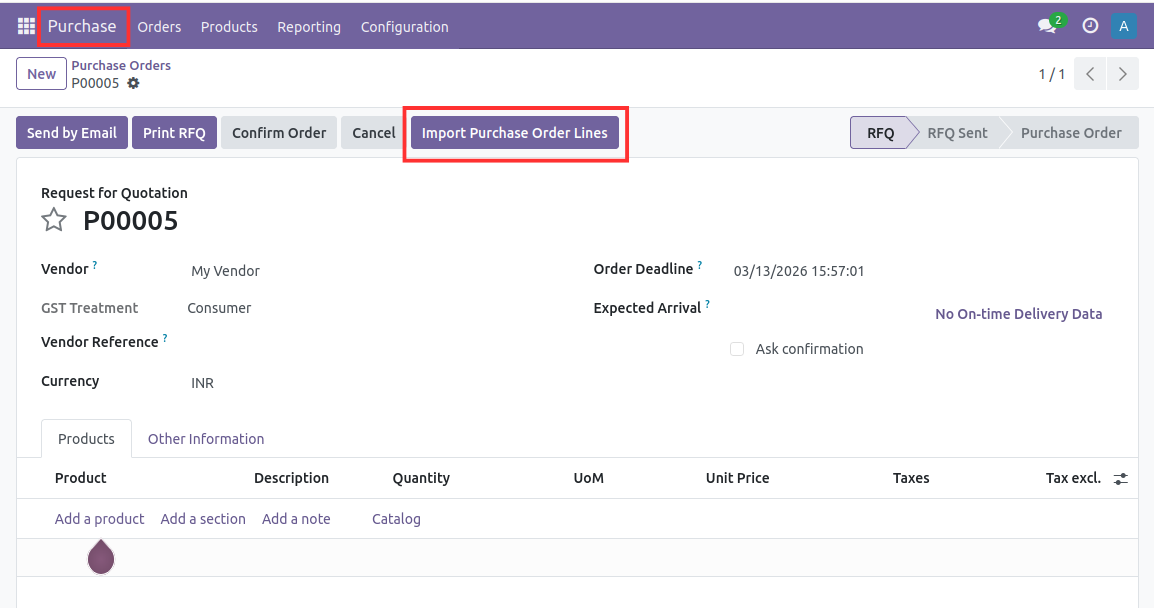
From the purchase order, click the Import Purchase Order Lines button to open the import wizard. This wizard allows you to execute an Odoo purchase order Excel import and configure how lines are processed.
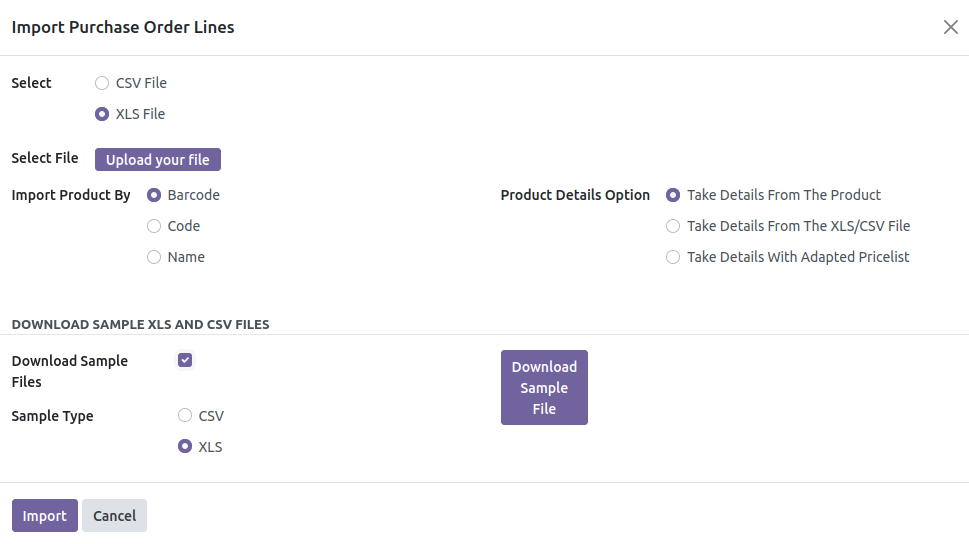
Select the Excel or CSV file containing the purchase order details. The wizard provides options to upload the file and prepare it for processing before the import begins.
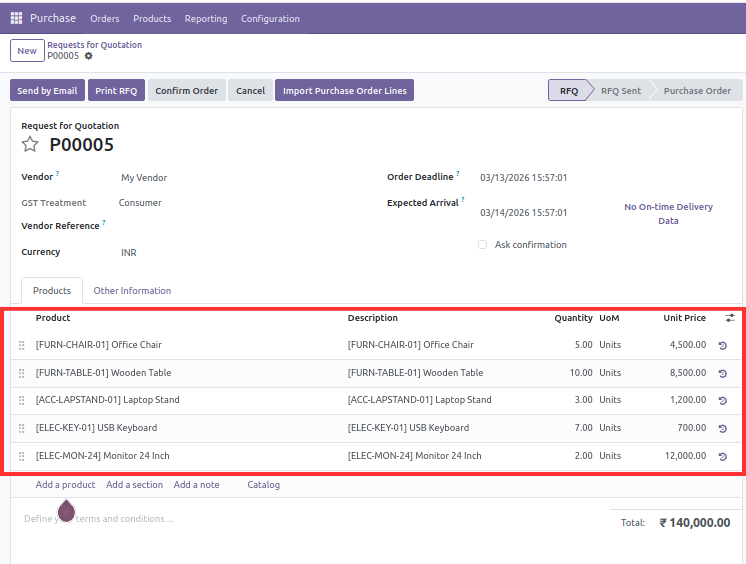
After verifying the import settings, click the Import button. The module validates the uploaded data and automatically creates all purchase order lines within the selected purchase order, eliminating the need for manual data entry.
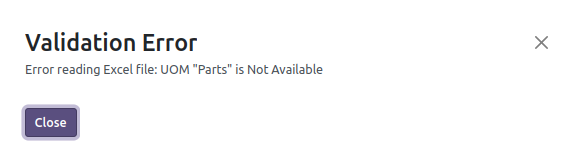
This screen shows the validation message displayed when the imported file contains an incorrect or unsupported Unit of Measure (UoM) and it will generate an error if you import the wrong Tax. The module automatically detects the mismatch during the import process and prevents the purchase order lines from being created until the error is corrected, helping maintain accurate purchasing data and avoiding incorrect inventory transactions.
This advanced Odoo purchase management module delivers essential technical capabilities to streamline enterprise purchasing workflows.
Instead of adding products one by one, enterprises utilizing structured Odoo implementation services can import multiple purchase order lines at once using an Excel or CSV file. This significantly reduces manual data entry and makes it easier to create large purchase orders in just a few clicks.
The module supports different ways to identify products during import, including Internal Reference, Barcode, and Product Name. This provides flexibility for businesses using different product identification standards in their spreadsheets.
Users can configure how product information such as pricing and other values should be imported. Depending on business requirements, the module can retrieve information from the uploaded file or existing product and vendor records, helping maintain consistent purchasing data.
Before creating purchase order lines, the module validates important information such as product details, Units of Measure (UoM), and vendor taxes. This helps minimize import errors and ensures that only valid data is added to the purchase order.
To simplify the import process, the module provides sample Excel and CSV templates that users can download and follow. This makes it easy to prepare import files in the correct format and reduces the chances of formatting mistakes.
The imported purchase order lines are added directly to the selected purchase order and continue through Odoo’s standard procurement workflow. Once the import is complete, users can review, confirm, and process the purchase order without any additional configuration.
Watch the video below to see the Import Purchase Order Lines module in action. The demonstration covers the complete workflow, including creating a purchase order, uploading an Excel or CSV file, configuring the import options, validating the data, and automatically generating purchase order lines within Odoo.
Managing massive supplier lists manually creates severe operational friction within standard Odoo purchase management environments. Deploying the Odoo Import Purchase Order Lines module eliminates this tedious administrative burden completely. Enterprise teams execute a reliable Odoo bulk purchase order import using standard spreadsheet tools.
System architects implement seamless Odoo purchase order CSV import processes to save countless hours. Properly validating units of measure and taxes through reliable Odoo development services prevents costly inventory errors before processing. Upgrading your infrastructure with Odoo 19 purchase order import capabilities guarantees strict data accuracy.
Modern businesses streamline global supply chains through effective Odoo purchase order automation today.

 Chand Prakash
 Hardik Soni
 Chand Prakash
 Hardik Soni
 Hardik Soni