







How Do You Import Invoices Into Odoo Without Manual Data Entry?
 Hardik Soni
Default enterprise ERP systems often enforce strict email registration workflows. This rigid restriction frustrates mobile-first users and quietly damages conversion rates. Implementing a dedicated Odoo phone login module solves this exact friction point directly. Expert Odoo integration services allow users to authenticate securely using familiar mobile credentials.
Customers strongly prefer typing a known number over navigating congested email inboxes. An advanced Odoo authentication module handles real-time duplicate validation instantly. This critical feature catches database conflicts before any form submission occurs.
Upgrading your architecture with an Odoo signup with phone number feature ensures highly secure access. It maintains clean infrastructure without disrupting existing email login paths. Enterprise technical leaders require this exact flexibility to support shifting user behaviors effectively.
By default, Odoo restricts user registration strictly to email addresses, which quietly costs businesses valuable customer registrations daily. Mobile-first users prefer entering a familiar number rather than checking congested email inboxes for verification links. Furthermore, many global regions rely heavily on mobile numbers as their primary form of personal identification.
This rigid restriction frustrates customers and forces visitors to abandon unyielding web forms entirely. Support tickets rapidly pile up when users forget their specific registration email during account recovery.
Your core product quality remains excellent, but technical failures occur because the authentication gateway lacks flexibility. Implementing a dedicated Odoo phone number signup easily resolves this exact architectural limitation.
This Odoo signup module directly upgrades the core authentication system. Users can now register, log in, and reset passwords using their mobile credentials. The existing email workflow remains fully functional alongside this new option. Nothing about the current email-based flow gets disrupted. The system simply opens a second reliable entry path for users.
The interface now features a full country-code selector with flag icons. This ensures global users enter their digits correctly on the first attempt. The architecture runs real-time validation and duplicate-detection checks in the background. It catches already-registered credentials before the user clicks submit. Users no longer need to remember their specific registration method.
They enter their email or phone details on the login page. The system automatically resolves this input to the correct user account. This integrated Odoo mobile number authentication operates smoothly within existing user management architecture. Administrators maintain no separate systems and require no costly Odoo development services or technical workarounds.
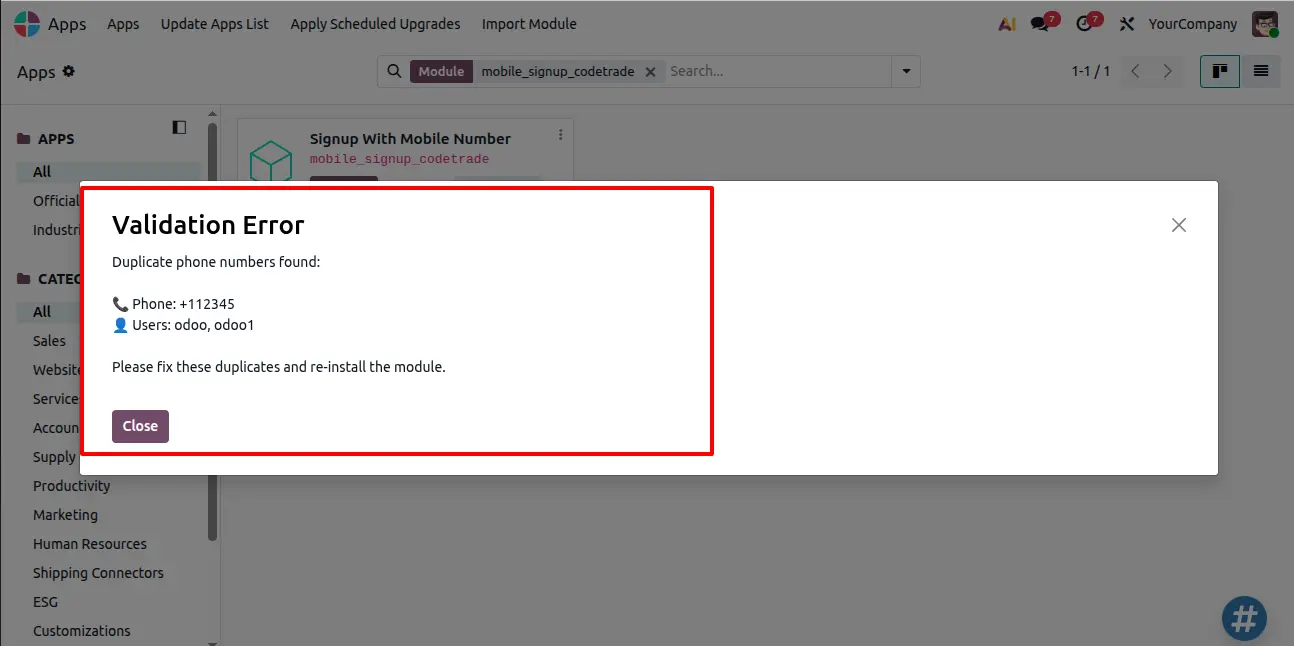
This Odoo signup module gives users a genuine choice between registering, logging in, and recovering passwords. They can easily use their mobile credentials or email. The installation process first runs a strict background safety check across existing users. This verifies mobile number uniqueness and prevents critical authentication conflicts later. Once active, the module automatically enables free registration for immediate use. The upgraded interface features a searchable country-code selector for accurate data capture. Both login and password recovery reliably accept either identifier. This Odoo custom signup approach provides a flexible account recovery experience without manual configuration.
Before deployment, the system initiates an automatic background check across your existing user base. Unique mobile numbers remain critical for this Odoo mobile number authentication framework. The architecture simply cannot resolve login requests if multiple accounts share identical digits.
To install the module safely:
This mandatory upfront check protects core data integrity and prevents future authentication failures.
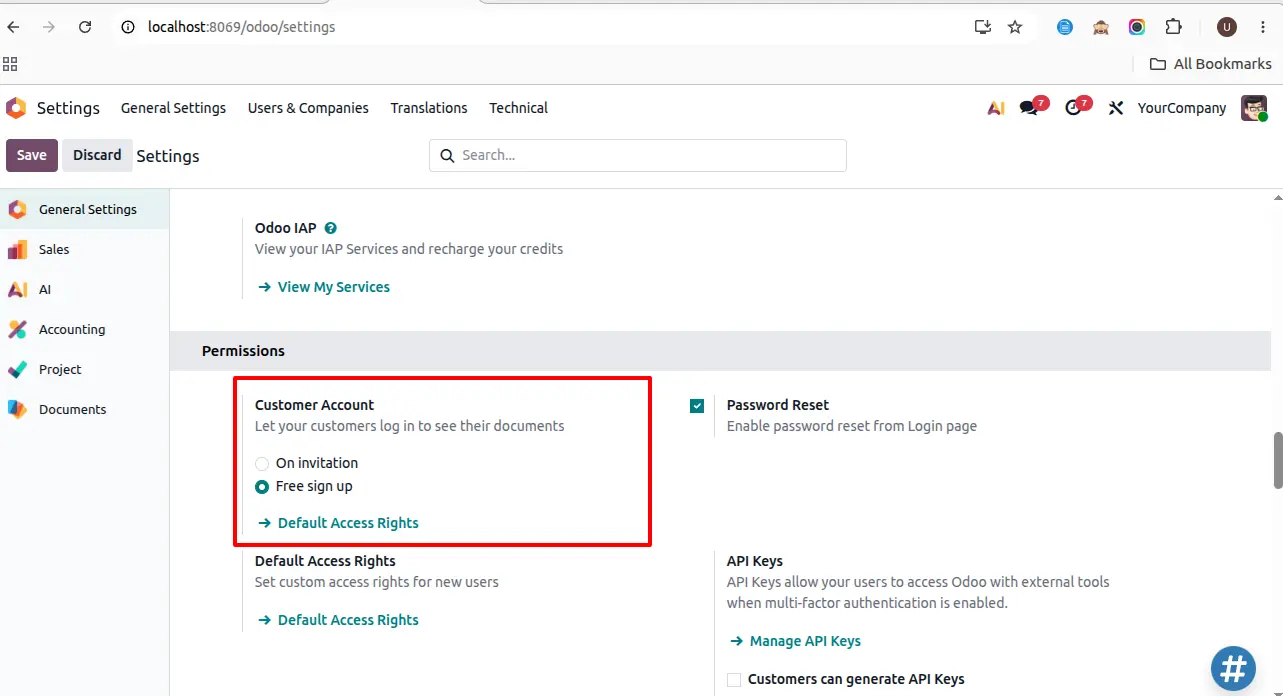
Many system extensions require extensive manual configuration before becoming usable. This specific Odoo authentication module automatically activates the permissions needed for immediate self-registration. This direct automation eliminates the traditional gap between technical deployment and live customer access.
To verify this setting:
By automating this configuration, the module removes a tedious step that traditionally slows down Odoo implementation services.
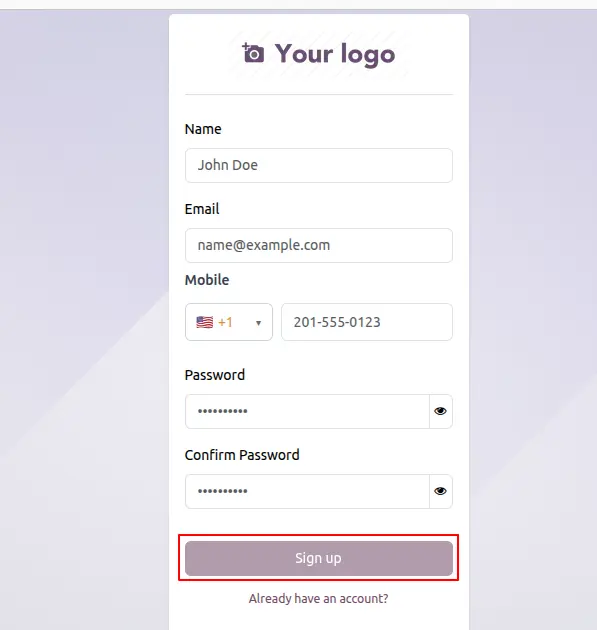
Visitors landing on the registration page encounter an interface optimized for accurate data capture. This Odoo phone number signup process treats mobile credentials as primary validated fields.
To sign up using the new form:
This structured enforcement guarantees your database receives clean and correctly formatted user profiles immediately.
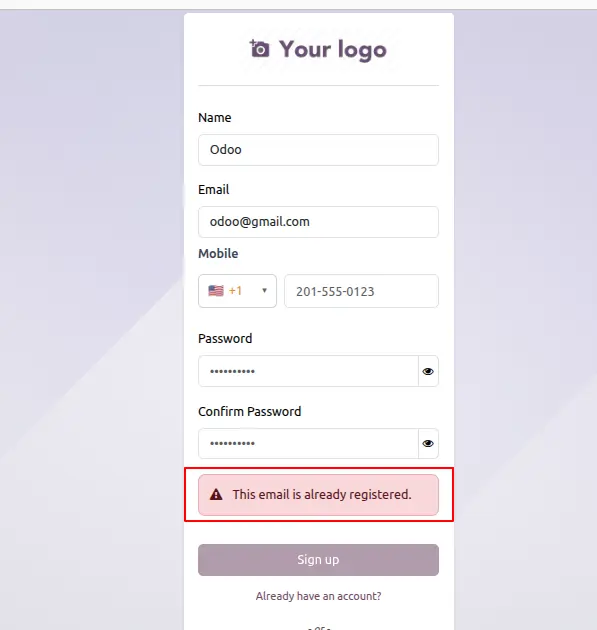
Users frequently abandon registration when systems flag duplicate credential errors after form submission. This architecture prevents friction by running continuous conflict checks during the actual typing phase.
To see duplicate validation in action:
This proactive validation keeps the Odoo signup with phone number process highly efficient and prevents user drop-off.
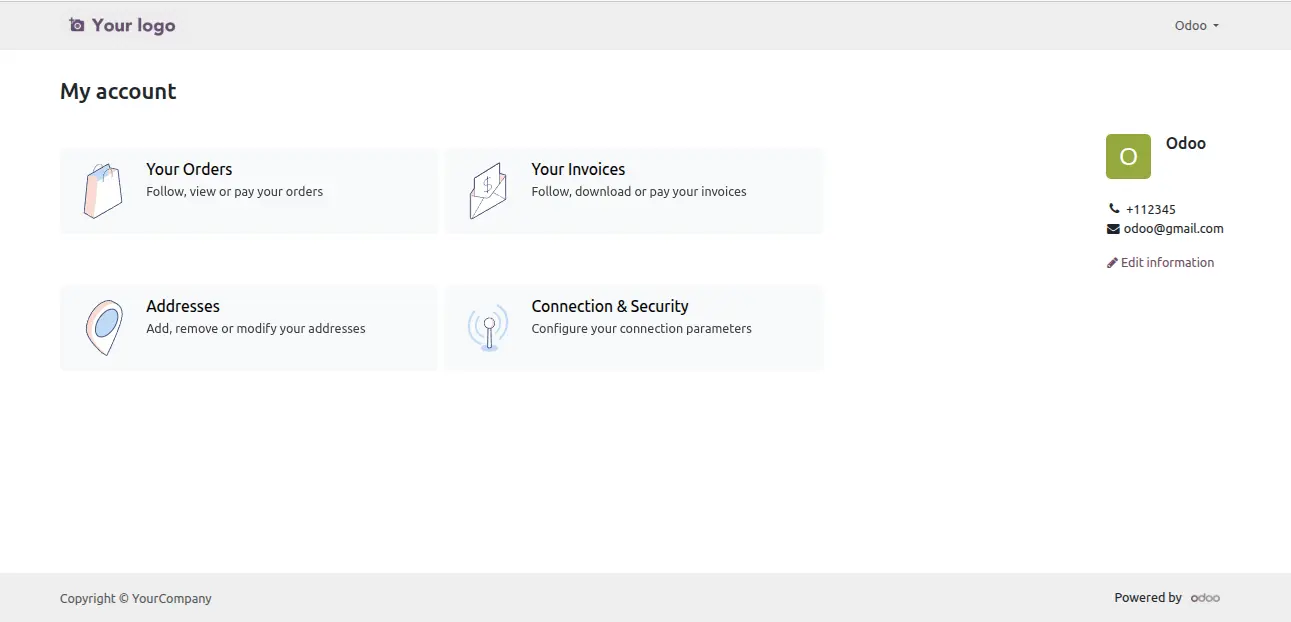
The system instantly connects validated frontend data directly to the backend user account database. This Odoo signup with mobile number integration requires absolutely no secondary confirmation steps.
To complete registration:
Every entered credential becomes fully live and usable the exact moment registration finalizes.
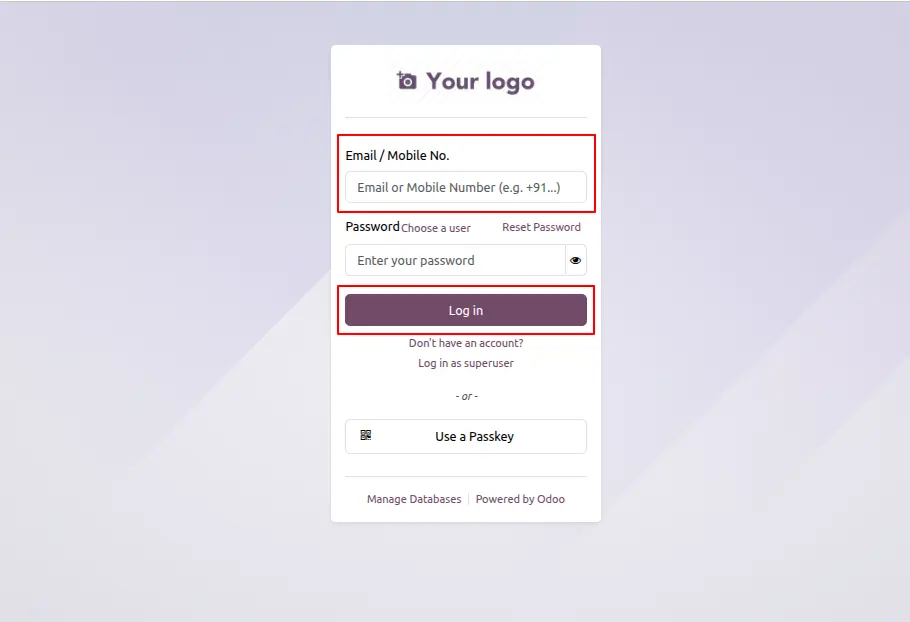
Customers often experience login friction when they forget their specific registration method. This dedicated Odoo phone login module makes the distinction between email and mobile identifiers irrelevant.
To log in using your mobile number:
This dual-path architecture ensures users maintain consistent platform access without confusing credential roadblocks.
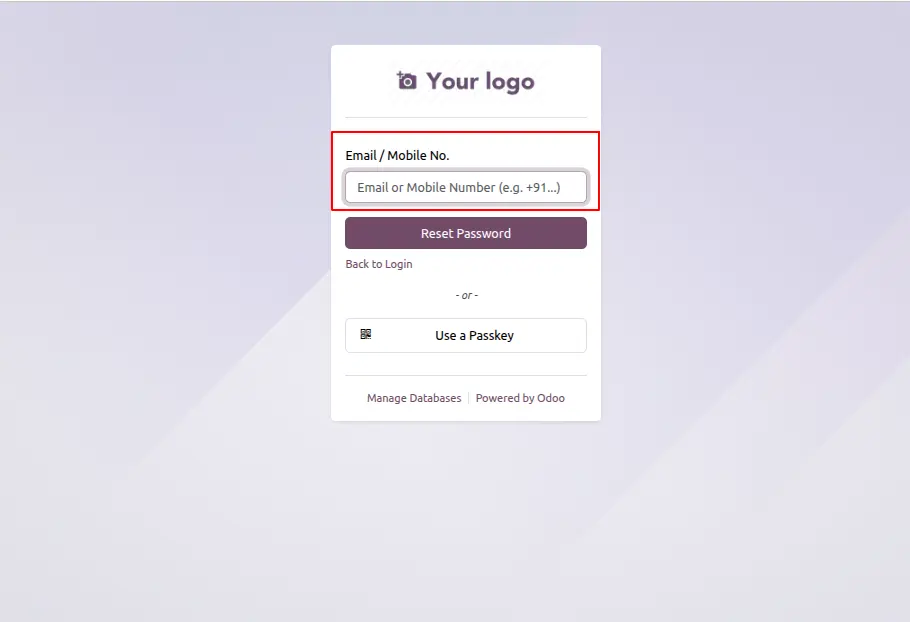
Password recovery frequently generates support tickets when users forget their original registration email. This architecture guarantees phone users the exact same reliable recovery path as traditional users.
To reset your password using your mobile number:
This standardized process guarantees users always retain a dependable route back into their active accounts.
Password recovery links require a correctly configured outgoing mail server to reach user inboxes successfully. Administrators must manually input specific mail provider credentials before launching the platform publicly.
To configure your outgoing mail server:
Proper configuration ensures the platform reliably dispatches all critical security alerts and account recovery links.

This specific Odoo authentication module delivers essential technical capabilities to strictly secure and streamline enterprise user registration.
Before this Odoo authentication module becomes active, it scans your entire existing user database for duplicate mobile numbers. Installation halts completely if the system detects a conflict, presenting a clear error detailing exactly which users share identical credentials. This proactive block prevents administrators from discovering broken authentication setups after deployment. The architecture demands clean underlying data before finalizing the installation process.
The moment deployment completes, the Odoo signup module automatically enables free registration under your general customer account settings. Administrators avoid tedious follow-up steps and manual configuration toggles. New visitors can immediately begin self-registering on your platform the exact instant the system goes live.
The registration interface features a searchable country-code dropdown utilizing standard system records rather than vulnerable hardcoded lists. The primary submission button remains disabled until every input passes strict validation protocols. This strict Odoo signup with phone number validation process prevents malformed or incomplete entries from corrupting your enterprise database.
The system displays an immediate inline warning if a visitor attempts an Odoo phone number signup using duplicate credentials. This real-time alert catches data conflicts during the active typing phase rather than after form submission. Resolving these errors instantly saves users from frustrating failures and prevents cluttered IT support queues.
Established users are never restricted to a single authentication method for platform access. They can authenticate using either their email or complete phone digits, making this Odoo phone login module highly versatile. The password reset flow accepts either identifier while securely routing the recovery link directly to the registered email address. This standardized approach keeps enterprise account recovery exceptionally flexible and rigorously safe.
An outdated Odoo authentication module restricts enterprise growth and frustrates modern users. Implementing an Odoo signup with phone number feature directly solves this critical architectural flaw.
Enterprise IT leaders secure higher conversion rates using reliable Odoo mobile number authentication. Deploying this architecture through expert Odoo customization services ensures secure access across all global regions. Your infrastructure immediately benefits from a validated Odoo phone number signup process. Users strongly prefer this direct Odoo signup with mobile number experience over checking congested inboxes.
This advanced Odoo signup module captures accurate data while maintaining strict security compliance. Upgrade your technical stack today with an efficient Odoo custom signup solution.

 Hardik Soni
 Chand Prakash
 Hardik Soni
 Hardik Soni
 Hardik Soni