






How Can An Odoo Stock Valuation Report Improve Your Warehouse Analytics?
 Chand Prakash
Managing employee reviews manually forces HR teams to chase scattered spreadsheets and inconsistent evaluation data. Switching to a dedicated Odoo employee evaluation module centralizes this entire process into one system.
A reliable Odoo performance management module replaces endless email threads with structured digital questionnaires. Managers and peers submit their feedback directly through a unified Odoo employee appraisal workflow.
The system then calculates final scores automatically for highly accurate Odoo workforce performance management. Implementing advanced performance management in Odoo 19 eliminates manual grading errors completely.
Administrators configure exact evaluation rules without needing external computational tools or complex Odoo custom module development. Departments finally gain clear visibility using a real-time Odoo performance dashboard to track progress. This transition gives organizations the exact historical context needed for confident promotion decisions.
Managing Odoo employee performance management manually is messy and time-consuming for most HR teams. Reviews usually end up scattered across spreadsheets, email threads, and printed forms. This leaves administrators with no clear, one single place to see how an evaluation is really progressing.
Collecting self-assessments, manager ratings, and peer feedback by hand is slow and also kinda error-prone. Then, when you try to cram all of those signals into one final score without solid Odoo performance tracking, you end up with meaningful delays. Deadlines get missed and scoring formulas get applied inconsistently. HR ends up spending more time chasing responses than actually analyzing performance.
This Odoo appraisal management solution basically puts the whole evaluation process into one connected system. It relies on Odoo Surveys to gather self-assessments, manager evaluations, and peer feedback via simple questionnaires. After that the system calculates the final weighted score automatically, like no extra spreadsheet gymnastics.
Instead of juggling spreadsheets and follow up emails or relying on third-party Odoo integration services, HR teams and managers get one unified dashboard. There is less confusion, more rhythm. Users track every review, its current stage, and its score in real time using this Odoo performance evaluation software.
This Odoo performance appraisal module introduces a complete evaluation workflow inside the system. It covers everything from setting up assessment rules to arriving at a final rating for each employee. Administrators start by creating an appraisal cycle. This defines the review period, the included employees, and the required scoring weights.
Each employee receives an individual record for Odoo automated employee performance reviews. The document moves through clearly defined draft, self-review, manager review, peer review, and completed stages.
Every phase uses the familiar Odoo Surveys interface to ensure a minimal learning curve. Once all three reviews are submitted, this Odoo employee appraisal software pulls the responses together automatically. It calculates a final weighted score and performance rating instantly.
This step-by-step walkthrough explains how the Odoo employee appraisal workflow functions from start to finish.
Understanding the system layout helps before setting up a new cycle. The best Odoo performance management module groups all appraisal-related menus in one place. Follow these steps to access the dashboard.
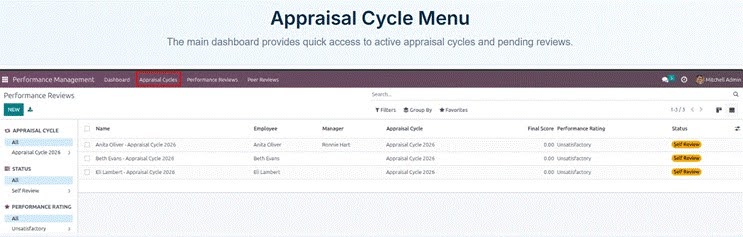
The Appraisal Cycle menu gives quick access to active cycles and pending reviews
Every appraisal requires an active cycle to begin. A cycle defines the review period and the employees undergoing evaluation. It also determines the scoring weights given to each evaluation stage. Follow these steps to configure a new appraisal cycle.
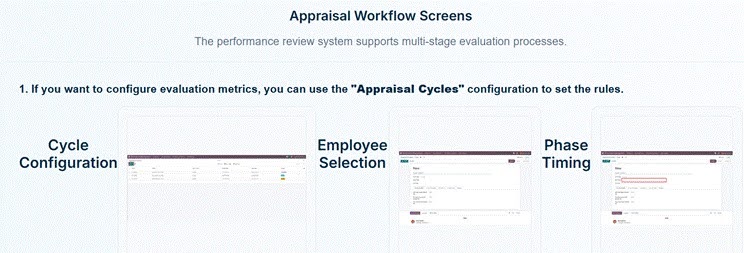
Cycle Configuration, Employee Selection, and Phase Timing settings inside an appraisal cycle
Each employee under a cycle receives their own performance review record. This document compiles all survey responses and scores for that individual. Follow these steps to create a performance review.
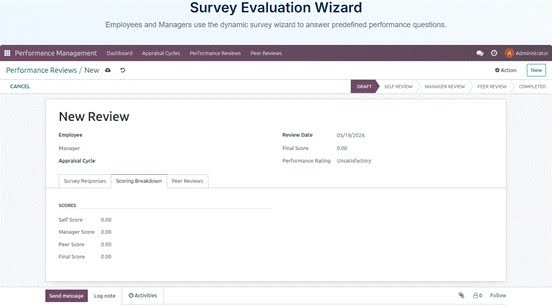
A new performance review record showing the Scoring Breakdown tab
The appraisal process starts with employees looking at their own performance. It lets them think through their work on their own, without anyone leaning over the desk. Follow these steps to complete a self-assessment.
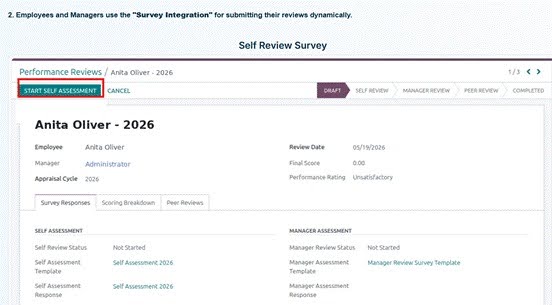
Starting the self assessment survey for an employee review
The manager evaluates the employee independently after the self-assessment submission. They use a dedicated Manager Assessment survey for this process. Follow these steps to complete a manager review.
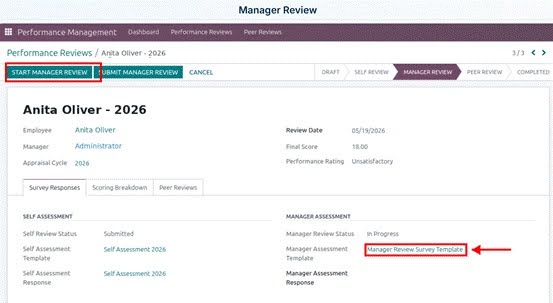
Filling out the manager review for an employee
Peer reviews add a comprehensive view to the appraisal process. They include vital feedback from colleagues working closely with the employee. Follow these steps to submit a peer review.
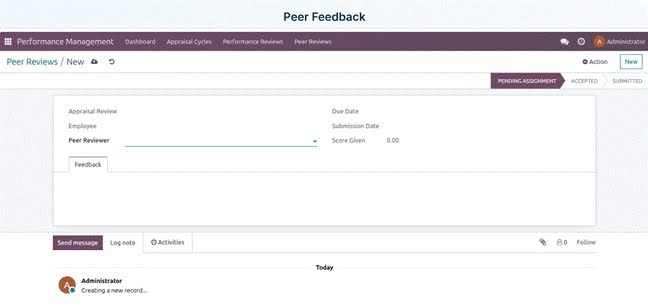
Submitting peer feedback for an employee review
The system calculates the final performance rating without any manual work. This happens immediately after all three reviews are fully submitted. Follow these steps to track final scores.
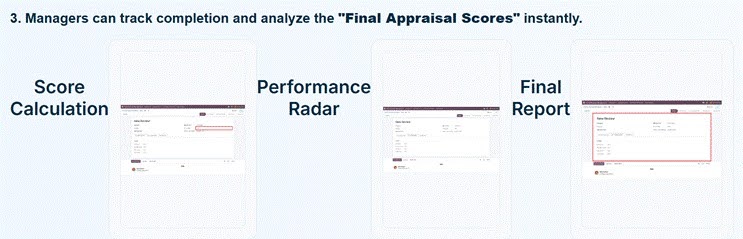
Score Calculation, Performance Radar, and Final Report views
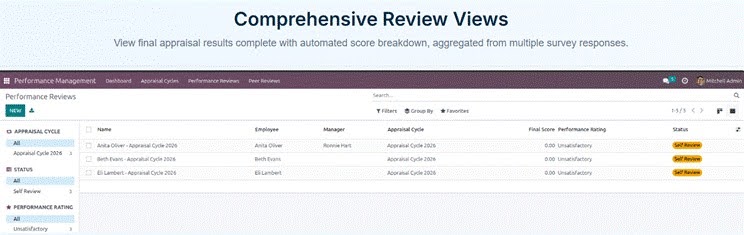
The Performance Reviews list showing final score, rating, and status for every employee
This advanced Odoo appraisal software for enterprises delivers powerful features to completely automate and streamline your evaluation process.
Every appraisal cycle kicks off with the employee’s own perspective, so the Odoo employee appraisal workflow stays balanced. Employees fill out a structured self-assessment survey to reflect on their achievements and mark areas to improve before a manager weighs in.
So the review becomes more of a shared discussion rather than a top-down call. Managers gain valuable context before writing their own evaluation. The system tracks the self-review status automatically, eliminating the need to chase down pending responses.
Managers step in with a dedicated survey template that keeps every evaluation consistent across the team. They rate competencies and leave constructive written feedback while viewing the employee’s self-assessment side by side. This ensures evaluations remain highly informed and objective. The system calculates the manager’s score the moment the review is submitted. This value flows straight into the final rating without requiring any manual data entry.
Peer feedback is built directly into the workflow to provide a comprehensive view of employee contributions. Reviewers are assigned to specific appraisals and move through clear stages from pending assignment to final submission.
Administrators can configure this feedback to be transparent or anonymous depending on company culture. This layer highlights daily collaboration and teamwork that a manager alone might miss. The software automatically folds every peer score into the overall employee rating.
Administrators can define custom KPIs and assign distinct weights to different phases of each appraisal cycle. Not every role requires the same measurement criteria. A sales department might weigh manager scoring heavily, while an engineering team leans on peer feedback.
The system calculates the final weighted score automatically the moment all three reviews are complete. This completely removes the risk of inconsistent formulas or manual calculation errors.
Every evaluation stage runs directly on the native Odoo Survey engine. HR professionals can create flexible questionnaires for specific roles using a drag-and-drop interface they already know, without writing any code or needing to hire Odoo developers.
Administrators can swap, reorder, or tailor the questions for each appraisal cycle pretty easily. This guarantees the assessment always matches the exact priorities of that team for the current review period.
Automated email alerts keep things from slipping, even when appraisal cycles get complicated. Employees get reminders to complete self-assessments, managers get nudges when a review needs attention, and peer reviewers receive instant notifications the moment they are assigned to provide feedback. Deadlines set during the phase timing configuration drive these reminders automatically, freeing HR from tracking down late responders.
The best Odoo performance management module kind of rolls all the evaluation data into one dedicated analytics dashboard, so executives can see performance trends almost in real time across the whole company. Emerging skill gaps and department rating comparisons remain highly visible in one central location.
Managers can easily spot critical patterns, such as a team consistently scoring lower on a specific competency, long before it becomes a larger problem, paving the way for future Odoo artificial intelligence forecasting.
Every completed appraisal cycle is permanently preserved as part of the ongoing employee record. The data is never discarded once the review period officially closes. It makes things easy to line up how someone moved forward over several evaluation phases.
Managers, plus HR teams get the historical background they need to back promotion choices, development roadmaps and those performance improvement talks, you know.
Self, manager, and peer evaluations function as independent stages with their own statuses, templates, and deadlines. They are never bundled into a single confusing step. It also gives the entire evaluation process a clearer structured approval chain. Each phase has to be finished before the next one is allowed to open, this way reviews stay in the proper sequence all the time, no skipping around.
Administrators can produce thorough performance reports straight from any review record, in both PDF and Excel. Those files sum up the self-assessment, the manager evaluation, peer input and the final weighted score. The clean shareable layout works well for HR records, one on one sessions, or compensation related discussions. This ensures a formal and accurate record is always available for critical promotion decisions.
Relying on manual spreadsheets creates unnecessary delays for growing HR departments. Upgrading to an Odoo employee evaluation module removes these administrative bottlenecks instantly. Teams gain a centralized dashboard for tracking every evaluation phase accurately. This powerful Odoo performance appraisal module ensures consistent scoring across all departments.
Managers no longer waste valuable time chasing missing feedback from peers. Implementing Odoo automated employee performance reviews builds trust through a transparent workflow. The system preserves every completed cycle to support future promotion decisions safely.
Organizations finally achieve clear visibility over their entire workforce development strategy. Deploying this Odoo employee appraisal software gives executives immediate analytical insights. Administrators can easily generate comprehensive final reports for each employee. Leverage expert Odoo development services to install the Advanced Performance Management application today and build a highly structured review process.

 Chand Prakash
 Hardik Soni
 Chand Prakash
 Chand Prakash
 Hardik Soni