







How Can An Odoo Stock Valuation Report Improve Your Warehouse Analytics?
 Chand Prakash
Managing regional teams requires strict Odoo CRM access control to protect client data. Default configurations lack proper Odoo customer visibility restriction for growing departments. Implementing the Odoo customer access control module solves territorial conflicts directly.
Administrators can easily restrict customer access by salespeople. This eliminates the immediate need to hire an Odoo development company for complex coding. Proper Odoo salesperson access control prevents staff from viewing unassigned accounts. This setup enforces strict Odoo customer record permissions across your database.
Systematic Odoo sales team access management eliminates duplicate quotations instantly. Mastering customer access control in Odoo keeps your pipeline organized. Managers apply Odoo partner access restriction to maintain clear operational boundaries. The system automatically extends Odoo sales order access control to related documents. Deploying this Odoo customer assignment module secures daily operations.
In standard Odoo setups, all salespersons can see every customer regardless of who actually manages that specific account. This open access creates issues for companies with multiple sales teams or regional divisions, especially right after completing their Odoo implementation services.
A salesperson handling one territory can easily browse or edit records belonging to a colleague. This lack of Odoo customer visibility restriction creates confusion, data privacy concerns, and team conflicts.
Consider a company with five salespersons covering different regions. Management typically wants each representative to see only their own assigned accounts. Without proper Odoo salesperson access control, Salesperson A can open any record owned by Salesperson B.
They can easily view pricing, contact history, and past order details. This unrestricted access often leads to accidentally creating a duplicate quotation for the same customer.
The Odoo customer access control module by CodeTrade solves this problem directly. It lets administrators restrict customer access by salesperson precisely. Users set to “Own Documents Only” can only access the customers explicitly assigned to them.
Meanwhile, sales managers and administrators retain full visibility across all database records. This ensures management oversight is never compromised while protecting client data.
The Odoo customer access control module by CodeTrade helps businesses protect sensitive client data effectively. It ensures that salespersons can only access the specific customers assigned to them.
Instead of allowing every representative to view all database entries, administrators define exactly who accesses each record. Establishing proper customer access control in Odoo helps organizations maintain data privacy. It also prevents accidental interference between different sales teams.
The system adds dedicated salesperson assignment fields directly to each profile. Businesses can assign a primary salesperson and multiple authorized users easily. This feature supports accounts that must be managed collaboratively.
These settings automatically enforce Odoo sales order access control for related quotations. This ensures consistent visibility restrictions throughout the sales process.
For businesses managing a large client database, this Odoo customer assignment module includes a Mass Assignment Wizard. It allows administrators to update salesperson assignments across multiple records in a single action, which is highly beneficial for data management after utilizing Odoo migration services.
Sales managers and system administrators continue to have unrestricted access to all records. This provides complete managerial visibility while maintaining strict Odoo sales team access management.
Installing this Odoo customer assignment module takes just a few minutes and requires no custom coding.
After installation, the Allowed Salespersons field appears automatically on all customer records. To configure Odoo customer record permissions, open the specific user profile. Set their sales access level to Own Documents Only.
Below is a step-by-step walkthrough of how this Odoo customer access control module works. It covers everything from activating user restrictions to verifying that a salesperson only sees their assigned accounts.
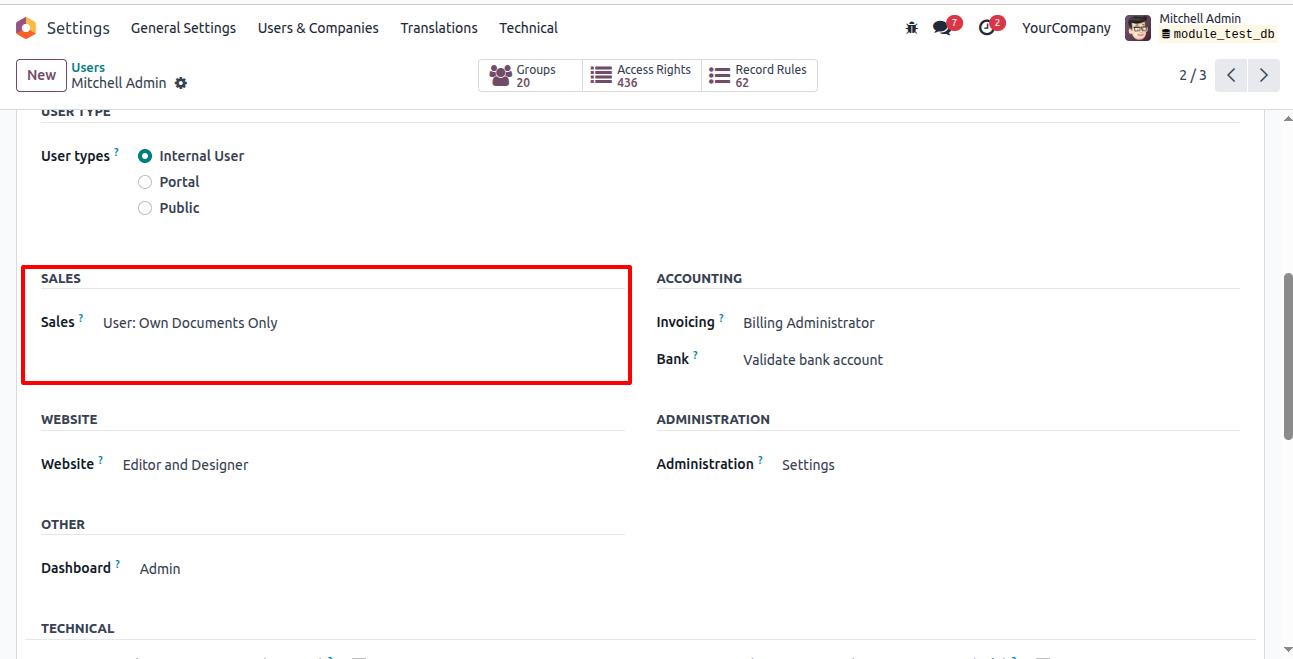
Go to Settings, open Users & Companies, and select Users. Open the target user profile and find the Sales section. Set their access level to Own Documents Only. Once saved, this user only sees explicitly assigned client records.
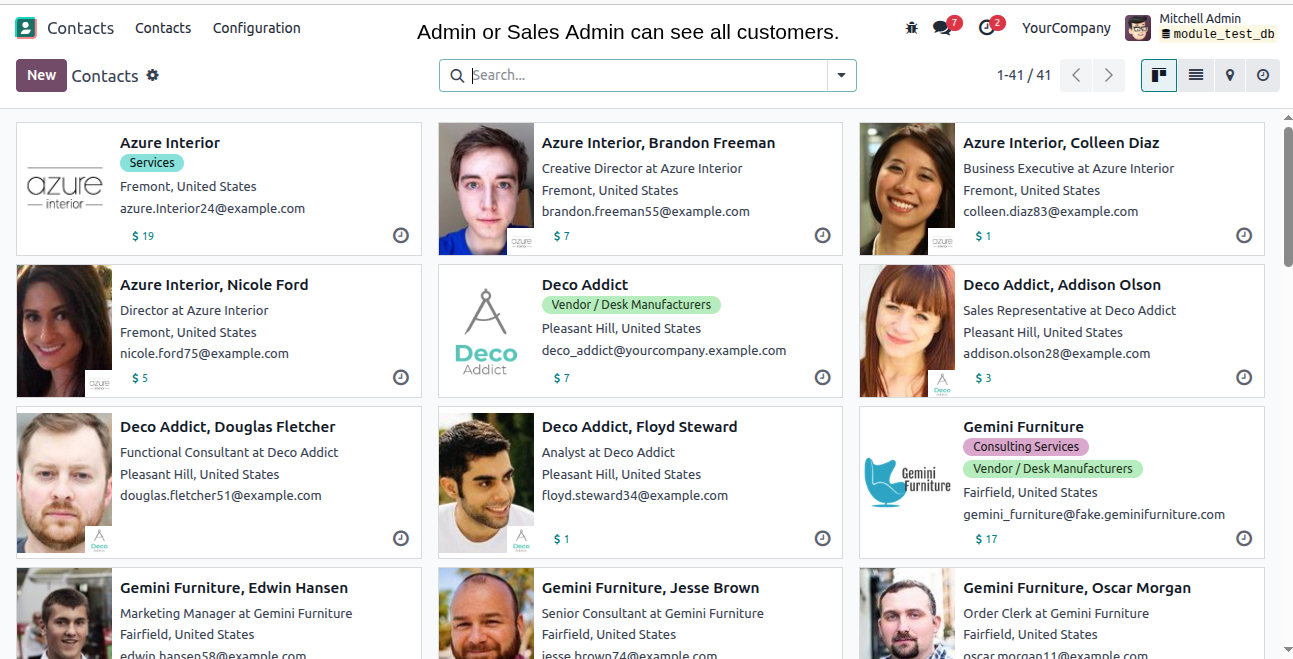
Before applying any rules, the salesperson sees all customers in the system. This represents standard Odoo behavior before applying any Odoo customization services. Every contact remains visible to every user regardless of the actual account manager.
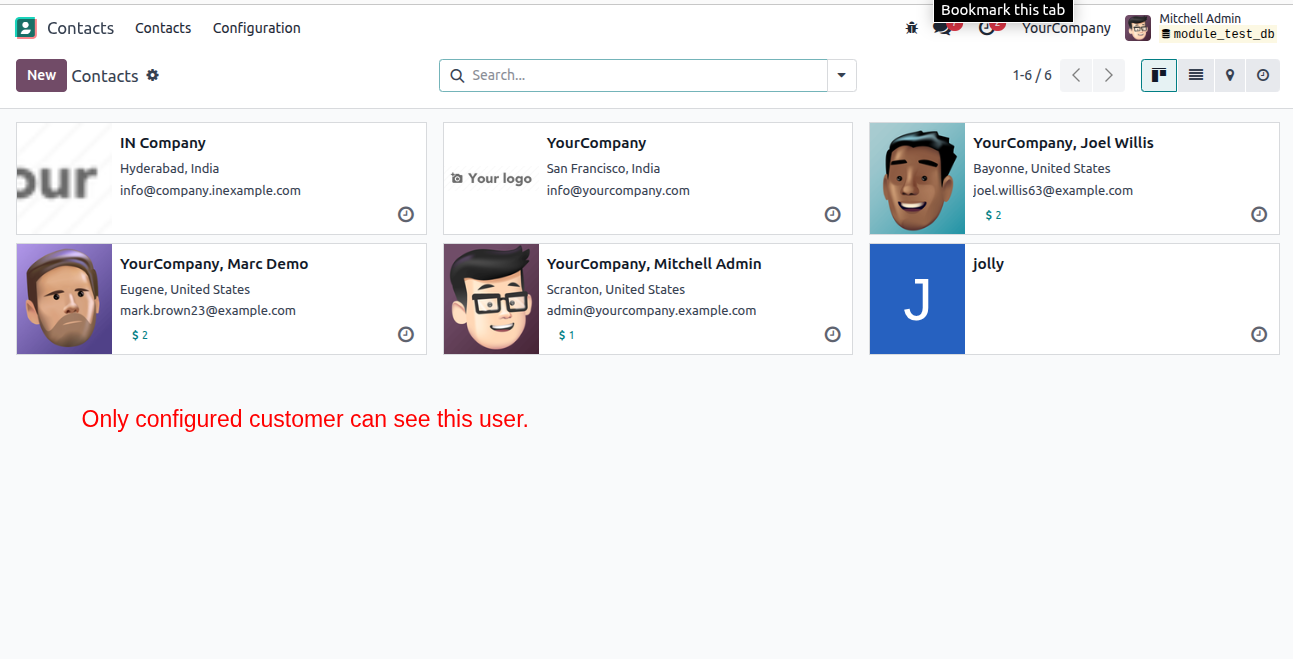
Saving the Own Documents Only setting triggers immediate Odoo CRM access control. The customer list filters to show only records assigned to that specific salesperson. Unassigned customers disappear from all system views completely.
Open any customer record to locate the primary Salesperson field and the Allowed Salespersons list. Add reps that require access to that client. All listed users can view this record and generate related quotations.
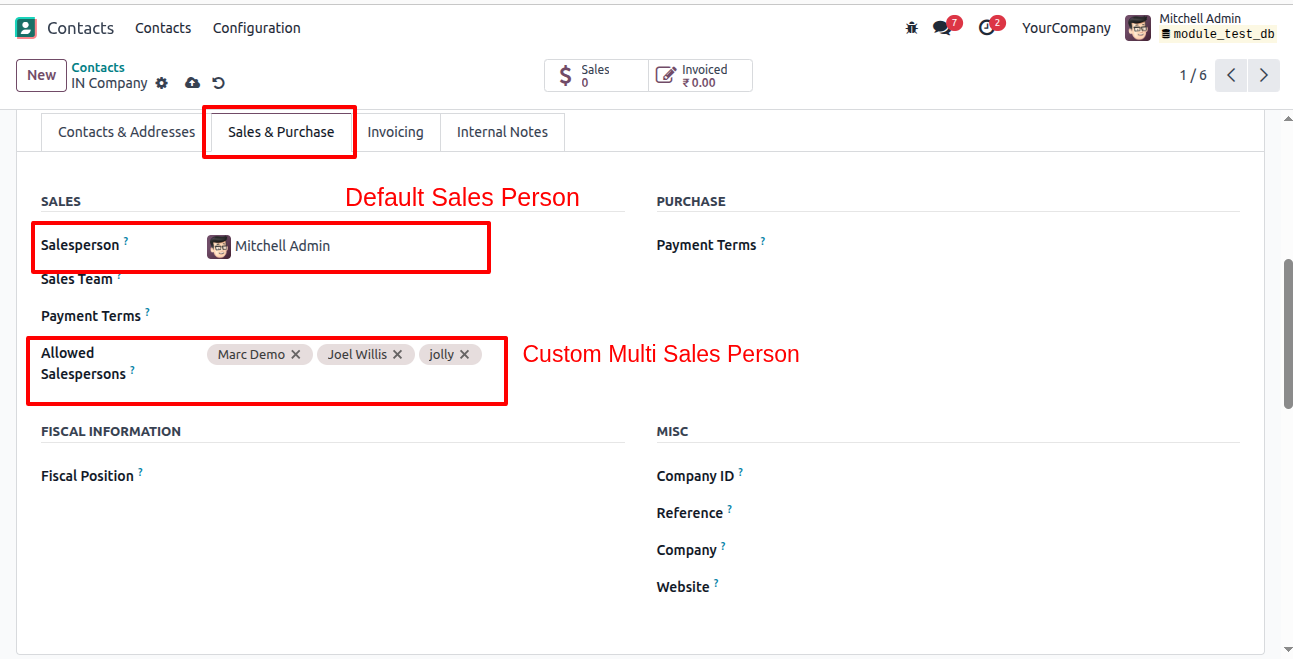
To update salesperson assignments across multiple customers simultaneously, navigate to the customer list view. Select the desired records using the provided checkboxes. This bulk action is available exclusively to system administrators.
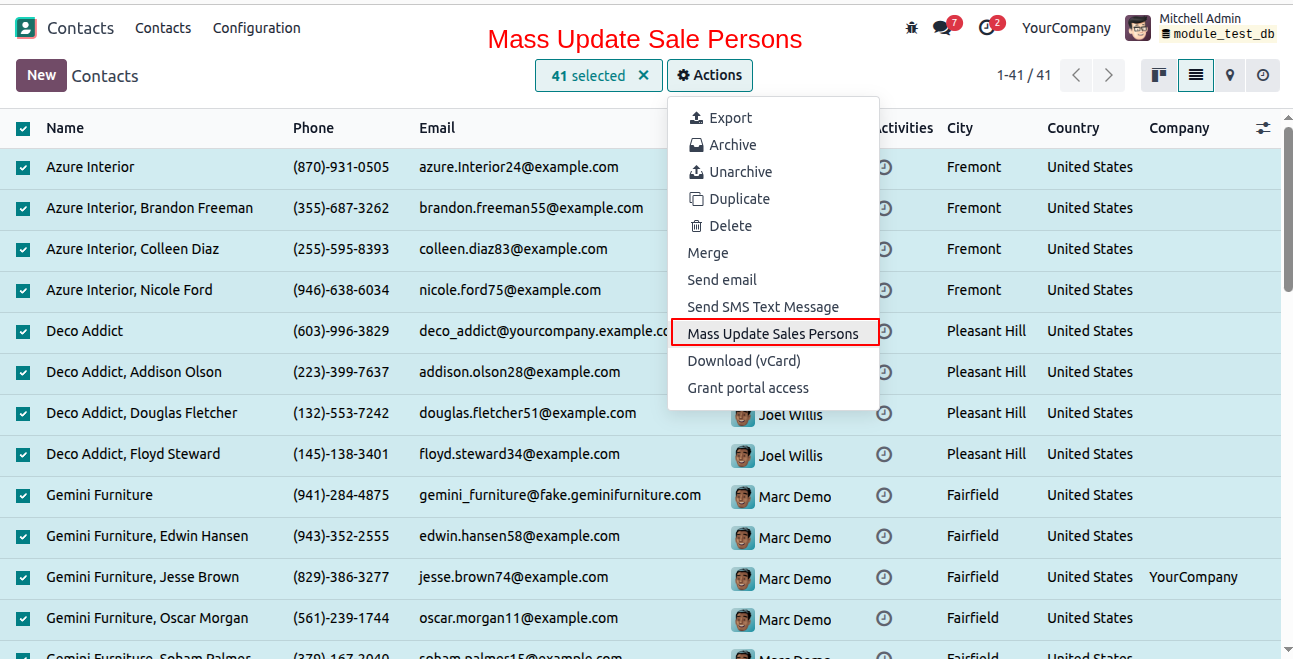
After selecting the required customers, click the Action menu and choose Mass Update Salespersons. This opens the wizard to update all selected records in a single operation. Only administrator users can view this option.
The wizard offers four distinct operation modes for Odoo partner access restriction. New adds reps to the existing roster. Replace clears the current list and assigns new users. Remove All deletes all allowed salesperson entries. No Change leaves current assignments untouched. Select the preferred operation and click Confirm.
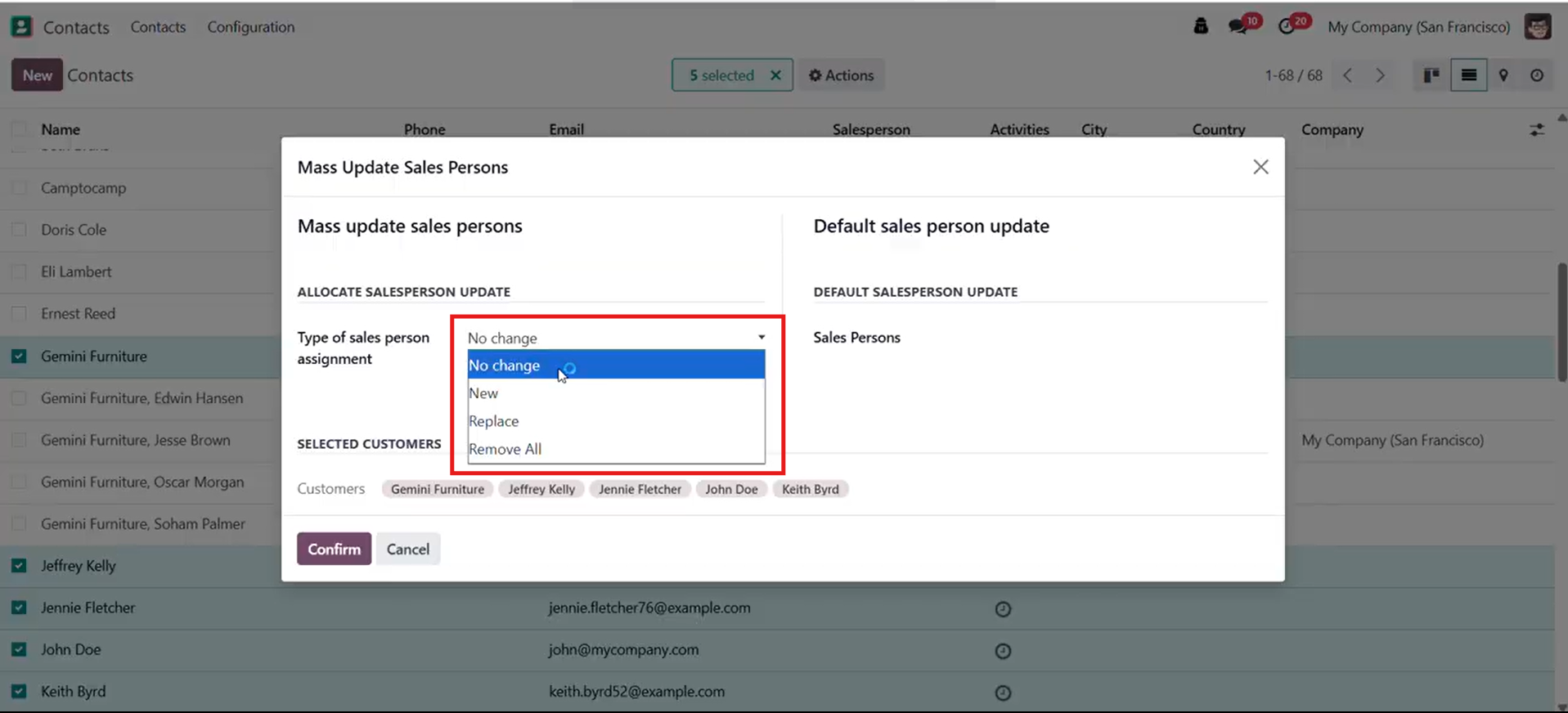
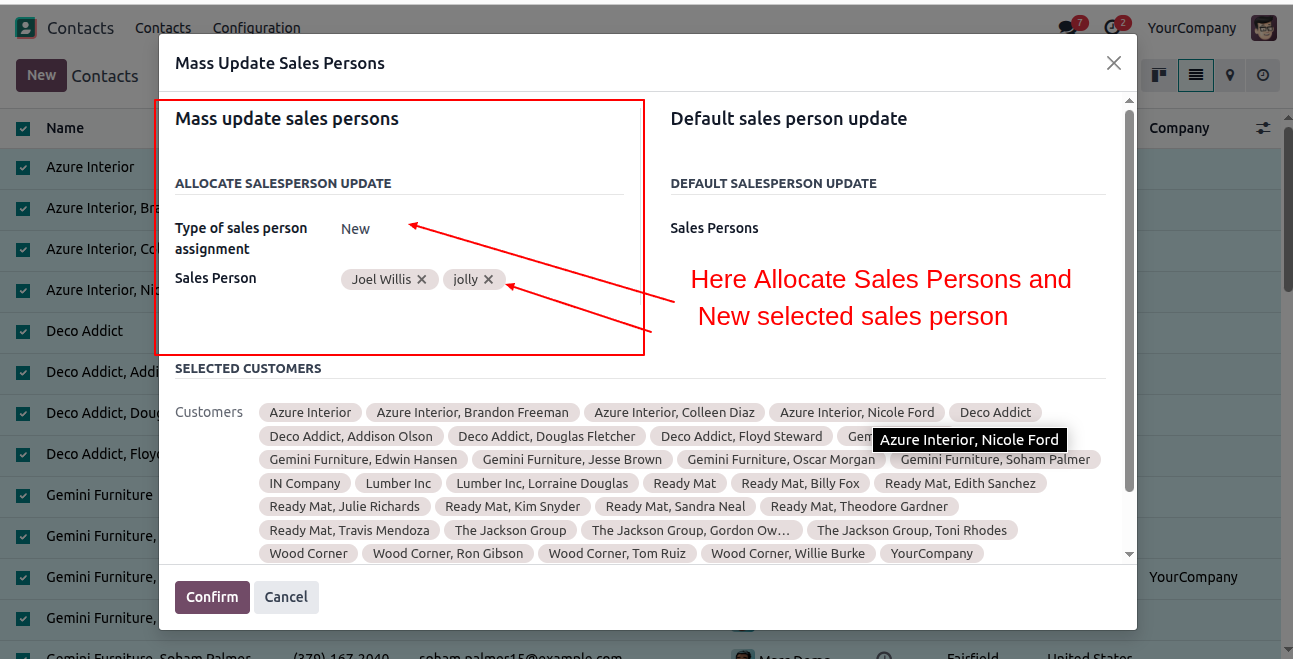
The wizard also includes an option to update the primary salesperson field across all selected records. Choose the representative to assign as the default owner. The system applies this to every selected customer simultaneously.
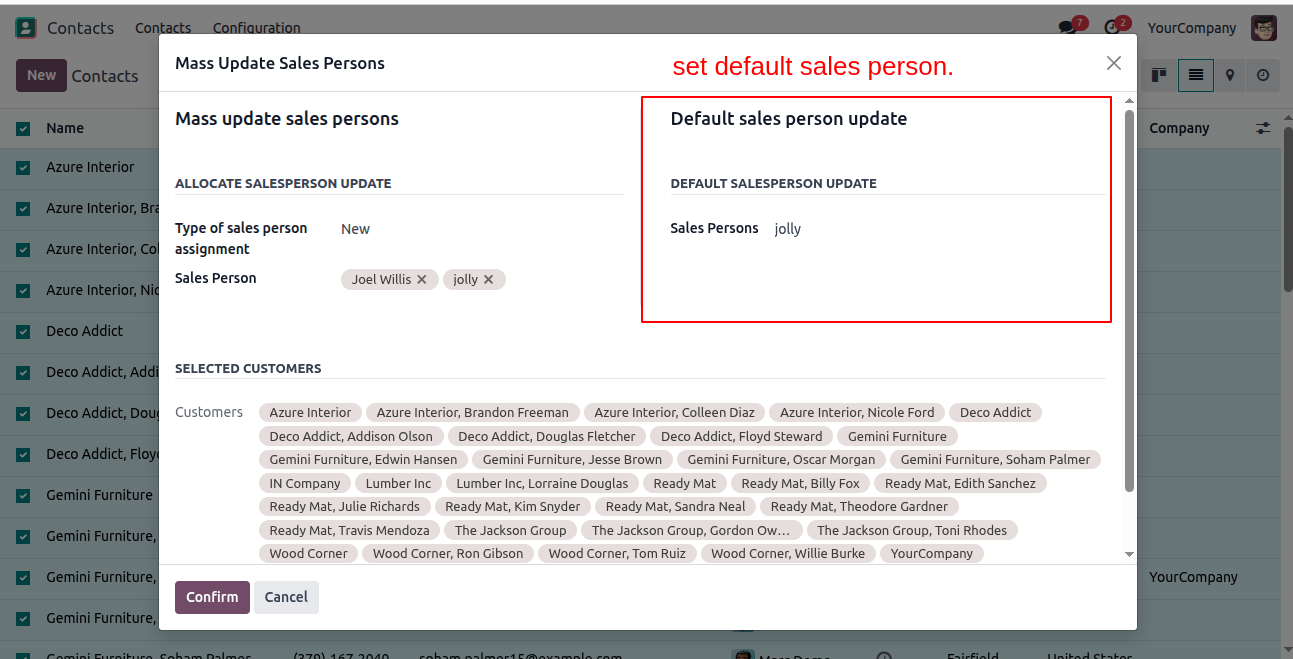
After the wizard runs, open any updated profile to verify proper Odoo sales team access management. The record confirms the new salesperson assignments. A simple comparison shows exactly who was added, replaced, or removed.
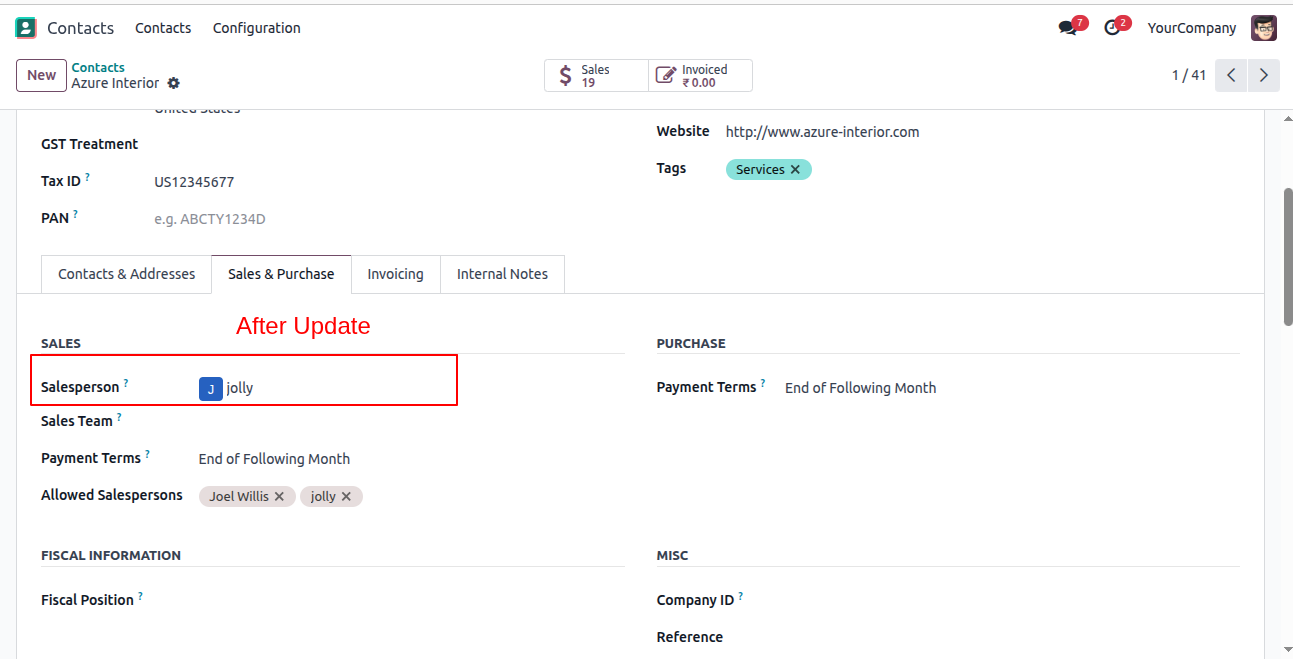
These profile limits automatically trigger Odoo sales order access control. A salesperson with restricted access can only create quotes for assigned clients. Any record linked to an unassigned customer remains completely hidden from their list.
This Odoo customer access control module provides powerful features to secure your database and streamline daily sales operations.
Each profile supports a primary owner and a separate allowed users list for shared accounts. This Odoo salesperson access control lets multiple team members manage a single client jointly. They collaborate smoothly without gaining unrestricted access to the entire database.
Setting a user to Own Documents Only enforces strict Odoo customer visibility restriction immediately. They only see profiles where they appear as the primary owner or an allowed salesperson. All other records remain hidden from list views, search results, and form lookups.
These permission rules automatically enforce strict Odoo sales order access control. A restricted representative cannot view orders belonging to unassigned clients. They also cannot select unassigned customers when generating new quotations. This setup keeps your sales pipeline clean and accountable.
Administrators can update multiple records simultaneously using this powerful Odoo customer assignment module. The Mass Assignment Wizard offers four simple operation modes. New, Replace, Remove All, and No Change provide precise control over bulk updates across selected profiles.
The wizard also allows updating the primary owner field across multiple records at once. This simplifies Odoo sales team access management during team restructuring. Managers can reassign accounts from one representative to another instantly.
Sales managers and administrators retain full visibility across all customer records and quotations. This managerial bypass overrides standard Odoo customer record permissions completely. Management monitors performance, resolves disputes, and accesses any record without facing user-level restrictions.
Watch the video below to see how the Customer Access Control module functions. It covers setting up user restrictions and assigning salespersons to customer records. The demonstration also highlights using the mass assignment wizard and verifying access limits across customers and sale orders.
Securing client data requires the proper Odoo customer access control module. Referencing an authoritative Odoo development guide ensures these configurations are established correctly from day one. Administrators must restrict customer access by salespeople to prevent internal sales team conflicts.
Applying strict Odoo salesperson access control keeps regional territories completely separated. Configuring exact Odoo customer record permissions ensures representatives only view assigned accounts. Mastering customer access control in Odoo stops accidental duplicate quote creation. This Odoo customer visibility restriction protects databases from unauthorized internal browsing.
Establishing reliable Odoo CRM access control builds a highly organized pipeline. Managers apply Odoo partner access restriction settings to maintain clear operational boundaries. Effective Odoo sales team access management provides executives with complete departmental oversight.
The system applies Odoo sales order access control to all related sales documents. Deploying this Odoo customer assignment module secures your daily business operations very smoothly.

 Chand Prakash
 Hardik Soni
 Chand Prakash
 Chand Prakash
 Hardik Soni