






Why Should HR Teams Switch To An Odoo Employee Evaluation Module?
 Hardik Soni
Finance managers often struggle to calculate accurate inventory values across multiple locations. Standard Odoo ERP implementation setups hide this crucial data deep within complex journal entries. Extracting these metrics usually requires building a custom Odoo stock valuation report from scratch. This manual approach creates delays and limits effective Odoo warehouse analytics.
A dedicated Odoo inventory reporting module solves this exact operational bottleneck. Teams gain immediate access to opening and closing stock totals. The system computes incoming and outgoing product values directly from actual stock operations.
Users can easily filter this data to view precise Odoo inventory valuation by warehouse. Implementing advanced stock valuation insights for Odoo provides complete financial clarity. Procurement officers also receive instant alerts to maintain optimal inventory levels.
Calculating an accurate Odoo multi warehouse stock valuation remains a significant challenge for most businesses. The standard system stores financial data deep within complex journal entries and valuation layers. Accessing a clean and filtered view of this information requires extensive navigation across multiple screens or expensive custom report development.
Finance managers preparing monthly reports need exact opening, incoming, outgoing, and closing values for every product across multiple locations. Standard systems lack a single Odoo stock movement value report that surfaces all this critical data together. Administrators cannot easily slice the information by specific locations, products, and date ranges in one consolidated place.
The CodeTrade Odoo stock valuation report module solves this exact operational bottleneck by upgrading the standard reporting menu. The system displays precise opening, incoming, outgoing, and closing stock values per product computed directly from actual valuation layers.
A real-time stock valuation dashboard in Odoo adds visual analytics with instant filters for specific locations, product categories, and dates. This application provides high-value product insights directly within the standard interface without requiring any external tools.
This Odoo inventory management module extends the native Reporting menu with two powerful new tools. Users gain an immediate Stock Valuation Report alongside an Odoo inventory analytics dashboard. Both features become fully accessible without any complex setup, additional configuration, or costly Odoo customization services after installation.
The Stock Valuation Report presents detailed product value movements based entirely on actual stock operations. It displays the exact opening stock value alongside incoming receipts and production totals. Users also see total outgoing deliveries and the resulting closing stock value. This gives finance teams a complete picture of Odoo real-time inventory valuation changes for any period.
The advanced dashboard provides a clear visual summary using charts, KPI cards, and category-wise distribution. Administrators apply instant filters for specific locations, products, and date ranges to isolate distinct business segments. Dashboard cards link directly to the corresponding backend list or form records.
Teams can drill into the exact details behind any figure for precise Odoo inventory cost tracking. A dedicated low stock section highlights items approaching or dropping below their minimum threshold. This critical visibility supports highly proactive replenishment decisions.
This Odoo inventory valuation software depends on Inventory, Invoicing, Discuss, and the base CodeTrade module. It is available for Odoo Online, Odoo.sh, and On-Premise deployments. Installation takes just a few minutes and requires no custom coding, eliminating the need to hire Odoo developers.
This walkthrough explains how advanced stock valuation insights for Odoo function from start to finish. It covers everything from opening the application to drilling into dashboard cards and reviewing low stock alerts.
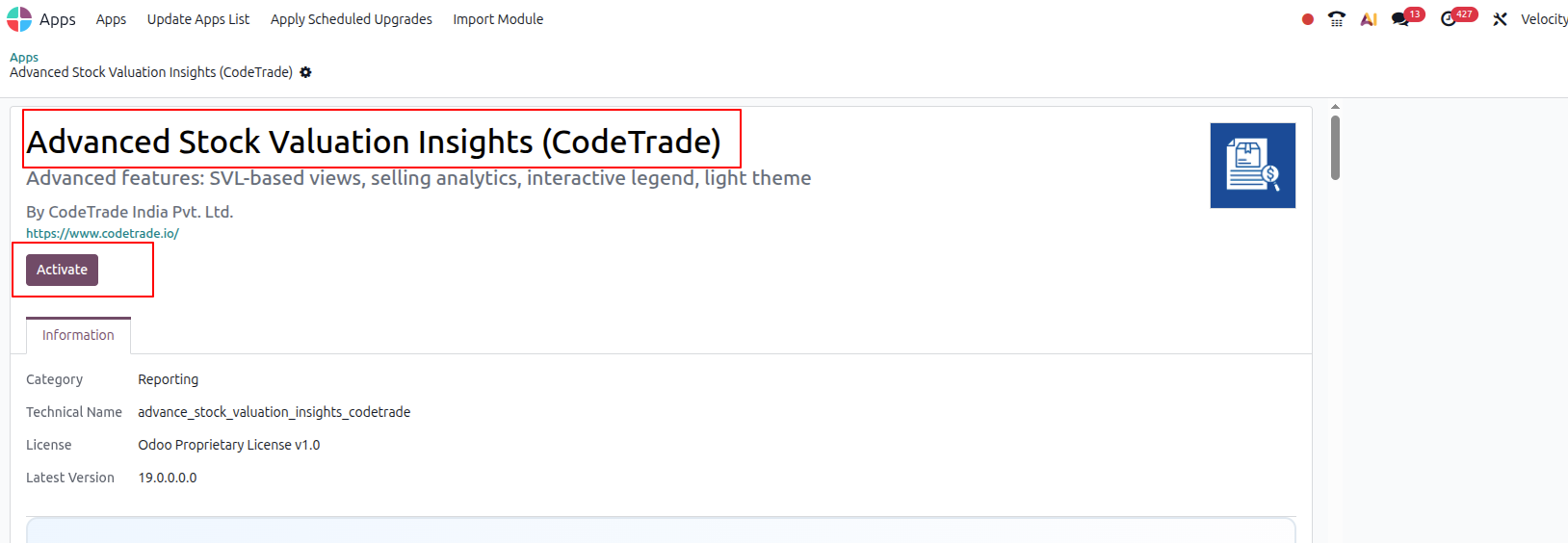
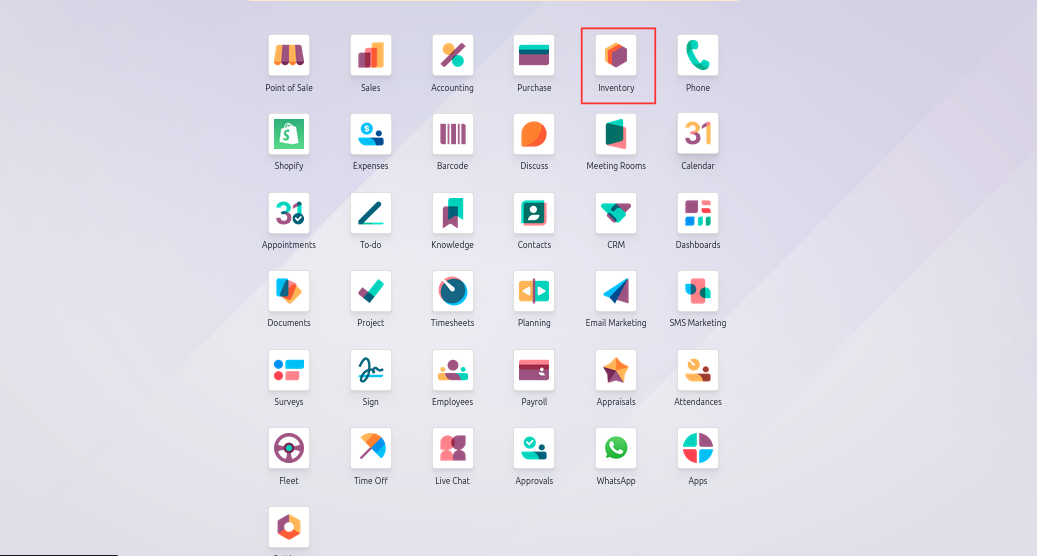
Open the application directly from the main Odoo dashboard. This serves as the starting point for accessing all the enhanced Odoo warehouse stock valuation features added by this system.
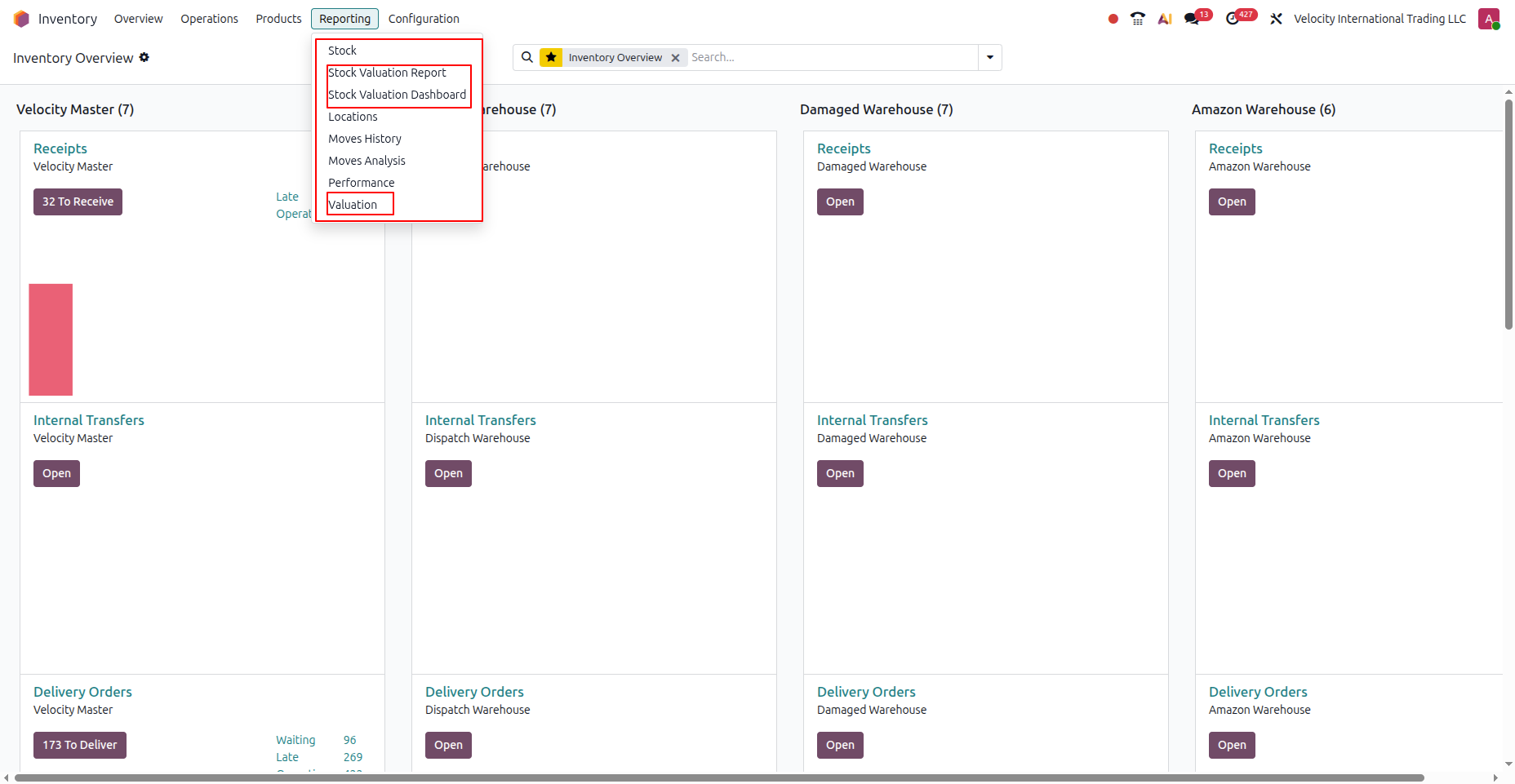
Click the Reporting menu located in the top navigation bar. The menu now includes both the Odoo stock valuation report and the advanced dashboard options. Select Stock Valuation to instantly open the full details of the financial valuation layers.
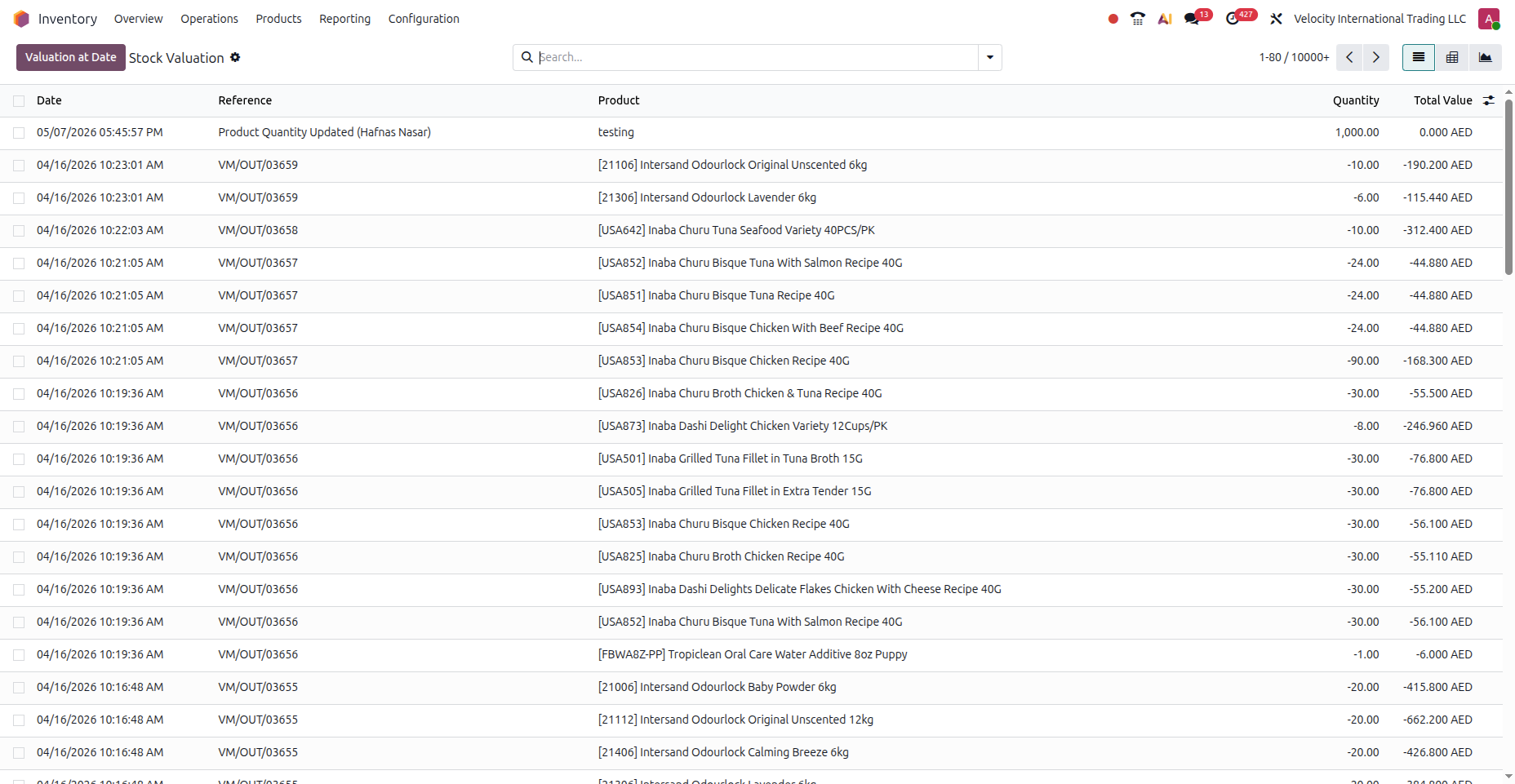
The report displays precise inventory value movements per product based entirely on actual stock operations. Each product row reveals its opening value alongside total incoming figures from receipts and production. Users also see the total outgoing value from deliveries and the final closing stock value. Apply date and product filters to narrow this Odoo stock movement value report to a specific period or product range.
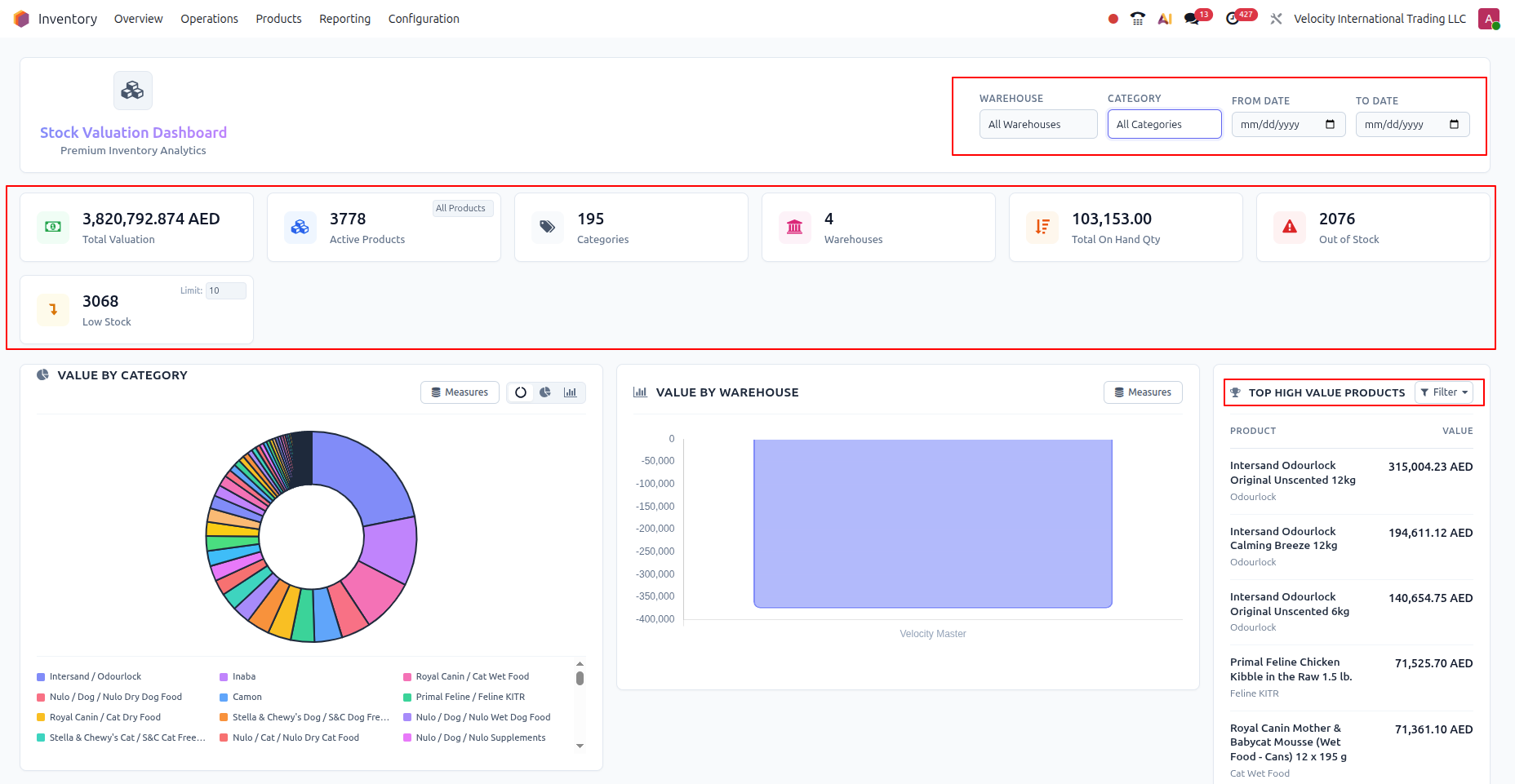
Open the visual dashboard directly from the main Reporting menu. The top section displays KPI summary cards detailing the total current stock, incoming, outgoing, and closing values for the selected filters. Use the location, product, category, and date range filters at the top to achieve precise Odoo inventory valuation by warehouse. Click any KPI card to navigate directly to the corresponding backend list or form view.
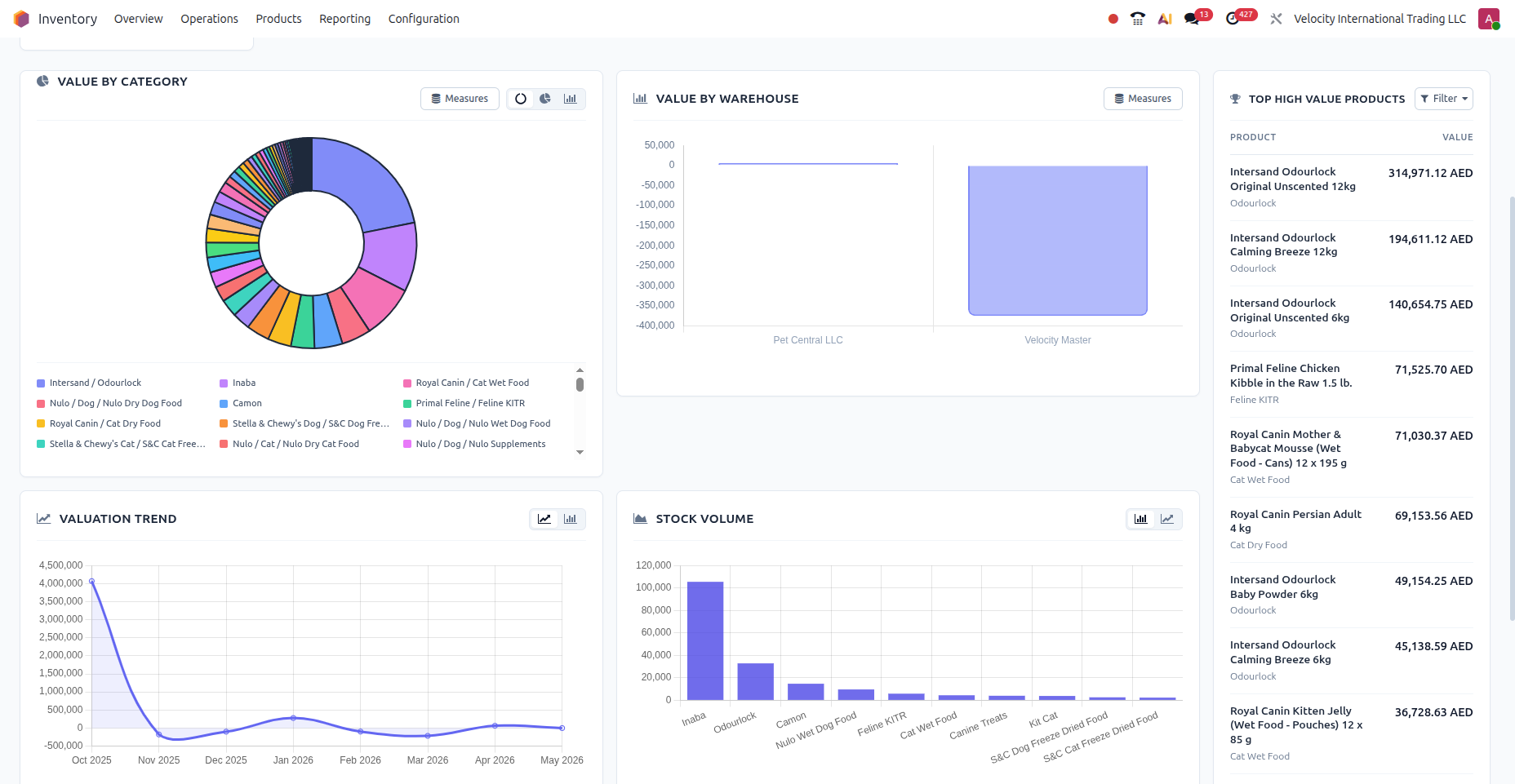
The middle section features a stock movement chart visualizing incoming and outgoing value trends over time. A category-wise distribution panel also breaks down the current stock value by product category. These visuals update instantly when users modify any filter in the Odoo real-time inventory dashboard.
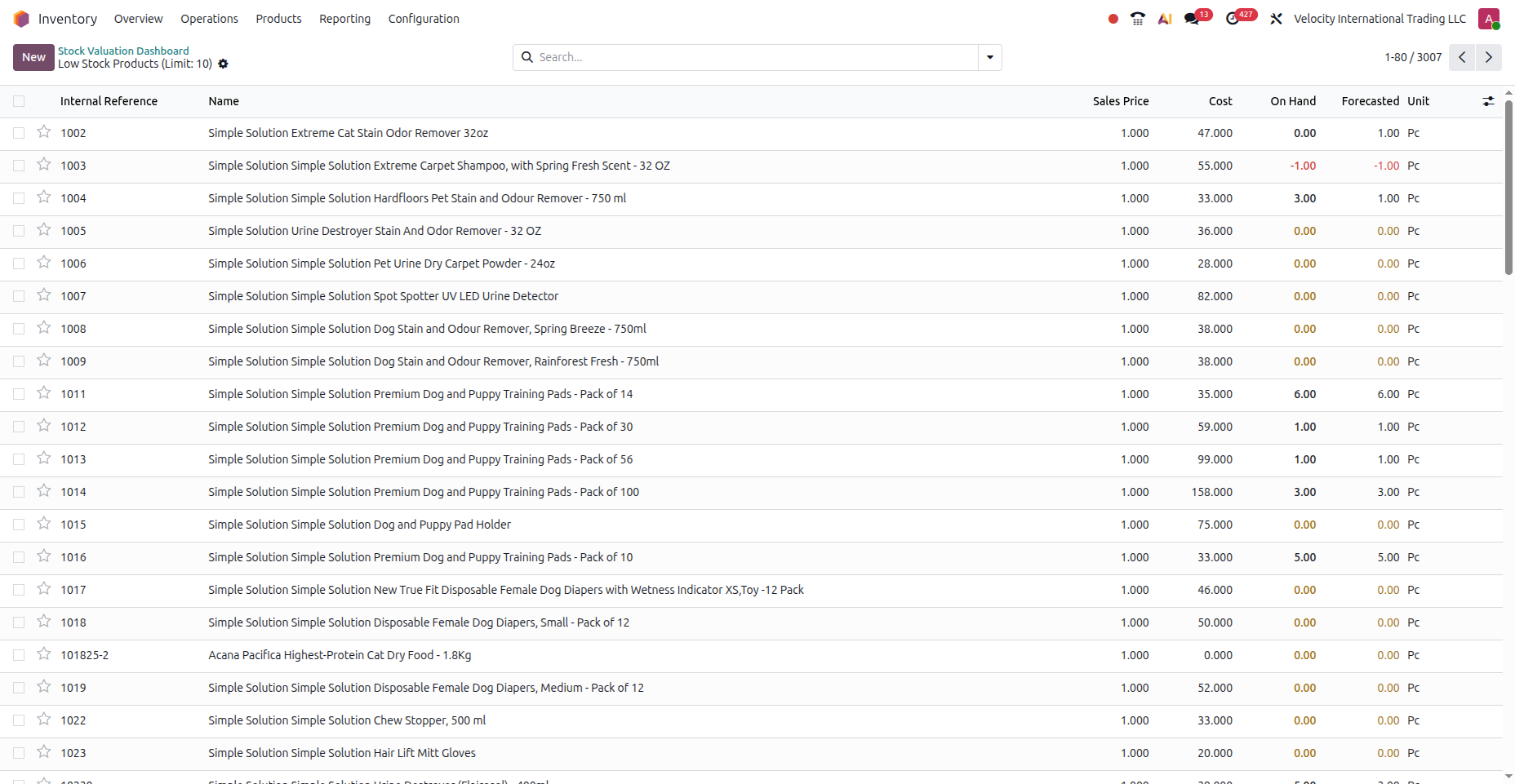
The bottom section displays a dedicated panel for low stock products. Items that reach or fall below their configured minimum quantity are listed here alongside their current on-hand counts and reorder points. This gives procurement teams an immediate view of items needing replenishment without running a separate Odoo inventory reporting module search.
This advanced Odoo inventory reporting module provides powerful features to completely streamline your warehouse financial tracking and reporting processes.
The Odoo stock valuation report provides a structured view of inventory value movements per product. The system computes these figures directly from standard stock valuation layers. Each product row reveals the opening value alongside total incoming transfer additions. Users also see total outgoing transfers and the final closing stock value. Administrators can apply specific date and product filters to scope the data perfectly.
The real-time stock valuation dashboard in Odoo delivers a live summary of inventory value in a visual format. Top KPI summary cards display total current, incoming, outgoing, and closing stock values based on selected filters. All metrics update instantly when users modify filter parameters. This eliminates the need for manual page refreshes or scheduled spreadsheet exports to see current financial positions.
Both the report and the dashboard support filtering by warehouse, product category, and date range. Administrators can combine these filters freely to isolate very specific business segments. This functionality makes Odoo multi warehouse stock valuation highly practical for daily operations. Finance teams generate the exact slice of data needed for financial reviews without building custom reports.
The Odoo inventory analytics dashboard includes a stock movement chart plotting incoming and outgoing values over time. This visual helps teams identify periods of high inbound activity and seasonal consumption spikes without relying on external Odoo development services. Managers can track critical trends in inventory value without exporting data to external spreadsheets. The chart updates automatically whenever users adjust date range or category filters.
A dedicated distribution panel breaks down the total current stock value by product category. This gives finance and operations teams a quick view of concentrated inventory value across the product range. Such visibility proves highly useful for understanding financial exposure by category. It also supports strategic discussions regarding Odoo warehouse analytics and potential write-down risks.
The low stock section highlights products that have reached or fallen below their exact reorder point. Each entry displays the product name alongside its current on-hand quantity and minimum threshold. This feature completely removes the need to run separate reorder reports or manually monitor levels. It actively supports timely replenishment decisions before disruptive stockouts ever occur.
Every KPI card and summary figure on the advanced dashboard links directly to the corresponding backend list. Clicking the total incoming value card instantly opens the list of specific stock transfers making up that figure. Teams can move from a high-level overview to underlying transaction details in one single click. This Odoo inventory cost tracking feature prevents manual navigation through complex menus.
This application is built directly within the standard system and uses existing Odoo real-time inventory valuation data. There is no separate application to open or complex data synchronization required. The solution eliminates the need for any external reporting tools completely. Both the report and dashboard sit perfectly alongside standard options and behave like native features.
Relying on manual spreadsheets severely limits effective Odoo inventory management. Implementing a dedicated Odoo stock valuation report removes these financial blind spots entirely. Finance teams finally secure accurate Odoo multi warehouse stock valuation metrics across all branches.
An integrated Odoo inventory analytics dashboard provides instant visual clarity for daily operations. Administrators master complex Odoo inventory cost tracking without expensive custom development or relying on external Odoo migration services. The new Odoo real-time inventory dashboard updates incoming product values instantly. Procurement teams depend on this Odoo inventory reporting module for essential low stock alerts.
Deploying advanced stock valuation insights for Odoo actively prevents costly operational stockouts. Overall financial accuracy improves through automated Odoo real-time inventory valuation tools. Superior Odoo warehouse analytics directly support much smarter supply chain decisions. Upgrade your core system today using this reliable Odoo inventory valuation software.

 Hardik Soni
 Hardik Soni
 Chand Prakash
 Chand Prakash
 Hardik Soni