Open edX Development 22 January 2024Quince Open edX: Explore the Latest Features of Quince
Open edX, a powerful Open-source platform to create and deliver engaging eLearning Courses recently released its new version, Quince. As we all know, Quince has a few different features and functionalities from Palm. But what new features does Open edX release with Quince and how does it differ from the Palm version? Let’s delve deep into the features of Quince.
Quince: Open edX Latest Released
Open edX Quince launched in December 2023 the 17th community release of the Open edX platform. It offers a range of exciting new features for learners and educators, including enhanced interactive tools, improved user interfaces, and other innovative features that aim to revolutionize online learning. Let’s take a closer look at these features and see how they can help us achieve our educational goals.
Breaking Challenges
Quince supports upgraded versions of Docker, provides a default theme and updates Django settings to simplify creating online courses.
These are some technical specifications that Quince supports. Let’s examine how both learners and instructors can gain from its other features.
Learner Experiences
The 17th community release of the Open edX platform, Quince, introduces various UI/UX-based updates that provide a more streamlined and focused discussion experience. Get ready to explore these enhancements!
1. Slidebar Discussion
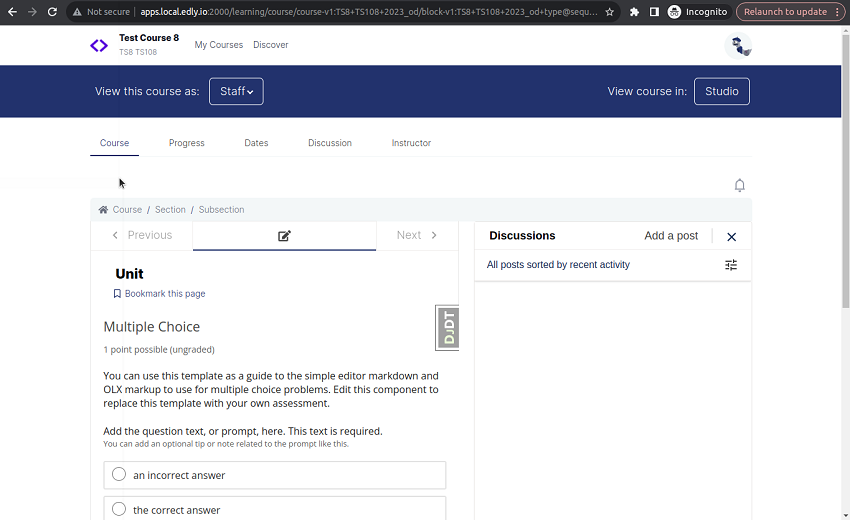
The new sidebar feature brings a sleek collapsible panel directly into your course units. This means no more switching tabs or navigating away from your learning materials to engage in forum discussions. This eliminates the need for discussion xBlocks.
The given image illustrates how the new sidebar discussion feature appears.

2. Automatic Upgrade For New Courses
All new course runs and re-runs created after your upgrade to Quince will automatically benefit from this enhanced discussion experience. No additional configuration is required!
3. Fetch Program Subscription Details
With the integration of subscription checks directly within the Program Listing and Program Details pages, users now have a more streamlined and informative experience.
Instructor Experiences
Copy and Paste Content
Note:
Copy and paste is possible for individual components: text blocks, video blocks, and problem blocks. You can paste components within the same course or into a different course.
Steps to Copy and Paste Content
- Locate the Component: Find the text block, video block, or problem block you want to copy.
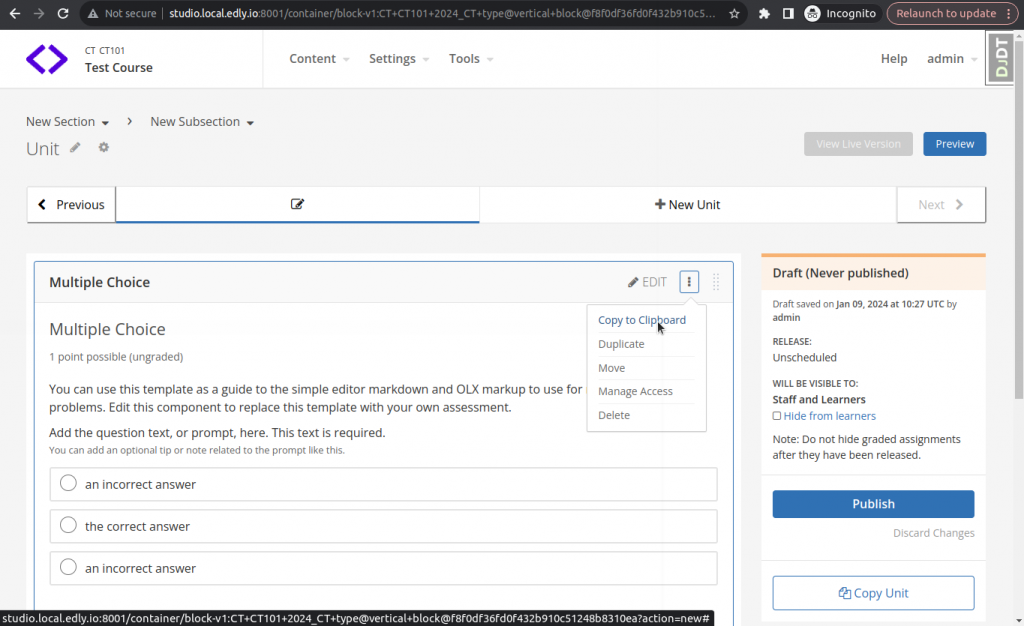
- Copy: Click the “actions” hamburger menu in the top right corner of the component and select “Copy to Clipboard.” A notification in the bottom right corner will confirm the copy.
- Navigate: Go to the unit where you want to paste the copied component. This can be in the same course or a different one.
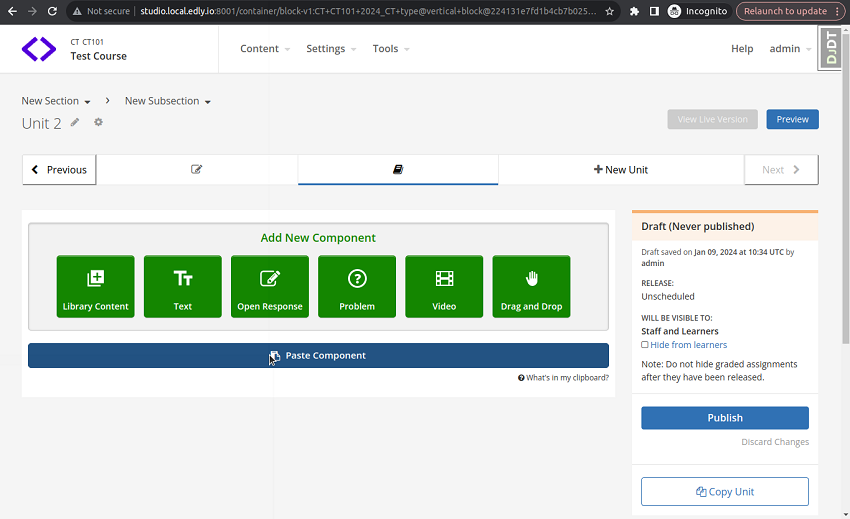
- Paste: Click “Paste component”.
Administrators & Operators
Let’s look at updated features on the administrator and operator sides of Quince Open edX.
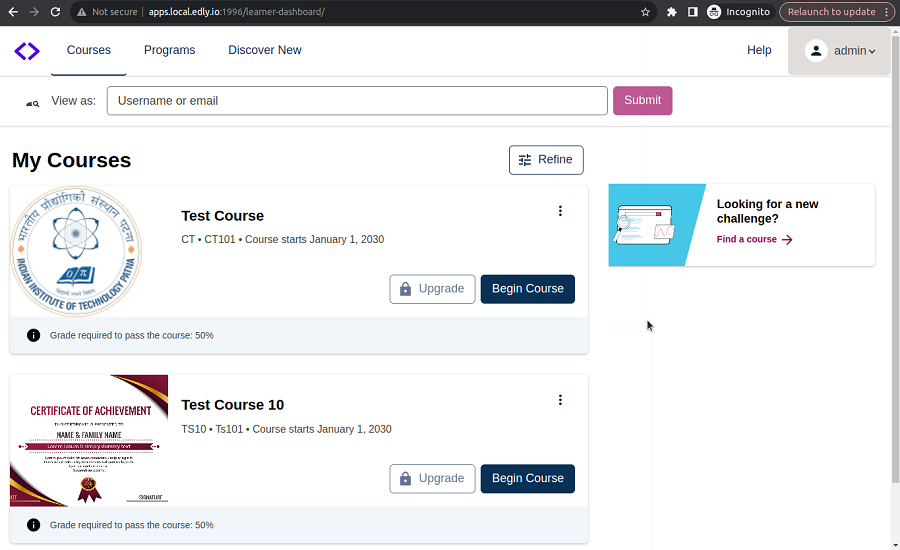
New Learner Home Page
The new Learner Home is now officially available on all Open edX platforms. It comes with updated look and feel views that make managing courses easier for administrators.
- Paragon-Powered: The new design utilizes Paragon, Open edX’s design pattern library, making it more accessible and easier to customize with your brand colors.
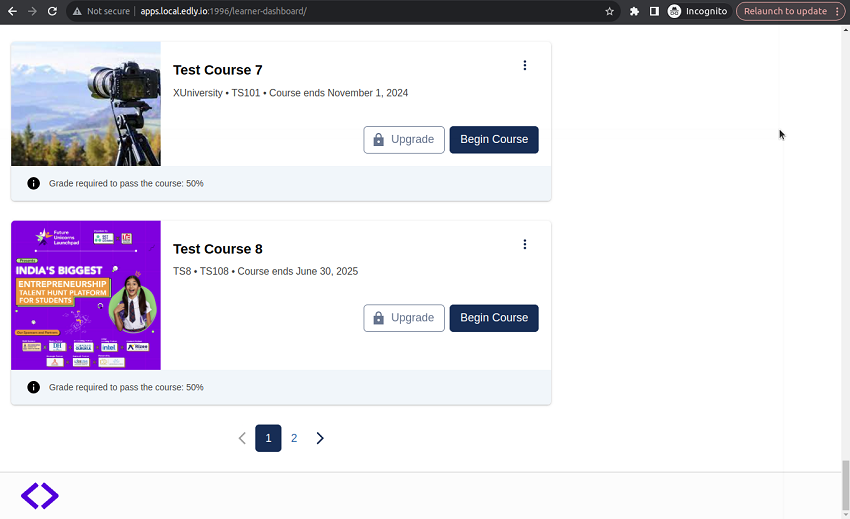
- Enhanced Course Cards: In Course Cards, you can now view thumbnails, and course information, and start a course, upgrade, view, or view a course. Each card also includes a menu icon that allows users to perform additional actions, such as unenrolling or managing email settings.
- Course sorting/filtering: Refine your course list by status or sort by most recent enrollment or title. To view filters, click on the “Refine” button.
- Pagination: All enrolled courses are displayed in groups of 25 initially to improve page performance. Use the pagination controls at the bottom to access other courses.
- Masquerade: Learners can now gain a “view only” perspective of the platform by accessing the “View as” box. This feature allows them to observe the platform from the standpoint of another learner. However, It is important to note that this mode allows only observation and restricts actions such as enrollment, unenrollment, and session selection.
Admin Panel and New Settings
Tutor Credentials Plugin
This is a plugin designed for Tutor that enables the integration of the Credentials application into an Open edX platform. The Credentials application provides support for certificates related to courses and programs. Users can now effortlessly configure certificates for their courses and programs with the help of the admin panel provided by this plugin.
It’s important to note that the user will first need to create the course or program using the Discovery plugin before they can use the Credentials plugin to configure certificates.
New Settings
- EXAMS_DASHBOARD_MICROFRONTEND_URL: Specifies the URL of the microfrontend responsible for the exams dashboard. Used for routing and integrating the exams dashboard within the platform’s UI.
- ELASTIC_SEARCH_INDEX_PREFIX: Apply a prefix to all Elasticsearch index names. Helps organize and manage indices for different environments or purposes.
New Waffle Flags
- CREATE_COURSE_WITH_DEFAULT_ENROLLMENT_START_DATE: Controls automatic setting of the enrollment start date for new courses.
- SHOW_REGISTRATION_LINKS: Enables/disables displaying registration links on the learner home page.
- IGNORED_ERRORS[N][‘LOG_ERROR’]: Defines which error types should not be logged in detail (multiple flags available).
- IGNORED_ERRORS[N][‘LOG_STACK_TRACE’]: Define which error types to avoid logging in detail (multiple flags available).
- SEND_CERTIFICATE_CREATED_SIGNAL: This feature allows the system to send a signal when it creates a certificate.
- SEND_CERTIFICATE_REVOKED_SIGNAL: This enables sending a signal when a certificate is revoked.
- TPA_AUTOMATIC_LOGOUT_ENABLED: Enables/disables automatic logout for third-party authentication providers.
- content_tagging.auto: Enables automatic content tagging using machine learning or other techniques.
Contentstore
- contentstore.default_enable_flexible_peer_openassessments: Enable flexible peer open assessments by default and enhance assessment options.
- contentstore.enable_copy_paste_units: Enables copy-pasting units within courses.
- contentstore.enable_studio_content_api: Enable the Studio content API for accessing course content.
- contentstore.mock_video_uploads: This functionality simulates video uploads for testing and demonstration, making it easier to develop and test new features.
- New Studio MFE (Micro-Frontend): Flags to enable or disable specific features within the new Studio MFE that offer control on various functionalities: course outline, course team, custom pages, export, file uploads, grading, import, schedule details, unit, updates, video uploads.
Course Experience
- course_experience.relative_dates_disable_reset: Prevents resetting of relative dates, maintaining consistency in course scheduling.
Course Home
- course_home.course_home_mfe_progress_tab: Enables a progress tab within the Course Home MFE, providing visual progress tracking for learners.
Courseware
- courseware.learning_assistant: Activates the learning assistant feature for potential personalized guidance and support.
- courseware.mfe_courseware_search: Enables a micro-frontend for courseware search, enhancing course discovery and navigation.
Learner Dashboard
- learner_dashboard.enable_b2c_subscriptions: Permits B2C (business-to-consumer) subscriptions, potentially expanding monetization options.
New Editors
- new_core_editors.use_video_gallery_flow: Employs a video gallery flow within the core editors, streamlining video management.
- new_editors.add_game_block_button: Adds a button to create game blocks, expanding content creation options.
Notifications
- notifications.enable_notifications: Turns on notifications functionality within the system, enabling user alerts and updates.
- notifications.show_notifications_tray: Displays a notifications tray for user visibility and interaction.
xBlocks
- xblocks.xblock_skill_tag_verification: Enforces skill tag verification for XBlocks, promoting content quality and accuracy.
These are the latest features and functionalities that we experienced in the Quince Open edX released version. Rather than those functionalities, Quince removes many waffle flags to ease developers like:
- BLOCK_STRUCTURES_SETTINGS[‘PRUNING_ACTIVE’]
- EXPECTED_ERRORS[N][‘IS_IGNORED’]
- EXPECTED_ERRORS[N][‘LOG_ERROR’]
- EXPECTED_ERRORS[N][‘LOG_STACK_TRACE’]
- block_structure.invalidate_cache_on_publish
- contentstore.enable_copy_paste_feature
- learner_home_mfe.enable_learner_home_amplitude_recommendations
- registration.enable_failure_logging
Several flags indicating permanent feature status have been removed. Let’s compare Quince’s features with Palm.
Comparison With Old Experience
New Home
- Course Refining: Users can now sort and filter their courses using a new “refine” feature.
- Upgrade Button Enhanced: The Upgrade button has been visually enhanced with an icon and relocated from the card footer to the card body for better visibility.
- Program Links Reorganized: Program links have been moved to separate lines for improved readability.
- Card Footer Streamlined: The card footer has been made smaller to focus on essential information, and a passing grade requirement has been added.
- Call to Action Removed: The “Get the most out of your course” call to action has been removed.
- Social Media and Settings Relocated: Social media buttons and the settings gear have been moved from individual cards to a more centralized location.
- Course Access Button Text Modified: The text on the Course Access Button has been updated.
- Codebase Improved: The code has been refactored to address technical debt and ensure ongoing maintainability.
Learner Home
Support and Resources
Visit the official release notes pages for a comprehensive overview of all the detailed changes introduced in the Quince release of Open edX. In Community Forums and Support Channels, Explore discussions, updates, and community support on the Open edX Quince Release Notes.
Wrapping Up
Quince comes with additional functionalities than Palm, and Open edX is still working on it to improve and upgrade the next release “Redwood”. Get the latest updates about Open edX releases and explore features and functions with CodeTrade. CodeTrade, a leading Open edX development agency based in India, ensures the success of your Open edX project and helps you stand out in the crowd. Get in touch with CodeTrade Today…!
Chand Prakash founded CodeTrade India and continues to lead it as CTO, shaping the technical direction of the company since its early days. He has spent his career solving hard engineering problems and building teams that ship reliable software, with a focus on ERP, e-commerce, and custom enterprise platforms.






 Chand Prakash
22 June 2026
Chand Prakash
22 June 2026 Chand Prakash