






Salesforce
 Chand Prakash
25 November 2026
Salesforce Development Services: A Complete Guide for Businesses
 Chand Prakash

Moving your customer data to Salesforce does not automatically make your sales or service operations better. The platform needs to reflect how your business works. Your employees should know where to find information, how to update records, and which processes they need to follow.
Getting these details right takes planning. Before Salesforce goes live, someone needs to decide which teams will use it, what information they need, which existing systems must connect to it, and how the transition will take place.
Miss these decisions, and employees may end up maintaining spreadsheets alongside Salesforce, entering the same information twice, or struggling with workflows that do not match their daily responsibilities.
That’s why Salesforce implementation deserves careful attention before anyone starts configuring the platform.
This guide walks through the Salesforce implementation process, from the first planning discussions to deployment and employee training. We’ll also look at common challenges, implementation costs, timelines, and a few practices that can save businesses considerable rework.
A closer look at each stage can help businesses understand what to expect from a Salesforce implementation guide before starting the project.
Salesforce implementation is the process of preparing and deploying Salesforce to support a company’s sales, customer service, and other business operations.
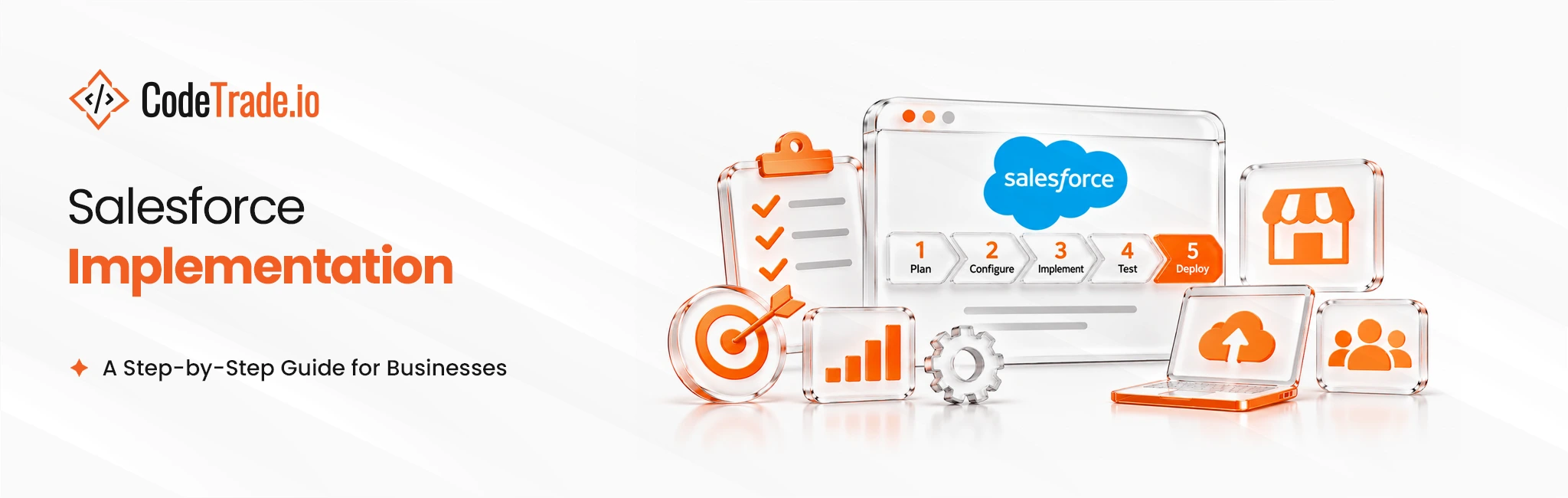
The work usually begins with reviewing existing processes. From there, the implementation team selects the relevant Salesforce products, configures the platform, prepares customer data, connects other applications, and tests everything before employees start using it.
What gets implemented depends on the business.
A company introducing Salesforce for its sales department may need lead tracking, opportunity management, and sales reports. A business with a large customer support operation may also need Service Cloud, case management workflows, and customer portals.
A typical Salesforce CRM implementation covers:
It’s worth understanding the difference between implementation, customization, and development. Implementation covers the complete setup and launch. Customization involves adjusting existing Salesforce features, while development involves building additional functionality using technologies such as Apex and Lightning Web Components.
A project may involve all three, depending on what the business needs.
Imagine a company where sales representatives track leads in spreadsheets, managers review opportunities through separate reports, and customer support teams use another application to handle service requests.
Moving all these records into Salesforce might bring the information into one place, but it won’t automatically fix the way these teams work.
Someone still needs to decide how leads will be assigned, which customer details each department can access, when managers should approve an opportunity, and how support teams will see previous customer interactions.
These decisions belong in the implementation plan, not in a list of changes made after launch.
A little preparation can prevent several common problems:
There is also a financial reason to take CRM planning seriously. Nucleus Research’s January 2024 analysis found that organizations generated an average return of $3.10 for every dollar spent on CRM. Productivity gains and process efficiency accounted for 51% of the total return.
These figures cover CRM investments broadly, rather than Salesforce implementations alone. Still, they make an important point: businesses should look at what their CRM investment changes in everyday operations, not just what it costs to install.
Every Salesforce project has its own requirements. A small sales team setting up a CRM will have a different implementation journey from an enterprise connecting several departments and legacy systems.
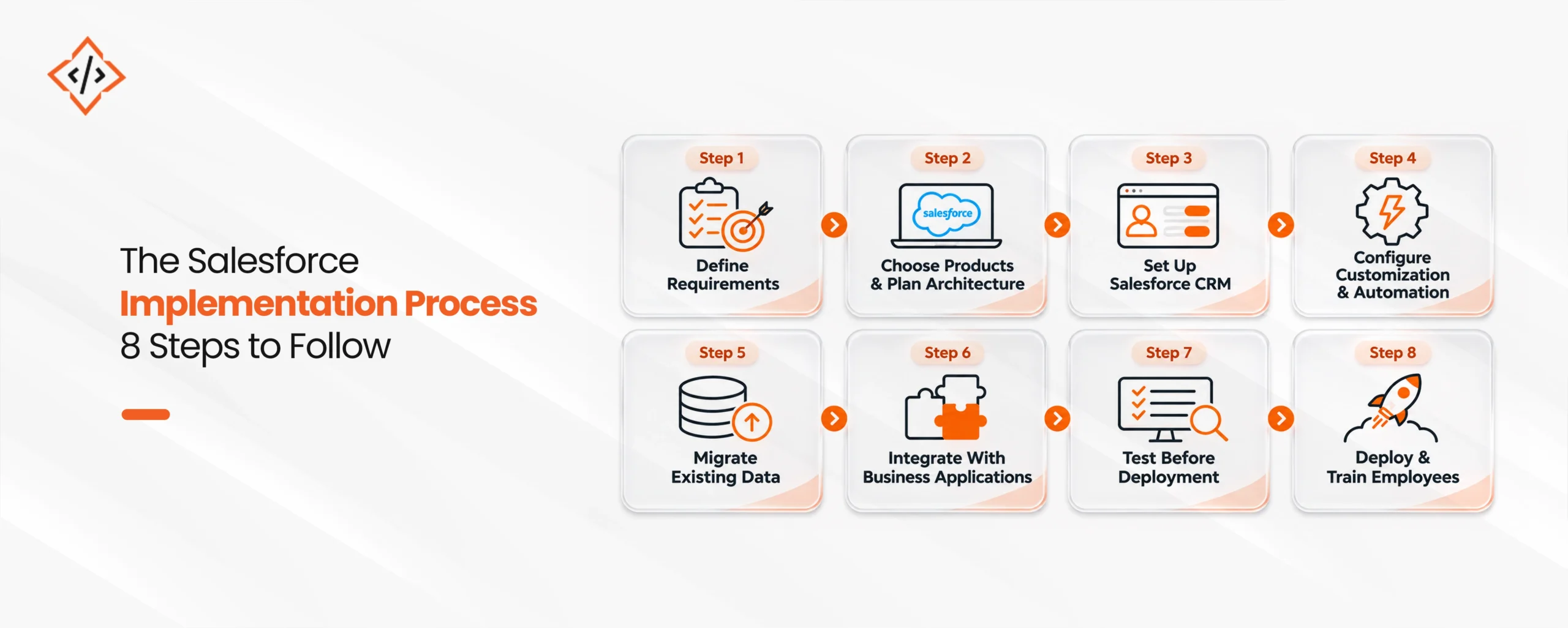
Even so, most projects pass through eight key stages.
These Salesforce implementation steps provide a practical sequence for taking the project from initial planning to deployment.
The Salesforce implementation methodology may also vary depending on the project’s size, existing systems, and the number of departments involved.
Start by speaking to the people who will actually use Salesforce.
Sales representatives, service agents, managers, and operations teams may all have different expectations from the platform. Find out how they currently manage their work, where information gets lost, and which tasks take longer than they should.
For example, sales representatives may complain about receiving leads late. Managers may struggle to get an accurate picture of the sales pipeline. Customer support agents may have to switch between applications to understand a customer’s history.
Write down these problems before discussing technical solutions.
A clear Salesforce implementation strategy helps keep these requirements connected to business priorities throughout the project.
Here are a few questions worth answering:
Be specific when setting objectives. “Improve sales visibility” is difficult to measure. Tracking every opportunity through defined sales stages, on the other hand, gives the team something concrete to work towards.
The requirements document should become the reference point for the rest of the project. If a proposed feature doesn’t address an identified need, question whether it belongs in the scope.
Salesforce offers several products, each designed for different business functions. Choosing the right ones means looking at the requirements gathered in the previous stage.
For instance:
A business may need one product or a combination of several. There’s little value in adding products that employees won’t use or that don’t address a genuine requirement.
Once the product selection is clear, the technical team can plan the Salesforce architecture.
This involves deciding how data will be organized, which objects and fields are required, how users will access records, and how Salesforce will connect with other systems. The team should also identify any technical limitations or dependencies that could affect development.
One decision deserves particular attention: how much customization will the project need?
Standard Salesforce features should be the first option when they meet the requirement. Custom development makes sense when the business needs functionality that the existing platform cannot provide adequately.
Making this distinction early prevents unnecessary development work and keeps the implementation manageable.
With the architecture agreed upon, the team can start configuring the Salesforce environment.
This stage covers the settings and structures employees will interact with every day.
A well-planned Salesforce CRM setup should make everyday tasks straightforward while giving each team access to the information it needs.
Consider a company with sales teams operating across several regions. Each team may need access to a different set of customer records, while regional managers need reports covering their respective teams. These access rules and reporting views should be configured before the CRM goes live.
Avoid filling the platform with fields and options simply because they’re available. Employees should be able to find what they need without working through screens full of information they rarely use.
Salesforce comes with a range of features that can handle everyday business processes. However, some companies have approval rules, reporting requirements, or workflows that need additional configuration.
Salesforce customization may involve changing page layouts, creating validation rules, configuring approval processes, building reports, or adjusting existing workflows.
More specialized requirements may call for custom development using Apex or Lightning Web Components.
Automation is another part of this stage.
Take lead assignment as an example. When a new lead enters Salesforce, the system can assign it to a sales representative based on its region or source. It can also create a follow-up task and notify the assigned employee.
Salesforce Flow can handle many such requirements without custom code. Apex is useful when the required business logic is more complex.
The important thing is to choose the simplest approach that meets the requirement. Building custom code for a process that Salesforce Flow can already handle adds work without necessarily adding value.
Data migration needs more attention than simply exporting records from one system and importing them into another.
Existing databases often contain duplicate contacts, outdated customer details, missing fields, and inconsistent formats. If these records are moved without review, the new Salesforce environment inherits the same problems.
A typical Salesforce data migration follows these stages:
For example, a company moving from two different CRM systems may find that the same customer has several records. The team should review these records and consolidate duplicates before transferring the data.
It’s also worth deciding how much historical information the business actually needs. Old records that serve no operational or reporting purpose may not need to move to the new system.
A smaller, accurate dataset is generally easier to manage than a large database containing years of inconsistent information.
Salesforce rarely operates in isolation. Businesses may already rely on ERP software, accounting platforms, e-commerce applications, payment gateways, marketing tools, and customer support systems.
Salesforce integration services connect these applications so employees don’t have to keep copying information between them.
Consider an online retailer. When a customer places an order, the e-commerce platform can send the relevant customer and order details to Salesforce. The sales and support teams can then view this information without asking another department to retrieve it.
Before starting integration work, the team should settle a few important questions:
Depending on the systems involved, integrations may use Salesforce APIs, middleware, or platforms such as MuleSoft.
Testing matters here. A connection may work perfectly with a handful of sample records but struggle when the business starts processing hundreds or thousands of transactions. The implementation team should account for data volumes, system limits, error handling, and synchronization frequency before approving the integration.
Before employees start using the new environment, the team needs to check whether everything works as expected.
Testing should cover the features configured during implementation, the data that was migrated, and the applications connected to Salesforce.
The main areas include:
It’s useful to test with realistic scenarios rather than simply checking whether individual features open.
For instance, ask a sales representative to create a lead, update an opportunity, and move it through the sales pipeline. Have a manager review the same opportunity and check whether the correct information appears in their reports.
Also test what happens when something goes wrong. What if a user submits incomplete information? What if an integration fails? Can an employee access a record they shouldn’t be able to see?
Finding these problems before deployment is considerably easier than dealing with them after employees have started relying on the system.
Once testing is complete and the business approves the solution, Salesforce can be moved into the production environment.
The Salesforce deployment process needs a clear schedule, particularly when the new CRM is replacing an existing system.
The team should decide when employees will switch to Salesforce, when the final data migration will happen, and who will handle problems during the initial rollout.
A deployment plan generally covers:
Training should happen before employees are expected to work independently on the platform.
Keep it relevant to their responsibilities. Sales representatives need to know how to manage leads and opportunities. Managers may need help with dashboards and sales reports. Customer support agents need to understand case management and customer history.
Salesforce Research’s State of Sales report found that 76% of sales professionals using sales analytics said it improved their ability to provide a consistent customer experience across channels. The report also found that 70% reported improvements in sales velocity.
These figures relate to the use of sales analytics, rather than Salesforce implementation itself. They do, however, show why employees need to know how to use the information available to them.
Once Salesforce goes live, keep an eye on how employees use it. Collect feedback, address problems, and provide additional training where needed. Some improvements will only become apparent after teams have worked with the platform for a while.
A project plan tells the team what needs to happen. These practices help keep the work sensible and prevent avoidable problems along the way.
It’s easy to get carried away by the number of features Salesforce offers. Resist the temptation to configure everything at once.
Decide which business problems need attention first. Then select the features that address those problems.
Not every existing business process needs a custom solution. Salesforce already provides tools for managing leads, approvals, reports, and automated workflows.
Use these features when they fit. Custom development should have a clear purpose, particularly when it introduces additional maintenance work.
The people using Salesforce every day can spot problems that may not appear during technical discussions.
Ask them to review workflows, participate in testing, and point out anything that makes routine tasks difficult. Their feedback can save considerable rework.
Don’t wait until records appear in Salesforce to discover that customer details are incomplete or duplicated.
Review the existing database, agree on data standards, and decide how duplicates and outdated records will be handled.
Permissions should be planned before users are added to the system. Define access according to job responsibilities and check that sensitive information is not visible to employees who don’t need it.
Training requires time and preparation. Include it in the implementation plan rather than treating it as something to arrange after deployment.
Role-specific sessions, practical exercises, and simple reference guides can make the transition easier.
A completed deployment doesn’t tell you whether employees are using Salesforce properly.
Look at login activity, record creation, updates, and feedback from different departments. If certain teams continue relying on spreadsheets, find out why before assuming they need more training.
Together, these practices form a useful Salesforce implementation checklist that teams can revisit during planning, deployment, and post-launch reviews.
Even a carefully planned project can run into difficulties. Some problems come from technical limitations; others arise because business requirements were not discussed early enough.
| Challenge | What can go wrong | How to address it |
|---|---|---|
| Unclear requirements | Repeated changes and delays | Document requirements before development |
| Poor data quality | Duplicate or inaccurate customer records | Clean and validate data before migration |
| Too much customization | Higher maintenance effort | Use standard features wherever practical |
| Integration problems | Inconsistent information across applications | Plan data flows and test connections early |
| Low employee adoption | Teams continue using old tools | Involve users and provide relevant training |
| Insufficient testing | Errors appear after launch | Test real business scenarios |
| Unclear ownership | Decisions and approvals get delayed | Assign responsibilities to specific people |
One issue deserves particular attention: treating Salesforce implementation as an IT department’s responsibility alone.
The technical team can configure the platform, but it cannot decide every business rule without input from the departments involved. Sales, service, finance, and operations teams should have a say in decisions that affect their work.
Salesforce implementation costs vary from one project to another. The amount depends on the products selected, the number of users, the complexity of the workflows, and the technical work required.
A basic setup using standard CRM features will generally cost less than an enterprise project involving custom applications, several integrations, and data migration from multiple systems.
Here are the main expenses to consider:
Keep subscription fees separate from implementation expenses when preparing the budget. They cover different parts of the investment.
Before approving a project, ask for a breakdown of the proposed work. It should explain what’s included, which integrations and customizations are planned, how testing will be handled, and what support is available after deployment.
There isn’t one timeline that applies to every Salesforce project.
A small setup with standard CRM features may take a few weeks. A project involving custom workflows, integrations, and data migration will need more time. Enterprise implementations covering several departments can take several months or longer.
For initial planning, consider these broad categories:
These are planning estimates, not promised delivery dates.
The quality of the existing data, availability of decision-makers, speed of approvals, and access to connected systems can all affect the schedule.
Some businesses also choose a phased rollout. Instead of introducing Salesforce across the entire organization at once, they start with one department or a smaller group of users. Once the setup has been tested in day-to-day operations, the rollout can expand to other teams.
The implementation team should include people who understand the business as well as those who can configure and develop the platform.
Depending on the project, these responsibilities may be assigned to:
Smaller projects may not need a separate person for every role. What matters is that someone is clearly responsible for each decision and task.
Salesforce implementation involves several connected activities, from understanding business requirements to preparing data, configuring the CRM, and testing it before launch. Having the right technical team involved can make these stages easier to manage.
Salesforce consulting services can help businesses assess their requirements, identify the right solutions, and plan the technical work before implementation begins.
CodeTrade provides Salesforce development services for businesses looking to implement, customize, integrate, or improve their CRM environments.
The team can work on requirement analysis, solution design, Salesforce configuration, custom development, integrations, data migration, and ongoing improvements.
If your internal team needs additional technical support, you can also hire Salesforce developers to work alongside your existing resources.
You can explore CodeTrade’s Salesforce Development Services to learn more about its capabilities and how they align with your project requirements.
Getting Salesforce up and running is one part of the job. The real work lies in making sure employees can use it without changing their entire routine just to accommodate the software.
That starts with understanding how different departments operate. From there, businesses can decide which Salesforce products they need, how customer information should be organized, which applications must connect, and what employees need to learn before launch.
Rushing through these decisions often leads to extra customization, messy data, and a CRM that employees find difficult to use.
Take the time to plan the implementation, test it with real users, and review how the platform performs after deployment. These steps give the business a much better chance of getting lasting value from its Salesforce investment.
 Chand Prakash
 Chand Prakash
 Chand Prakash
 Chand Prakash