AI 13 November 2026What Is Customer Experience Automation (CXA)? A Complete Guide
Key takeaways:
- Customer experience automation uses data, workflows, and AI to act on customer signals across the journey without manual effort.
- CXA sits on top of a CRM, which stores the record, while CXA decides and triggers the next action.
- Gartner reports that 91% of service leaders face executive pressure to implement AI in 2026, yet only 24% show positive financial returns from it.
- A clear route to a human agent is a design requirement, since 87% of customers expect one when GenAI handles service.
- Cost depends on integrations, AI usage, and channels more than on license fees.
Introduction
Customer experience automation (CXA) is the practice of using customer data, rules, and AI to trigger the right action at each point of the customer journey, from a welcome message to a renewal reminder. It connects the systems a business already runs, such as CRM, helpdesk, ecommerce, and messaging tools. As a result, responses happen on time without anyone copying data between screens.
Interest in the approach has grown quickly. According to a Gartner survey of 321 service leaders, 91% reported executive pressure to implement AI in 2026. However, budget alone does not produce results.
This guide explains how CXA works, how it differs from CRM and customer experience management, and which processes it can automate. It also covers what drives cost and how to roll it out in stages.
What CXA means
CXA is a layer of logic that watches customer behavior and responds to it. When a customer signs up, opens a ticket, abandons a cart, or goes quiet for 60 days, the system recognizes the event and runs a predefined workflow. In many setups, AI also chooses which workflow fits best or writes the response itself.
The term is broader than customer service automation. Service automation handles tickets and queries, whereas CXA covers marketing, sales, onboarding, support, and retention as one connected journey.
Consequently, customers get consistent answers no matter which team or channel they reach.
How CXA works

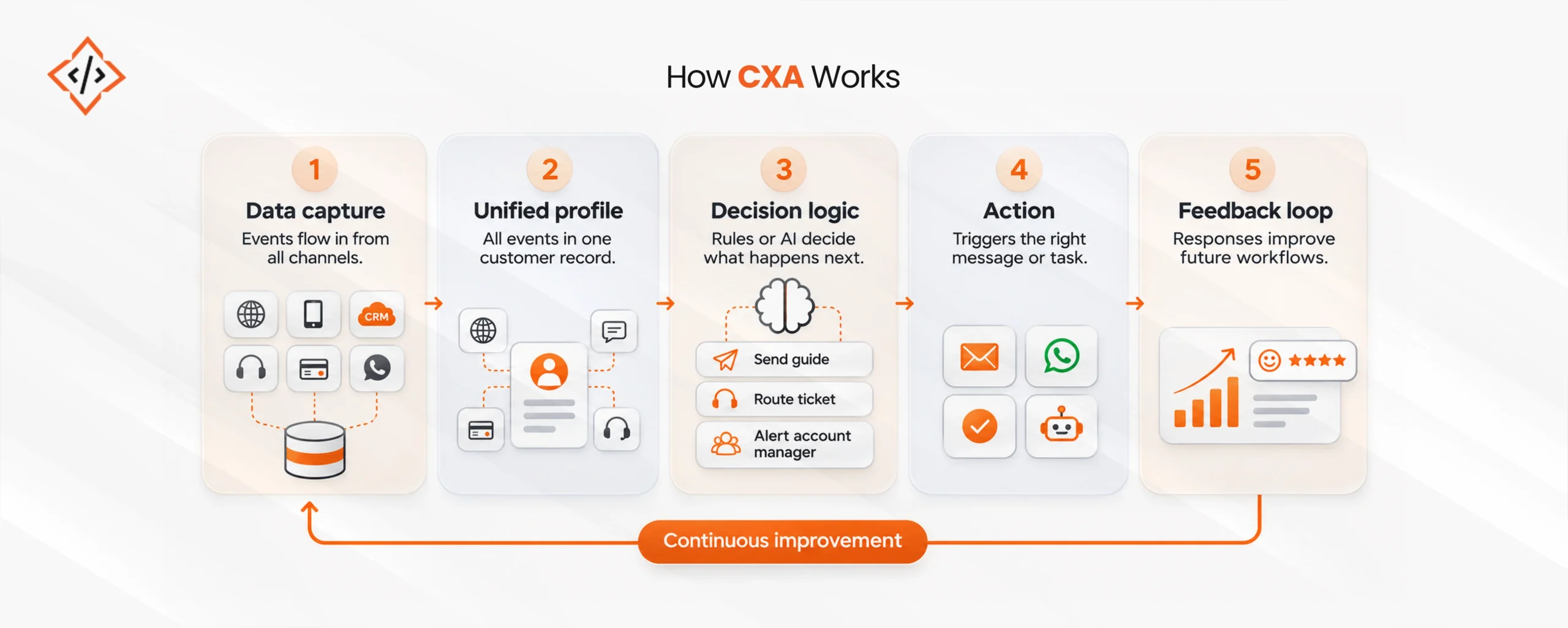
A CXA system usually runs through five layers:
- Data capture: Events flow in from the website, app, CRM, helpdesk, payment system, and messaging channels.
- Unified profile: The system merges these events into one customer record, so every workflow sees the same history.
- Decision logic: Rules or AI models decide what happens next, for example, sending a guide, routing a ticket, or alerting an account manager.
- Action: The system triggers the email, WhatsApp message, task, or chatbot reply through connected tools.
- Feedback loop: Replies, conversions, and CSAT scores feed back into the logic, so workflows improve over time.
In practice, the weakest layer is usually data. If the helpdesk and the CRM disagree about who the customer is, every automated step that follows inherits the error.
For this reason, most projects start with integration work before any AI goes live.
CXA vs CRM vs CXM
These three terms often get mixed up in vendor pitches.
Put simply, a CRM stores customer information, customer experience management (CXM) measures how customers feel, and CXA acts on both.
| Aspect | CRM | CXM | CXA |
|---|
| Main job | Store records, deals, and interaction history | Measure sentiment through surveys, feedback, and analytics | Trigger actions across the journey in real time |
| Typical output | Contact records, pipeline reports | NPS, CSAT, journey insights | Messages, routed tickets, tasks, AI replies |
| Main users | Sales and account teams | CX and research teams | Marketing, service, and operations together |
| Works alone | Yes, as a database | Yes, as a reporting layer | Rarely, since it depends on CRM data and CXM signals |
Most businesses need all three. CXM shows where the journey breaks, the CRM holds the context, and CXA closes the gap automatically.
Business processes CXA can automate
CXA works best on high-volume, repeatable moments where speed matters. Customer journey automation and customer engagement automation are narrower labels for parts of this list:
- Onboarding: New accounts receive setup steps, document requests, and product guides based on what they have or have not completed.
- Support triage: Incoming tickets get classified by intent and urgency, then routed to the right queue with the customer’s history attached.
- Self-service resolution: Chatbots and voice assistants handle order status, password resets, booking changes, and policy questions.
- Order and delivery updates: Customers receive status messages on their preferred channel before they need to ask.
- Renewals and payments: Reminders, failed-payment retries, and renewal offers go out on schedule without manual follow-up.
- Feedback collection: Surveys trigger after a resolved ticket or delivery, and low scores open a recovery task for a human.
- Churn prevention: Drops in usage or repeated complaints flag at-risk accounts for outreach.
Many of these processes run across departments. For example, a refund touches support, finance, and inventory at once.
As a result, CXA projects often overlap with wider business process automation solutions that connect back-office systems to customer-facing channels.

Find out which customer journeys are costing your team the most time.

How AI improves CXA
Rule-based automation follows fixed paths: if a customer does X, the system sends Y. AI adds judgment to those paths in several ways:
- Intent detection: Language models read free-text messages and identify what the customer wants, even when the phrasing varies.
- Sentiment scoring: Signs of frustration can push a ticket up the queue or route it straight to a senior agent.
- Predictive signals: Models spot churn risk or upsell readiness from usage and purchase patterns.
- Generated responses: AI drafts replies grounded in the knowledge base and the customer record, which agents can approve or send automatically.
- Agentic actions: AI agents complete tasks such as issuing a refund or rescheduling a delivery within set limits.
That said, an AI-powered customer experience still needs a human route.
A Gartner survey of 3,566 customers found that 87% consider access to a human agent essential when companies use GenAI for service, even though 50% say GenAI makes interactions easier.
Good CXA design therefore treats escalation as part of the workflow and passes full context, so the customer never repeats the problem.
Building these models into existing systems takes specialist skills. For this reason, many teams hire AI developers for the integration layer instead of retraining in-house staff.
Customer experience automation software generally falls into three groups:
- Suite platforms: CRM vendors such as Salesforce and HubSpot bundle marketing, service, and automation modules on one data model.
- Point tools: Helpdesk and messaging platforms such as Zendesk, Intercom, and Braze automate one channel or function in depth.
- Custom builds: Businesses with legacy systems, regional channels, or data residency needs build their own orchestration layer on top of existing tools.
When comparing customer experience automation tools, check integration depth with current systems first. Also confirm support for local channels such as WhatsApp, Arabic language handling where relevant, data residency options, and pricing at year-two volumes rather than launch volumes.
How much does customer experience automation cost?
There is no single price, because cost depends more on scope than on a license fee. The main drivers are:
- Platform licenses: Usually priced per seat, per contact, or per conversation, so costs rise with volume.
- Integration work: Connecting CRM, ERP, helpdesk, and ecommerce systems is often the largest one-time expense, especially with older software.
- AI usage: Generative AI is typically billed by usage, so resolution volume affects spend directly.
- Channels and languages: Each added channel or language needs content, testing, and maintenance.
- Ongoing tuning: Workflows, knowledge bases, and models need regular review after launch.
Spending trends show why scope matters.
According to Gartner, AI spending by customer service leaders rose 38% while overall service budgets grew only 2%.
Yet a separate Gartner survey found that just 24% of service leaders could show positive financial returns from their AI use cases. Starting with one or two high-volume journeys keeps investment tied to measurable outcomes.
How to implement CXA in stages
- Audit the journey: List every customer touchpoint and mark where delays, handoffs, or repeated questions occur.
- Fix the data first: Connect core systems and agree on one customer ID before automating anything.
- Pick two pilot journeys: Choose high-volume, low-risk flows such as order updates or onboarding.
- Design the human handoff: Define when AI stops, who takes over, and what context passes with the case.
- Set baseline metrics: Record first response time, resolution rate, CSAT, and cost per contact before launch.
- Expand in phases: Add channels, AI features, and journeys only after the pilots show measurable gains.
For businesses running CXA on custom platforms, a specialist AI development team usually handles model integration, guardrails, and monitoring.
Common mistakes to avoid
- Automating a flawed process: Automation repeats existing problems at scale, so fix the steps before adding triggers.
- Blocking the human route: Forcing customers through repeated bot attempts damages trust across every channel.
- Ignoring data regulations: Laws such as GDPR and the personal data protection laws in the UAE and Saudi Arabia govern how customer data is stored and processed.
- Measuring activity over outcomes: Message counts say little, while resolution rate, retention, and cost per contact show real impact.
Conclusion
Customer experience automation works when data, logic, and people are designed together.
A connected customer record, clear decision rules, carefully scoped AI, and a reliable path to a human agent produce an automated customer experience that customers trust.
Moreover, businesses that begin with a few journeys and measure results before scaling tend to see returns sooner.
FAQs
CXA uses customer data, workflows, and AI to trigger timely actions across the customer journey. It covers onboarding, support, engagement, and retention without manual follow-up from teams.
A CRM stores customer records, deals, and interaction history. CXA uses that data to decide and trigger the next action automatically, such as routing a ticket or sending a personalized message.
AI adds intent detection, sentiment scoring, predictive signals, and generated replies to rule-based workflows. As a result, CXA can handle varied requests, prioritize urgent cases, and escalate complex issues with full context.
CXA can automate onboarding, support triage, self-service queries, order updates, renewals, payment reminders, feedback surveys, and churn alerts. It works best on high-volume, repeatable moments where response speed matters.
Cost depends on platform licenses, integration work, AI usage, channels, and ongoing tuning. Starting with one or two high-volume journeys keeps early spend focused and makes returns easier to measure.
Chand Prakash founded CodeTrade India and continues to lead it as CTO, shaping the technical direction of the company since its early days. He has spent his career solving hard engineering problems and building teams that ship reliable software, with a focus on ERP, e-commerce, and custom enterprise platforms.




 Chand Prakash
11 November 2026
 Chand Prakash





 Hardik Soni