






Odoo Development
eCommerce
 Hardik Soni
29 October 2026
Hardik Soni
29 October 2026
Odoo WooCommerce connector: how to connect, sync, and automate your store (2026 guide)
 Hardik Soni
Most Odoo integrations were built once and then forgotten. An order sync written five years ago still runs every few minutes, and the person who wrote it may have left the company. Nobody checks which API it uses until an upgrade breaks it.
That is why the Odoo 20 XML-RPC API timeline matters. The short answer is that XML-RPC is not removed in Odoo 20. One part of it is, and the rest has a fixed end date. Teams that read “still works” as “safe” are the ones who will be rewriting connectors under pressure in 2028.
Odoo XML-RPC deprecation happens in stages, not all at once. Each stage hits a different kind of integration.
| Release | Odoo Online | What changes | Who is affected |
|---|---|---|---|
| Odoo 19 (2025) | Online 19.0 | XML-RPC and /jsonrpc marked deprecated. JSON-2 introduced. | Nobody breaks yet. Planning should start. |
| Odoo 20 (fall 2026) | Online 19.1 (winter 2025) | db service removed | Scripts that list, create, copy, back up or restore databases |
| Odoo 21 (2027) | Online 21.1 (winter 2027) | common and object removed on Online | Every Online integration still using XML-RPC |
| Odoo 22 (fall 2028) | Already removed | common and object removed on-premise and Odoo.sh | Every remaining XML-RPC or /jsonrpc integration |
Two things in this table are easy to miss.
First, Odoo Online runs about a year ahead of the numbered releases, so an online customer has less time than the version numbers suggest. Second, “deprecated” in Odoo 19 already meant no new work should be built on XML-RPC. Anything built since then is new debt.
Odoo also notes that these dates can shift.
Check the official documentation before you lock an Odoo API migration timeline into a project plan.
Most of the Odoo 20 API changes have little to do with XML versus JSON. The bigger shift is in how an integration logs in, how it calls methods, and how it handles failures.
| - | XML-RPC (legacy) | JSON-2 (new) |
|---|---|---|
| Endpoint | /xmlrpc/2/common and /xmlrpc/2/object | /json/2/<model>/<method> |
| Login | Username and password or key, then a uid | API key sent as a bearer token on every request |
| Calling a method | execute_kw with positional arguments | HTTP POST with named arguments in a JSON body |
| Database choice | Passed inside each call | X-Odoo-Database header, needed when one server hosts several databases |
| Transactions | One per call | One per call, and calls cannot be chained into one transaction |
| Status | Deprecated | Recommended for all new work |
The transaction rule deserves attention. Each JSON-2 call is committed on its own. An integration that creates an order in one call and its lines in the next can leave a half-built order behind if the second call fails. Good JSON-2 integrations either do the whole job in one method call or are built so that a retry does not create duplicates.
API keys also behave differently now. Odoo asks for a duration when a key is created, so keys expire. A connector that worked for years can stop on a Monday morning simply because its key ran out. Put key expiry dates in the same calendar as your SSL certificates.
The easiest way to see the change is to put the same request side by side. Both examples below read the names of companies from the contact list.
The legacy XML-RPC version logs in first, then calls execute_kw:
import xmlrpc.client

common = xmlrpc.client.ServerProxy(f"{url}/xmlrpc/2/common")
uid = common.authenticate(db, username, api_key, {})

models = xmlrpc.client.ServerProxy(f"{url}/xmlrpc/2/object")
partners = models.execute_kw(
    db, uid, api_key,
    "res.partner", "search_read",
    [[["is_company", "=", True]]],
    {"fields": ["name"], "limit": 5},
)
The JSON-2 version skips the login step and calls the model method directly:
import requests

response = requests.post(
    f"{url}/json/2/res.partner/search_read",
    headers={
        "Authorization": f"bearer {api_key}",
        "X-Odoo-Database": db,
    },
    json={
        "domain": [["is_company", "=", True]],
        "fields": ["name"],
        "limit": 5,
    },
)
partners = response.json()
The JSON-2 call is shorter, uses plain HTTP, and needs no XML library. Arguments are named so a reader can tell what each value means.
Odoo’s JSON-2 API documentation also describes a live reference page at /doc on each database, which lists the models and methods that the instance exposes. It is the fastest way to map old calls to new ones.
When a call fails, JSON-2 returns an HTTP error status with a JSON body that describes the problem. A missing or invalid API key returns 401 Unauthorized. Permission problems, missing records, and validation errors come back as Odoo error messages in the response body.
Three habits prevent most surprises:
Many migration guides skip a basic question: can your Odoo instance use the external API at all? According to Odoo’s documentation, any Odoo external API integration needs a custom pricing plan. External API access is not available on One App Free or Standard plans.
This catches some Odoo Online customers off guard. A business on the Standard plan that relies on a third-party connector should confirm how that connector reaches Odoo, because a direct XML-RPC or JSON-2 connection will not work on that plan.
PHP integrations have a second, quieter problem. Odoo’s documentation notes that from PHP 8 onward, the XML-RPC extension may not be installed by default. Many WooCommerce and custom PHP connectors use it. A server upgrade can break them before Odoo ever removes anything.
Prioritize by two things, that is, how soon the call breaks and how much damage a failure causes. A broken monthly report is an annoyance. A broken order sync is lost revenue by lunchtime.
A practical order:
Internal reports and one-off scripts can wait, but they should still go on the list.
A vendor saying their app “supports Odoo 20” does not tell you which API it uses. Ask these questions and get the answers in writing:
Writing JSON-2 calls is the easy part. Finding every place that still uses the old ones takes far longer.
Start with a code search across every repository that touches Odoo. Look for these strings:
Then look beyond code you own.
The logs are the most reliable source. Code search finds what exists, while logs show what is still in use.
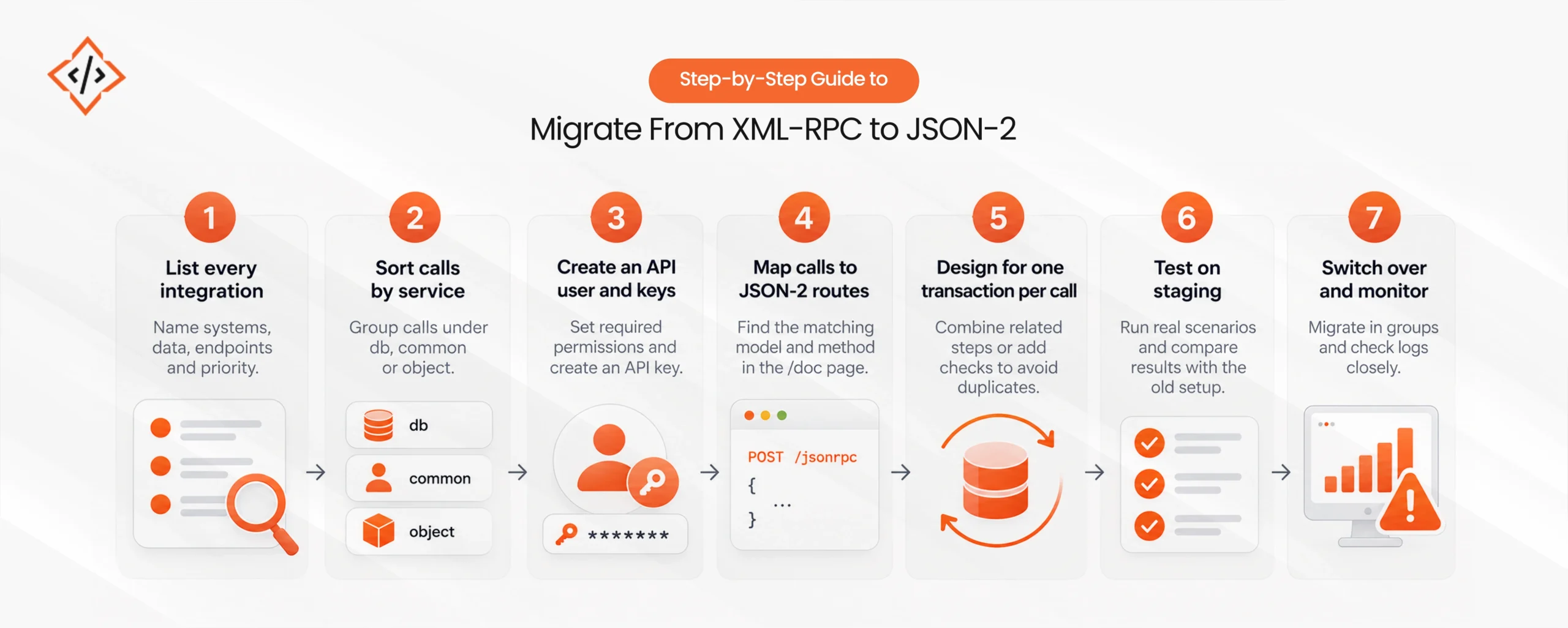
Treat Odoo JSON-2 API migration as a small project with an owner, not a find-and-replace job. This Odoo API upgrade guide covers the steps that work for most teams.
Record each connected system, who owns it, what data it moves, which endpoint it calls, and how critical it is. This list becomes your migration plan.
Group each call under db, common, or object. Calls to db need a different solution entirely. Calls to common and object map to JSON-2.
Set up one Odoo user per integration with only the permissions it needs. Create an API key with a clear description and a duration, and record the expiry date.
Use the /doc page on your database to find the matching model and method. Turn positional arguments into named ones, and check that each response is handled correctly.
Combine steps that must succeed together into a single method call, or add checks so retries do not create duplicates.
Run real scenarios, including missing records, permission errors, timeouts, and repeated requests. Compare results with the old integration before switching over.
Move one business area at a time. Keep the old integration ready to restore for a short period, and monitor errors closely in the first weeks.
Teams that run several connected systems often bring in an experienced Odoo development company for steps 1, 4, and 5, where most of the risk sits.
Moving to JSON-2 is a good moment to clean up access. Many old integrations run with far more rights than they need, and nobody has looked at them in years.
Use the migration to fix these:
The API change is the same everywhere. The deadline and the work involved are not.
If you are planning an Odoo 20 upgrade anyway, migrate the integrations as part of that project. Specialist Odoo migration services can cover the version upgrade and the API move together, so the business only goes through one round of testing.
The Odoo 20 XML-RPC API timeline gives teams a window, not a reprieve.
Odoo 20 removes the db service. Odoo 22, or Online 21.1 for cloud customers, removes the rest. Everything that still calls /xmlrpc or /jsonrpc now has a fixed end date.
Not every team needs outside help for this. If you have one or two internal scripts and a developer who knows them, that developer can move them to JSON-2 in a few days. The risk grows with the number of connectors, vendors, and people who no longer work at the company. Past that point, a structured audit is worth the time.
 Hardik Soni
 Hardik Soni
 Chand Prakash
 Chand Prakash
 Hardik Soni