






AI
Odoo Development
 Hardik Soni
28 October 2026
Hardik Soni
28 October 2026
Top Odoo Modules for AI & Automation: Best Apps for Business
 Hardik Soni
Most Odoo teams start with standard reports. When those are not enough, the choice usually comes down to AI dashboard builder vs custom Odoo dashboard development. One gives you dashboards from plain language prompts. The other gives you dashboards built by developers for your exact needs.
The build price is only part of the answer. Over three years, maintenance, Odoo upgrades, user licenses, and changing business questions often cost more than the first build. This blog breaks down each cost, compares the options over three years, and explains when each one makes sense.
Each option has a different cost pattern, so it helps to separate them first.
An AI dashboard builder for Odoo comes in two forms. Some are apps installed inside Odoo, often sold for a one-time fee. Others are external BI platforms that connect to Odoo and charge per user, per month. The long-term cost of these two forms is very different.
Custom Odoo dashboard development is billed by developer hours. The cost depends on how many apps the dashboard reads from, how complex the calculations are, and the developer’s rate.
A simple dashboard based on one Odoo model takes only a few hours. A dashboard that combines sales, inventory, and accounting data with custom calculations takes much longer. Your Odoo dashboard development cost includes:
The last point matters most. When leadership asks to see the same data by region instead of by salesperson, a custom module needs more development hours. For the Odoo dashboard customization, teams that use Odoo customization services can reduce this by asking for flexible filters and grouping options in the first build.
A custom dashboard needs regular care after launch. Odoo dashboard maintenance costs include bug fixes, small changes, and security reviews.
Odoo also releases a new major version every year. Each version can change models, views, and APIs. Odoo’s upgrade documentation states that fixing a customization broken by a new version is the responsibility of whoever maintains that custom module. In practice, this means you should plan an upgrade review for every custom dashboard each time you move to a new Odoo version.
Code written with standard Odoo methods and clear documentation is easier to upgrade. Heavily customized modules take longer to fix.
The cost of an AI dashboard builder depends on which form you choose.
For an app installed inside Odoo, plan for:
For an external AI BI tool, plan for:
In either form, buy only the features your team will use. Gartner’s Predicts 2026: The Future of ERP predicts that more than 70% of acquired ERP AI capabilities will go unused by 2030.
The figures below are example numbers to show how costs behave over time. They are not price quotes. Replace them with your own quotes before you decide.
Assumptions: 3 dashboards, 20 users, and a developer rate of $50 per hour.
| Cost item | Custom module | AI builder app in Odoo | External AI BI tool |
|---|---|---|---|
| Build or setup | $7,500 (150 hours) | $900 (license plus 12 hours setup) | $1,500 (connector setup) |
| Yearly maintenance or fees | $4,500 (20% of build per year) | $540 (AI usage) | $30,863 (20 users at $40 per month, 7% yearly increase) |
| Odoo version upgrade | $2,500 | $500 | Included |
| Three-year total | $14,500 | $1,940 | $32,363 |
In this example, the AI builder app costs the least. The external AI BI tool costs the most because it charges for every user every month. The custom module sits in the middle, and its cost grows with every new dashboard or change request.
The comparison changes if a dashboard needs custom logic that an AI builder cannot produce. In that case, you would add custom work for those dashboards on top of the app cost.
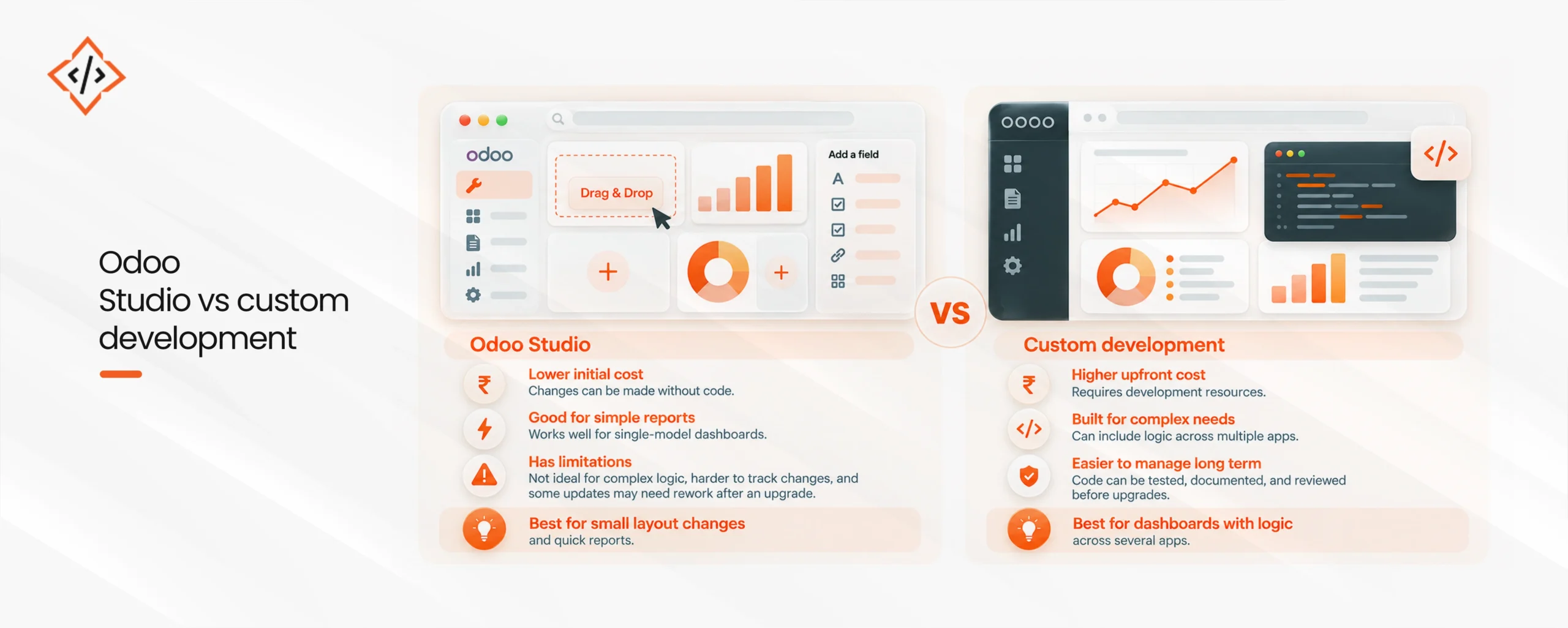
The Odoo Studio vs custom development choice comes up often for simple dashboards. Studio costs less at the start, since a functional consultant can make changes without writing code.
Studio has limits, though. It works best for single-model reports and simple layouts. Studio changes are also harder to track in version control, and some may need rework after an upgrade. A custom module costs more upfront, but its code can be tested, documented, and reviewed before each upgrade.
Use Studio for small layout changes and quick reports. Use a custom module when the dashboard needs logic across several apps.
An AI dashboard builder is best for showing existing data in new ways. Custom development is worth the higher cost when a dashboard needs:
In these cases, custom Odoo development services build logic that is tested and controlled in code, which an AI tool cannot reliably produce.
AI-powered Odoo dashboards raise one extra question: what data leaves your system? Before you turn on AI features, ask the vendor these questions:
A schema-only setup, where only field names and types reach the AI provider, is the safer choice for financial and customer data. If your policies require AI to run on your own infrastructure, AI development services can set up private models that work with your Odoo data.
To settle the AI dashboard builder vs custom Odoo dashboard development question for your business, answer these questions:
If your answers point to “existing data” and “changes often,” an AI dashboard builder is likely cheaper. If they point to “new logic” and “rarely changes,” a custom module is a sound investment. If you are still in your Odoo ERP implementation, plan dashboards alongside the main setup to avoid paying for rework later.
Good dashboards also depend on clean data. Odoo reporting and analytics, and Odoo business intelligence dashboards in general, are only as accurate as the records behind them.
The AI dashboard builder vs custom Odoo dashboard development decision depends on what your dashboards need to do. For standard reporting that changes often, an AI dashboard builder installed inside Odoo usually costs the least over three years.
For unique calculations, write-back, or strict formats, custom development is worth the cost. Many businesses use both: an AI builder for everyday reports and custom modules for the few dashboards with special logic. For help planning, building, or maintaining dashboards, experienced Odoo development services can give you a clear estimate before you commit.

 Hardik Soni
 Chand Prakash
 Hardik Soni
 Chand Prakash
 Hardik Soni