







Odoo Development
 Hardik Soni
21 October 2026
Hardik Soni
21 October 2026
How to Integrate WhatsApp with Odoo: A Complete Guide for Businesses
 Hardik Soni
Every Odoo database holds the answers a manager needs. Which product lines lost margin this quarter, which sales rep has the slowest pipeline, and which warehouse keeps running short? The data is there. Getting it onto one screen is the hard part.
In most companies, that job falls to one person who knows pivots, filters, and spreadsheet formulas. Everyone else waits for that person. An AI dashboard builder for Odoo removes the wait.
A user describes the view they want in plain words, and the tool builds the charts, KPIs, and filters from live records. This guide covers how that works, how it compares with native Odoo reporting and analytics, and what to check before you trust it with business data.
Odoo already ships solid reporting. Every app has graph and pivot views, and the Dashboards app collects standard boards for Sales, Inventory, Accounting, and more. According to Odoo’s documentation, these dashboards are built on Odoo Spreadsheet. You customize a standard board by editing its underlying spreadsheet, and you build a new one from scratch inside a spreadsheet too.
That design is powerful for anyone comfortable with pivots and formulas. For a sales head or a plant manager, it creates three gaps:
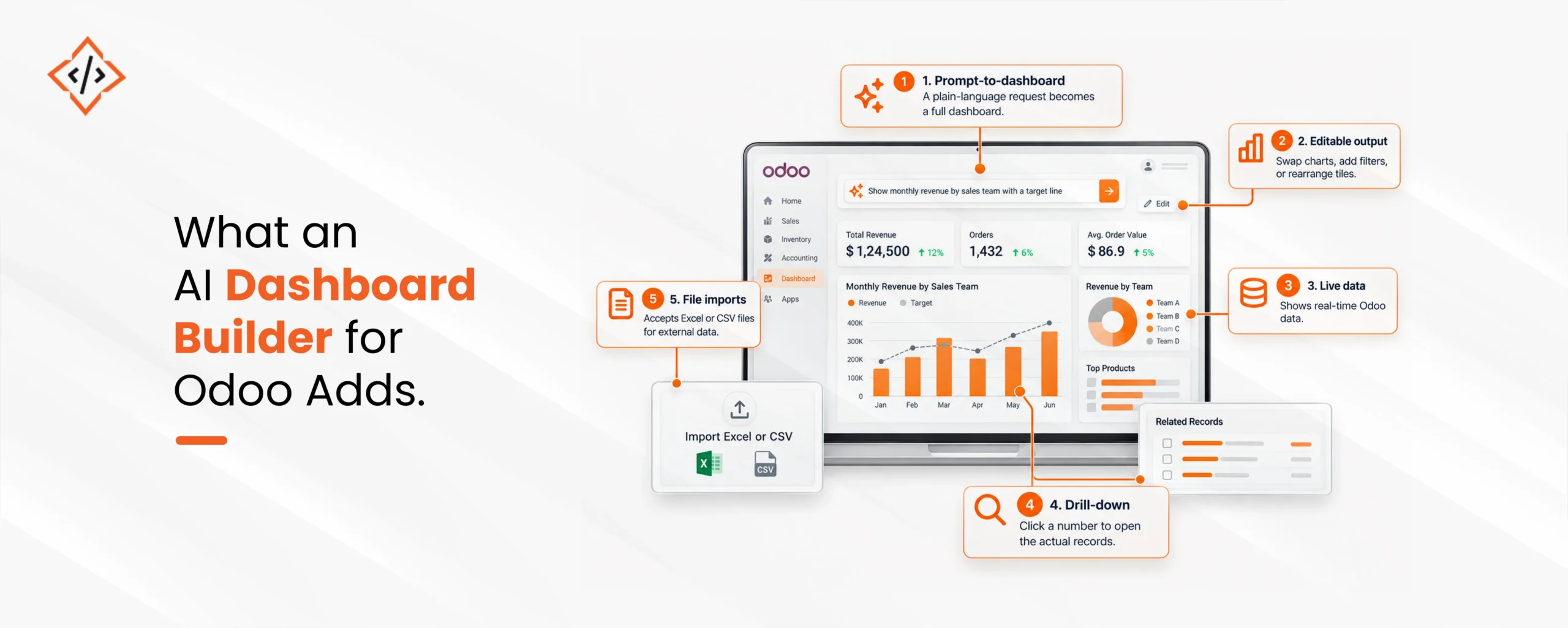
An AI dashboard builder sits on top of the same Odoo data and changes how people ask for it. Instead of configuring a chart, a user types a request such as “monthly revenue by sales team with a target line.” The AI picks the right models, fields, and chart type, then renders the dashboard inside Odoo.
In practice, a good Odoo AI dashboard offers:
The last point on that list deserves care. A dashboard is only as trustworthy as its source, so imported files need the same review as any other report.
This shift is already underway in larger analytics teams. A Gartner survey of 403 analytics and AI leaders, run in late 2024, found that over half of their organizations already use AI tools for automated insights and natural language queries. In the same release, Gartner predicts that 75% of new analytics content will be contextualized for intelligent applications through generative AI by 2027.
For an Odoo business, that forecast has a practical meaning. Questions that used to need a report request will increasingly be asked in plain language, right next to the data. AI-powered Odoo dashboards bring that model to companies that never had a dedicated BI team.
Gartner also adds a warning worth taking seriously. It expects augmented analytics to run 20% of business processes autonomously by 2027, and it flags the risk of AI agents drifting from their intended goals. The lesson for Odoo business analytics is simple. Let AI draft the dashboard, and keep a person responsible for checking the numbers that drive decisions.
The exact screens vary by module, but the workflow for an Odoo dashboard builder with AI follows the same pattern.
Good Odoo data visualization depends on restraint. Five or six KPIs on one board beat twenty tiles that compete for attention. When a team needs more, build a second dashboard for a second decision.
Odoo dashboard customization also extends to the data model. If a KPI needs a field Odoo does not track, such as a custom approval stage, add the field first. Teams that work with Odoo development services usually settle these data questions before any dashboard work begins, which saves rework later.
Any AI dashboard builder needs a language model to read requests and plan queries. That raises the question finance and IT teams will ask first: does business data go to the AI provider?
The answer depends on the design, so ask the vendor these questions directly:
Edition matters too. Native Dashboards and Spreadsheets are enterprise features. An AI dashboard module built on Odoo’s core framework can run on Community as well, but confirm compatibility with your Odoo version before buying.
| Route | Best for | Main trade-off |
|---|---|---|
| Native Dashboards (Enterprise) | Teams with spreadsheet skills and standard KPIs | Manual build and edits |
| AI dashboard module | Business users who need self-serve answers | Data privacy depends on design |
| Custom Odoo dashboard development | KPIs across modules, external sources or strict data rules | Higher upfront effort |
A custom build fits when dashboards need data from a CRM, an e-commerce store, or a logistics platform outside Odoo.
Experienced Odoo integration services teams connect those sources first, then build the dashboard on clean, joined data. Pair that with AI-powered business automation, and a KPI can trigger the next action, such as a purchase order when stock falls below a threshold.
An AI dashboard builder for Odoo pays off when it answers real weekly questions on clean data. Start with one team and one decision, check the drill-downs, and settle the data privacy questions before anyone types a prompt.
Once the first board earns trust, the rest of the company will ask for theirs.
 Hardik Soni
 Hardik Soni
 Hardik Soni
 Hardik Soni
 Hardik Soni