






Odoo Development
 Hardik Soni
21 October 2026
Hardik Soni
21 October 2026
Odoo Dashboard Guide: How to Build AI-Powered Dashboards Without Code
 Hardik Soni
Most sales and support teams already run half their customer conversations on WhatsApp.
The trouble is that those chats live on a few phones, while quotes, invoices, and order history live in Odoo. So a rep copies a price from the ERP, pastes it into a chat, and nobody else on the team can see what was promised.
Odoo WhatsApp integration closes that gap. It connects the official WhatsApp Business Platform to your Odoo database, so messages, templates, and replies live on the same record as the lead, sales order, or invoice.
This guide explains how the connection works, how to set it up, what it costs per message, and when a custom build makes more sense than the standard app.
WhatsApp integration with Odoo links a WhatsApp Business Account (WABA) to your database through the Odoo WhatsApp Business API connection that Meta provides.
According to Odoo’s documentation, this lets users send and receive messages inside Odoo. It also lets them send pre-approved templates with dynamic placeholders, such as quotations from Sales, receipts from Point of Sale, and tickets from Events.
The connection supports two flows. In the first, the company starts the chat by sending a template to one or more customers. In the second, a customer messages the public business number, and Odoo opens a group chat in Discuss with every operator assigned to that WhatsApp channel.
One detail trips up many teams early. Odoo’s documentation states that the integration works only with WhatsApp Business Platform accounts. Personal WhatsApp accounts and WhatsApp Business App accounts are not compatible. In practice, this means:
Also worth knowing before you plan the budget: Odoo’s documentation is clear that the WhatsApp app is Enterprise only and does not run on Community edition. Community users need a third-party module or a custom connector, which a later section covers.
The reach argument is simple. WhatsApp crossed 3 billion monthly users, Meta CEO Mark Zuckerberg said on the company’s Q1 2025 earnings call. For businesses in the Middle East, India, and much of Europe, that number is less a statistic and more a description of where customers already are.
Reach alone does not justify an ERP project, though. The real Odoo WhatsApp integration benefits show up when chats stop living outside the system of record:
Automation is where the next gain sits.
Gartner predicts that by 2029, agentic AI will resolve 80% of common customer service issues without human help, cutting operational costs by 30%. That figure is a forecast with conditions attached.
It describes common issues, and it assumes the AI can access accurate order and account data. Odoo is where that data lives, which is why the integration matters more than the chat window itself.
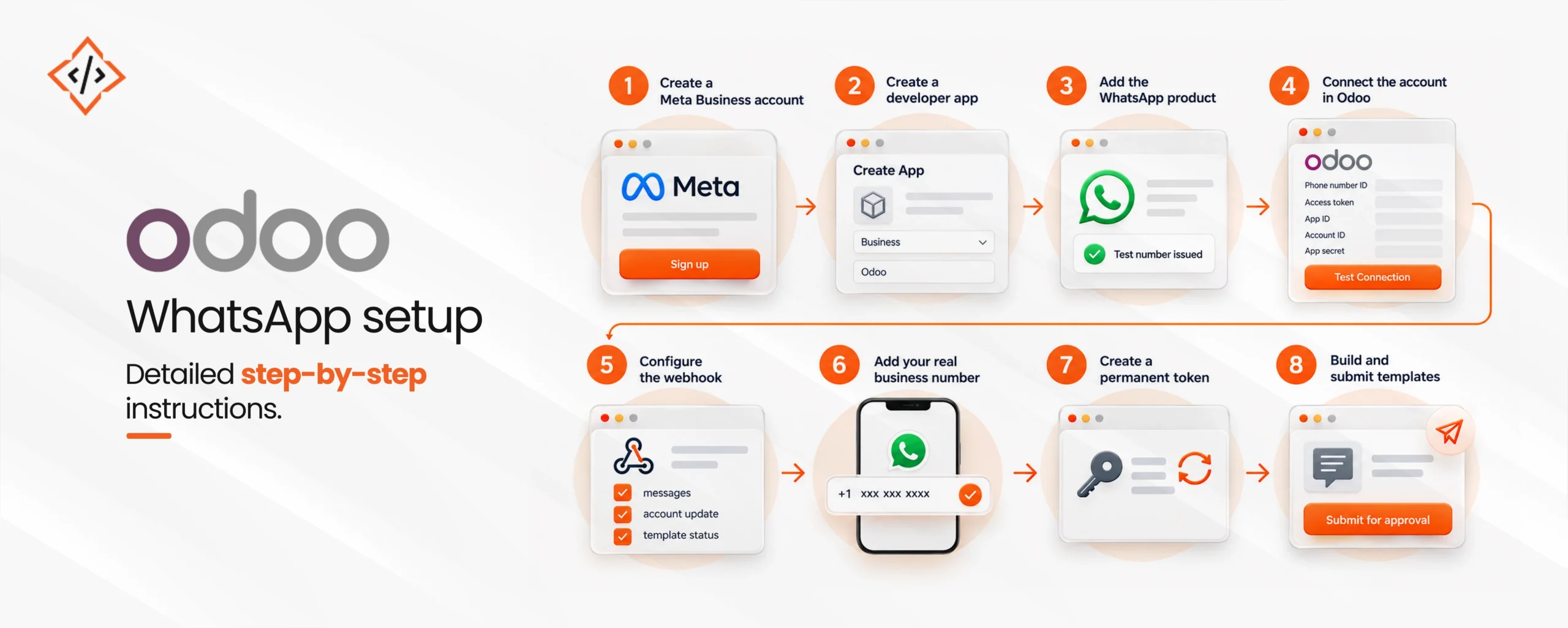
This Odoo WhatsApp integration guide follows the flow in Odoo’s official documentation. Most of the work happens in Meta’s dashboards, and Odoo only needs the right values pasted in.
So how long does it take? With admin access to Meta and Odoo, the technical steps fit into a working day. Business verification and template approval run on Meta’s timeline, so plan a buffer of a few days before the first campaign.
A connected number is only the start. The value of Odoo ERP WhatsApp integration comes from tying messages to the modules your teams already use every day.
For sales teams, Odoo CRM WhatsApp integration means a lead’s chat sits on the lead itself. Reps can send a follow-up template from the opportunity, and the reply arrives in Discuss with the context attached. As a result, pipeline reviews stop depending on what someone remembers from their phone.
Odoo WhatsApp automation uses automation rules to trigger templates when a record changes. For example, a delivery order that moves to Done can send a shipping update, and a confirmed booking can send a reminder the day before. This kind of Odoo automated messaging removes the manual “just checking in” work that eats an agent’s afternoon.
However, every proactive message outside a customer’s reply window must be an approved template. Meta categorizes templates as marketing, utility, or authentication, and the category decides the price, so write utility messages that stay strictly transactional.
A WhatsApp chatbot for Odoo answers routine questions, such as order status, store hours, or invoice copies, by reading live ERP data. Built with AI chatbot development expertise, it can also qualify a lead and book it into CRM before a rep picks it up.
Still, design the exit first. A Gartner survey of 5,728 customers found that 64% would prefer companies didn’t use AI in customer service, and difficulty reaching a person was the top concern. A bot that hands off cleanly keeps customers. A bot that traps them loses them.
Meta’s pricing documentation confirms that since July 1, 2025, the platform charges per delivered message instead of per conversation. Charges apply only to template messages. Free-form replies sent inside the 24-hour customer service window carry no fee, and utility templates sent inside that window are free as well.
Rates vary by country and template category, and Meta may revise them only on the first day of each quarter. Teams selling into Saudi Arabia or the UAE should check the current rate card, because Meta has listed higher marketing rates for both markets.
The right Odoo WhatsApp API integration route depends on your edition and on how far the workflow goes beyond sending templates.
| Route | Edition | Best for | Main trade-off |
|---|---|---|---|
| Native WhatsApp app | Enterprise | Templates and two-way chat from standard modules | Limited to what Odoo ships |
| Marketplace module | Community or Enterprise | Basic sending on a tight budget | Quality and API approach vary by vendor |
| Custom connector | Community or Enterprise | Chatbots, multi-number routing, custom triggers | Higher upfront effort |
Treat marketplace modules with care. Some connect by scanning a QR code with WhatsApp Web instead of using the official Business Platform API. This approach risks number bans and breaks when WhatsApp changes its web client.
A custom build makes sense when the workflow spans several modules, needs AI on top, or must route chats by region or department.
Experienced Odoo integration services teams build on the official API, follow Odoo’s module structure, and keep the connector upgrade-ready for future Odoo versions.
That is the practical case for custom Odoo integration services over a self-built script.
Odoo WhatsApp integration works best when teams plan it as part of the ERP itself.
Start with two or three high-volume messages, such as quotes, delivery updates, and payment reminders, and measure response times before adding a chatbot. Then extend into automation once the templates and handoff rules are stable.
 Hardik Soni
 Hardik Soni
 Hardik Soni
 Hardik Soni
 Hardik Soni