







How Do You Import Invoices Into Odoo Without Manual Data Entry?
 Hardik Soni
Finance teams using Odoo Community Edition often struggle without built-in advanced reporting features. Preparing a monthly Profit and Loss statement usually means manually formatting raw spreadsheet data. This tedious manual work creates messy financial records that actively hinder accurate AI sales forecasting in Odoo. Engineered by an expert Odoo development company, the CodeTrade Accounting Reports module eliminates this specific technical bottleneck completely.
It seamlessly adds eight structured Enterprise-level financial statements directly to the community dashboard. IT administrators can now provide dynamic account hierarchies without paying expensive software upgrade costs. Clean financial data is the ultimate foundation for reliable Odoo business forecasting.
Accountants can instantly export perfectly formatted PDF and XLSX files to close their books faster. The entire financial reporting workflow becomes highly accurate and remarkably efficient.
Odoo Community Edition does not include the advanced financial reporting features available in the Enterprise edition. Businesses running Community miss out on structured reports such as the Balance Sheet and Profit and Loss.
They also lack the Cash Flow Statement, Aged Receivable, Aged Payable, Trial Balance, General Ledger, and Analytic Report. Finance teams rely on these reports every day to monitor performance, close the books, and feed accurate data into demand forecasting software. Proper reporting data is also essential for accurate Odoo sales forecasting.
For example, an accountant on Odoo Community who needs to prepare a monthly Profit and Loss statement faces limitations. They have no built-in way to generate a properly structured report with collapsible account hierarchies and comparison periods.
Getting a clean PDF export is also not natively possible. They typically end up exporting raw journal entries to a spreadsheet and formatting the report manually. This manual process takes hours and is easy to get wrong.
The Accounting Reports module by CodeTrade brings all eight of these Enterprise-style financial reports. Each report includes dynamic filters, collapsible hierarchies, and real-time computation. Users get the ability to export a clean PDF or formatted XLSX file that matches what is shown on screen. This delivers complete functionality with no Enterprise licence required. These structured reports also create a strong data foundation for reliable AI revenue prediction.
This module adds eight fully featured financial reports under the Accounting module. Each report replicates the structure and capabilities found in the Odoo Enterprise edition, integrating smoothly with broader AI automation solutions. Features include dynamic date filters and comparison period selection. Users also get posting status filters and collapsible parent-child account rows. The interface displays right-aligned balance columns with color-coded positive and negative values.
All reports support instant export to PDF using a professionally styled QWeb template. Users can also export formatted XLSX files that preserve the current expanded or collapsed state. Drill-downs on individual accounts open the underlying journal entries directly.
Accountants can move from a summary view to the transaction level without leaving the report. Accurate transaction data provides a reliable baseline for AI-powered sales forecasting.
The eight reports cover the full range of standard financial statements. This includes the Profit and Loss and Balance Sheet. It also provides the Analytic Report, General Ledger, and Trial Balance. Users can access the Aged Receivable, Aged Payable, and Cash Flow Statement.
All reports are accessible from a single menu inside the Accounting module. No separate application or configuration screen is needed. Clean financial reporting perfectly complements your overall Odoo sales analytics.
This module depends on the Invoicing and Discuss applications. It is available for Odoo.sh and On-Premise deployments. It cannot be used with Odoo Online SaaS environments. Installation takes a few minutes and requires no custom coding.
After installation, all eight reports appear immediately under Accounting > Reporting. No additional configuration is required before generating reports. Clean financial data from these initial setups supports reliable Odoo AI forecasting.
Below is a walkthrough of each report available in this module. It covers what it shows and how the filters work. It also explains how to export the output.
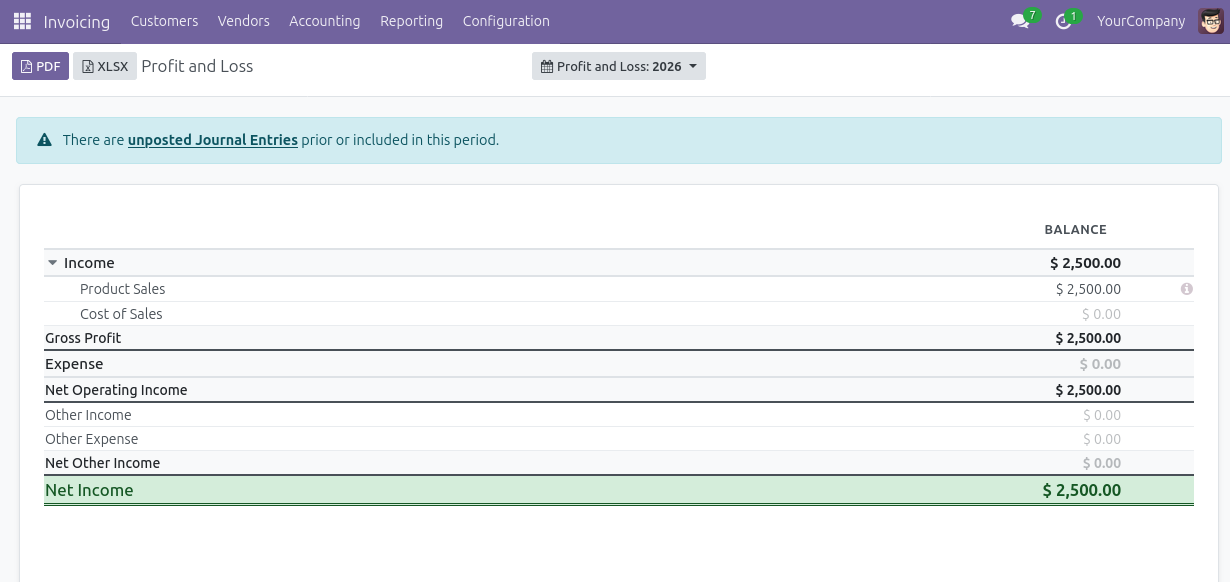
Navigate to Accounting > Reporting > Profit and Loss. The report displays income and expense accounts grouped in a collapsible hierarchy. It shows computed balances for the selected date range. Use the date filter and comparison period selector in the filter bar. This lets you view month-over-month or year-over-year comparisons. Click any account row to drill down into the underlying journal entries. Analyzing these revenue trends aids accurate sales forecasting with AI.
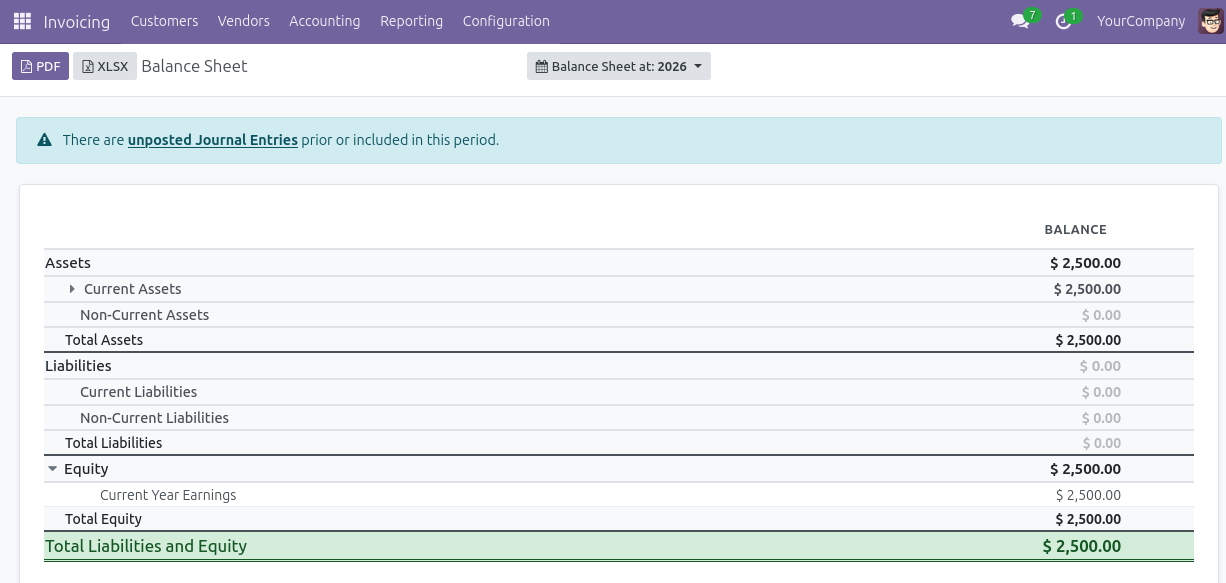
Open the Balance Sheet report from Accounting > Reporting > Balance Sheet. The report presents Assets, Liabilities, and Equity in a structured layout. It features collapsible parent-child rows and real-time balance computation. Parent rows can be expanded or collapsed to show or hide child account details. Export to PDF or XLSX using the toolbar buttons. This provides a formatted financial statement ready for review or distribution.
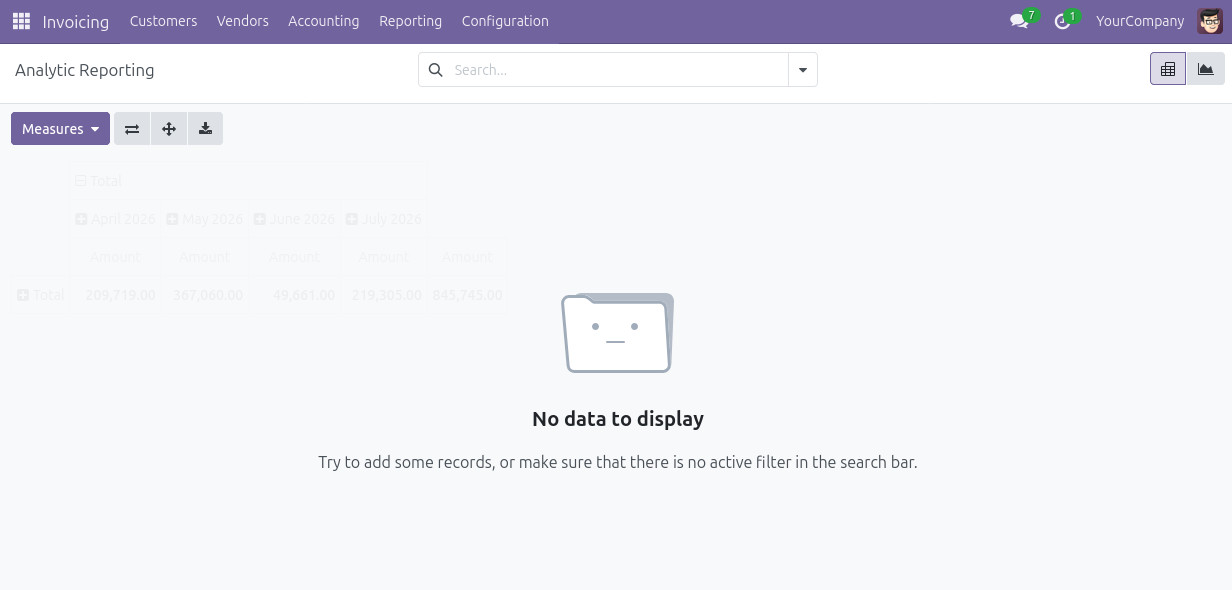
Open the Analytic Report from Accounting > Reporting > Analytic Report. The report groups transactions by analytic account and cost centre. It features dynamic grouping that expands to show line-level details. Use this report to compare budgeted versus actual costs. You can easily track these across projects, departments, or business units to support custom AI demand forecasting initiatives.
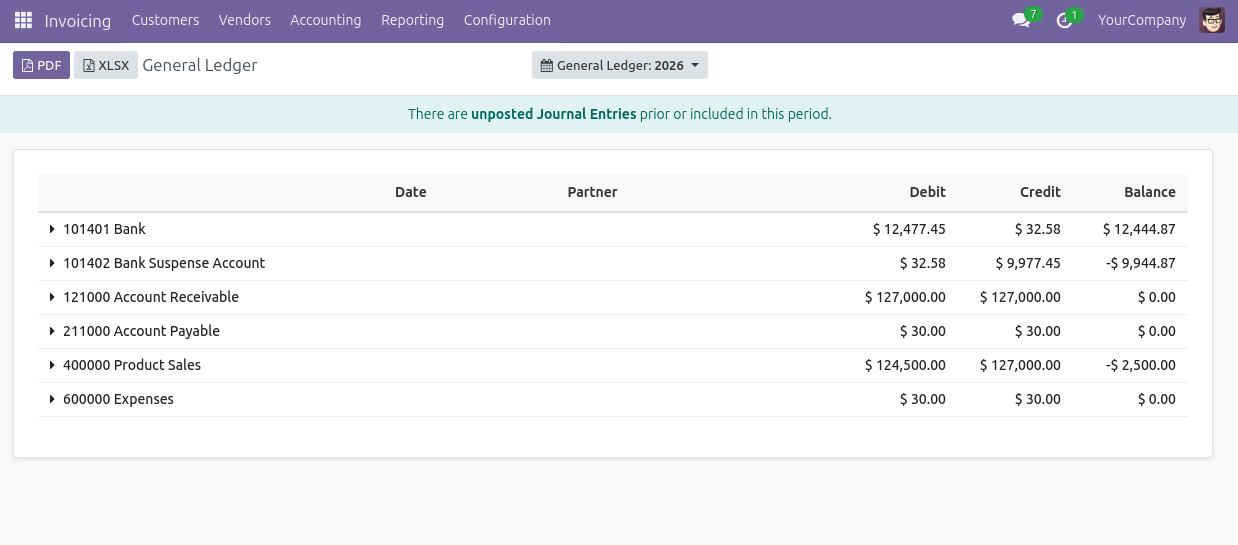
Navigate to Accounting > Reporting > General Ledger. The report lists every journal entry for each account within the selected date range. It includes opening balance, debit, credit, and closing balance columns. Drill down on any individual line to open the originating journal entry directly. Filter by posting status to show only posted entries. You can also include all draft and cancelled entries. Clean ledger data ensures precise AI sales prediction models.
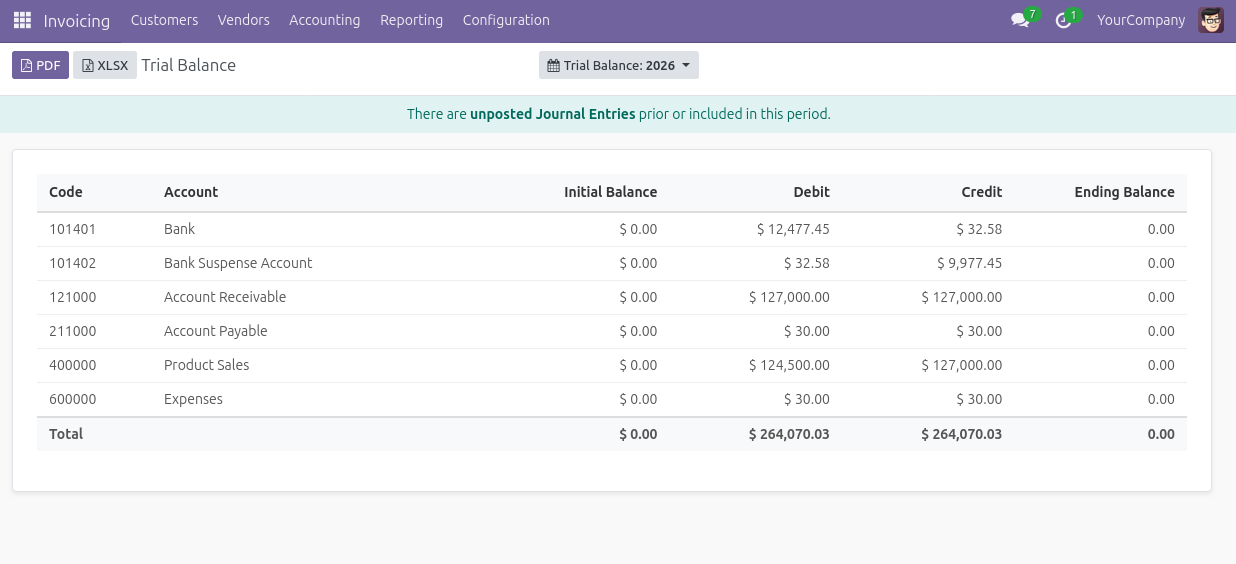
Open the Trial Balance from Accounting > Reporting > Trial Balance. The report displays each account with its initial balance. It details total debit movements, credit movements, and the ending balance. Use this report to verify that debits and credits are balanced before closing the period. Export to XLSX for a formatted spreadsheet that mirrors the on-screen column layout.
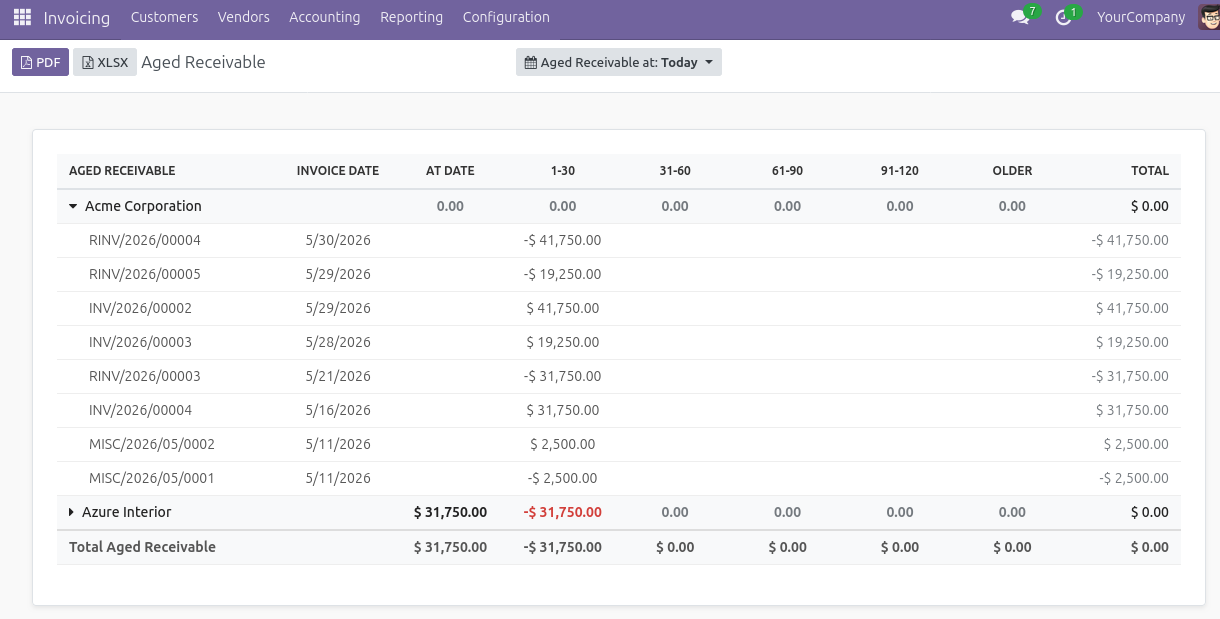
Navigate to Accounting > Reporting > Aged Receivable. The report groups outstanding customer invoices into aging buckets. These include current, 30 days, 60 days, and 90 or more days overdue. This gives a clear picture of collection risk across the customer base. Each customer row is expandable to show the individual invoices contributing to that aging bucket. This structured data helps refine your overall Odoo sales forecast.
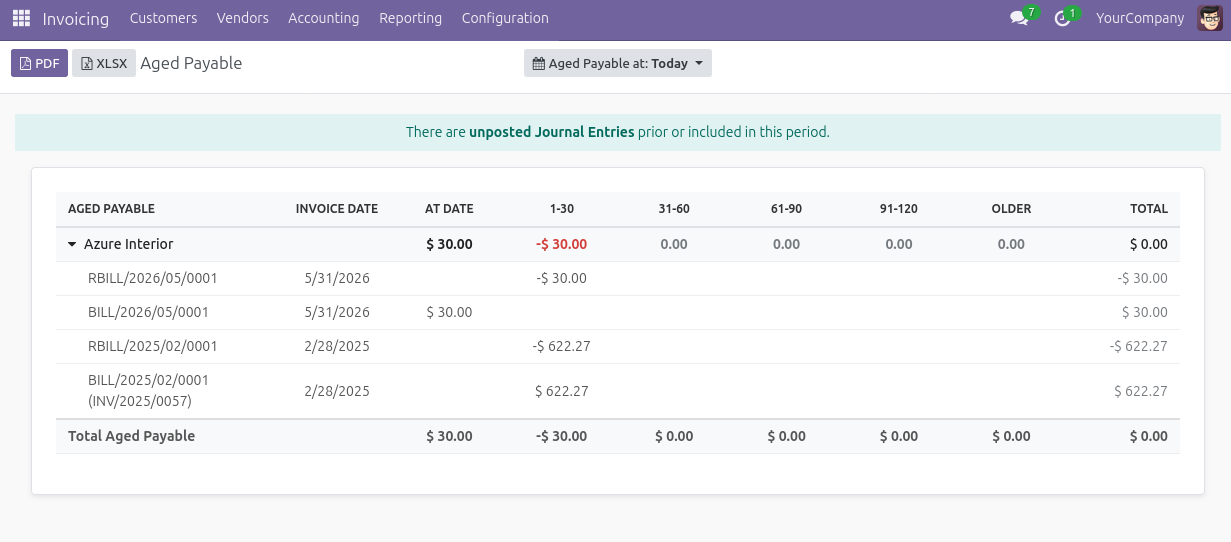
Open the Aged Payable report from Accounting > Reporting > Aged Payable. The report shows outstanding vendor bills grouped by aging period. This makes it straightforward to identify overdue payables and prioritize payment runs. Like the Aged Receivable, each vendor row can be expanded. Users can then see the individual bills located in each bucket.
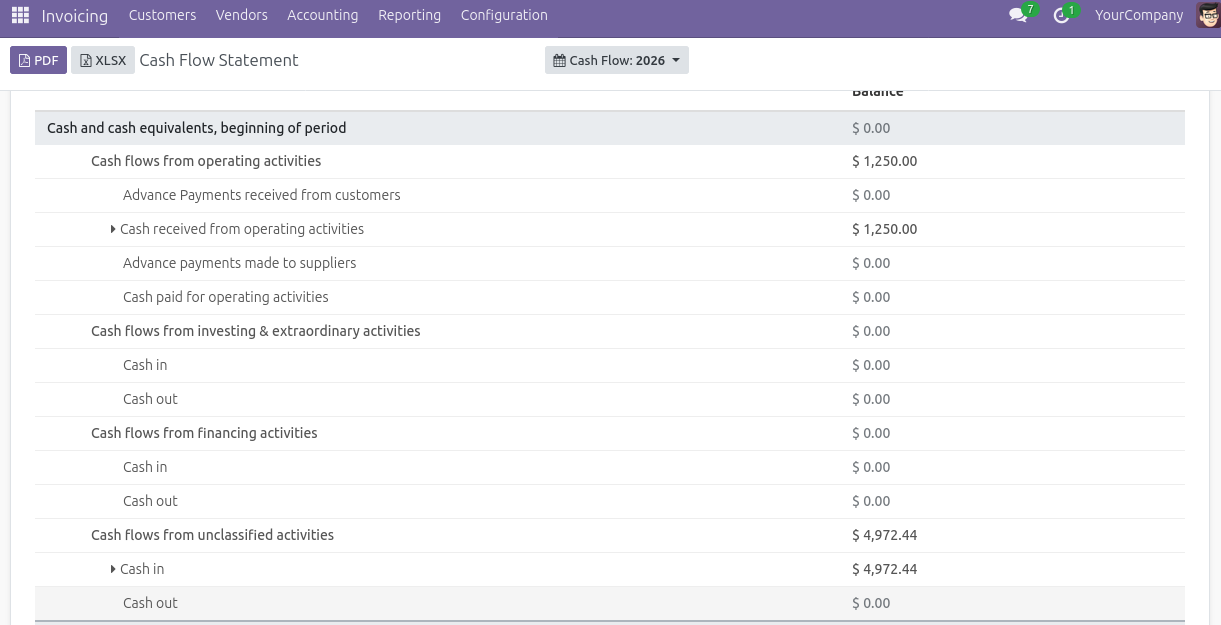
Navigate to Accounting > Reporting > Cash Flow Statement. The report organizes cash movements into three collapsible sections. These sections cover Operating, Investing, and Financing activities. It displays real-time totals for each section and a net cash change summary at the bottom. Expand any section to see the individual account movements driving the cash flow figures.
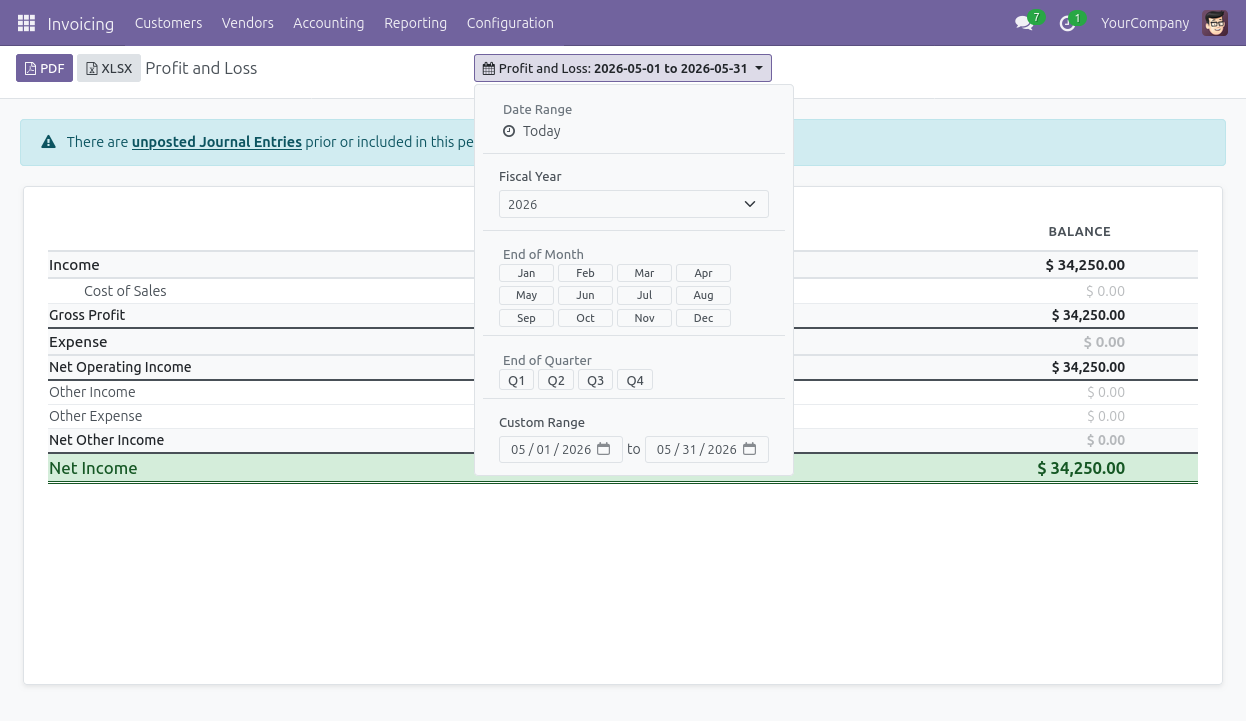
All eight reports share the same dynamic filter bar at the top of the screen. Select a date range using the pre-defined options like current month, quarter, or year. Users can also enter custom start and end dates. Add a comparison period to show changes between two time periods side by side. Toggle the posting status filter between Posted Entries Only and All Entries. This controls which journal entries are included in the report calculations.
This powerful reporting module provides essential financial visibility and structured data necessary for robust AI revenue forecasting initiatives.
The module adds eight essential financial statements directly to Odoo 19 Community. These include the Profit and Loss and Balance Sheet. It also provides the Analytic Report, General Ledger, Trial Balance, Aged Receivable, Aged Payable, and Cash Flow Statement. Each report replicates the exact structure and layout of the Enterprise edition. Community users gain complete access to standard financial statements without expensive license upgrades.
Every report includes a filter bar with predefined date ranges and custom date entry options. It also features comparison period selection and a posting status toggle. Comparison periods display two date ranges side by side in the same report. This makes analyzing month-over-month or year-over-year changes straightforward. Users skip building separate views entirely. Clean historical comparisons naturally enhance your AI-powered sales forecasting.
Parent account rows expand or collapse independently within each report. This allows users to view a high-level summary of major account groups easily. Users drill into specific details only where needed. This eliminates the need to switch between different report views. It also removes the requirement to apply additional filters for changing detail levels.
Clicking any account row opens the underlying journal entries for that specific period directly. Accountants move from a summary financial statement to the transaction level in one click. This makes investigating variances or verifying balances much faster. Users accomplish this without ever navigating away from the active report. Reliable transaction verification supports accurate Odoo AI forecasting.
Each report exports to a professionally formatted PDF using a QWeb print template. Users can also download an XLSX file with formatted columns and row groupings. Both export methods preserve the current expanded or collapsed state of the report hierarchy. The final document output matches exactly what is visible on the screen.
Reports use right-aligned balance columns and clear parent-child row indentation. The interface includes subtle zero-row styling and color-coded positive and negative values. This makes the financial output easy to read at a quick glance. The design is highly professional and ready to share directly with management or auditors. No additional manual formatting is required.
Healthcare administrators require precise financial reporting and expert AI development services to reduce back-office overhead and eliminate costly manual data entry errors across clinic networks. The CodeTrade Accounting Reports module delivers this exact operational efficiency directly within the Odoo Community platform.
Clinic directors gain immediate access to structured financial statements without funding expensive software license upgrades. This automated reporting workflow guarantees accurate data sets necessary for reliable AI revenue prediction models.
Administrators can quickly export clean PDF and XLSX files to maintain strict operational oversight. Implementing these standardized financial controls provides the perfect foundation for advanced AI sales forecasting in Odoo. Your healthcare organization can finally achieve measurable back-office scalability and secure long-term financial stability.

 Hardik Soni
 Hardik Soni
 Hardik Soni
 Hardik Soni
 Chand Prakash