







Odoo Development
 Hardik Soni
28 September 2026
Hardik Soni
28 September 2026
Odoo 20 AI features: what the AI agents actually do
 Hardik Soni

Rehearsing an Odoo 19 upgrade on a database sample tells you little about actual cutover time. Stored computed fields are the main reason. A recompute that takes twenty minutes on trimmed data can run for hours on a full account move line table.
The cost rises with row volume, while release notes do not flag every field that will recompute. Test at real size, or discover the delay at 2am after a four-hour window is already gone. Standard Odoo 19 data migration for core modules is predictable. The uncertainty sits in custom code and steps nobody has timed.
Treat an Odoo 18 to Odoo 19 upgrade as a database exercise and the estimate can miss badly. Modules written without future versions in mind are where overruns usually appear. This Odoo 19 upgrade guide follows the sequence that keeps that risk manageable. Teams on older releases should also use the Odoo migration checklist because multi-version jumps need a different plan.
An Odoo 19 upgrade affects more than the database, with changes reaching custom code, APIs, and front-end components. Three categories of change matter, and only one shows up in release notes.
Fields get renamed, split, merged, or removed. Models can also move between modules. Each change needs a migration decision for any custom code or stored data that references it. The Odoo 19 features guide covers what is new functionally. The priority during an Odoo 18 to Odoo 19 upgrade is identifying what has moved.
Method signatures change. Decorators get deprecated. ORM behavior around computed and stored fields, including onchange semantics, has tightened progressively across recent versions. Custom code that relies on undocumented behavior is the most fragile category because failures often appear at runtime rather than installation.
OWL continues to evolve. Custom widgets, views, and JavaScript assets often need rework rather than simple adjustments. Teams routinely underestimate this part of the Odoo 19 upgrade because the Python side usually migrates more cleanly.
| Component | Typical effort | Risk | Why |
|---|---|---|---|
| Standard module data | Low | Low | Odoo’s own migration handles it, verification is the work |
| Configuration and settings | Low | Low | Mostly carried forward, some re-entry |
| Third-party OCA modules | Low to medium | Medium | Depends entirely on whether maintainers shipped a 19 branch |
| Custom Python modules | High | High | API changes, deprecated methods, model changes |
| Custom reports (QWeb) | Medium | Medium | Template and styling changes |
| Custom front end (OWL) | High | Medium | Framework evolution between versions |
| Integrations | Medium | High | External contracts unchanged, internal calls change |
| Stored computed fields | Medium | High | Recomputation on large tables is slow and easy to get wrong |
That final row is where a nine-hour recomputation can surface.
A reliable Odoo 19 upgrade process depends on completing each phase in sequence, with testing built into every stage. Reordering them is the most common cause of overruns.
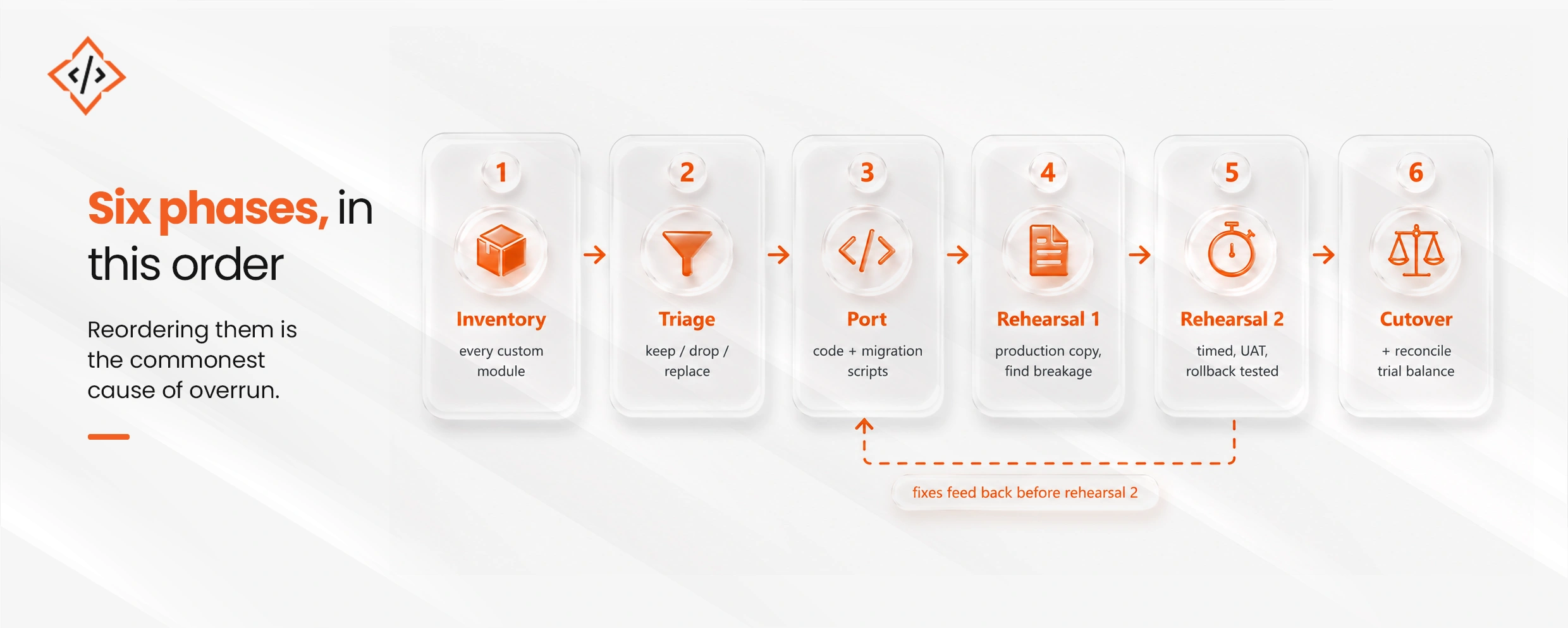
Six phases. Two rehearsals are not optional for an estate with meaningful customization.
Before touching code, list every custom module with three facts attached. Record the business process it supports, who owns that process, and when the module was last used.
This exercise removes unnecessary work. In most mid-market estates, some custom modules are unused or have been replaced by native functionality in later versions. Others remain installed because the people who understood their original purpose have left the company. Every module removed at this stage is upgrade effort you do not need to spend.
Then triage each remaining module into keep, drop, or replace with native functionality. The third category is where upgrades can create value rather than simply add cost.
Port the modules you need to keep through Odoo customization services. Where data requires transformation, write pre- and post-migration scripts instead of adjusting the database manually. Scripts remain repeatable across rehearsals. Manual edits do not, and that difference becomes critical during cutover.
The first rehearsal runs on a full production copy and is designed to identify breakage. Expect several issues to surface. That is the purpose of this stage.
The second rehearsal is timed end to end and includes user acceptance testing on migrated data. It must also include a tested rollback. Run it at full data volume. The nine-hour recompute would have surfaced at this stage.
The result is a cutover runbook with measured durations, allowing the business to plan the outage window accurately.
Reconciliation is the acceptance criterion. Trial balance, open receivables and payables, inventory valuation, and open sales and purchase orders must match pre-upgrade figures exactly. An upgrade that completes without matching numbers leaves the business with an unreliable ledger, which is worse than not upgrading.
These issues recur across almost every mid-market Odoo 19 upgrade.
If you use Odoo with no custom modules, no third-party extensions beyond mainstream OCA modules, and no integrations, use Odoo’s own upgrade service. It handles that case well, costs less than we do, and avoids paying for Odoo upgrade services when the additional support is unnecessary.
The same applies if your estate has custom code and an in-house developer who has already completed a major Odoo version upgrade. They will usually be faster than us because they already know which modules are critical to your operations.
We earn our fee on estates with substantial undocumented customization, no remaining developers who originally wrote it, and strict reconciliation requirements. In these environments, a poor cutover can become expensive quickly.
Duration depends more on customization volume than data volume, which often surprises teams expecting the opposite. A ten-million-row database with no custom modules can upgrade faster than a smaller database carrying forty bespoke modules.
Cost drivers, in order of weight:
Odoo 19 upgrade cost can also change after go-live. The Odoo maintenance cost breakdown explains those ongoing costs.
Most mid-market estates benefit from treating each Odoo version upgrade as routine annual maintenance. Smaller version gaps usually mean less code rework, lower migration effort, and less version debt.
The alternative is to skip one or two releases and complete a larger upgrade later. This reduces the number of cutovers, but each project becomes more complex and may require more extensive testing. Every Odoo 19 upgrade carries cutover risk, so upgrade frequency should reflect the team’s ability to manage that risk.
The right approach depends largely on rehearsal discipline. Teams that test thoroughly at full data volume can usually upgrade more frequently with greater confidence. Teams with limited testing capacity may benefit from fewer upgrades supported by experienced Odoo migration services.
There is no single upgrade schedule that suits every estate. The decision should reflect customization complexity, testing maturity, available Odoo Implementation Partner support, and the business impact of each cutover.
Sometimes the right answer is not yet, and there are two valid reasons to delay an Odoo 19 upgrade.
The first is a pending business change large enough to alter requirements. Upgrading before a restructure, acquisition, or major process redesign can mean migrating customization that will soon be rewritten.
The second is an unfunded customization backlog. An estate with substantial undocumented custom code and no clear owner is not ready for an upgrade project. It first needs documentation and triage, which are covered in phases 1 and 2 above. Completing those steps separately still creates value, regardless of when the Odoo 18 to Odoo 19 upgrade begins.
Waiting also has a cost. Version debt compounds over time. Each skipped release adds another API generation to cross, and multi-version jumps can cost more than completing the individual upgrades.
A successful Odoo 19 upgrade depends more on custom code than database size. Standard modules usually migrate predictably, while bespoke modules, front-end work, and integrations carry most of the effort and risk. Mid-market teams should start the Odoo 18 to Odoo 19 upgrade by inventorying every custom module.
Remove Odoo custom modules that no longer add value. Only the modules that remain should move into porting and migration work. Two rehearsals at full data volume should follow, with rollback tested before production cutover. The Odoo 19 upgrade process is complete only when trial balances, receivables, payables, inventory valuation, and tax reports reconcile with pre-upgrade figures.
Following this sequence keeps the project controlled and gives teams a clearer view of timing, risk, and readiness. It also reduces avoidable surprises during the final cutover window.
 Hardik Soni
 Hardik Soni
 Hardik Soni
 Hardik Soni
 Hardik Soni