

Odoo Development
 Hardik Soni
25 June 2026
Hardik Soni
25 June 2026
How to Measure Vendor Performance in Odoo?
Hardik Soni
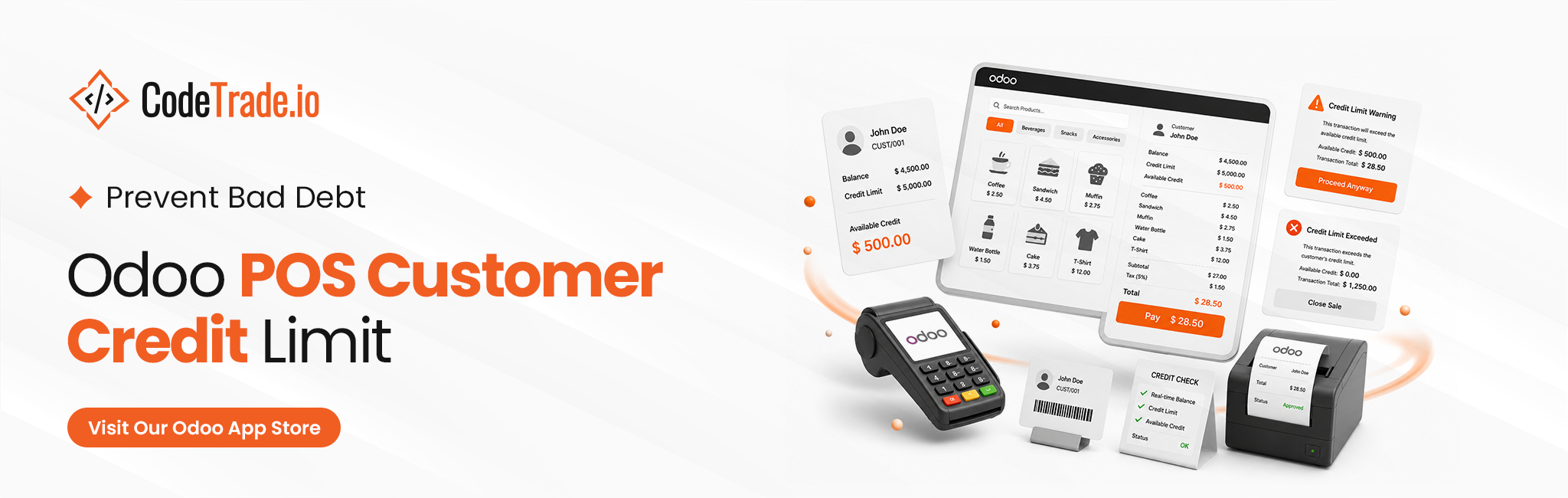
Unmonitored credit sales at the checkout counter directly threaten merchant cash flow and inflate bad debt. Cashiers frequently process on-account transactions without real-time visibility into existing customer liabilities. This baseline operational gap allows outstanding accounts to accumulate silently until balances become completely uncollectible.
Manual tracking fails to scale, leaving small and mid-sized retail operations exposed to severe financial risk during daily checkout routines. Deploying the Odoo POS Customer Credit Limit module resolves these critical vulnerabilities by enforcing programmatic financial safeguards at the front end. This system provides proactive POS credit risk management by cross-referencing live cart values with historical customer ledger data.
Cashiers instantly see outstanding balances, ensuring corporate risk parameters remain secure without complicating standard store workflows. This guide details how to configure this automated module to eliminate manual tracking and enforce strict checkout validation.
The Odoo credit limit module brings automated financial guardrails directly to your active point of sale terminals. This system acts as a real-time validation engine that tracks every checkout transaction to enforce corporate risk parameters automatically.
Here’s what this module does:
Implementing these systematic controls allows management to deploy flexible credit terms while maintaining strict credit exposure management in POS. Store teams receive instant data visibility to maintain secure, objective checkout operations, eliminating the need for extensive Odoo development services to handle complex backend approval delays.
Setting a hard Odoo POS Customer Credit Limit at the register stops cashiers from accidentally approving bad debt. This module links your front-end registers directly to your accounting balances so you do not have to double-check accounts manually during a rush.
It handles two main tasks:
This tool is built specifically for store owners who:
Configuring standard guardrails inside Odoo retail credit management takes only a few quick adjustments in your backend settings. Once you complete your initial Odoo implementation services, follow these steps to manage checkout thresholds across your store.
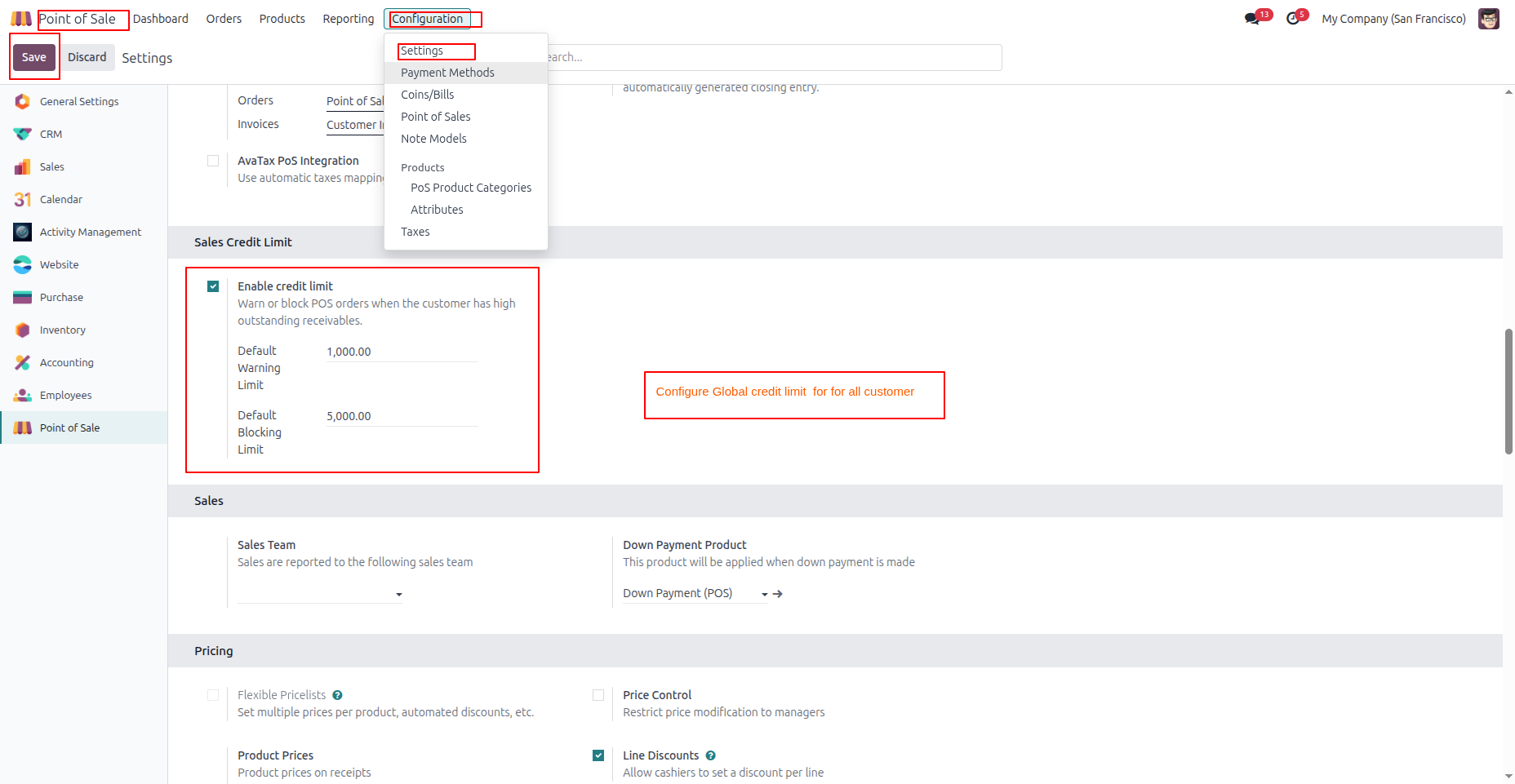
Establishing baseline rules ensures that all cashiers follow identical risk policies automatically. This central rule handles standard transactions before you apply any individual client overrides.
To configure your store defaults:
Result: The Odoo Point of Sale credit limit feature is live, forcing all terminals to run the same safety rules.
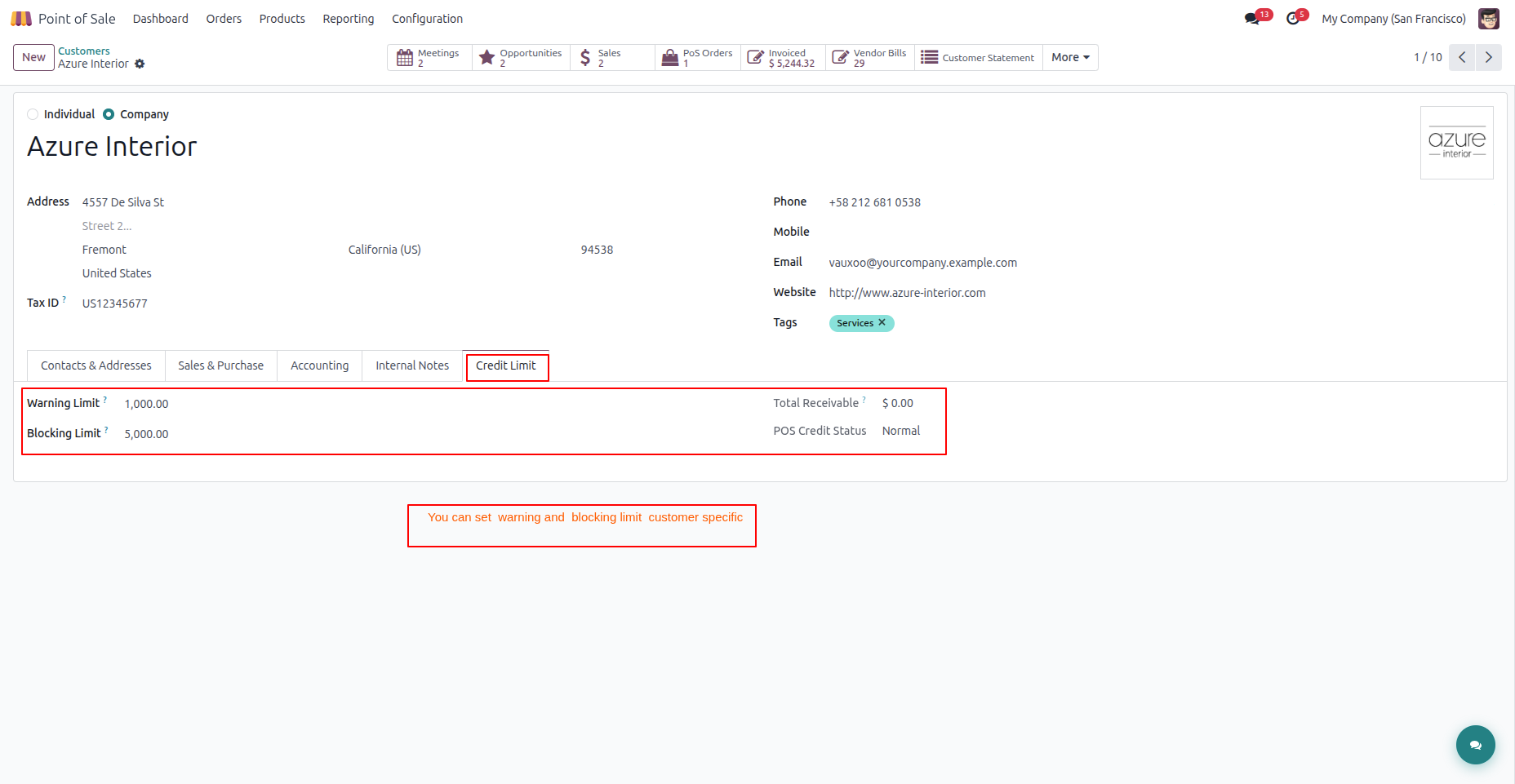
You can set a custom customer account credit limit Odoo policy for specific buyers who need unique terms. This allows you to raise limits for long-standing clients or apply tighter controls to high-risk profiles.
To update specific customer files:
Result: The profile overrides global rules, giving you flexible customer credit management Odoo options based on real relationships.
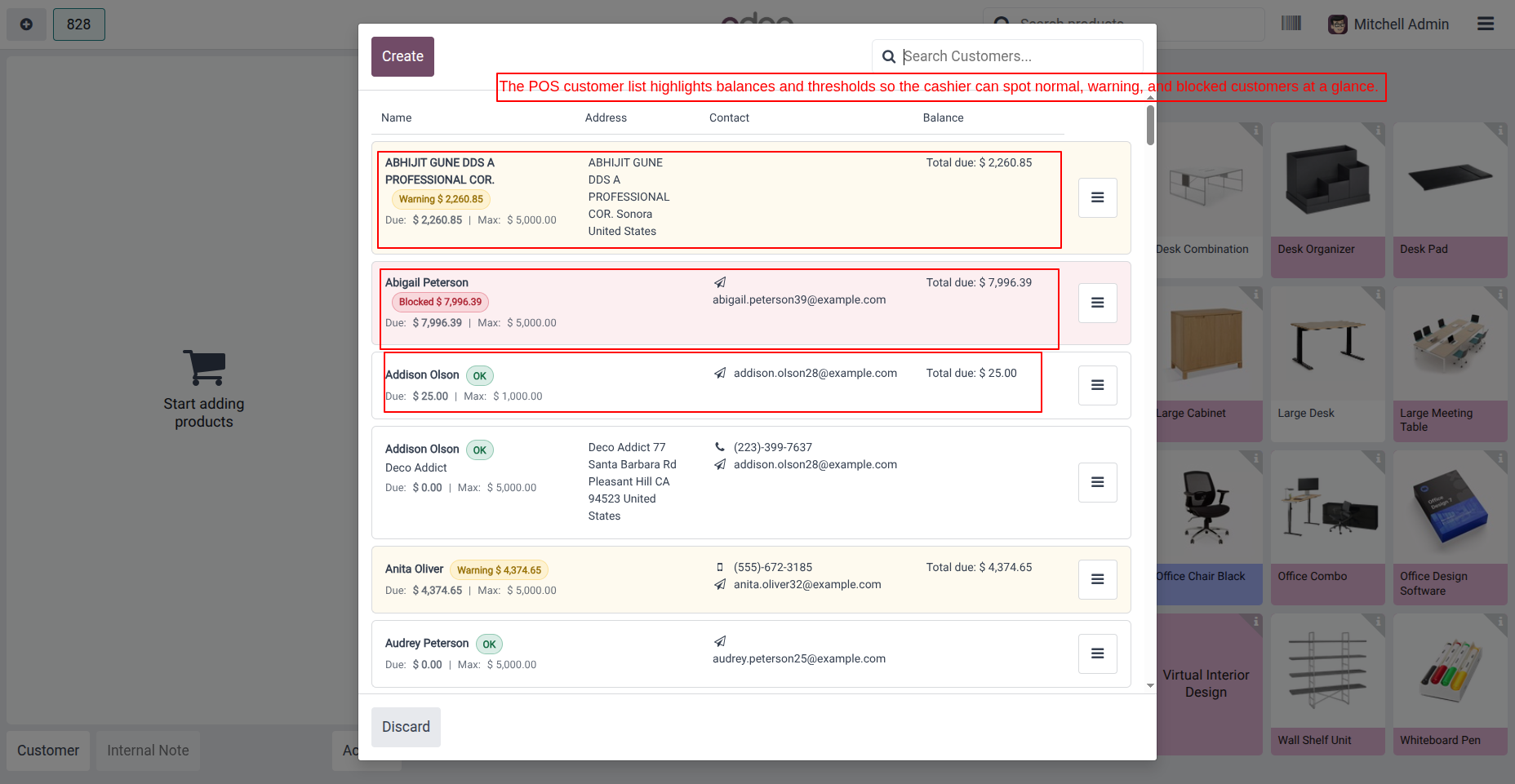
The customer dashboard inside the register screen provides real-time data visibility before a cashier rings up items. Frontline employees can spot an account status immediately to stop high-risk sales early.
To check buyer profiles at the register:
Result: Register staff utilize instant Odoo customer balance tracking to handle credit sales safely during busy shifts.
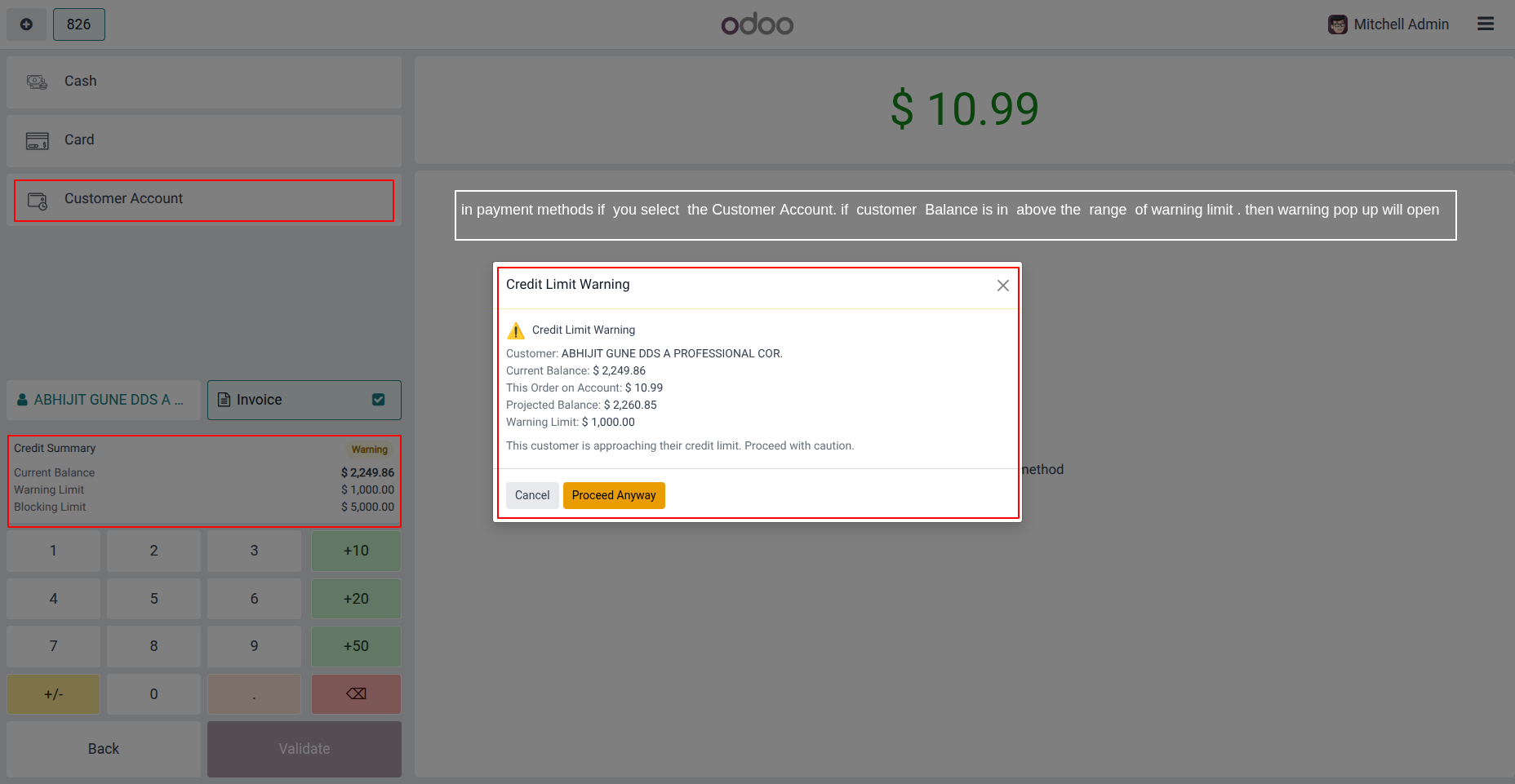
The register triggers an automatic Odoo POS credit warning the moment a transaction pushes a buyer past safety margins. This safeguard helps your staff review risk before finalizing an order.
To test a threshold alert:
Result: The system enforces clear POS credit risk management by alerting staff before exposure grows too high.
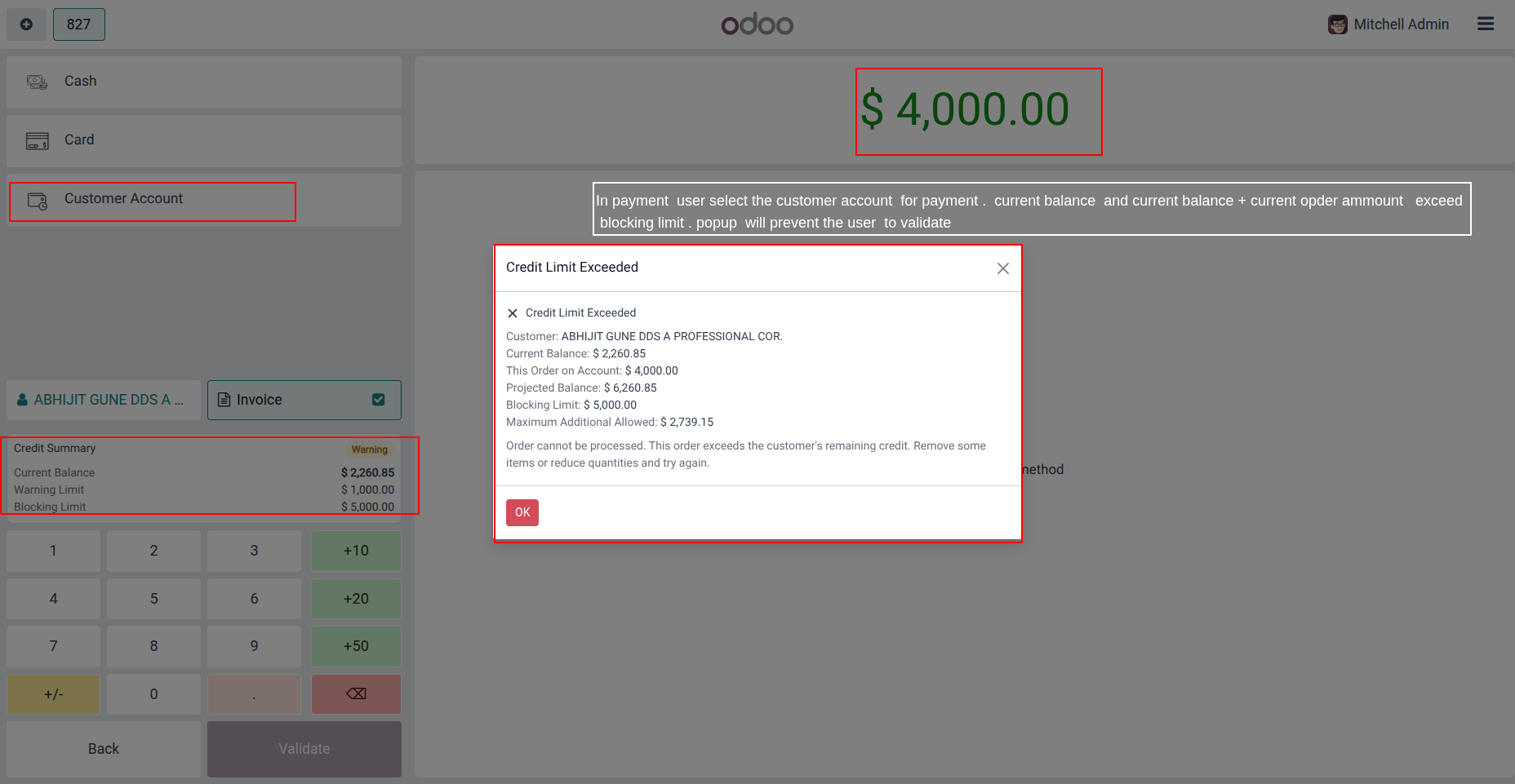
The system blocks transactions automatically if a buyer’s projected debt moves past their absolute cap. This hard stop protects your cash flow from unapproved credit overextension.
To review a hard threshold stop:
Result: Strict POS bad debt prevention stops high-risk transactions right at checkout, shielding the business from liability.
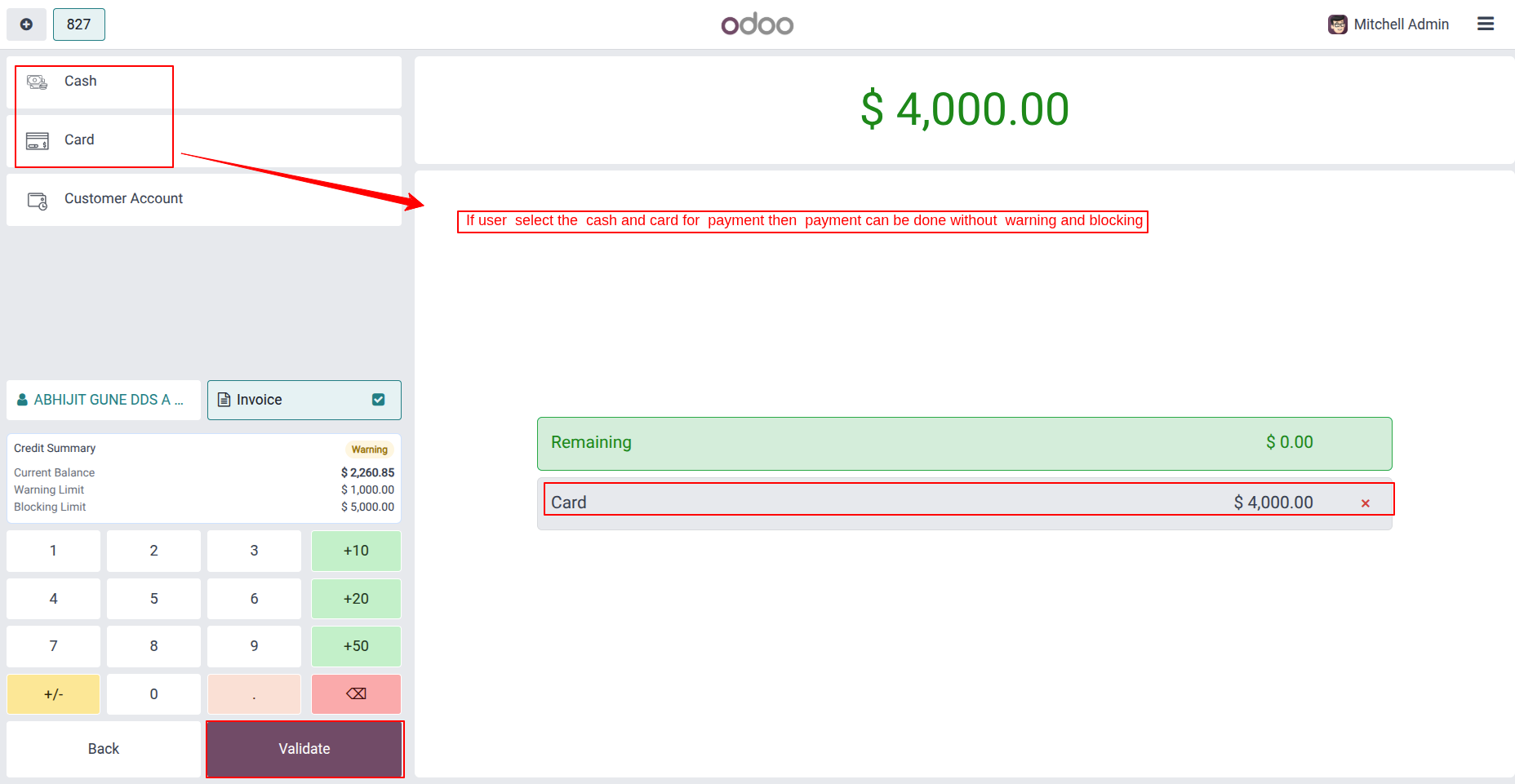
System restrictions only apply when clients buy items on time using their ledger profile. Direct payments go through instantly without initiating any database limit checks.
To run a direct cash or card transaction:
Note: Automated Odoo POS payment control ignores transactions that do not increase a buyer’s ledger balance. Direct tender bypasses verification because it creates no new financial risk.
Result: Sales clear smoothly without triggering alerts, giving merchants reliable risk protection while keeping payment options flexible.
This module delivers critical financial safeguards directly to your checkout terminals to eliminate unapproved retail debt accumulation automatically.
You set default warning and blocking thresholds once in your backend settings to establish storewide rules. These parameters apply automatically to all profiles that do not have a custom administrative override. This automation saves time and ensures strict operational consistency across your entire sales team. Every cashier works with the exact same safety guidelines, preventing high-risk accounts from slipping through checkout unnoticed.
Account risk profiles vary, meaning long-standing clients often deserve higher caps while new buyers require stricter parameters. You can override global defaults on a per-customer basis directly from the core partner profile. This flexibility allows management to adapt active risk policies to match real commercial relationships. Avoid a rigid setup by rewarding trusted buyers while shielding your cash flow from unverified accounts.
Opening the active customer directory at checkout provides front-end cashiers with immediate visibility into critical account metrics. Staff can review crucial data fields before starting a transaction:
This visibility ensures register staff see exactly where an account stands before scanning a single item.
The register tracks thresholds dynamically to issue an immediate Odoo POS credit warning or stop risky orders. Selecting the on-account payment method triggers the system to calculate the final projected balance instantly. If this calculation hits the safety threshold, a warning popup alerts the cashier on the screen. Crossing the hard ceiling triggers a blocking dialog that prevents credit selection entirely.
Secure your margins through advanced customer credit validation Odoo protocols that evaluate risk prior to order confirmation. The register combines the existing due balance with the active cart total to determine true exposure. This proactive check ensures the terminal flags risk using real-time cart data rather than outdated past statements. Programmatic protection guarantees that unapproved transactions are stopped at the exact moment it matters most.
Deploying an automated Odoo POS Customer Credit Limit system protects your retail business from devastating cash flow leaks. This intuitive module integrates immediately with your checkout counters to eliminate the errors caused by manual ledger checks. Business owners maintain reliable, continuous POS credit risk management across every terminal without delaying daily customer lines.
The extension replaces high-risk cashier guesswork with systematic, objective Odoo POS payment control during busy hours. Real-time customer credit validation Odoo checks cart values against active account debt profiles to secure operational cash reserves. This automation ensures reliable, ongoing POS bad debt prevention without forcing management to navigate tedious administrative hurdles.
Enforcing a precise POS customer credit limit policy is a highly effective operational strategy for modern merchants. Secure your business margins by configuring this automated Odoo solution to safeguard checkout cash flows today.
 Hardik Soni
 Hardik Soni
 Hardik Soni
 Hardik Soni
 Hardik Soni